
LinkedIn ad types: choose the format your campaign can use
Choose a LinkedIn ad format by the action you want someone to take and the creative you have ready. A product demonstration, a report, an expert’s post and an event invitation need different things from an ad.
Use the format selector below to choose one primary format and, when another fits, one backup. You’ll get the reasons, excluded options and a production handoff. Missing assets, permissions or measurement inputs produce a Hold with the next step named.
Product sources checked: 1 October 2026. Some format-specific sources were captured in September 2026; the handoff keeps each observation date with its source. A recommendation helps you prepare the work. Campaign Manager still needs to confirm the exact account, objective and ad setup.
Compare the formats · Choose your format · See worked decisions
Compare LinkedIn ad types
LinkedIn’s main format families are Sponsored Content, Sponsored Messaging, Dynamic Ads and Text Ads. Connected TV delivers video in streaming environments. Start with where the ad appears and what the reader can do there.
Keep four layers separate:
- Creative format: the image, video, document, message or existing LinkedIn post you promote.
- Delivery surface: the feed, inbox, desktop rail or streaming environment.
- Capture or destination: a website, Lead Gen Form, event registration or native action such as following a Page.
- Measurement: what you can observe after the ad runs.
A Lead Gen Form belongs to the capture choice. You still need an eligible creative format and objective to present the offer.
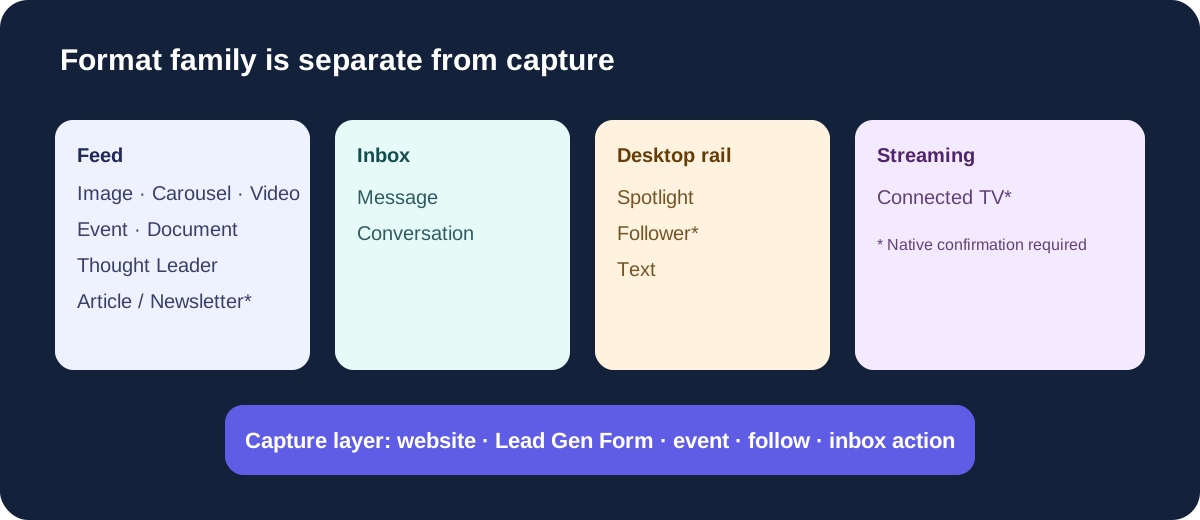
- FeedImage, carousel, video, event, document, person-authored and native long-form units.
- InboxMessage and Conversation Ads.
- Desktop railSpotlight, Follower and Text Ads.
- StreamingConnected TV; native confirmation required.
- CaptureWebsite, Lead Gen Form, event, follow or inbox action.
| Format | What it carries | Consider it when | Have this ready | Check before choosing |
|---|---|---|---|---|
| Single Image Ads | One image and one main message in the feed | A clear offer or claim can be understood in one visual | Approved image and copy | Would a sequence, motion or document explain the idea better? |
| Carousel Image Ads | A swipeable sequence of image cards | Each card advances a process, comparison or argument | Ordered cards and card copy | Can someone understand the sequence after skipping a card? |
| Video Ads | Motion, a demonstration or a spoken explanation | Seeing an action unfold adds meaning | Finished video and captions or on-screen text | Is there a finished asset, or only a plan to make one? |
| Event Ads | An event and its attendance or registration path | The event itself is the offer | Approved event details and a real event destination | Is this a LinkedIn Live, another LinkedIn Event or an off-platform event? |
| Document Ads | A document preview in the feed | The guide, report or reference is the value | Finished document and cover | Should people read freely or submit a form before accessing the full document? |
| Thought Leader Ads | An eligible existing post from a named person | That person’s perspective is central to the message | Eligible public post and author permission | Is the exact post eligible and approved for sponsorship? |
| Article and Newsletter Ads | An existing native LinkedIn article or newsletter | Reading the article or reaching its subscribers is the task | The article or issue and the relevant permissions | Confirm the author, objective and available setup in the account. |
| Conversation Ads | Several reader-selected paths in an inbox message | The reader needs to choose among different next steps | Approved sender and a complete branching message plan | Are the branches necessary and supported by real destinations or content? |
| Message Ads | One focused inbox message | One direct request fits the offer | Approved sender and message | Would a branching conversation add anything? |
| Spotlight Ads | A personalized desktop ad that leads to a website | Desktop rail delivery and a direct site action fit | Logo, offer and destination | Does the campaign also require mobile delivery? |
| Follower Ads | An invitation to follow the company Page | A Page follow is the action you want | An active Page and logo | Confirm native eligibility and the Page-follow experience. |
| Text Ads | A compact headline, description and destination on desktop | The message works in a small unit | Compact copy, image and destination | Is desktop delivery sufficient, and can the offer fit the space? |
| Connected TV Ads | Full-screen video in streaming environments | Large-screen awareness is the task | A finished video for that environment | Confirm objective, account access and measurement before committing. |
The “consider it” column is editorial guidance. It explains what each format can help you communicate; it is not a performance ranking.
LinkedIn’s format guide supplies the broad inventory. Its objective-by-format table shows the documented combinations. Dedicated format pages control the details when an overview is incomplete or inconsistent.
Job Ads belong to LinkedIn’s wider inventory, but this selector covers B2B marketing. Click-to-message Ads are also a distinct route: an in-feed entry into a conversation. They need a separate eligibility check and are not treated here as inbox-first Conversation Ads.
Choose your format
Start with a concrete brief: “Get security leads to read our finished incident-response guide” is easier to act on than “generate engagement.” Include what the reader should do, where the ad must appear and the assets that already exist.
The selector checks documented objective availability first. It then checks the desired action, surface, device needs, assets, permissions, capture choice and measurement plan. Among formats that pass those checks, it compares how closely each fits the brief.
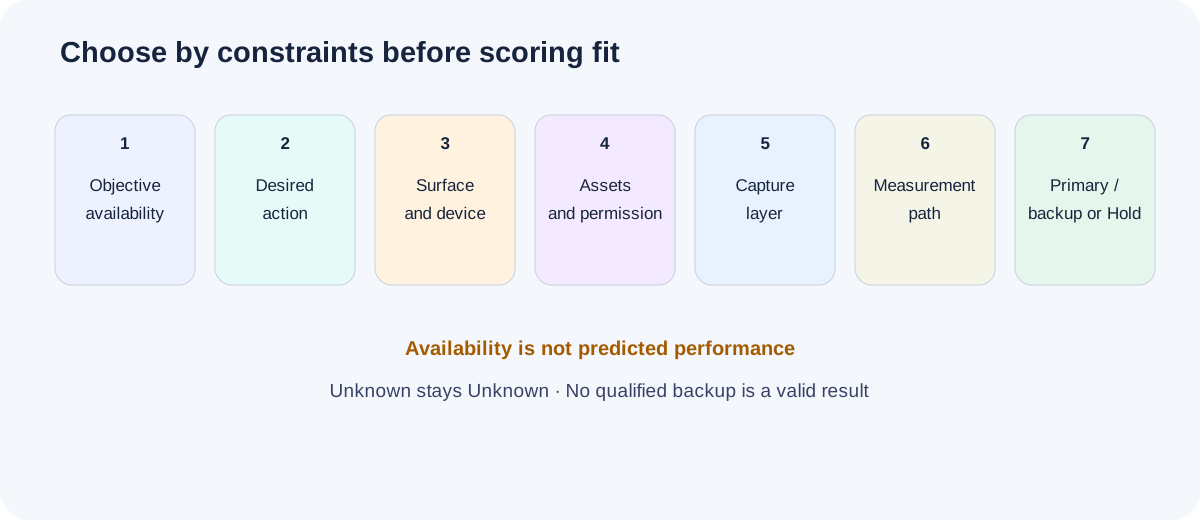
- 1. ObjectiveCheck dated documented availability.
- 2. ActionName one reader action.
- 3. Surface and deviceRespect feed, inbox, rail or streaming needs.
- 4. Assets and permissionRequire affirmative evidence.
- 5. CaptureEvaluate separately from creative.
- 6. MeasurementDefine five layers or give a reason they do not apply.
- 7. ResultReturn one primary, one qualified backup or Hold.
Interactive worksheet
Choose one primary LinkedIn ad format
Complete the facts you know. Unknown inputs stay Unknown. The result never proves native availability or performance.
Assets and evidence
Permissions
Exclusions
Open requests
Canonical JSON
Use available only when you can point to the asset or approval. A video on next month’s production list is planned. An author permission request is requested. Neither is finished evidence.
Audience temperature helps explain the commitment you are asking for. It does not make a format eligible or guarantee a response. A warm audience still cannot watch a video you have not made.
Your result has three parts:
- Primary: the format that best fits the supplied task and passes its requirements.
- Backup: at most one other qualified format, with a reason to use it. If none passes, the result says so.
- Exclusions and open questions: what ruled out the other formats and what must change before the handoff can proceed.
A Hold means required information or verification is missing. No fit means the supplied constraints rule out every format. The result should name the problem: an unapproved post, a missing event destination, a mobile requirement that excludes desktop rail, or an undefined measurement owner. It should not fill the gap by inventing a backup.
Check the objective before producing the creative
The campaign objective narrows the available formats. For example, LinkedIn’s captured matrix lists Video Ads for the Video Views objective. Thought Leader Ads appear under Brand Awareness and Engagement. They do not become a documented Lead Generation option because the person promoting the post would like more leads.
There are specific checks to preserve:
- Text Ads with Engagement: the current objective matrix omits this pairing while the dedicated Text Ads Help page includes it. Keep the pairing unresolved until the account confirms it.
- Connected TV: the format appears in the Ads Guide but not the captured objective matrix. Check the dedicated setup and account access before selecting it.
- Article/Newsletter and Follower Ads: the matrix establishes some objective combinations; the exact creation and eligibility requirements still need an account check for your chosen route.
These checks are part of the handoff. They do not make every other format automatically approved.
Choose the action and capture path separately
“Generate leads” leaves several choices unresolved. A reader might request a demo on your website, submit a LinkedIn form for a report, register for an event or select a topic in a message. Name the action before choosing the ad.
Lead Gen Form or website?
A Lead Gen Form collects information within LinkedIn using eligible creative and objective combinations. A website destination gives you a separate page to explain the offer and complete the action. Choose based on what you need the person to do and how you will handle the response.
If someone submits a form for a report, the submission establishes that action. Your follow-up and CRM checks must establish whether the person fits the audience and takes a further step. The form itself does not establish lead quality.
For Document Ads, decide whether the full document should be freely accessible or gated. LinkedIn’s Document Ads guidance describes the form-gated path and notes that single-page documents cannot use Lead Gen Forms. Use the Document Ads guide and Lead Gen Forms handoff to build the chosen path.
One message or several branches?
Choose a Message Ad when one direct request fits. Consider a Conversation Ad when different readers need different next steps: read a guide, watch an explanation or ask about a specific problem. Each branch needs content and a purpose.
Both need an approved sender and the relevant permissions. Current LinkedIn guidance also documents regional conditions for Sponsored Messaging. Confirm the exact route with the Conversation Ads guide, which separates Message and Conversation Ads.
Watch the branching example: B2Linked’s Sponsored Messaging discussion, starting at 6:11. Look for what the reader chooses and what follows each choice. This is a 2024 practitioner walkthrough; current LinkedIn Help controls today’s setup and availability.
Event destination or general landing page?
An Event Ad can promote a LinkedIn Event or an off-platform event. The off-platform route does not require you to create a LinkedIn Event first.
Choose the event route before preparing the creative. LinkedIn Live, a static LinkedIn Event and an external registration page have different requirements and reader experiences. Record the approved topic, speakers, schedule, destination and registration action. The Event Ads guide handles those setup decisions.
Five examples that make the format choice concrete
These public ad records show different ways to carry a message. Each link opens the original Ad Library record. The observations come from saved September 2026 captures; the records do not establish delivery or campaign results.
Microsoft Advertising: an argument across carousel cards
Open Microsoft Advertising’s six-card Carousel Ad.
The captured sequence opens with a claim about AI-assisted shopping traffic, develops the argument through further evidence and ends with a playbook offer. Each card gives the next part of the explanation somewhere to go.
Consider this structure when your message has a sequence the reader can follow. Write down the job of each card before choosing carousel. If the middle cards only repeat the first, one image may carry the idea more clearly. The statistics inside this example remain Microsoft’s advertising claims; they are not format-performance evidence.
Atlassian and DZone: a reference the reader can preview
The saved previews show a “Getting Started With DevSecOps” cover, a comparison table and integration-point material. Here, the document itself carries the explanation. It is more than a cover image advertising a separate page.
Consider Document Ads when your report or reference rewards reading across pages. Decide what the preview must explain and whether full access needs a form. Only three preview pages were captured for this example; the full length and any gate are unknown.
Pinterest Business: a person’s post with a company sponsor
Open Stacy Wright Malone’s post sponsored by Pinterest Business.
The author and sponsoring company are distinct. That relationship is the important detail when choosing a Thought Leader Ad: you need a suitable existing post and permission to sponsor it.
Start by selecting the actual post. “Our founder could write something” is a production idea, not an asset ready for the handoff. The Pinterest record illustrates the author/sponsor relationship; it does not prove that personal posts outperform company-page ads.
Check the Thought Leader Ad requirements.
Salesforce: a short interface sequence
Open Salesforce News & Insights’ “Ask Slackbot” Video Ad.
The roughly ten-second creative uses an interface sequence and a question entered on screen, then closes with branding. It is a short product teaser. The action unfolding on screen gives you a reason to consider motion.
Ask what a still frame would lose. If the same idea is already clear in one image, making a video adds production work that needs a reason. If the sequence is essential, record the finished video and captions in the brief. The linked example does not establish product outcomes or video-format superiority.
Study the video examples and creative structure.
Quiq: an event as the offer
Open Quiq’s historical Event Ad.
The captured copy names two speakers and offers a discussion of five questions for evaluating AI-handled customer calls. The archived platform CTA is “View event.” The topic and the people presenting it explain why someone would consider attending.
Use this as a brief-writing example: event promise, speakers and action should be concrete before you choose the format. The event is historical. Its button destination, registration behavior and attendance were not captured.
Plan the event route and registration handoff.
Three worked format decisions
The following briefs are hypothetical. They show how supplied facts can change the choice; they are not Maestro campaign results or promises about what will perform best.
1. The report is ready and reading is the action
A security software team wants practitioners to read an incident-response guide in the feed. It has an approved multi-page PDF and cover. It has no video, carousel cards or eligible member post. The objective is Engagement, full reading is ungated, and desktop and mobile delivery matter. The content lead owns production; the analyst owns the engagement review. No website visit or contact capture is part of this test.
Primary: Document Ad. The finished document is the thing the team wants readers to consume. Backup: none qualified from the supplied assets. A cover alone would not replace the full guide, and a planned video is not ready.
The handoff sends the PDF and cover to the Document Ads workflow. It records the delivery and document-interaction measures to review. Site, CRM and commercial measurement are marked not applicable to this reading-only test, with reasons. Business results remain unknown; the team cannot turn document engagement into a revenue finding.
If the PDF is still a draft, the decision moves to Hold. The next action is to finish and approve the document.
2. The team needs to show an action on screen
A software team wants people to watch a short product demonstration in the feed. It has a finished, approved clip with captions, plus approved screenshots. The objective is Video Views, the action is watching the video, and both desktop and mobile matter. The creative lead and analyst are named, with a plan to review delivery and video viewing. No lead capture is attached.
Primary: Video Ad. Backup: none qualified for this objective and action. A screenshot exists, but it cannot satisfy a Video Views campaign. Available files do not override the objective.
The handoff calls for a video specification check and a review of the opening, captions and expected viewing action. It marks site, CRM and commercial measurement not applicable to this viewing-only test, with reasons. Those later outcomes cannot be assumed from a completed view.
If the file is only planned, the handoff stays on Hold until there is a finished video to inspect.
3. One website offer has two finished ways to explain it
A software team wants warm prospects to visit a product page from the feed. Its objective is Website Visits. It has an approved single image with copy, plus a finished captioned video showing the same product action. Both assets support the same approved offer. The audience needs desktop and mobile delivery. Production and measurement owners are named, and the plan covers ad interactions, tagged site visits and later CRM reconciliation.
Primary to evaluate: Single Image Ad. Qualified alternative to evaluate: Video Ad. The image carries the brief’s one-message offer with less production complexity. The video has a reason to remain in the shortlist because the product action adds explanation. Both must pass the actual selector’s checks before the exported handoff labels either selected.
Carousel and Document Ads have no verified assets in this brief. A Thought Leader Ad has no eligible member post or permission. Text and Spotlight cannot satisfy the cross-device requirement. The backup is bounded by this offer, audience and action; it is not a general ranking of image over video.
If CRM ownership becomes unresolved, keep the format reasoning visible and hold the handoff for that missing measurement input. Do not silently rewrite the recommended format to make the status look complete.
Take the decision into production
The handoff should let a colleague continue without re-reading this article. Include the campaign and offer, primary and backup, reasons for exclusion, asset references, permissions, capture path, owners, measurement plan and unresolved checks.
Take the complete format-choice kit
The prompts, inventory and handoffs all use the same decision contract.
Use the blank handoff for a new campaign. Use a worked case to see how facts and missing inputs should be recorded. Keep the format inventory and source dates with the brief when you ask an AI assistant to review it.
The build prompt should return a choice and its reasons from your supplied facts. The review prompt should challenge the choice: wrong objective, wrong surface, missing asset, unapproved sender, incompatible capture path or an outcome the evidence cannot support. Neither prompt should fill an empty field with a plausible guess.
Export the result as Markdown for the person producing the ad and as JSON to continue editing it. After changing the brief, recompute the decision. An old “ready” label must not survive a missing asset or withdrawn permission.
Build the selected format
| Your choice | Next resource |
|---|---|
| Single image, or a known file that needs checking | LinkedIn ad specifications |
| Carousel | LinkedIn Carousel Ads |
| Video | LinkedIn video ad examples for creative structure; ad specifications for file checks |
| Document | LinkedIn Document Ads |
| Thought Leader | LinkedIn Thought Leader Ads |
| Conversation or Message | LinkedIn Conversation Ads, including the distinction between the two |
| Event | LinkedIn Event Ads |
| Spotlight | LinkedIn Spotlight Ads |
| Text | LinkedIn Text Ads |
| Eligible format with a Lead Gen Form | LinkedIn Lead Gen Forms |
| Article/Newsletter, Follower or Connected TV | Start with the current LinkedIn format guide and confirm the dedicated setup in your account. These need further eligibility checks before the selector can finalize the route. |
Targeting and budget are separate decisions. Use the LinkedIn targeting guide and LinkedIn advertising cost guide once the format brief is coherent.
Decide what the test can tell you
Name the question before looking at a format’s numbers. A video view, a form submission and a sales opportunity describe different events.
| Layer | Question | Record in the handoff |
|---|---|---|
| Delivery | Did the ad receive the intended exposure? | Platform delivery measures, reporting period and owner |
| Interaction | Did people take the action within the ad? | Relevant clicks, video viewing, document interaction or message choices |
| Site | What happened after a website visit? | Tagged sessions and the site action, if a website is part of the route |
| CRM | Who responded, and did they meet the qualification criteria? | Lead/account records, follow-up owner and the rule for qualification |
| Commercial | Did a qualified response become an opportunity or customer? | The actual opportunity or revenue record and the attribution method |
Define the measures you can review now. Mark a layer not applicable only when you can explain why; mark missing evidence Unknown. A later outcome does not follow automatically from an earlier interaction.
For Event Ads, LinkedIn’s reporting guidance includes registrations attributed after clicks or views. Reconcile those with actual registrations, attendance and follow-up when those are the questions you need to answer.
Keep the comparison interpretable
Write down what changes between primary and backup. If you change the offer, audience, message and format together, the result cannot tell you which change mattered. Preserve what you can and record the differences that the format requires.
Watch B2Linked’s discussion at 20:44–21:47. The speakers discuss keeping the creative constant while comparing video aspect ratios. That is a test within video, rather than evidence that one LinkedIn ad format beats another. The principle helps you describe exactly what your own comparison changes.
Common format questions
Which LinkedIn ad type is best for B2B?
Choose the one that can carry your message, support the intended action and use the assets you can supply. A general CTR or CPC ranking cannot settle that decision for your campaign. Start with objective eligibility, then compare the surviving formats against the brief.
Are Lead Gen Forms a separate creative format?
Treat them as the capture layer. Specify the eligible creative format, objective, offer and follow-up path as separate parts of the plan. A form completion and a qualified lead are also separate observations.
Should a cold audience always get video?
Audience temperature alone is not enough. A finished report may fit a reading task; a single image may explain a simple offer; a demonstration may need video. Check the actual action and asset before choosing.
Can I use a carousel to show video clips?
The dedicated Carousel Ads specification says Carousel Ads do not support video. Use image cards for the carousel route and assess Video Ads separately when motion is required.
Do I need two formats?
No. A backup must pass the same requirements as the primary. If your brief has one eligible format with finished assets, record “no qualified backup” and proceed with the remaining checks.
Does a complete handoff mean the ad can launch?
It means the planning work is ready for the next person. Native availability, permissions, asset validation, ad review and delivery still need their own checks. Keep the owner and next action visible until those checks are complete.