Match the budget to the question
Watch 0:18–0:43. AJ Wilcox separates a quick attention question from the longer job of turning cold demand into sales. His later dollar recommendations are practitioner opinion, not a platform minimum.

Model LinkedIn ad costs in both directions, keep media separate from the full program, and decide whether to launch, narrow, instrument first or hold.
One average price cannot answer a LinkedIn budget question. LinkedIn runs an auction. What you pay changes with the audience, objective, bidding strategy, format, competition and how people respond to the ad.
This page covers paid campaigns in LinkedIn Campaign Manager. It does not cover job listings, Premium or Sales Navigator.
The better question is: what can your budget teach you, and what would have to happen for the campaign to be commercially defensible?
This guide helps you answer that question. Use the calculator to work from a budget toward possible outcomes, or work backward from a target outcome toward the budget it would require. Every result is arithmetic based on your assumptions. It is not a forecast or promise.
Campaign Manager displays the minimum that applies to the selected currency, product, schedule and campaign structure. LinkedIn's current budget documentation does not support one universal lifetime minimum across every setup.
That platform minimum only tells you whether LinkedIn will accept the campaign. It does not tell you whether the campaign can produce enough evidence to make a decision.
Keep three different numbers separate:
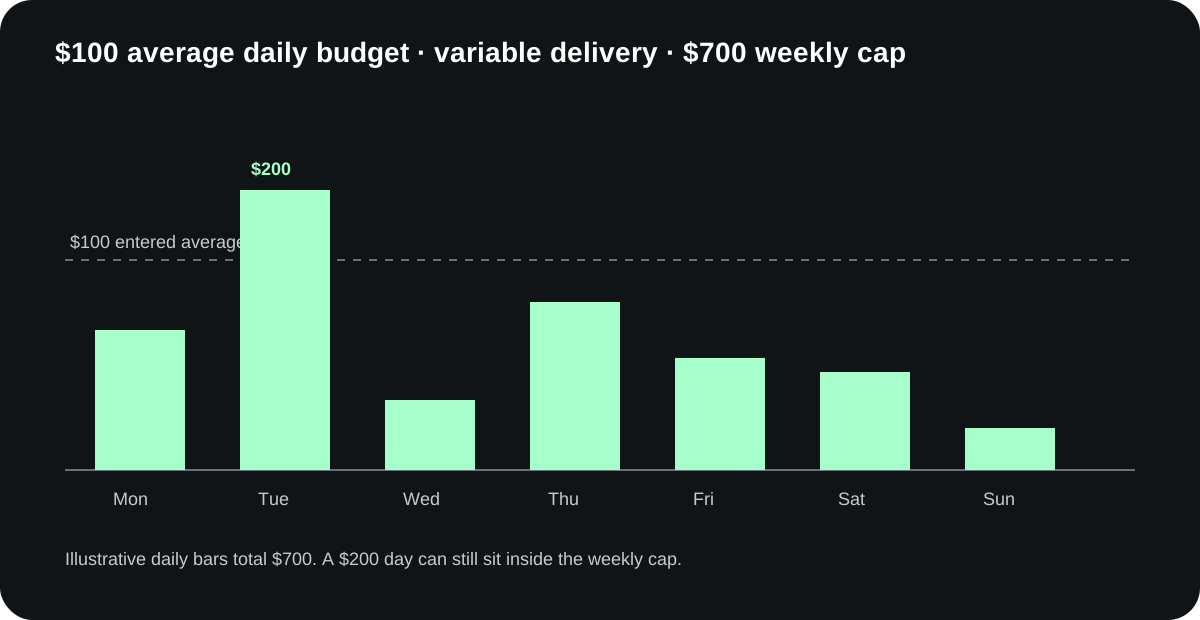
LinkedIn says a daily budget is an average. Spend can reach twice the entered daily amount on a given day while the platform respects its weekly or scheduled limits. Plan cash and pacing around the actual cap, not a perfectly even daily line.
Interactive planning tool
Load a fictional example or enter your own assumptions. Blank means unknown. Enter 0 only when zero is intentional.
No hidden benchmark defaults. Every loaded value is labeled fictional until you replace it.
Rates use percentages. For a low-outcome case, use less favorable costs or conversion rates. Leave later stages blank when you do not know them.
| Input | Low outcome | Base | High outcome |
|---|---|---|---|
| CPC ($) | |||
| CPM ($) | |||
| CTR | |||
| Click → response | |||
| Response → CRM record | |||
| CRM record → booking | |||
| Booking → held meeting | |||
| Held → qualified | |||
| Qualified → opportunity | |||
| Opportunity → customer |
Blank costs remain unknown, so the tool reports a known subtotal instead of a fake all-in total.
| Cost | One-time | Per period |
|---|---|---|
| Management/reporting | ||
| Creative/source work | ||
| Destination/resource | ||
| Measurement/integration | ||
| Software/data |
Choose Ready only when it has been checked. Not ready means the requirement is known to be missing. Unconfirmed means nobody has verified it yet.
The copied record includes this context. Mark each input as observed, sourced orientation, an owner estimate, fictional or unknown. Add enough detail for someone else to check it later.
| Assumption | Status | Source | Date window |
|---|---|---|---|
| Direction | |||
| Pricing basis | |||
| Periods | |||
| Media per period | |||
| Available media ceiling | |||
| Decision scenario | |||
| Decision event | |||
| Evidence needed per cell | |||
| Test cells | |||
| Low: CPC ($) | |||
| Low: CPM ($) | |||
| Low: CTR | |||
| Low: Click → response | |||
| Low: Response → CRM record | |||
| Low: CRM record → booking | |||
| Low: Booking → held meeting | |||
| Low: Held → qualified | |||
| Low: Qualified → opportunity | |||
| Low: Opportunity → customer | |||
| Base: CPC ($) | |||
| Base: CPM ($) | |||
| Base: CTR | |||
| Base: Click → response | |||
| Base: Response → CRM record | |||
| Base: CRM record → booking | |||
| Base: Booking → held meeting | |||
| Base: Held → qualified | |||
| Base: Qualified → opportunity | |||
| Base: Opportunity → customer | |||
| High: CPC ($) | |||
| High: CPM ($) | |||
| High: CTR | |||
| High: Click → response | |||
| High: Response → CRM record | |||
| High: CRM record → booking | |||
| High: Booking → held meeting | |||
| High: Held → qualified | |||
| High: Qualified → opportunity | |||
| High: Opportunity → customer | |||
| Management/reporting: one-time | |||
| Management/reporting: per period | |||
| Creative/source work: one-time | |||
| Creative/source work: per period | |||
| Destination/resource: one-time | |||
| Destination/resource: per period | |||
| Measurement/integration: one-time | |||
| Measurement/integration: per period | |||
| Software/data: one-time | |||
| Software/data: per period | |||
| Readiness: Audience is usable | |||
| Readiness: Offer is ready | |||
| Readiness: Proof is approved | |||
| Readiness: Destination works | |||
| Readiness: Follow-up owner is named | |||
| Readiness: Follow-up capacity exists | |||
| Readiness: Decision event is defined | |||
| Readiness: System of record is ready | |||
| Readiness: Measurement owner is named | |||
| Readiness: Review window is set |
Choose a fictional example or enter your assumptions, then calculate.
Choose the direction that matches your decision.
Use this when someone has already proposed a media number. The calculator shows what that number implies across impressions, clicks, responses and later sales states.
Enter a low, base and high case. Use your own account and CRM data when you have it. Mark an input unknown when you do not.
The model follows this chain:
media spend → impressions → clicks → responses → identified CRM records → bookings → held meetings → qualified meetings → opportunities → customers
Each arrow is a separate assumption. A click is not a lead. A form fill is not a held meeting. A held meeting is not automatically qualified. Keeping those states separate stops a cheap early metric from hiding a weak sales outcome.
Use this when the business has a concrete evidence target, such as 20 identified responses or 5 held qualified meetings.
The calculator works backward through the same chain. It shows the media budget implied by the rates you enter, then adds known non-media costs. If a required rate is unknown, the result stays incomplete instead of silently treating the missing value as zero.
The calculator exposes the math so you can audit it.
| Output | Formula |
|---|---|
| Impressions | Media spend ÷ CPM × 1,000 |
| Clicks | Impressions × click-through rate |
| Responses | Clicks × response rate |
| CRM records | Responses × identifiable-record rate |
| Bookings | CRM records × booking rate |
| Held meetings | Bookings × show rate |
| Qualified meetings | Held meetings × qualification rate |
| Opportunities | Qualified meetings × opportunity rate |
| Customers | Opportunities × close rate |
| Total program cost | Media + management + creative/production + data/software/integration |
The reverse model divides the target outcome by each later conversion rate, then calculates the clicks, impressions and media spend required. A zero or unknown required rate blocks the result because the math cannot support a finite budget.
Start with the closest observed data you have. Use Campaign Manager delivery for impressions, clicks and platform conversions. Use the CRM for identified responses, meetings, qualification, opportunities and customers.
Benchmarks are orientation, not defaults you can trust blindly.
| Source | Population and date | Published signal | What it can tell you | What it cannot tell you |
|---|---|---|---|---|
| LinkedIn Help | Current platform documentation, checked September 2026 | Auction price depends on audience competition, objective, bid strategy and ad relevance | Why costs vary and which event is chargeable | Your likely CPC, CPL or sales result |
| HockeyStack | 70+ B2B SaaS companies, $28M in spend, report published December 2025 | Quarterly CPC in its dataset ranged from $10.48 to $15.72 in examples reported | Cost moves over time, and a higher CPC can coexist with stronger downstream performance | A universal B2B benchmark outside its customer population and attribution model |
| B2Linked | Named LinkedIn specialist, article published August 2025 | Reported roughly $10–$16 CPC for English North America and lower optimized account ranges | A practitioner reference point and a warning that cheap clicks can be low quality | A forecast; the article does not disclose a complete sample and calculation file |
| Zapier | Cost explainer published January 2026 | Publishes much lower headline CPC and CPM estimates | The range of estimates a buyer will encounter | A transparent benchmark; the visible article does not disclose the sample behind its headline numbers |
The disagreement matters because one average cannot carry a budget decision. Put all three cases into the calculator and see which assumption changes the decision.
The same budget means different things in different situations.
Question: Can a known audience be moved toward one clear next step?
This is often the narrowest test. The audience already has some relationship with the company, but the usable audience may be small. The main risk is confusing limited delivery with weak creative.
Before launch, verify:
If the audience is too small, broadening it may answer a different question. Record that change rather than calling it the same test.
Fictional planning example: $1,000 per month for two months, $50 CPM, 0.7% CTR and 5% click-to-response rate. The base arithmetic is 40,000 impressions, 280 clicks and 14 captured responses. With two creative cells, that is seven modeled responses per cell.
Later stages stay unknown because no CRM, booking or qualification rates were supplied. This test may answer a message question. It cannot establish pipeline economics.
Decision box
Question: Can LinkedIn reach enough of the right buying group to create observable response?
The account list is only the input. LinkedIn still has to match it, the campaign has to deliver, and the creative has to make sense to people inside those companies.
Track at least four separate states:
Do not convert matched audience size into person-level proof. It shows addressability, not exactly who saw the ad.
Fictional planning example: $6,000 per month for three months, $14 CPC, 4% click-to-response, 35% booking, 75% show and 50% qualification. The base arithmetic is about 1,286 clicks, 51 responses, 18 bookings, 14 held meetings and 7 modeled qualified meetings.
Across two audiences and three creative cells, that is about 1.2 modeled qualified meetings per cell. If the owner requires more evidence per cell, the plan should narrow before launch. Submitted accounts, matched members and delivered reach remain unknown until the platform reports them.
Decision box
Question: Can one audience and message combination produce enough evidence to justify a second test?
This usually needs more media and more creative variation because the audience has less prior context. Keep the first test narrow enough to interpret. One focused offer, one destination and a small set of meaningfully different creatives are easier to learn from than ten small variations spread across several objectives.
If the model predicts only a handful of clicks across every creative cell, you may be funding campaign setup without funding a readable comparison.
Fictional planning example: $10,000 per month for three months, $60 CPM, 0.6% CTR, 2% click-to-response, 30% booking, 75% show, 40% qualification, 30% opportunity and 20% close. The chain is 500,000 impressions, 3,000 clicks, 60 responses, 18 bookings, 13.5 held meetings, 5.4 qualified meetings, 1.62 opportunities and 0.324 modeled customers.
The last number is expected-value arithmetic. It is not part of a person and it is not a promised win. The long chain also makes the answer highly sensitive to rates the company may not have observed.
Decision box
This example is deliberately fictional. It demonstrates the math; it does not represent Maestro results.
Suppose a B2B company is considering $12,000 in LinkedIn media over eight weeks. It wants to learn whether a named-account audience responds to a practical resource.
The team enters three cases:
| Assumption | Low case | Base case | High case |
|---|---|---|---|
| CPM | $110 | $80 | $55 |
| Click-through rate | 0.35% | 0.60% | 0.90% |
| Click-to-response rate | 3% | 6% | 10% |
| Identifiable CRM rate | 80% | 90% | 95% |
| Booking rate | 15% | 25% | 35% |
| Show rate | 60% | 75% | 85% |
| Qualification rate | 35% | 50% | 65% |
| Opportunity rate | 20% | 35% | 50% |
Using the displayed formulas, the low case produces too few downstream events to judge pipeline economics. The high case looks encouraging, but it depends on several assumptions the company has not observed yet. The base case can still answer a narrower question if the team treats audience delivery, click quality and response capture as the first decision gates.
The appropriate answer is instrument first, then launch the narrow test after the list, destination and CRM path pass. It is not “LinkedIn will create a certain number of opportunities.”
The worked example also needs a sensitivity result. Holding the base case fixed and changing one rate at a time shows that click-to-response creates the largest swing in modeled qualified meetings. That does not prove it will be the most important real-world variable. It tells the team which assumption deserves the first measurement check.
A budget can support a decision when it buys enough observable evidence for that decision.
Check five things.
Can the audience be built, matched and delivered at the intended scope? If not, fix the audience before debating CPC.
How many impressions, clicks or responses does the low case produce? Divide the relevant events across the creative cells you plan to compare. A test with four creatives and eight expected clicks does not create a reliable four-way comparison.
Can you connect the ad to the destination, record the response, preserve campaign fields and observe the later CRM states? If the chain breaks after a form submission, the campaign cannot answer a pipeline question.
Who responds, how fast, and where is the outcome recorded? Media cannot repair a follow-up process with no owner.
Can the test run long enough for the event you care about to occur? Click and response evidence can appear before opportunity or customer evidence. Name the decision window before launch.
The calculator returns one of four planning decisions.
Use launch when the audience is usable, the response path and measurement chain have passed, the budget produces enough events for the chosen question, and a sales owner can act on the result.
Use narrow when the budget cannot support the current number of audiences, messages, formats or destinations. Reduce the number of variables while preserving the most important question.
Use instrument first when the campaign could be viable but the destination, CRM fields, attribution rules or stage definitions are incomplete. Fix those before buying traffic.
Use hold when a critical fact is missing, the audience cannot deliver, the offer is unsupported, the sales path has no owner, or the economics fail even in a credible high case.
These decisions should change when the evidence changes. They are not labels for the company.
Media is only one part of the program.
| Cost | What belongs here | Planning treatment |
|---|---|---|
| LinkedIn media | Auction spend paid to LinkedIn | Enter the approved media amount or solve for it |
| Management | Strategy, setup, monitoring, analysis and iteration | Enter the actual internal allocation or vendor fee; leave unknown if unscoped |
| Creative and production | Concepts, copy, design, video, documents and refreshes | Separate initial build from recurring production |
| Destination | Landing page, Lead Gen Form, resource, booking flow or demo | Include build and testing work |
| Data and software | Audience data, connectors, tracking, enrichment and reporting tools | Include only tools required for this test |
| Sales follow-up | Qualification and response work | Show the owner and capacity even when the accounting treatment is internal |
Do not put an invented agency fee into the calculator. Use the actual proposal or internal cost. Maestro's public $10,000 total-media fit criterion is a commercial fit filter across paid media. It is not LinkedIn's minimum and it is not a quoted LinkedIn-only package.
LinkedIn connects the campaign objective and optimization goal to a chargeable result. Depending on the setup, that may be impressions, clicks, video views, sends or another event.
A daily budget controls average pace, not a hard daily maximum. LinkedIn documents these limits:
| Budget and schedule | Limit to check |
|---|---|
| Daily budget, no end date | Up to seven times the daily budget per Monday–Sunday week. A single day can spend up to twice the daily amount. |
| Daily budget, start and end dates | Total spend cannot exceed the daily budget multiplied by scheduled days. A single day can still spend up to twice the daily amount. |
| Lifetime budget, set or custom schedule | Total spend cannot exceed the lifetime amount; daily spending varies. Campaign Manager shows the minimum required for that duration. |
| Daily and lifetime budget together | Available on a continuous schedule with no end date. The ad set ends when its lifetime amount is reached. |
Record the budget level as well as the amount. With Dynamic Group Budget enabled, the campaign shares its budget across ad sets and those ad sets do not have individual budgets. Confirm the applicable limit before treating a per-ad-set amount as protected.
Source: LinkedIn campaign and ad set budgets, checked 29 October 2026.
The main bidding choices behave differently:
| Strategy | What you set | What to watch |
|---|---|---|
| Maximum delivery | Budget; LinkedIn seeks the most results available | Unit cost can move. Watch delivery and downstream quality, not just spend. |
| Cost cap | An average cost benchmark | It is not a hard ceiling for every result. Delivery can be constrained. |
| Manual bidding | A bid for an available charge type | A bid is not the final cost or a guarantee of delivery. |
Campaign Manager forecasts can help with audience size, projected spend, key results and cost per key result. LinkedIn says those forecasts depend on settings and historical data and are not guarantees. Use the forecast as another scenario, then compare it with observed delivery.
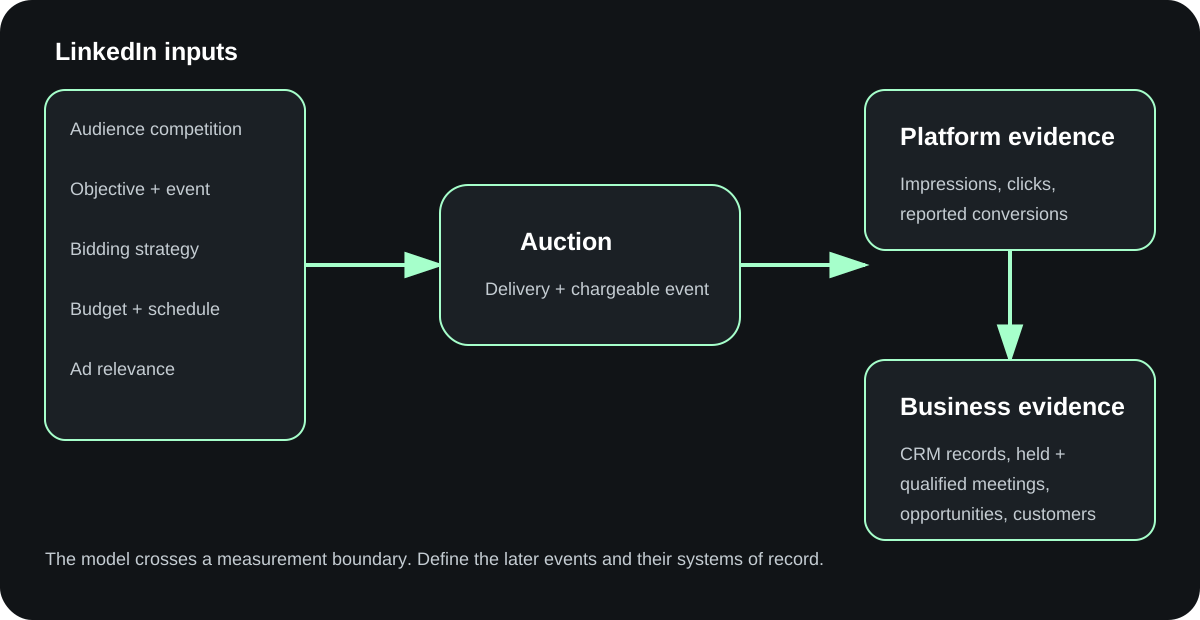
Review the chain from left to right. Stop where the evidence first breaks.
A lower CPC is not automatically an improvement. If the cheaper traffic produces fewer qualified meetings, it moved the wrong number.
Open the completed fictional workbook first. Check the low, base and high formulas, then use the blank workbook for your own plan. Blank cells remain unknown. A typed zero means the cost is intentionally zero.
You are reviewing a LinkedIn ads budget for a B2B company. Work only from the supplied brief. Do not invent a benchmark, owner, result, fee, conversion rate, audience size or attribution claim.

INPUT CONTRACT
Require these fields. If one is missing, report it as UNKNOWN.
- mode: budget_to_outcomes or target_to_budget
- currency, period_label and periods (>0)
- media_per_period for budget mode, or available_media_ceiling for target mode
- basis: cpc or cpm_ctr
- decision_scenario: low, base or high
- decision_event: one exact stage identifier below
- required_events_per_cell (>0) and one explicit test_cells count (integer >=1)
- low, base and high scenarios
- five non-media cost layers with one_time and per_period components
- ten readiness values, each true, false or null/unconfirmed

STAGES, IN ORDER
- impressions: ad impressions reported by Campaign Manager
- clicks: clicks or the selected click result
- captured_responses: actions directly captured by the form, page or response path
- crm_records: captured responses present as identifiable records in the named system
- bookings: scheduled meetings
- held_meetings: meetings that occurred
- qualified_meetings: held meetings that meet the supplied qualification definition
- opportunities: records that meet the supplied CRM opportunity definition
- customers: recorded wins; do not call them attributed or incremental without separate evidence

SCENARIO FIELDS
cpc; cpm; ctr; click_to_response; response_recorded; crm_to_booking; booking_to_held; held_to_qualified; qualified_to_opportunity; opportunity_to_customer.
Rates are decimals from 0 through 1. If the brief uses percentages, convert once at the boundary. A known 0 is different from null/UNKNOWN.

VALIDATION
Reject negative money, CPC/CPM <=0 when required, rates outside 0..1, periods <=0, required events <=0 and test_cells below 1. Never return Infinity or NaN. Use exact values for arithmetic and round only for display.

FORWARD MODEL
planned_media = media_per_period * periods.
CPC basis: clicks = planned_media / cpc. Impressions are UNKNOWN from CPC alone.
CPM+CTR basis: impressions = planned_media / cpm * 1000; clicks = impressions * ctr.
Then:
captured_responses = clicks * click_to_response
crm_records = captured_responses * response_recorded
bookings = crm_records * crm_to_booking
held_meetings = bookings * booking_to_held
qualified_meetings = held_meetings * held_to_qualified
opportunities = qualified_meetings * qualified_to_opportunity
customers = opportunities * opportunity_to_customer
Stop at the first required unknown. A known zero produces zero at that and later known-rate stages. Cost per stage with a zero denominator remains UNKNOWN with reason zero_denominator.

BACKWARD MODEL
required_target_events = required_events_per_cell * test_cells.
Starting at decision_event, divide by every required rate in reverse order to reach clicks. CPC basis: required_media = required_clicks * cpc. CPM+CTR basis: required_impressions = required_clicks / ctr; required_media = required_impressions / 1000 * cpm. Impression targets require CPM basis. Click targets need no downstream rate. A zero or unknown reverse-path rate blocks a finite budget and must name the exact field. After solving media, run the forward model and verify the decision-event count equals required_target_events before rounding.

COST MODEL
Required layers: management, creative, destination, measurement, software_data. Each contains one_time and per_period.
component total = one_time + per_period * periods.
known_non_media_subtotal sums every numeric component even if others are unknown.
all_in_total = media + all layer totals only when every component is numeric. Otherwise return UNKNOWN plus the exact unknown cost fields. An explicit zero remains zero.

READINESS AND FIXED DECISION PRECEDENCE
D1 HOLD fires first when any of target_audience_ready, offer_ready, proof_ready, destination_ready, followup_owner_ready or followup_capacity_ready is false or null. Say false means not ready and null means unconfirmed.
D2 INSTRUMENT FIRST fires next when any of decision_event_defined, system_of_record_ready, measurement_owner_ready or review_window_ready is false or null.
D3 NARROW fires next when the selected scenario produces fewer than required_events_per_cell, or target-mode required media exceeds available_media_ceiling. Say what cells or questions to remove.
D4 LAUNCH A LEARNING TEST fires only when D1-D3 do not fire.
Return the exact rule ID, selected scenario and reasons. These are planning rules, not performance forecasts.

Target mode with a null available_media_ceiling is a special incomplete decision state: complete the arithmetic, return decision_status = needs_available_budget, and return no disposition. Ask the owner for the total available media ceiling. Do not force one of the four dispositions until that number exists.

SCENARIO ORDER
For budget mode, low decision-event count should be <= base <= high. For target mode, low required media should be >= base >= high. Flag an inversion; do not reorder or silently repair it.

RETURN THESE SECTIONS
1. INPUT AUDIT: every input, value, provenance, source/date window and usability.
2. FORWARD MODEL: low/base/high arithmetic to the last supported stage.
3. BACKWARD MODEL: target math or the first blocking input.
4. COST STACK: media, each layer, known subtotal, unknown fields and all-in total only when complete.
5. TEST CELLS: explicit count, events per cell and comparison with the owner-set requirement.
6. SENSITIVITY: change one input at a time within supplied low/high bounds and identify which most changes the decision. Do not invent bounds.
7. READINESS GATES: all ten values, distinguishing false from unconfirmed.
8. DISPOSITION: exactly one of HOLD, INSTRUMENT FIRST, NARROW or LAUNCH A LEARNING TEST when the decision inputs are complete, with rule ID, next evidence, owner and system of record. In target mode with a null ceiling, return decision_status = needs_available_budget and no disposition.
9. COPYABLE RECORD: exact inputs, formulas, unrounded outputs, display values, provenance, disposition and review date.

If low/base/high values are missing, return INCOMPLETE for those sections. If a critical owner or system is unknown, ask for it. Never call arithmetic a forecast, guaranteed result, revenue, profit or ROAS.

BRIEF STARTS BELOW

[Paste the completed LinkedIn ads budget brief here]
Open the blank budget brief and complete the campaign question, audience, period, creative cells, low/base/high assumptions, non-media costs, measurement states and owners.
Then compare it with the completed fictional example. The example shows how to preserve unknowns and reach a decision without inventing results.
Paste the standalone review prompt into your agent with the completed brief. It will:
The prompt is designed to stop when a critical input is missing. It should never fill a blank rate with a confident benchmark or invent a result.
There is no fixed CPC. LinkedIn uses an auction, and published third-party estimates vary widely. Use your own campaign data when available and model a low, base and high case when it is not.
The amount Campaign Manager accepts depends on currency, schedule, campaign structure and product. The platform minimum is not the same as a test budget that can answer your question. Check the amount shown in the exact setup you plan to run.
Work backward from the evidence the company needs, the size and usability of the audience, the number of creative cells, and the conversion chain. A budget is defensible when it can answer the chosen question and the measurement and sales systems can observe the answer.
Unit costs often differ, but a CPC comparison alone is not a channel decision. Compare reachable audience, message, response quality, identifiable CRM outcomes and total program cost. The two channels can also play different roles in one B2B program.
No. Track response, identified CRM record, booking, held meeting, qualification and opportunity separately. Define each state before launch.
Use it as one input. LinkedIn says forecasts are estimates and can be unavailable or differ from actual results. Save the settings and date, then replace assumptions with observed delivery and CRM evidence as the campaign runs.
Watch 0:18–0:43. AJ Wilcox separates a quick attention question from the longer job of turning cold demand into sales. His later dollar recommendations are practitioner opinion, not a platform minimum.
Watch 2:49–3:11. The passage frames the pacing problem. LinkedIn's current documentation supplies the rule: daily spend can vary while the applicable weekly, scheduled or lifetime cap controls the total.
Platform mechanics in this guide are based on current LinkedIn Help documentation for pricing, budgets, bidding, forecasts, performance metrics, conversion reporting and attribution, checked in September 2026. Independent ranges are labeled with their population and limits.
The calculator produces planning arithmetic, not performance forecasts. Fictional examples are not Maestro client results. Your campaign may behave differently because its audience, market, objective, creative, offer, destination, sales process and measurement system are different.