See the branching and build workflow
Watch from 6:11. The episode later shows the flowchart at 16:39, test message at 17:17, reporting at 19:44 and sender permissions at 20:53. Product details are dated to 2024.

See real public openings, map every branch, catch broken paths and export a measurement-ready brief.
LinkedIn Conversation Ads put a sponsored, branching message inside LinkedIn Messaging. The recipient reads an opening message, chooses a button, and either sees another message, opens a page or completes a Lead Gen Form.
The format still exists. LinkedIn currently lists it under Sponsored Messaging and charges by cost per send. It is available on desktop and mobile, although some extras, such as the optional banner, are desktop-only.
The format earns its extra work when the recipient needs a real choice. Think event tracks, role-specific resources or different ways to learn. If every button leads to the same demo page, a simpler ad is usually clearer.
This guide shows four real public openings from LinkedIn, Siemens, Shopify and Ramp. The public Ad Library does not reveal the later messages, so we do not pretend it does. You will also get four complete planning examples, a flow builder that catches broken branches, a current setup guide, a standalone review prompt and downloadable briefs.
A Conversation Ad is an inbox ad with multiple possible actions. One choice might continue to another message. Another can open a landing page. Under the Lead Generation objective, a choice can open a LinkedIn Lead Gen Form.
That makes it different from two nearby formats:
| Format | Where it starts | What happens next | Best fit |
|---|---|---|---|
| Conversation Ad | LinkedIn Messaging | The reader chooses between multiple paths | The choice changes the next message, resource or action |
| Message Ad | LinkedIn Messaging | One message points to one main action | The offer and next step are already clear |
| Click-to-Message Ad | LinkedIn feed | A person clicks a feed ad to open a conversation | You want a feed creative to start the exchange |
LinkedIn's current objective matrix documents Conversation Ads for Brand Awareness, Website Visits, Engagement, Lead Generation and Website Conversions. A separate creation article omits Engagement. Treat Campaign Manager as the final check for the objectives and formats your account exposes.
LinkedIn also says Sponsored Messaging can target opted-in members in the European Economic Area and Switzerland. Older articles that say the format is unavailable across the EU are out of date.
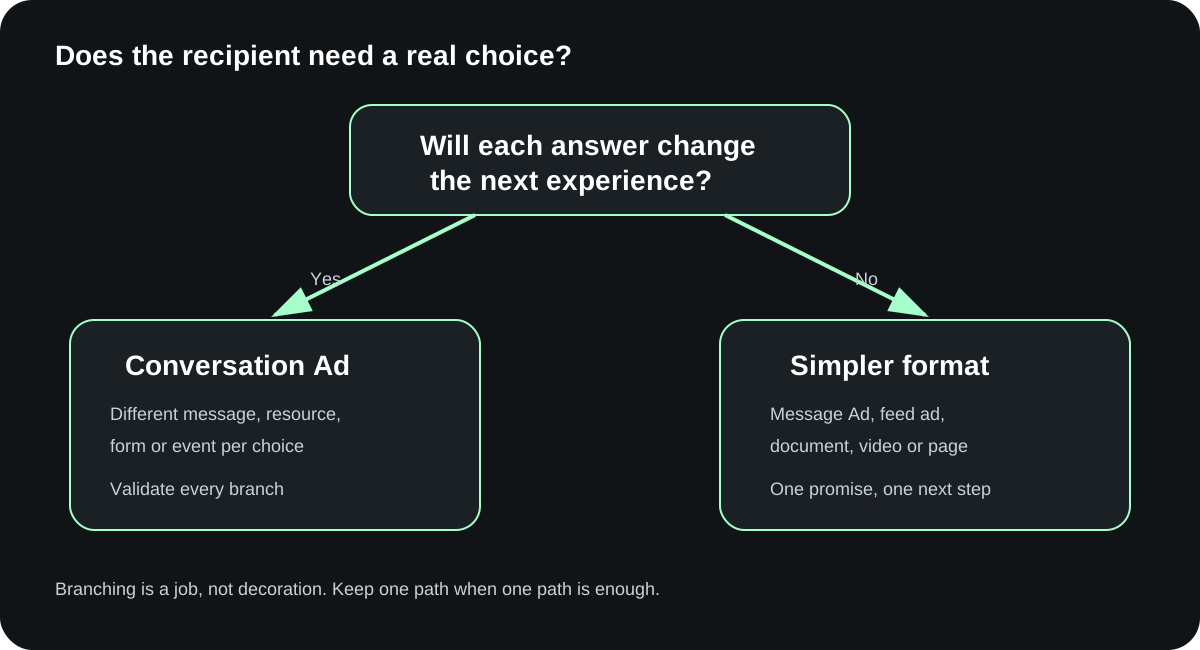
Start with the decision the recipient needs to make. Branching helps when each choice produces a different next step.
| Situation | Better starting format | Why |
|---|---|---|
| Invite a warm audience to choose one of three event sessions | Conversation Ad | The session choice changes the registration page and follow-up |
| Give technical and business buyers different resources | Conversation Ad | Self-selection changes the explanation and destination |
| Let a reader choose a benchmark, guide or product tour | Conversation Ad | Each asset answers a different question |
| Send everyone to one report | Message Ad, Document Ad or feed ad | Branching adds clicks without changing the outcome |
| Introduce an unknown brand to a cold audience | Video, Thought Leader or Document Ad | Build context before entering the inbox |
| Ask for a demo from a high-intent retargeting group | Message Ad or direct landing page | One action may be clearer than a decision tree |
A good test is simple: remove the buttons. If the message still works and every reader should take the same action, you probably do not need a Conversation Ad.
Warmth matters too. AJ Wilcox of B2Linked argues that these ads tend to make more sense for people who already know the company, especially for event invitations, meetups and specific offers. That is practitioner judgment, not a LinkedIn rule, but the logic is sound. An inbox message asks for more attention than a feed impression.
These are dated practitioner explanations. The selected passages help with fit, flow and copy. Current LinkedIn Help controls product facts.
Watch from 6:11. The episode later shows the flowchart at 16:39, test message at 17:17, reporting at 19:44 and sender permissions at 20:53. Product details are dated to 2024.
Watch from 1:27. The video covers funnel placement, retargeting at 1:53, an incentive flow at 5:05 and copy at 7:11. Treat results as attributed practitioner claims.
The screenshots below come from LinkedIn's public Ad Library. Each shows the paying advertiser, visible sender, opening copy and first set of buttons. They prove what the public record shows. They do not reveal the downstream messages or campaign results.
Open the public LinkedIn record · Observed September 25, 2026
Evidence limit: The public record shows the opening and initial actions. It does not reveal later messages or performance. Click the screenshot to inspect it at full size.
LinkedIn for Marketing asks which certification topic interests the reader: Advertising Fundamentals, Marketing Strategy or Content & Creative Design. A fourth option lets the person explore on their own.
This is a strong branching idea because each answer can lead to different material. The self-serve choice also gives people a clean path that does not force another message.
What to borrow:
What to improve in a new build:
Open the public LinkedIn record · Observed September 25, 2026
Evidence limit: The public record shows the opening and initial actions. It does not reveal later messages or performance. Click the screenshot to inspect it at full size.
Siemens Digital Industries Software uses a named sender, Hendrik Lange, and opens with a specific subject: AI and CAD for heavy equipment manufacturers.
The first button goes straight to the promised resource. Two other buttons continue the conversation: one asks for different content and one lets the reader explore independently.
This is a sensible mixed flow. A ready reader can leave immediately. A reader who needs another angle can stay in the message.
What to borrow:
What to check:
Open the public LinkedIn record · Observed September 25, 2026
Evidence limit: The public record shows the opening and initial actions. It does not reveal later messages or performance. Click the screenshot to inspect it at full size.
Shopify's public opening gives the reader two actions: “Get in touch” opens a Lead Gen Form, while “Read the research” opens an external page.
That is a meaningful split. A buyer can raise a hand, or keep learning without pretending to be sales-ready.
What to borrow:
What to watch:
Open the public LinkedIn record · Observed September 25, 2026
Evidence limit: The public record shows the opening and initial actions. It does not reveal later messages or performance. Click the screenshot to inspect it at full size.
Ramp's message has one visible button: “Yes, Let's Chat,” which opens a form. The message also includes an incentive for a 30-minute demo.
This is a helpful contrast. The public record is labeled a Message Ad, and the action is direct. Adding three decorative choices would not improve it.
What to borrow:
What to change:
The next examples are original planning examples. They are not LinkedIn screenshots, live campaigns or Maestro results. Each one shows the whole flow so you can see what the public Ad Library cannot show.
Situation: People who downloaded an event agenda or visited the event page can choose the session that fits them.
Sender: Maya Chen, Head of Community at fictional company Meridian AI.
Opening:
Hi %FIRSTNAME%, we are running a practical AI operations session for B2B teams on October 22. You can join the track that matches the work on your desk. Which would help most?
Choices and branches:
1. Measurement and attribution Follow-up: “We will map ad, CRM and sales events without treating every click as pipeline.” Destination: attribution-session registration page. Observable event: session_selected=attribution, then registration_completed.
2. Creative production Follow-up: “This track covers the brief, example library, review loop and handoff needed to ship more creative.” Destination: creative-session registration page. Observable event: session_selected=creative, then registration_completed.
3. Audience and targeting Follow-up: “This track covers account selection, contact coverage and the gap between a matched audience and a qualified buyer.” Destination: audience-session registration page. Observable event: session_selected=audience, then registration_completed.
4. See the full agenda Follow-up: none. Destination: full agenda page. Observable event: agenda_opened.
5. Not Interested LinkedIn supplies this action in the intro. Do not fight it or relabel another button as an exit.
Why the branching earns its place: each selection changes both the page and the follow-up. The sales team can see the session choice without calling an agenda click a qualified opportunity.
Situation: A warm account list contains security leaders and finance leaders evaluating the same fictional risk platform.
Sender: Daniel Ortiz, VP of Security Research at fictional Northstar Security.
Opening:
Hi %FIRSTNAME%, security and finance teams usually ask different questions before they approve a risk program. Which view would you rather start with?
Choices and branches:
1. Show me the technical model Follow-up: “Start with the control map, data inputs and alert-review workflow.” Destination: technical architecture guide. Event: persona_selected=technical, then architecture_guide_viewed.
2. Show me the business case Follow-up: “Start with the cost model, ownership map and questions procurement will ask.” Destination: business-case worksheet. Event: persona_selected=business, then business_case_downloaded.
3. I need both Follow-up: “Here is a two-page evaluation plan that assigns the technical and commercial reviews.” Destination: combined evaluation plan. Event: persona_selected=combined, then evaluation_plan_viewed.
Why the branching earns its place: the recipient selects the lens. The page, later email and sales context can follow that choice.
What would break it: sending all three buttons to the same demo page. If the destination does not change, the choice is theatre.
Situation: Product marketers who watched a webinar can choose the resource that matches their current campaign problem.
Sender: Priya Shah, Product Marketing Lead at fictional Beacon Analytics.
Opening:
Hi %FIRSTNAME%, if your next campaign is stuck, the problem is usually the audience, the message or the handoff after the click. Pick the one you are working on and I will send the right template.
Choices and branches:
1. The audience is too broad Follow-up: “Use this account-and-role worksheet to define who needs the campaign and who does not.” Destination: audience worksheet. Event: problem_selected=audience, then worksheet_downloaded.
2. The message sounds generic Follow-up: “Use this message brief to connect one buyer problem to one proof point and one next step.” Destination: message brief. Event: problem_selected=message, then brief_downloaded.
3. Leads disappear after the form Follow-up: “Use this routing map to assign the record, response time and sales context.” Destination: routing checklist. Event: problem_selected=handoff, then checklist_downloaded.
4. Talk through it with us Follow-up: “Tell us which campaign you are working on. We will review the page, ads and handoff before suggesting a call.” Destination: short qualification form. Event: review_requested, then request_submitted.
Why the branching earns its place: the first click becomes declared problem context. The resource delivery and CRM record can preserve it.
Situation: Operations leaders from target accounts have already visited a fictional freight-planning page.
Sender: Marcus Lee, Operations Director at fictional ParcelOps.
Opening:
Hi %FIRSTNAME%, teams usually come to our freight-planning guide for one of three reasons. Which one is closest to yours?
Choices and branches:
1. We are comparing systems Follow-up: “Here is the evaluation checklist. It covers data access, workflow ownership and implementation questions.” Destination: evaluation checklist. Event: buying_state=comparing, then checklist_viewed.
2. We are fixing a manual process Follow-up: “Here is the process map. Mark the handoffs, delays and data gaps before you compare software.” Destination: process-map template. Event: buying_state=process, then template_downloaded.
3. I am just researching Follow-up: “No problem. Here is the plain-language guide with no form.” Destination: ungated guide. Event: buying_state=research, then guide_viewed.
4. Ask me one question Follow-up: “What are you trying to change, and what keeps getting in the way?” Destination: reply or short form, depending on the current product option. Event: question_invited, then response_captured.
Why the branching earns its place: it collects honest stage information without forcing every reader into a demo request.
What sales should receive: selected buying state, destination event, account/contact match status, source ad and date. Sales should not receive “qualified lead” until the team's qualification rule is actually met.
Use the builder below to enter the audience, sender, sponsor, objective, opening and choices. Each choice needs an action, a destination or next message, and an observable event.
The builder blocks export when it finds an orphan button, a missing form or URL, a branch with no exit, or a choice with no measurable next event. It warns when different labels collapse into the same destination without an explanation.
Start with the completed event example, then replace it with your campaign. Export the brief only after every path has a clear end.
Interactive planning tool
Plan one opening and up to four custom choices. A branch can go straight to a page, form or close, or show one follow-up with an explicit second CTA. The checker will export a complete planning brief, but launch stays on Hold until the live build, destinations, devices, tracking and CRM record are tested.
LinkedIn changes interface labels, so start from the current Campaign Manager path and check what your account exposes. The sequence below follows LinkedIn's current Help documentation observed on September 25, 2026.
Have these items ready:
If those pieces are still unknown, build the draft flow but hold launch. The editor is a bad place to invent the campaign logic.
Choose a compatible objective. LinkedIn's current matrix lists Brand Awareness, Website Visits, Engagement, Lead Generation and Website Conversions for Conversation Ads. Your account settings and objective determine which formats appear.
Expected result: Conversation Ad is available as a format. If it is missing, do not change objectives blindly. Check the objective, account permissions and current Help guidance.
On Ads in this ad set, create a new ad. Name it, then select or add the sender.
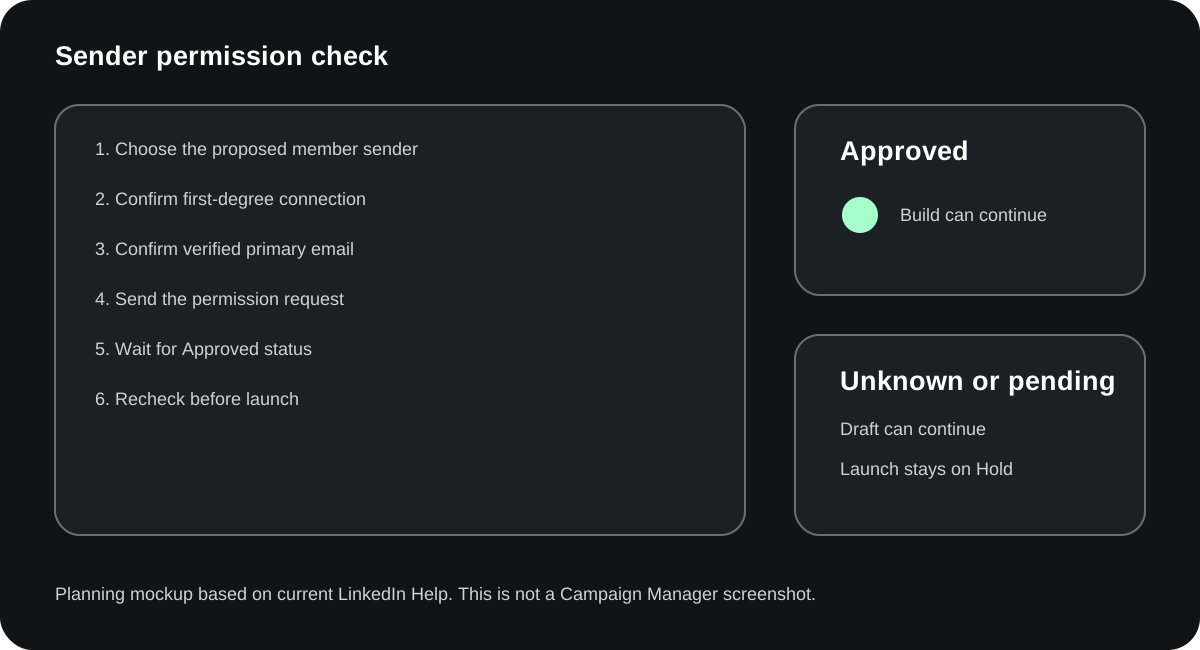
The builder needs creative manager access or higher. An individual sender must approve the request. LinkedIn says the request can go to a first-degree connection whose primary email is verified. The sender does not need prior ad-account access; LinkedIn grants viewer access when the request is sent.
If the sender later rejects permission or is removed, affected Sponsored Messaging ads are canceled.
Expected result: the correct sender is selected and permission is approved. The visible sender's role should make sense for the message.
For Lead Generation, attach or create the Lead Gen Form before you finish the branches. LinkedIn requires one CTA to open the attached form and allows one form per ad creative.
For website actions, open every URL. Add the campaign and branch identifiers that your analytics and CRM need. A working homepage is not a substitute for the promised report, session or template.
Expected result: every external action reaches the exact promised destination, and the form owner knows what happens after submission.
Choose a template or start the flow. Add the intro, image if needed, choices and response messages. Use View Flowchart to inspect the whole path.
LinkedIn allows up to five CTAs per message and 50 in the full conversation. The automatic Not Interested action takes one of the five intro slots, leaving four custom intro choices.
The limit is not a recommendation. Two or three meaningful choices are easier to understand than four variations of “learn more.”
Expected result: every visible choice has one clear action. Every continuation message ends at another valid choice, an external destination, a form or a respectful close.
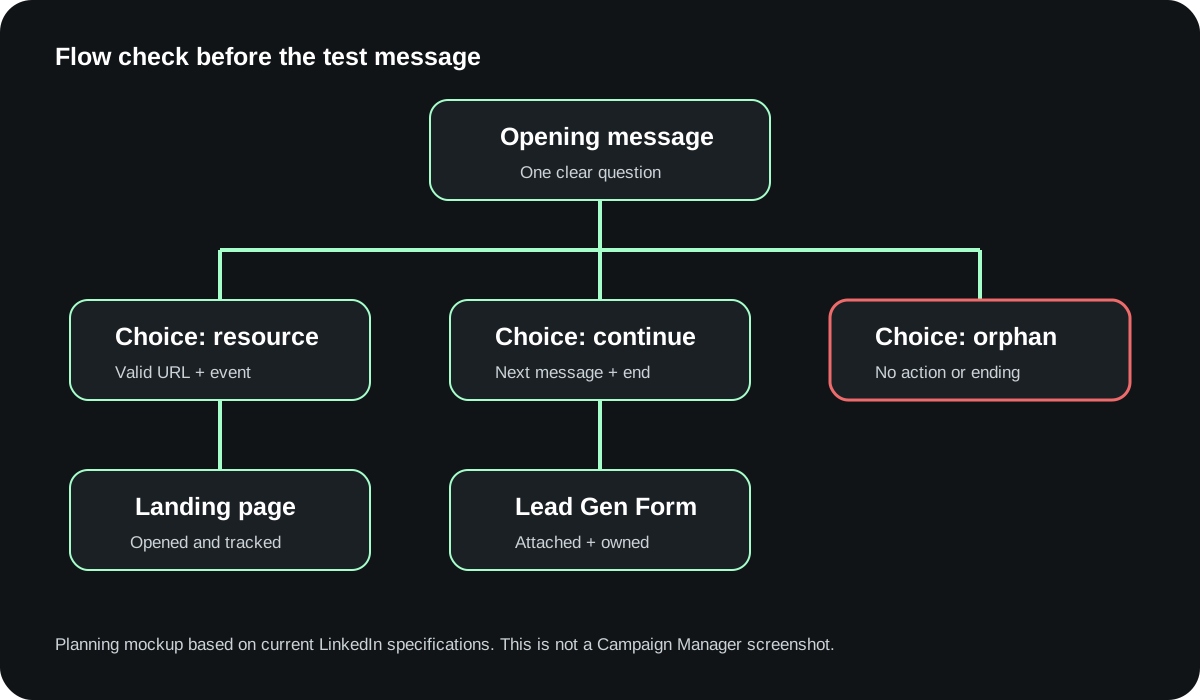
Use Send test message and inspect the recipient view on desktop and mobile.
Check the sender, sponsor label, opening, line breaks, image, button order, labels and destinations. Click every branch. Return to the opening and repeat until every path works.
Expected result: a reviewer who did not build the ad can explain each choice and reach the promised end without asking what the button means.
Change the ad from Draft to Active, then continue to LinkedIn's review and launch steps.
Before launch, confirm the campaign owner, budget, audience, dates, consent requirements, sender permission, destinations, form routing, UTM values and CRM fields.
Expected result: the ad is eligible for review, and the team can trace each downstream event to its system of record.
These are the current public limits observed in LinkedIn Help on September 25, 2026.
| Element | Current limit or behavior |
|---|---|
| Internal ad name | 255 characters |
| Subject | Optional; 60 characters including spaces, punctuation and macros |
| Intro and each message | 8,000 characters each |
| CTA text | 25 characters |
| CTA count | Five per message; 50 per conversation |
| Intro choices | One slot is the automatic Not Interested action |
| Inline image | JPG or PNG; 250 × 250; up to 5 MB |
| Optional banner | JPG or PNG; 300 × 250; up to 2 MB; desktop right rail only |
| Destination URL | Must start with http:// or https://; up to 2,000 characters |
| Custom footer or terms | Optional; up to 20,000 characters |
| Intro emojis | Up to 10 |
| Emojis per later message | Up to 10 per layer |
The optional banner is not clickable for Conversation Ads. It does not appear on mobile or when the message is viewed in a conversation window.
LinkedIn is gradually releasing a persistent CTA treatment. It may not appear for every recipient and is not available on iOS. Do not design the flow around an element that some people will not see.
The opening has four jobs:
A practical opening is often much shorter than the platform limit. Eight thousand characters is a ceiling, not a brief.
We are a leading end-to-end platform that helps forward-thinking organizations unlock efficiency across their digital transformation journey. We wanted to reach out and see if you would be interested in learning more about our innovative solutions.
The message could come from anyone. The buttons will have to rescue it.
Hi %FIRSTNAME%, teams evaluating warehouse software usually need one of two things first: a workflow map or a cost model. Which one would help you make the next decision?
The reader knows why the message exists and how the choices differ.
Conversation Ads create several observable events. They do not all mean the same thing.
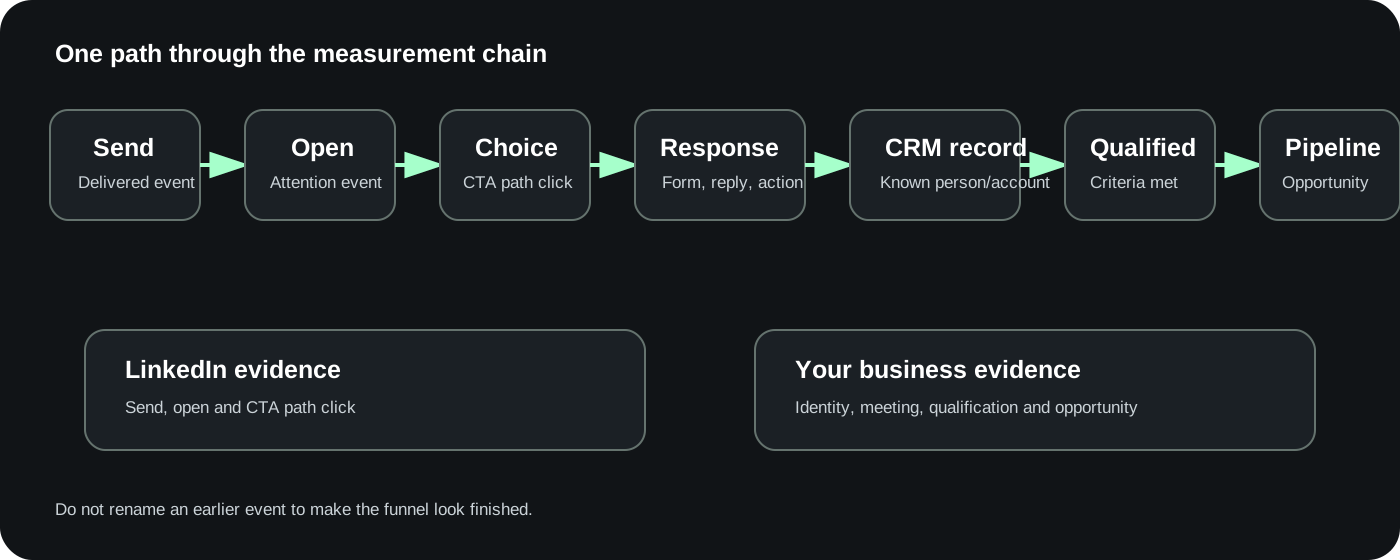
| Stage | Observable event | Where to record it | What it does not prove |
|---|---|---|---|
| Delivery | Send | Campaign Manager | That the person read the message |
| Attention | Open | Campaign Manager | That the offer was relevant |
| Choice | CTA click and selected path | Flowchart and export | That the person is qualified |
| Response | Form submission, reply or known destination action | LinkedIn, analytics or form system | That sales accepted the record |
| Identity | Contact/account matched in CRM | CRM | That a meeting happened |
| Sales progress | Meeting booked and held | Scheduling and CRM | That the account is qualified |
| Qualification | Team's stated criteria met | CRM | That an opportunity exists |
| Pipeline | Opportunity created and advanced | CRM | That the campaign caused revenue by itself |
LinkedIn's Conversation Ad Flowchart reports clicks for each CTA path. If you edit an ad, the flowchart shows clicks for the latest version. Other reports and exports retain clicks across versions, so save the ad version and date with your analysis.
Sponsored Messaging demographic reports can include Sends, Opens, Open Rate and Click-to-Open Rate. LinkedIn says demographic data may take 24 to 48 hours and is approximate for privacy.
For each branch, store:
A research click can trigger a relevant follow-up. It should not trigger a “ready for a demo” sequence unless the person actually asked for one.
This creates the appearance of personalization without changing the experience. Use one button, or make the branches real.
The recipient needs enough context to choose. They do not need the website copied into their inbox.
The sender should be believable for the topic and able to own the message. Secure permission before the launch date.
LinkedIn now supplies the Not Interested action in the intro. Treat it as part of the experience. Do not use misleading labels or dead-end loops to keep someone inside the ad.
Write and validate the branches first. Otherwise the editor becomes the planning document, and missing paths are harder to see.
Record the platform event, then follow the CRM chain. Keep unknown later outcomes unknown.
Public guides disagree on frequency caps, EU availability, objectives, pricing and button limits. Use current LinkedIn Help for product facts and date every practitioner recommendation.
Open the completed fictional flow first. Then fill in the blank brief with your audience, sender, choices, destinations, measurement fields and owners.
Run the QA checklist before Campaign Manager. Use the standalone prompt in a fresh agent to review the flow. The prompt contains the rules and output format it needs, so it does not depend on this article being open.
Open the completed fictional example first. Then fill in the blank brief, run the QA checklist and paste the brief into the standalone review prompt.
You are reviewing a LinkedIn Conversation Ad plan. Work only from the supplied brief and the reference rules below. Do not invent a brand claim, destination, form, sender approval, result, benchmark, budget or launch status.

REFERENCE RULES
1. A Conversation Ad earns its complexity only when the recipient's choice changes the next message, destination or action. If one action fits everyone, recommend a simpler format.
2. Use these stable parts: paying sponsor, visible sender, opening, choice, follow-up, destination or form, respectful exit, observable event and owner.
3. LinkedIn's current public specifications observed 2026-09-25 allow up to five CTA buttons per message and 50 per conversation. The automatic Not Interested action uses one intro slot, leaving four custom intro choices.
4. A button label is limited to 25 characters. Do not shorten a label in a way that hides whether it opens a page, a form or another message.
5. Under Lead Generation, at least one CTA must open the attached Lead Gen Form, and one form can be attached to each creative.
6. Individual senders require permission. Unknown, Requested, Approved, Declined and Revoked are different states. Unknown is not Approved.
7. Every continue-in-inbox action needs one follow-up message, a second CTA label and a second action. This review tool intentionally supports one follow-up level. The second action must end at a valid page, form or respectful close.
8. A URL is not verified merely because it looks valid. Reject URL whitespace, embedded credentials and malformed hosts. Launch requires opened destinations, tested forms, desktop and mobile test messages, a successful run through every branch, fired tracking and a CRM read-back.
9. Keep send, open, CTA click, form/reply, CRM record, held meeting, qualification and opportunity separate. A click is not a qualified lead.
10. If two differently labeled choices lead to the same outcome, require an explanation or merge them. The automatic Not Interested path needs its own observable event, owner and suppression or follow-up rule.
11. Current platform availability and interface labels must be checked in the live account before launch.
12. Planning mockups, fictional examples and practitioner opinions are not LinkedIn product evidence or campaign results.

SUPPLIED FLOW BRIEF
Paste the completed LinkedIn Conversation Ad flow brief below this line.

---
[PASTE BRIEF]
---

YOUR TASK
A. Decide format fit: Conversation Ad, simpler Message Ad, feed ad/Document/Video Ad, landing page, or Hold. Explain the decision in plain language.
B. Map every path from the opening through each choice, optional follow-up, second CTA/action and final destination/form/exit.
C. Find orphan choices, missing messages, missing destinations/forms, misleading labels, duplicate outcomes, overlong labels, missing exit behavior and unowned next events.
D. Separate Draft readiness from Launch readiness.
E. Return a repaired flow only when the supplied facts are enough. Preserve Unknown for missing facts.
F. Recommend one smallest next test that would resolve the most important uncertainty.

MISSING-INPUT BEHAVIOR
If the brief lacks the audience, offer, sponsor, sender, opening, choices, destinations/forms, platform events, analytics/form events, CRM fields/values, evidence limits, Not Interested handling or owners, do not write a finished ad from guesses. Return:
- Status: Needs information
- Missing item
- Why it blocks the draft or launch
- Person who should supply or verify it
- Exact question to ask

A draft may continue with an explicitly fictional or Unknown destination. Launch cannot.

OUTPUT CONTRACT
Return these sections:
1. Decision
2. Reader and offer summary
3. Path table with: choice, first action, follow-up, second CTA/action, final outcome, platform event, analytics/form event, CRM field/value, owner, evidence limit and status
4. Broken-path findings ranked Critical, Major or Minor
5. Repaired opening and choices, if facts allow
6. Measurement handoff
7. Draft readiness: Ready / Needs information / Hold
8. Launch readiness: Ready / Hold
9. Missing facts and owners
10. Smallest next test

Before finishing, verify that every custom intro choice plus the automatic Not Interested action fits the current intro-button limit, every custom button label is at most 25 characters, every continued branch has a second CTA/action, every branch has an end, Not Interested has an event/owner/rule, launch has all eight verification checks, and no click is described as qualification without the supplied rule and evidence.
Yes. LinkedIn currently documents Conversation Ads as an active Sponsored Messaging format and provides current creation instructions, specifications and an objective-format matrix. Availability can still depend on the selected objective and account settings.
LinkedIn bills Sponsored Messaging on a cost-per-send basis. There is no current first-party universal CPS price. Your audience, auction, objective, bid strategy and delivery conditions affect cost. Model the downstream events separately from sends.
LinkedIn currently allows up to five CTA buttons per message and 50 across the conversation. The automatic Not Interested action takes one of the five intro slots, so the intro has room for four custom choices.
Yes. Under the Lead Generation objective, at least one CTA must open the attached Lead Gen Form. LinkedIn allows one form per ad creative.
Yes. LinkedIn says Sponsored Messaging appears in LinkedIn Messaging on desktop and mobile. The optional 300 × 250 banner is desktop-only, and the gradual persistent CTA treatment is not available on iOS.
The standard flow uses an approved member sender. LinkedIn says a company-name or company-brand sender can be arranged through customer support. Do not assume it appears in the ordinary member picker.
LinkedIn's current guidance says targeting is supported in the EEA and Switzerland for members who opted in to Sponsored Messaging inbox ads. Older guidance that says EU targeting was discontinued has been superseded.
The best example is the one where each choice changes the next message, destination or action. LinkedIn's certification ad is a clean public example of routing by topic. Shopify's public opening is a clean example of separating a sales form from a self-serve research path.
Use a Conversation Ad when the recipient needs to choose between meaningful paths. Use a Message Ad when one message and one action already fit the situation.
Product details in this guide come from current LinkedIn Marketing Solutions Help pages observed on September 25, 2026, including the Conversation Ads overview, Sponsored Messaging overview, objective matrix, creation guide, specifications, sender permissions, Lead Gen Forms and Conversation Ad Flowchart.
The four brand screenshots come from public LinkedIn Ad Library records. They show the public opening and first-level actions. They do not expose full downstream messages or performance.
The complete flows, diagrams and builder examples are Maestro planning examples. They are not LinkedIn interfaces, campaign results or claims about the brands shown above.
Practitioner videos and articles are dated, attributed context. When they disagree with current LinkedIn documentation, current first-party documentation controls the product fact.
If you want a second set of eyes on the audience, offer, flow and measurement plan, book a Demand Gen Roast. For the broader operating model, see our LinkedIn Ads agency guide and LinkedIn Ads cost calculator.