
LinkedIn Text Ads: Decide If They Fit, Write the Copy and Build a Test
LinkedIn Text Ads are compact desktop ads for one approved claim, one action and one landing page.
Decide first. Then build the handoff.
Start with the offer, buyer, objective, desktop fit and whether one compact claim can carry the message. Production details change readiness; they do not rewrite the format decision.
Local decision from the five fields below · Native account evidence: unknown
1. Claims, source and image
2. Three claim-safe routes
Route 1
Route 2
Route 3
3. Bounded test handoff
4. Native validation receipt
A local pass stays on Launch Hold. A verified receipt must match this revision and fingerprint.
Revision 1 · Fingerprint
Inspect the current record
Consider them when one compact claim and action can explain the offer, the objective is supported, and enough of the audience uses LinkedIn on desktop to make the test useful. Choose a richer format when the offer needs a demonstration, long explanation, native lead form, personalization or several assets.
Use this page to make three decisions for one B2B offer:
- Choose Use, Hold or Another format.
- Turn approved claims into three valid copy routes without cutting words off or inventing proof.
- Export a bounded test with a goal, audience, spend ceiling, conversion, stop rule and owner.
The local checks prepare a campaign for review. LinkedIn Campaign Manager still decides whether the format, asset and objective are available and accepted in your account.
What LinkedIn Text Ads are
Text Ads are a self-service LinkedIn ad format built for compact desktop placements. A complete ad has four visible parts:
- a square image;
- a short headline;
- a short description;
- a destination URL.
LinkedIn’s current Help article says Text Ads can appear on the right rail of desktop pages. The same article lists brand awareness, website visits, engagement and website conversions in its creation instructions.
The desktop placement changes the job of the ad. A Text Ad does not have the space of a feed video, document or single-image ad. It needs one recognizable offer and one reason to click. If the buyer needs a long explanation before the offer makes sense, the format is already fighting the message.
The current LinkedIn Text Ads specifications
| Field | Current documented rule | What to do before launch |
|---|---|---|
| Image | 100 × 100 pixels, JPG or PNG, no more than 2 MB | Decode the real file and check its pixel size, file type and bytes. Do not trust the filename alone. |
| Headline | 25 characters, including spaces | Count the exact supplied text. Do not truncate it automatically. |
| Description | 75 characters, including spaces | Count the exact supplied text. Keep one claim and one action. |
| Destination | HTTP or HTTPS URL | Test the final URL and keep tracking parameters reviewable. |
| Objectives named in LinkedIn Help | Brand awareness, website visits, engagement and website conversions | Confirm the objective in the target Campaign Manager account. |
| Creation access named in LinkedIn Help | Creative Manager access or higher | Confirm the operator’s account role before handoff. |
LinkedIn’s two public sources disagree on the destination field limit. The Help article says 500 characters. The Text Ads specifications page says 2,000. This page uses 500 as a conservative local limit. A URL from 501 to 2,000 characters needs native validation instead of a made-up answer.
LinkedIn’s general Ads Guide also shows Spotlight wording and a 50-character detail under its Text Ads heading. That conflicts with the dedicated Text Ads pages, so this guide does not use the general Ads Guide for field limits.
Should you use LinkedIn Text Ads?
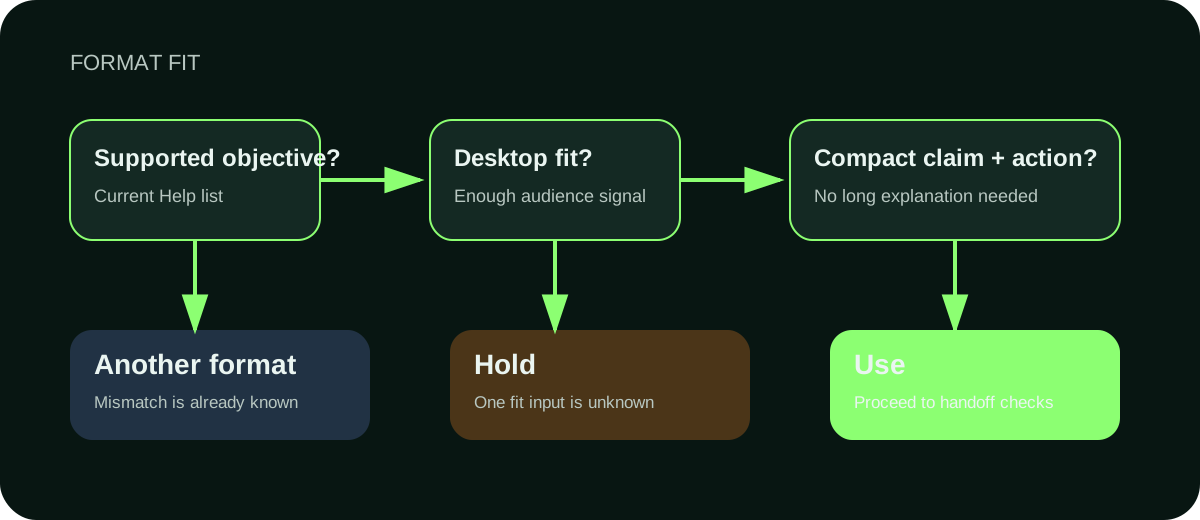
- Supported objectiveCheck the current Help list.
- Desktop fitConfirm the audience can teach you something.
- ResultUse, Hold or Another format.
Start with the format decision. Do not make someone finish a production form before telling them whether the format fits.
Choose Use
Choose Use when all four statements are true:
- The objective is supported by the current Text Ads creation instructions.
- Enough of the audience uses LinkedIn on desktop for the test to teach you something.
- The offer can be understood from one compact claim and one action.
- A site visit or other supported objective is the right next step.
“Use” means the format deserves a bounded test. It does not mean the campaign is ready to launch or likely to perform.
Choose Hold
Choose Hold when the format might fit but a decision input is missing. Common reasons include:
- the offer is still vague;
- the buyer has not been named;
- the objective is unknown;
- desktop audience fit has not been checked.
The result should name one missing input and one next action. “Needs more strategy” is not a next action. “Confirm whether at least part of the target account list is active on LinkedIn desktop” is.
Choose Another format
Choose Another format when the campaign needs something Text Ads do not provide.
Use a different format when you need:
- mobile and feed attention;
- a demonstration or longer explanation;
- a native lead form;
- personalized member details;
- several pages or assets in one unit.
The existing Maestro guides cover LinkedIn ad specifications, LinkedIn ad targeting, LinkedIn single-image mockups, LinkedIn Spotlight Ads and LinkedIn ads cost planning. Use the page that owns the next decision instead of forcing the whole campaign into this one.
Two readable LinkedIn Text Ad examples
Public screenshots can show the visible copy and composition. They cannot reveal the audience, bid, destination, attribution or business result.
The two examples below appear in one Getuplead editorial screenshot. Open the image to read both ads at full size. Use them to study visible structure and copy only; the screenshot does not reveal targeting, spend, attribution or results.
Source: Getuplead, The Ultimate Guide to LinkedIn Text Ads. The visible advertiser claims belong to the advertisers. No performance conclusion can be drawn from the screenshot.
Google Cloud: an audience and offer route
Headline: “BI tools for startups” Count: 21 of 25 characters
Description: “Make faster decisions with $200K in Google Cloud credits for analytics.” Count: 71 of 75 characters
The headline names the category and audience. The description gives the offer and what it helps the buyer do. It leaves four characters unused because the sentence already does its job.
The $200K figure is a visible Google Cloud claim. The screenshot does not establish who qualified for it, where the click led or what happened after the click.
What to adapt: pair one narrow audience or use case with one approved offer. Do not copy the number or the promise unless your own evidence supports it.
Grammarly: a category and benefit route
Headline: “AI Writing Assistant” Count: 20 of 25 characters
Description: “Eliminate errors and work seamlessly across multiple platforms and devices.” Count: 75 of 75 characters
The headline names the product category. The description uses the full documented limit for a benefit statement.
This route is easy to understand, but the wording also shows the risk of compact ads: broad claims can fit into 75 characters just as easily as supported claims. The character counter cannot decide whether “eliminate errors” is approved, current or appropriate for your company. A human still needs to review the source claim.
What to adapt: use a familiar category in the headline when the buyer already knows the problem. Put the approved benefit in the description. Keep the claim source beside the variant.
How to write LinkedIn Text Ads without inventing proof
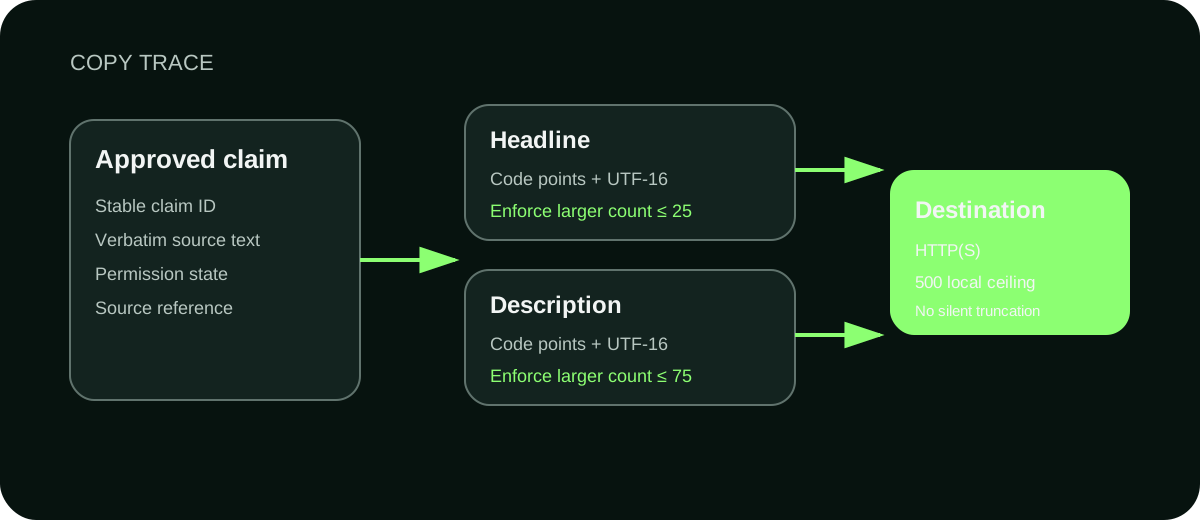
- Approved claimKeep the verbatim text and source ID.
- HeadlineEnforce the larger Unicode count at 25.
- DescriptionEnforce the larger Unicode count at 75.
- DestinationUse HTTP(S); do not truncate.
Start with approved facts. Copywriting comes after that.
Create one claim record for every fact the ad may use:
- a stable claim ID;
- the exact approved wording;
- the source or private reference;
- the person or process that approved its use.
Then write three materially different routes. Changing punctuation, swapping two adjectives or turning the same sentence into title case does not create a new route.
Route 1: buyer problem
Name a problem the buyer already recognizes.
Pattern
- Headline: the problem or decision
- Description: the next step and what it produces
Fictional example
- Headline: “Where did pipeline stall?”
- Description: “Trace delivery, clicks, site actions, CRM acceptance and revenue.”
Use this route when the problem is familiar and the offer helps diagnose it.
Route 2: concrete offer
Name the thing the reader gets.
Pattern
- Headline: the deliverable
- Description: the fields, result or next decision
Fictional example
- Headline: “B2B ad review template”
- Description: “Build a test with a spend ceiling, conversion, stop rule and owner.”
Use this route when the offer is easy to picture and the destination delivers it directly.
Route 3: method or mechanism
Name how the offer works without promising a result you cannot prove.
Pattern
- Headline: the method
- Description: the inputs it checks or the process it follows
Fictional example
- Headline: “Five-signal ad review”
- Description: “Keep delivery, site, CRM and commercial evidence in separate rows.”
Use this route when the mechanism is the clearest difference.
Every fictional example above needs to be replaced with claims from the real offer before production. The copy builder should reject an unapproved claim ID, even when the sentence fits the limit perfectly.
Count characters conservatively
LinkedIn says the limits include spaces. Unicode makes the count less obvious than it looks.
The checker on this page reports both Unicode code points and UTF-16 code units, then enforces the larger number. That matters for characters such as emoji. It preserves the supplied text and never shortens a sentence silently.
If a headline has 26 counted units, the fix is to rewrite it. Do not let the tool remove the last character and call the variant ready.
The same rule applies to the description. Keep the rejected version in the work history so the reviewer can see what changed.
Check the 100 × 100 image from its real bytes
A file named `logo.png` is not proof that it is a valid PNG. An image inspector should:
- read the raw bytes;
- identify the real MIME type from those bytes;
- decode the complete image;
- read the decoded width and height;
- compare the raw file size with the 2,000,000-byte local ceiling;
- record the SHA-256 hash used in the handoff.
Reject corrupt images, wrong dimensions, a filename that disagrees with the real file type and any asset over the limit. A metadata header by itself is not enough.
At 100 × 100 pixels, small details disappear quickly. Check the image at actual placement size. If the mark is unrecognizable without enlarging it, simplify the image before launch.
Build a bounded Text Ads test
The test handoff should answer the operating questions before anyone opens Campaign Manager.
1. State the learning goal
Write one sentence about what the test should teach you.
Examples:
- “Learn whether the compact offer earns qualified visits from the desktop audience.”
- “Learn whether repeated desktop reach helps the named accounts recognize the offer.”
The goal determines the bid discussion and the review. It gives the review a better basis than “test Text Ads.”
2. Name the audience and permission state
Write down the audience and whether its use is confirmed, denied or unknown. Unknown stays Unknown. It does not become confirmed because the campaign form is otherwise complete.
Audience construction belongs in the LinkedIn ad targeting guide. This handoff records the final audience and its permission state.
3. Choose CPC or CPM for the learning goal
Choose CPC when the first signal that matters is a click and you want the test plan framed around paid visits.
Choose CPM when the first signal that matters is delivery or repeated desktop exposure and the plan is framed around impressions.
Neither choice guarantees cheaper pipeline. Write the reason beside the bid basis, then review the native auction options in the target account.
4. Set a spend ceiling with currency and period
“Small budget” is not a ceiling.
Record the amount, currency and period. For example: “500 USD over seven days.” This is a user-supplied control, not a benchmark from this page.
5. Define the conversion
Name the event that counts for this test. A page view, form submission, accepted lead and qualified opportunity are different events.
If the conversion cannot be measured, keep the handoff on Hold. Do not substitute clicks and call the problem solved.
6. Write the stop conditions
Each stop condition needs:
- a metric;
- an operator;
- a threshold;
- a review window;
- the action that follows.
For example: “When spend reaches the supplied ceiling during the seven-day window, pause new delivery and review the five outcome layers.”
The threshold is supplied by the campaign owner. This page does not invent an acceptable cost per lead.
7. Assign one owner
Name the person responsible for reviewing the native preview, launching the approved revision and recording the result. “Marketing” is not an owner.
Keep five outcome layers separate
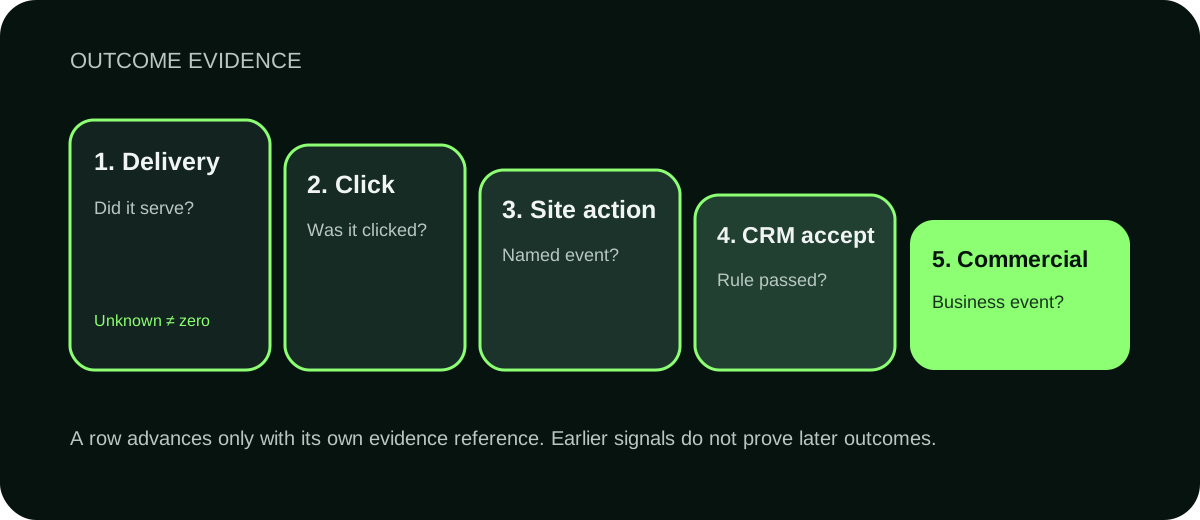
- DeliveryDid it serve?
- ClickWas it clicked?
- Site actionDid the event occur?
- CRM acceptanceDid the rule pass?
- Commercial outcomeWas the business event observed?
A Text Ad can deliver without earning a click. It can earn a click without producing a site action. A site action can enter the CRM and still fail the acceptance rule. An accepted lead can still produce no commercial outcome.
Record these five outcomes separately:
- Delivery: did the ad serve to the intended campaign and placement?
- Click: did the ad earn the click event being measured?
- Site action: did the visitor complete the named action?
- CRM acceptance: did the record meet the supplied acceptance rule?
- Commercial outcome: did the accepted record create the business event being tracked?
Before launch, these rows can all be Unknown. That is correct. Unknown is not zero, failure or success.
A complete worked handoff
This fictional example shows the shape of the decision. It does not report a Maestro or client result.
Offer: B2B ad measurement review Buyer: Demand generation lead Objective: Website visits Desktop audience fit: Confirmed for the proposed test Format decision: Use Reason: The offer can be explained in one compact claim, and the first learning goal is a qualified site visit from the desktop audience.
Approved claims: “Review five outcome layers”; “The review shows where an ad outcome sequence stops”; “The review template includes a spend ceiling, conversion, stop rule and owner” Claim source: Fictional worked-offer brief Permission: Approved for this example only
Variant A, problem route Headline: “Where did pipeline stall?” Description: “Trace delivery, clicks, site actions, CRM acceptance and revenue.”
Variant B, offer route Headline: “B2B ad review template” Description: “Build a test with a spend ceiling, conversion, stop rule and owner.”
Variant C, method route Headline: “Five-signal ad review” Description: “Keep delivery, site, CRM and commercial evidence in separate rows.”
Audience: US B2B demand generation leaders Audience permission: Confirmed for the fictional example Destination: Example review page Learning goal: Learn whether the compact offer earns qualified site visits Bid basis: CPC Reason: The first learning goal is a qualified click into the review page Spend ceiling: 500 USD over seven days Conversion: Submitted review request accepted by the CRM rule Stop condition: Pause when the supplied ceiling is reached, then review all five outcome layers Owner: Demand generation lead Native validation: Unknown Readiness: Launch Hold
The handoff stays on Launch Hold because the fictional record has no matching Campaign Manager receipt. That is the correct result even though the local fields pass.
Use the build and review prompts without this article
Take the complete Text Ads kit
Each file carries the same claim, copy, test and evidence boundaries.
The downloadable prompt pack contains two separate prompts.
The build prompt takes an offer, buyer, approved claim records, image receipt, destination, audience, learning goal and test controls. It returns the decision, three copy routes, counts, source IDs, handoff and open requests.
The review prompt checks that the claims, three routes, character counts and launch decision match the supplied record.
Both prompts include the full field contract. A person or agent should be able to use them without reading this page first.
Review the native campaign before launch
Local validation cannot prove what Campaign Manager will accept in a particular account.
Before launch:
- confirm the operator has the required account role;
- confirm Text Ads appear for the selected objective;
- upload the reviewed 100 × 100 asset;
- compare the native preview with the accepted copy;
- capture the account, campaign, creative and revision references;
- attach the native validation receipt to the same revision;
- launch only after the owner reviews that receipt.
If the claim, destination, audience, image, conversion or stop rule changes after review, review the new version before launch.
Frequently asked questions
Are LinkedIn Text Ads still available?
LinkedIn had live public Text Ads specification and Help pages when this guide was researched on 1 October 2026. Confirm availability in the target Campaign Manager account before launch.
Where do LinkedIn Text Ads appear?
LinkedIn’s Help article describes right-rail placement on desktop pages and documents other desktop sizes. Exact delivery is controlled by LinkedIn and the target campaign.
What is the LinkedIn Text Ads headline limit?
The dedicated LinkedIn Text Ads pages document 25 characters, including spaces.
What is the LinkedIn Text Ads description limit?
The dedicated pages document 75 characters, including spaces.
Can I use a logo for the image?
You can use a JPG or PNG that decodes to exactly 100 × 100 pixels and stays within the documented file limit. Check whether the mark remains recognizable at its real size.
Are LinkedIn Text Ads cheap?
Some practitioner guides position Text Ads as a lower-cost way to buy desktop exposure. That does not establish what your account will pay or whether the traffic will become qualified pipeline. Set a supplied ceiling and judge the five outcome layers separately.
Should I bid CPC or CPM?
Choose the bid basis from the first learning goal. CPC fits a paid-visit test. CPM fits a delivery or reach test. Confirm the native options and economics in your account.
Do local checks mean the ad is ready to launch?
No. Local checks can validate supplied fields, copy counts, decoded image bytes, URL syntax and record consistency. Launch readiness requires a matching native validation receipt and owner review.
Build the decision before you build the campaign
A good Text Ad is small because the decision is clear. It has one buyer, one approved claim, one action and one bounded test.
Start by choosing Use, Hold or Another format. If you choose Use, write three routes from approved claims and finish the handoff. If you choose Hold, resolve the named input. If you choose Another format, use the format that fits instead of squeezing more words into 75 characters.
If you want help deciding which LinkedIn ad format fits the offer, building the campaign and connecting the result to qualified pipeline, talk to Maestro.
Sources
- LinkedIn Text Ads specifications
- LinkedIn Help: Text Ads advertising specifications
- LinkedIn Ads Guide, retained as a documented source conflict rather than a field-limit authority
- Getuplead: The Ultimate Guide to LinkedIn Text Ads
- Customer Impact: LinkedIn Ads formats and when to use them
- ZenABM: LinkedIn Text Ads guide
- B2Linked: LinkedIn Ads cheapest ad formats