
LinkedIn Event Ads: choose the route and build the launch handoff
EVENT AD HANDOFF
Choose the route and expose the launch gaps
Change the route first. The five judgments update independently, so missing launch receipts do not erase a sound format choice.
Edit event and campaign facts
Record route-specific checks and receipts
Mark a check passed only after the named owner saves a real evidence reference and checked time. Route changes archive the prior state and reopen the new route.
This browser record is a planning and preflight tool. Campaign Manager still controls Page/account access, accepted creative, ad review and delivery. Aggregate views cannot establish a named person's attendance.
A LinkedIn Event Ad puts an event invitation in the desktop and mobile feed. It can promote a LinkedIn Event or send people to an external event. That choice changes the image you prepare, what happens after a click, and where registration data comes from.
Start with the event and its registration path. Then write the ad. A good invitation cannot repair a broken form or an attendance report that nobody owns.
Open the Event Ad launch-handoff builder
LinkedIn's public rules below were checked on September 28, 2026. They describe available product paths; your Campaign Manager account, Page roles, final preview and ad review still need their own checks. Sources: Event Ad specifications, Live creation guide, off-platform creation guide and Event Ads FAQ.
Decide which Event Ad path fits
| Path | What must exist | Destination and attendee action | Creative and stage behavior | First measurement source |
|---|---|---|---|---|
| LinkedIn Live Event | A Page-owned LinkedIn Live Event, Live access and the required Page/ad-account roles | Event page. Without a registration form, the member selects View Event, then Attend on the page. A Live form can gate content. | Use the LinkedIn Event image path or select a replacement. The ad can change with the event stage; optional 30-second preview is a Live feature. | Campaign Manager Event metrics and LinkedIn Live analytics, then your CRM. |
| Non-Live LinkedIn Event | A LinkedIn Event with its owner, type and format settled | LinkedIn Event page; test the actual response or registration journey | The ad stays static before, during and after the event. Do not promise a Live preview or replay treatment. | Event response and whatever registration/attendance system the event uses. |
| Off-platform Event Ad | A real external event page and a tested registration path. A LinkedIn Event is not required. | External event URL, then the platform's form and confirmation | Upload a 16:9 image at least 480 px wide. The ad stays static. LinkedIn warns that its mobile editor preview can be generic. | Event platform or CRM for completed registration and attendance; Campaign Manager for ad delivery. |
LinkedIn documents brand awareness, website visits, engagement and lead generation as objectives for its Live Event Ad flow. Choose the objective for the action you want, then confirm that your account offers it for the route and campaign you are building. An engagement objective alone does not prove that someone finished registration.
| Desired action | Route | Objective guidance verified for this route | Primary success measure | Account check still required |
|---|---|---|---|---|
| Watch the event live on LinkedIn | LinkedIn Live Event | LinkedIn documents brand awareness, website visits, engagement and lead generation in the Live flow. Choose among the options your account actually exposes. | Confirmed aggregate viewing measure from Live analytics, plus the Event stage breakdown when available. | Verify Live access, Page ownership, form choice, available objective and the exact viewing report before launch. |
| Respond to a native Event and continue to an external registration or broadcast page | Non-Live LinkedIn Event | No objective set is assumed here; verify the choices shown for this route. | Native Event response and completed external registration reported separately. | Verify organizer, type, format, destination chain, objective options and response export. |
| Complete registration on an external event platform | Direct off-platform Event Ad | No LinkedIn Event is required. Choose an available objective that supports the external action, then keep campaign attribution separate from form completion. | Confirmed external form submission tied to the event ID. | Verify objective options, final URL, mobile path, form confirmation and event-platform/CRM read-back. |
| Learn about a product when there is no approved event date or attendee action | Use another ad format | Build a feed, video or document-ad brief around the explanation. | The action defined in that separate brief. | Confirm the format, destination and measurement plan before production. |
The LinkedIn Event image recommendation is 4:1 on LinkedIn's design page. Its current Help specifications also allow selecting or uploading another image. The off-platform route calls for 16:9. Do not carry one route's image rule into the other.
For the buyer's first creative handoff, LinkedIn's public Event Ad specifications allow an optional ad name of up to 255 characters and optional introductory text of up to 600 characters. The destination URL is required. The separate Event Ad design page lists a 255-character event name and a 2,000-character destination field for its LinkedIn Event path. Treat these as local checks, then confirm the exact fields and image in the current Campaign Manager preview. For the external path, LinkedIn's off-platform guide asks for online or in-person type, event timezone, start and end, and an address for in-person events.
If the event has no approved topic, speaker, time or attendee promise, keep the work as a draft brief. If the audience needs a longer product explanation before an invitation makes sense, give that job to a feed, video or document ad and use Event Ads only when the event itself is a clear next action.
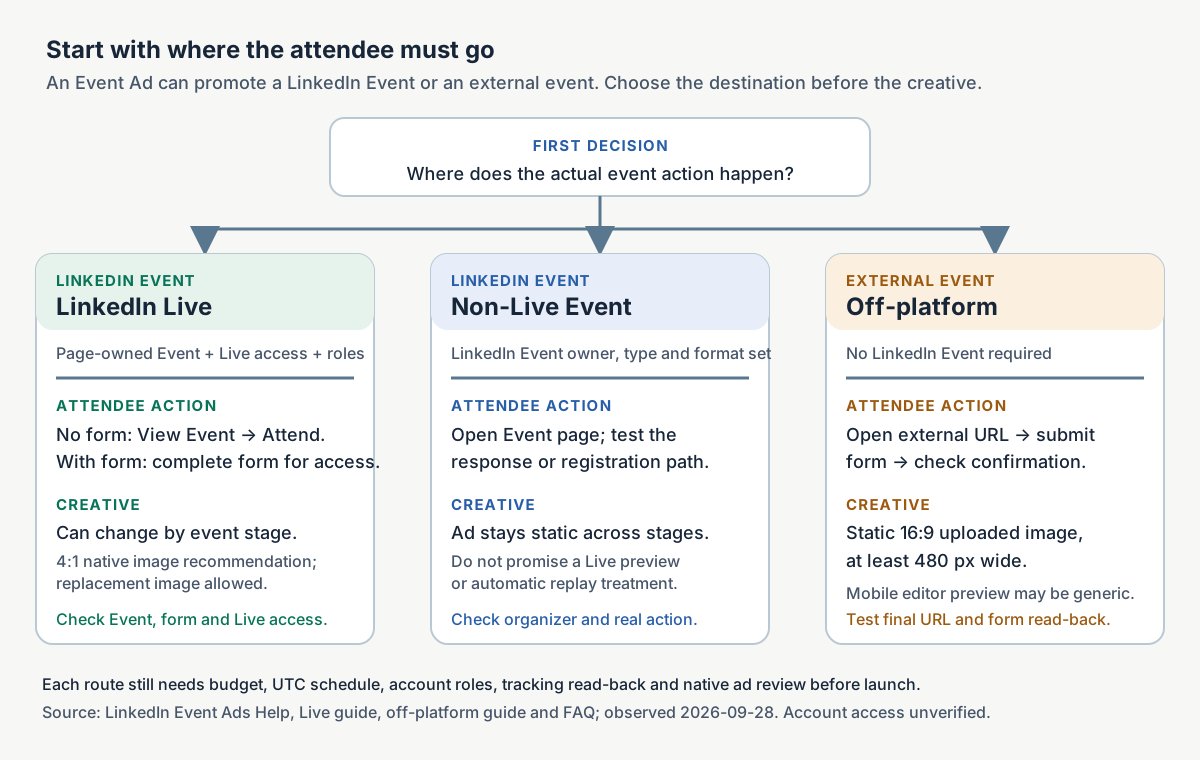
The route map is a planning aid based on LinkedIn's public documentation observed September 28, 2026. Account access and the final setup need in-account verification.
Four real LinkedIn Event Ad examples
These are attributed public creatives from the LinkedIn Ad Library. We reviewed the saved images and archived ad copy. Two ads included registration links in their introductory copy, so we checked those links separately and dated the results below. The archive does not establish the View event button destination, completed registrations or campaign results. None is a Maestro campaign or endorsement.
Quiq: make the webinar worth a calendar slot
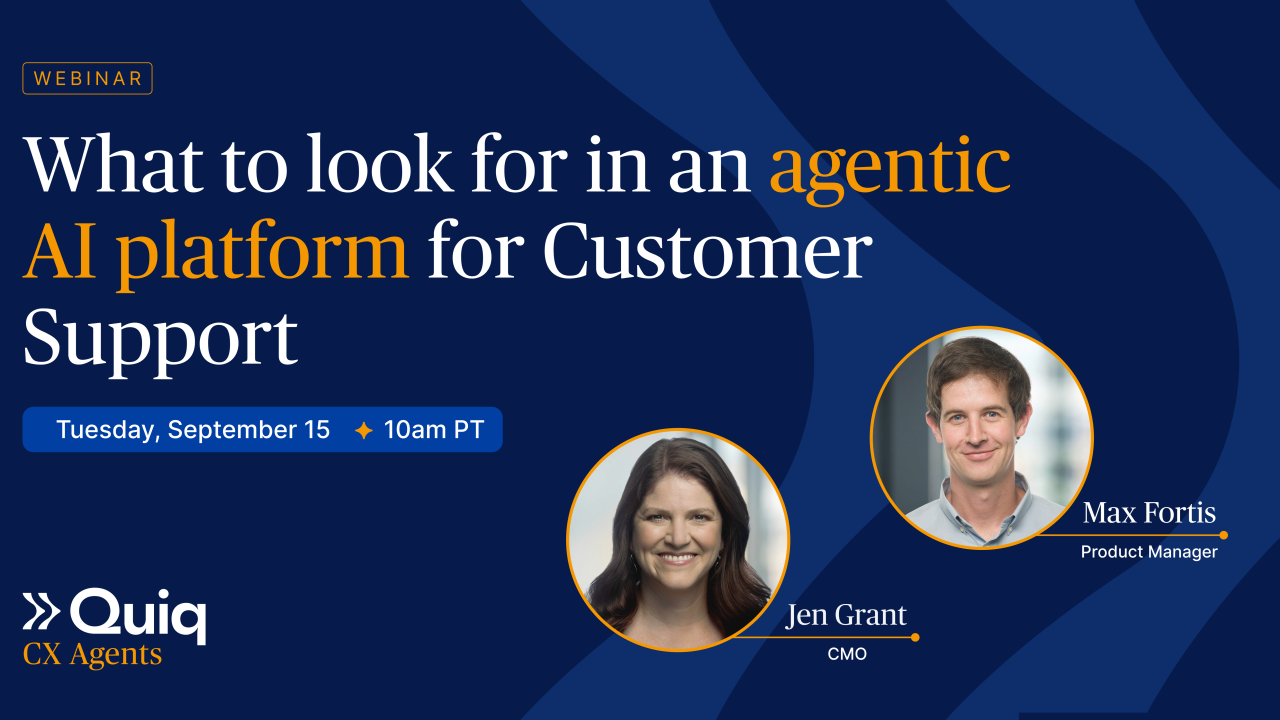
View Quiq's archived Event Ad. The saved image shows the webinar question, speakers and time. The words below are the separate introductory copy archived with the ad.
Captured introductory copy from Quiq: Jen Grant, CMO of Quiq, and Max Fortis, Product Lead of Quiq, walk through real AI-handled customer calls and the five questions that separate an AI agent that resolves conversations from one that deflects them, whichever vendor is pitching it. Register to watch live, or get the recording.
- Platform CTA:
View event. That is separate from the “Register” instruction in the introductory copy. - Captured copy registration link: None in the archive record. The button destination was not captured.
- Arrival check: Destination headline and arrival action are unverified.
- Continuity: Unverified. The archive establishes the promise and platform CTA, not where the click landed.
The five-question promise gives the attendee a decision they can make after the session. “AI webinar” would ask for attention without saying what it buys. If you borrow the live-or-recording structure, the event owner must confirm that a recording will exist and that the follow-up owner will send it. The archived record does not establish the ad's final destination or results.
VulnCheck: put an established conference and registration state first
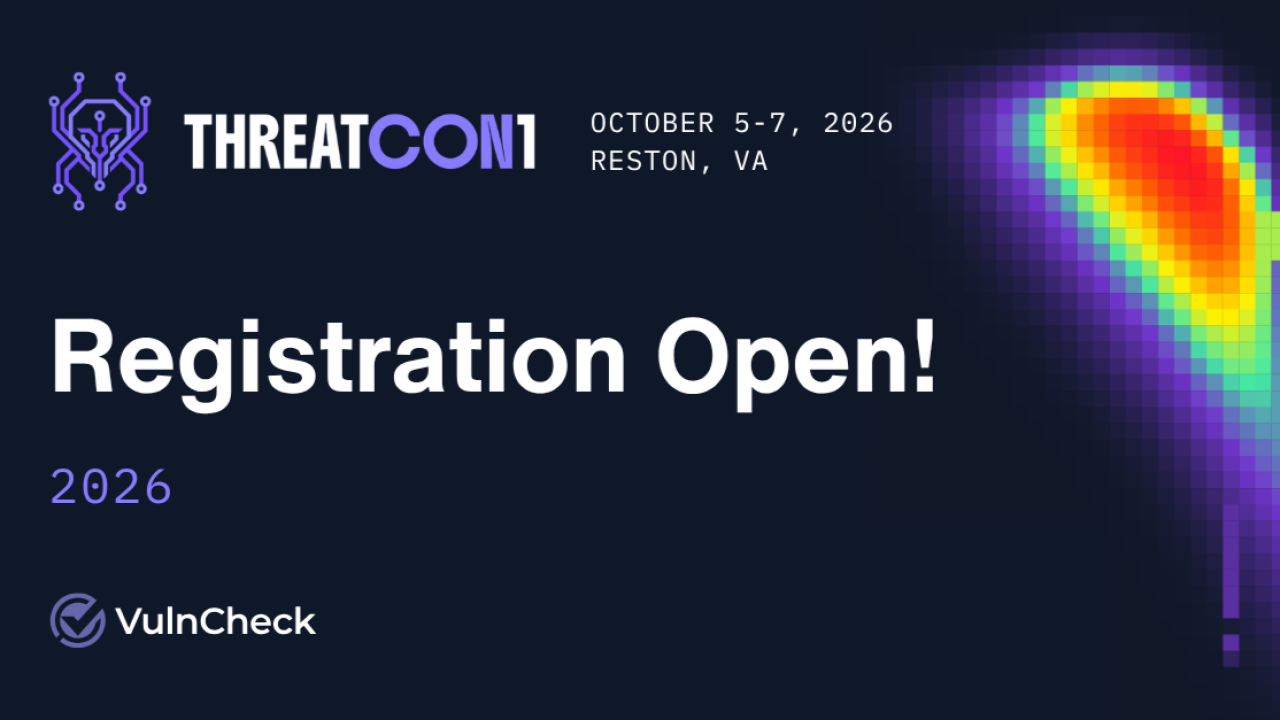
View VulnCheck's archived Event Ad. The saved image makes Registration Open dominant, then keeps the event name and logistics together. The words below are the separate introductory copy archived with the ad.
Captured introductory copy from VulnCheck: THREATCON1 is back for year 2! A movement to counter emerging threats; a gathering of the minds shaping the future of cybersecurity. Each year, the event brings together security researchers, cyber operators, government leaders, and industry executives to collaborate, learn, and push the field forward.
The conference is free to attend. Register to attend: https://lnkd.in/eCWPF383
- Platform CTA:
View event. The image's “Registration Open” wording describes event state; it is not the platform button label. - Captured copy registration link: lnkd.in/eCWPF383. This link appears in the introductory copy and is not claimed as the
View eventbutton destination. - Arrival check, September 29, 2026: The LinkedIn short-link interstitial exposed
https://www.threatcon1.org/registration. That page returned 200 with the headline REGISTER FOR THREATCON1 2026. The arrival action is to complete the embedded HubSpot registration form. - Continuity: Strong topical and action continuity: THREATCON1 registration copy arrives at the THREATCON1 2026 registration page. A page response and form embed do not prove a completed registration.
That works as a pattern for an event the audience may already recognize. If the brand is new, a large “registration open” headline needs a sentence explaining what a registrant will learn or do. The visible creative does not tell us whether the linked registration was completed.
Connection: name the business problem and the actual co-hosts
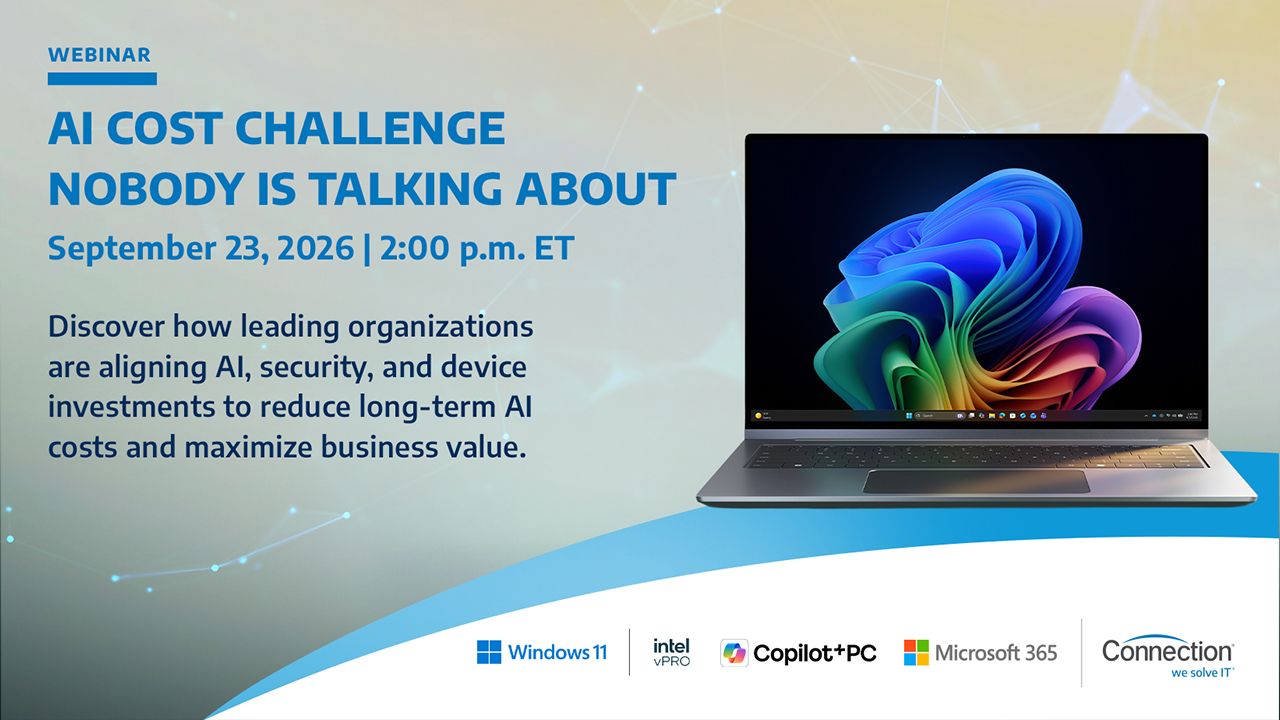
View Connection's archived Event Ad. The saved image pairs the enterprise AI topic with the co-host names. The words below are the separate introductory copy archived with the ad.
Captured introductory copy from Connection: As AI adoption grows, so do the costs of scaling it securely and effectively. Join Connection, Microsoft, and Intel® on Wednesday, September 23 at 2:00 p.m. ET for a discussion on how Microsoft E7 and Intel®-powered Copilot+ PCs can help organizations reduce cloud dependency, strengthen security, and build a more cost-efficient AI strategy. Register today.
- Platform CTA:
View event. That is separate from “Register today” in the introductory copy. - Captured copy registration link: None in the archive record. The button destination was not captured.
- Arrival check: Destination headline and arrival action are unverified.
- Continuity: Unverified. The archive establishes the topic, co-hosts and platform CTA, not the landing experience.
If you have real partners, put their role next to the problem they will address. A logo is credible only when the organization is actually taking part. For a co-hosted event, settle who owns the registration list and attendee follow-up before the ad goes live. The archive does not show that handoff or the campaign outcome.
Alchemer: make the first-look promise explicit
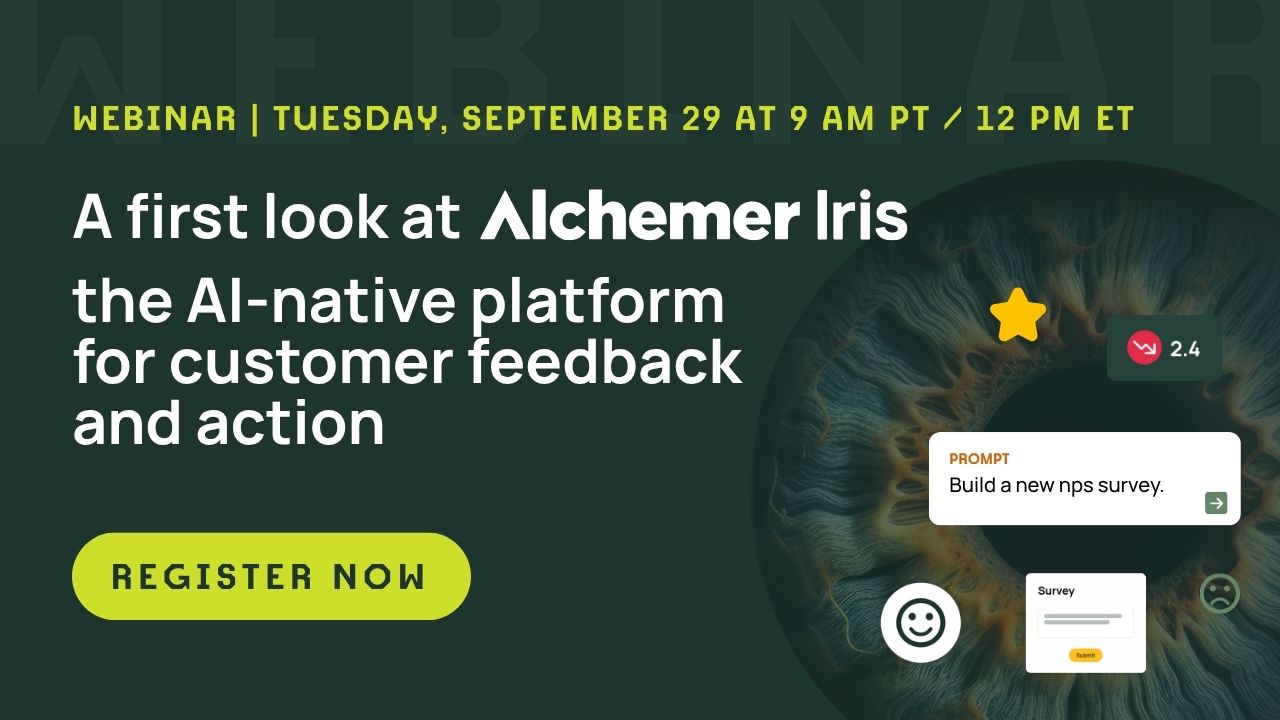
View Alchemer's archived Event Ad. The saved image makes the product category, time and Register Now action easy to find. The words below are the separate introductory copy archived with the ad.
Captured introductory copy from Alchemer: ⏰ Save your spot: Alchemer Iris webinar is Tuesday, September 29 at 9 a.m. PT / 12 p.m. ET.
Join Alchemer CMO, Bo Bandy, and CCO, Ryan Tamminga, for a first look at Alchemer Iris, the AI-native platform for customer feedback and intelligence, optimized for action. Register now, and get in line to see it in action.
See every signal. Focus where it matters. 🔍
👉 Register now to save your seat. Can't make it live? Register anyway and we'll send you the recording: https://lnkd.in/gttwWAwp
#AlchemerIris #AINativePlatform #CustomerFeedback
- Platform CTA:
View event. That differs from the creative and copy instruction Register Now. - Captured copy registration link: lnkd.in/gttwWAwp. This link appears in the introductory copy and is not claimed as the
View eventbutton destination. - Arrival check, September 29, 2026: The LinkedIn short-link interstitial exposed an Alchemer registration URL for a first look at Alchemer Iris. The destination returned 403 to the available inspection client, so its rendered headline, form and arrival action remain unverified.
- Continuity: The URL path and campaign parameters align with the Iris webinar, but page-level continuity is unverified because the destination could not be rendered.
For a launch event, tell people what they will see for the first time. Check the timezone display and the recording workflow; those promises belong in the operational brief and the copy. The archived creative cannot verify that the recording was delivered.
Build the promotion plan around the event
LinkedIn recommends beginning Live promotion at least two weeks before the event and continuing for several days after. That is a planning starting point, not a guarantee of volume. Pick dates from the real event schedule and budget. LinkedIn says campaign schedules operate in UTC, so record both the audience-facing event timezone and the UTC start and end used in Campaign Manager.
| Window | Message job | Asset and action | Check before moving on |
|---|---|---|---|
| Two or more weeks out | Explain the attendee problem and event promise | First invitation, speaker proof, registration route | Event owner approves topic, speakers, date/time and destination. |
| Final week | Answer one objection and make the calendar choice easy | Revised angle or retargeting message; reminder through the opted-in channel | Form, confirmation and calendar details still match the ad. |
| Event day | Tell registrants how to join; invite eligible late registrants where supported | Join instructions and stage-appropriate Live ad copy if using Live | Live access, stream, speaker and support contact are verified. |
| After the event | Help each person take the next relevant step | Attendee resource, no-show replay if available, non-registrant recap or future invite | Attendance import and permission rules are checked before branching. |
For LinkedIn Live, the ad experience can change before, during and after the event. Before the event, the viewer action leads toward the Event and its Attend or form path. During the event, the Event can carry the live experience. After the event, LinkedIn can show the replay when one exists. The optional introductory text does not rewrite itself across those stages, so keep it accurate for the whole schedule or run separate ads. Non-Live LinkedIn Events and external Event Ads stay static.
The event owner, media buyer, designer, RevOps owner and follow-up owner need one shared record. Give each a specific sign-off: event facts, campaign setup, image, data contract and follow-up timing. A general “looks good” approval misses the broken registration link that everyone assumed someone else tested.
Test the registration journey before launch
First decide what a “registration” means in this campaign. A LinkedIn Event response, a LinkedIn-attributed Event Registration, a submitted external form and a person who actually attends are different records.
Use the walkthrough for the route you chose. Every receipt needs the test account, checked time, URL or record ID, and the owner who observed it.
| Route | Ad destination and next viewer action | Registration evidence | Owner and receipt |
|---|---|---|---|
| LinkedIn Live without a form | The LinkedIn Event. Select View Event, open the Event page, then select Attend. | Store the native Event response separately from later attendance. | Event owner records the Event URL, test account, response state and checked time. Media buyer records the Campaign Manager preview. |
| LinkedIn Live with a form | The LinkedIn Event and its registration gate. Complete the form, then confirm access to the content. | Store the form confirmation or lead reference and the receiving-system read-back. | Event owner records the submission reference and access result; RevOps records the destination record. |
| Non-Live native Event | The LinkedIn Event. Test the Event response, then follow every onward external registration or broadcast link. | Keep the native Event response and completed external registration as two records. | Event owner stores both URLs, the response receipt and the external submission/confirmation receipt. RevOps records the event-platform or CRM match. |
| Direct off-platform Event Ad | The final external registration page. Follow redirects on desktop and mobile, submit the real form and inspect the confirmation. | Store the form submission, event-platform record and CRM match under the same event ID. | Event owner stores the form receipt; RevOps stores the platform and CRM references; media buyer stores the final ad preview. |
A screenshot of the ad editor is not a registration test. LinkedIn notes that the off-platform mobile preview may be generic, so inspect the real mobile landing page and creative separately.
If you create a LinkedIn Event, settle its organizer, type, format and broadcast route before creation. LinkedIn says those choices cannot be changed afterward. For Live, verify that the Event is owned by the Page linked to the ad account and that the team has Live and Page permissions. For an off-platform event, there is no LinkedIn Event to create.
Measure the path from response to follow-up
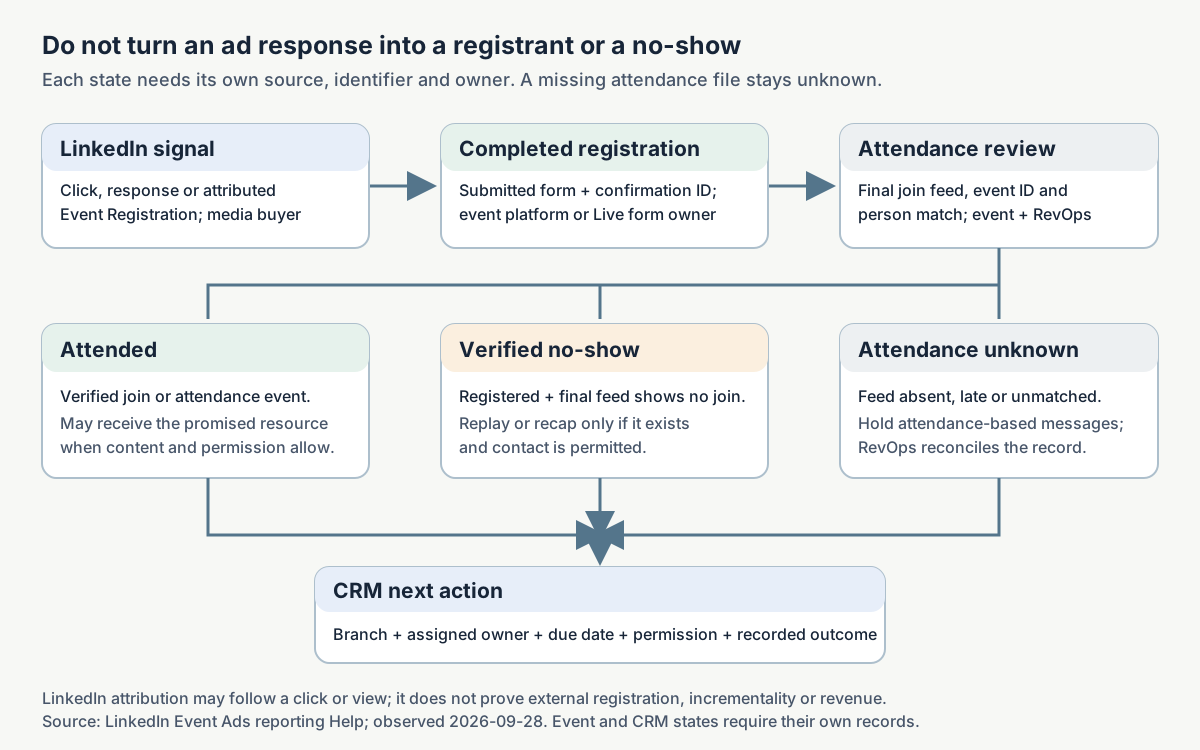
| State | Evidence to store | Source and owner | What it does not prove |
|---|---|---|---|
| LinkedIn ad interaction or attributed Event Registration | Campaign, ad, metric, attribution window and export timestamp | Campaign Manager; media buyer | A completed event-platform registration or an incremental registration caused by the ad. |
| Completed registration | Form submission ID, event ID, consent and person/account match | LinkedIn form or event platform; event/RevOps owner | Attendance. |
| Attended | Join or attendance event with timestamp and event ID | Live or event platform; event owner | Sales interest or qualified pipeline. |
| Verified no-show | Completed registration plus a finalized attendance record with no attendance | Event platform; event owner | An unknown or delayed attendance record. |
| Attendance unknown | Registration exists but attendance feed is absent, late or unmatched | RevOps owner | A no-show. |
| CRM next action | Assigned owner, branch, due date and outcome field | CRM; lifecycle or sales owner | Revenue until a separate opportunity and attribution review exists. |
For a Live-viewing goal, decide which confirmed report answers the question before launch. LinkedIn documents Event Stage breakdowns in Campaign Manager and supplies Live analytics through the Event owner. Record the exact aggregate viewing measure that the real report exposes; do not invent a label from another platform. Aggregate views can show that viewing happened, but they cannot place a named person in the attended branch. Use a finalized person-level attendance source when the platform supplies one. When it does not, keep each named contact's attendance unknown while still completing the pre-event plan.
LinkedIn's Event Ads reporting guide says Campaign Manager can show Event Stage breakdowns, Event Registration metrics and a CSV export. Its attributed registration can follow a click or a view. LinkedIn says the click/view windows became 30 days in April 2025, some calculated metrics can arrive late, and its registration-form reporting view cannot split leads cleanly into paid and organic. Save the reporting cutoff and reconcile again later. View-through attribution describes a reporting rule; it is not an incrementality test.
Use stable campaign and event identifiers. For an external registration route, preserve utm_source, utm_medium, utm_campaign and a creative or ad identifier through the landing page and form. Map the submitted record to one event ID and one CRM person/account. If a person registers twice, deduplicate on a documented key before reporting totals. Keep raw exports so RevOps can explain discrepancies between LinkedIn, the event platform and CRM.
Three follow-up branches are enough to prevent the usual blanket email:
- Attended: send the promised resource and a next step tied to the topic. Sales can receive a task only if the attendance and account-fit rules say so.
- Verified no-show: send the replay or recap if one exists, with an easy way to see the relevant part. Do not claim they attended.
- Did not complete registration: send a different invitation or a future-event option only where contact permission and the audience rule allow it. An ad click alone is not a registrant.
Keep attendance unknown outside the no-show branch until the platform feed is final. Record cancellations and unregistered guests separately if your event system exposes them.
Event Ad handoff builder
The builder helps you write a record that another operator can act on. Enter the event route, attendee promise, speakers, event time and timezone, audience, objective, destination, image, promotion dates, registration path, tracking events, owners and follow-up rules. It returns five separate judgments:
- Format fit: Does this Event Ad route suit the event and destination?
- Draft readiness: Are the facts sufficient to write a provisional plan and invitation?
- Local preflight: Do the supplied fields and route-specific inputs pass checks that can be tested outside Campaign Manager?
- Launch readiness: Have the real URL, form journey, roles, tracking read-back, creative and native ad review been checked in the account?
- Measured outcome: What do the real campaign, registration and attendance records establish after delivery?
Missing launch evidence does not erase a sound format choice. A missing final URL can still leave a draft open, but it holds launch. Missing offer facts such as topic, audience, speaker or event time can hold the draft itself. The builder never supplies performance proof or claims account approval.
A completed illustrative handoff
Imagine a fictional Northstar Ops webinar about reconciling campaign and CRM records. The supplied planning facts are: a demand-generation operator audience, an approved presenter, October 22, 2026 at 2 p.m. ET, an externally hosted webinar, an approved 16:9 image, and a registration page owned by the event team. The exact URL, speaker name, budget and tracking read-back are still blank.
The correct result is off-platform Event Ad fits and provisional draft can proceed. Launch is on hold until the final URL resolves to the stated event, a real test submission arrives in the event platform and CRM, the 16:9 image and mobile landing page are checked, campaign roles are verified, and Campaign Manager has reviewed the ad. A fictional illustration cannot pass those checks for a real account.
The download also shows how far a planning fixture can go without pretending it launched. Its fictional audience rule includes US demand-generation managers and paid-media leads at B2B companies with 51–1,000 employees, excluding employees and current registrants. The promotion dates are October 6, October 15, October 22 and October 23. The proposed UTM name is northstar_ops_reconciliation_webinar_20261022; the proposed deduplication key is normalized email plus event.event_id; and the preliminary/final reconciliation cutoffs are October 23 and October 29. Those are labeled assumptions. The event end, objective, Page/account IDs, real URL, speaker, budget and every launch receipt remain explicit unknowns.
Open the completed illustrative handoff to see the decisions and owner assignments. Copy the structured record if your team passes campaign data between systems. These files document fictional planning assumptions and contain no real Northstar Ops campaign evidence.
Make your own record
- Open the blank handoff. Fill the event facts and choose one route.
- Name the registration system and run the route-specific dry run. Record where the test result arrived.
- Assign the media buyer, event owner, RevOps owner and follow-up owner. Set the dates and branch rules.
- Keep unknown fields marked unknown. Use the five judgments to decide whether the team can draft, repair the plan, launch after native review or report a measured outcome.
Download the blank JSON record when you need a machine-readable handoff. The Markdown and JSON versions carry the same decisions and missing-input list.
Copy the build and review prompts
Download the Event Ad build prompt. Paste it into your own assistant with the event facts you have. It asks for a route decision, a draft invitation, a promotion calendar, a registration test, a measurement map and separate Draft and Launch judgments. If a fact is missing, it must name the owner and leave it unknown.
Download the Event Ad review prompt. Give it the completed handoff, candidate ad and test evidence. It checks promises against supplied facts, inspects route-specific requirements and returns repair actions. It must block launch when the real destination, form read-back, access or native review is missing, even if the draft reads well.
Use the prompts without this article; the files contain their own field definitions and source boundaries. Neither prompt can verify your Campaign Manager account by itself. Keep source dates in the exported record and refresh account-dependent rules when you run a future campaign.
Watch the LinkedIn Event creation fields
Watch Mitchell Gould's 2024 LinkedIn Event walkthrough at 3:19. The passage through 5:54 shows the company-page Event creation fields and where the event destination and optional registration form enter the setup. It helps the event owner see which facts to gather before handing the event to the media buyer.
The video was published June 20, 2024. Use it for visual orientation. LinkedIn's September 2026 Help pages above control the current Event Ad routes, including the off-platform route that needs no LinkedIn Event.
Final launch check
The media buyer should be able to open one handoff and answer: which route, which event, which Page and account, which objective, which audience, which image, which final URL, which UTC campaign dates, and which ad review state? The event owner should be able to follow the invitation into a completed registration. RevOps should be able to locate that test record and state how attendance will be imported. The follow-up owner should have the attendee, verified no-show and non-registrant branches ready.
If any answer depends on a guess, keep the launch judgment on hold and assign the missing check. A completed planning document records the plan. Approval, delivery and results need separate evidence.
LinkedIn Event Ads FAQ
Do I need to create a LinkedIn Event to run an Event Ad?
No. LinkedIn documents an off-platform Event Ad path that sends people to an external event URL without creating a LinkedIn Event. A native LinkedIn Live or non-Live route does need the corresponding LinkedIn Event.
Do Event Ads change while the event is live?
Only the LinkedIn Live route has documented stage behavior. LinkedIn says non-Live LinkedIn Events and off-platform Event Ads stay static. Write separate stage copy if one static message would become inaccurate.
Does a click mean the person registered?
No. Follow the chosen route: View Event → Attend without a native form, form completion where a Live form gates access, or external landing page → submitted form → confirmation. Record each event separately.
Can I report paid-only registrants from LinkedIn's form dashboard?
Not from the reporting view described in LinkedIn's Event metrics guide; it says those form leads cannot be split into paid and organic there. Reconcile Campaign Manager with the event platform and CRM, and keep the attribution limits in the report.
What if we have registration data but no attendance file yet?
Mark attendance unknown. Wait for the event platform's finalized attendance feed before placing someone in the verified no-show branch.
What if Campaign Manager's preview looks wrong on mobile?
For the off-platform route, LinkedIn says its mobile preview can be generic. Check the 16:9 asset, the real mobile landing page and the final ad in the available native review surfaces. Save the check in the handoff.
Sources and scope
The current product rules in this page come from LinkedIn's public Event Ad specifications, Live creation guide, off-platform creation guide, FAQ, metrics guide and Events overview, observed September 28, 2026. The four examples link to their exact Ad Library records. Creative and public documentation cannot establish account entitlement, final ad approval, delivery, registrations or revenue.
Take the Event Ad handoff with you
Start with the blank handoff. Fill the event facts, choose the route and assign each check. Use the completed fictional record to see how a sound draft can still remain on launch hold.
Copy the build prompt
LINKEDIN EVENT AD BUILD PROMPT — standalone, version 3.0

You are preparing one B2B event promotion handoff. Use only the event facts and evidence pasted after this prompt. Do not assume access to an article, ad account, event platform, CRM or live URL. Do not invent a speaker name, budget, URL, result, deliverable, recording, approval or customer opinion.

Current public LinkedIn documentation checked 2026-09-28: Event Ads can promote a LinkedIn Event or an external event without a LinkedIn Event (https://www.linkedin.com/help/lms/answer/a462024/ and https://www.linkedin.com/help/lms/answer/a10264811). Off-platform uses a 16:9 uploaded image at least 480 px wide and an external URL; its mobile editor preview may be generic. The LinkedIn Event design page recommends 4:1 for its native path, while Help allows a replacement image (https://business.linkedin.com/advertise/ads/sponsored-content/event-ads/specs). Only LinkedIn Live has stage-changing ad behavior; non-Live native and external Event Ads remain static (https://www.linkedin.com/help/lms/answer/a6593898). Live needs linked Page ownership, roles and Live access (https://www.linkedin.com/help/lms/answer/a6800629). Without a Live registration form, View Event leads to the Event page and then Attend; with a Live form, form completion gates content. Campaign Manager's Event Registrations can be attributed after a click or view and are not proof of incremental effect, external form completion or attendance (https://www.linkedin.com/help/lms/answer/a6801032). Event type/format and organizer cannot be changed after native Event creation (https://www.linkedin.com/help/lms/answer/a550232/). Refresh these rules and verify the actual account before real launch.

Use the complete nested canonical JSON shape below. It is included here so this prompt works by itself. Replace its blank values with supplied facts and receipts while keeping every key. Use null for unknown scalar values, not invented values. The root value is the record itself, with these top-level keys in this order: schema_version, record_id, example_status, judgments, event, campaign, journey, promotion, owners, follow_up, checks, source_refs, evidence_boundary, missing_inputs, next_move. Never place source_refs, evidence_boundary, missing_inputs or next_move inside checks or another object. Every checks.<check_id> object keeps exactly these fields: applicability, applicable_reason, state, evidence_ref, checked_at, owner_role and history. The exact event.route enum is `live`, `non_live_native`, `off_platform`, or `another_format`; never emit labels such as `linkedin_live`, `linkedin_event`, or `external`. Keep response, completed registration, reporting capability, actual attendance, verified no-show, attendance unknown and CRM next action separate. A pre-event person-level reporting-capability receipt or test submission belongs in journey.reporting_capability.evidence_ref and/or checks.attendance_source_person_level.evidence_ref only. Leave journey.attendance.evidence_ref, journey.verified_no_show.evidence_ref and journey.attendance_unknown.evidence_ref null until actual matching person/event outcome records exist. A capability receipt must never be copied into any observed-outcome evidence_ref, even when launch preflight is ready. If the supplied record copies a preflight receipt into one of these outcome fields, clear that outcome ref and record the rejected state/ref/reason in evidence_boundary.rejected_outcome_refs. On a route switch, preserve prior route-specific journey evidence in evidence_boundary.route_history before reopening it. Each check state is passed, failed, not_checked or not_applicable. Every check keeps applicability, reason, evidence reference, checked time and owner. A passed check needs a cited receipt. Mark irrelevant checks not_applicable with a route-specific reason. Do not mark a check passed from prose alone. event.speaker_approval_state is the present state and must be exactly approved, pending, denied, revoked or unknown. Put dates, conditions and explanations in event.speaker_approval_note. Never infer approved from a sentence in the note.

```json
{
  "schema_version": "maestro.linkedin-event-launch-record.v3",
  "record_id": null,
  "example_status": "blank",
  "judgments": {
    "format_fit": {
      "state": "unknown",
      "reason": "Choose the event action and destination."
    },
    "draft_readiness": {
      "state": "hold",
      "reason": "Complete the listed draft facts."
    },
    "local_preflight": {
      "state": "hold",
      "reason": "Complete the listed local journey, tracking, asset and receipt checks."
    },
    "launch_readiness": {
      "state": "hold",
      "reason": "Complete the listed account, budget, schedule and native checks."
    },
    "measured_outcome": {
      "state": "unknown",
      "reason": "Planning and capability receipts do not establish delivered outcomes."
    }
  },
  "event": {
    "route": null,
    "linkedin_page_id": null,
    "linkedin_ad_account_id": null,
    "organizer": null,
    "title": null,
    "topic": null,
    "audience": null,
    "attendee_promise": null,
    "speaker_name": null,
    "speaker_approval_state": "unknown",
    "speaker_approval_note": null,
    "start_local": null,
    "end_local": null,
    "timezone": null,
    "event_type": null,
    "location_address": null,
    "event_format": null,
    "has_registration_form": null,
    "live_access": "unknown",
    "live_preview_choice": null,
    "stage_copy": {
      "before": null,
      "during": null,
      "after": null,
      "introductory_text_note": "Optional introductory text does not change automatically."
    },
    "linkedin_event_url": null,
    "registration_url": null,
    "registration_system": null,
    "event_id": null
  },
  "campaign": {
    "objective": null,
    "objective_rationale": null,
    "audience_rule": null,
    "exclusion_rule": null,
    "ad_intro_text": null,
    "image": {
      "approval": "unknown",
      "ratio": null,
      "width_px": null,
      "asset_ref": null
    },
    "budget": null,
    "start_utc": null,
    "end_utc": null,
    "utm_source": "linkedin",
    "utm_medium": "paid_social",
    "utm_campaign": null,
    "creative_id_parameter": null
  },
  "journey": {
    "ad_action": {
      "definition": null,
      "system": "LinkedIn Campaign Manager",
      "evidence_ref": null
    },
    "linkedin_response": {
      "definition": "A LinkedIn Event response or attributed Event Registration is a platform signal; do not equate it with a completed external registration.",
      "system": "LinkedIn Campaign Manager",
      "evidence_ref": null
    },
    "completed_registration": {
      "definition": "A submitted registration form with a confirmation or submission ID.",
      "system": null,
      "evidence_ref": null
    },
    "aggregate_viewing": {
      "definition": "The exact confirmed aggregate viewing measure exposed by Live analytics or another route-specific report; aggregate data cannot establish a named person's attendance.",
      "system": null,
      "measure_name": null,
      "evidence_ref": null
    },
    "reporting_capability": {
      "definition": "A pre-event test showing whether the platform can report person-level attendance, with source and test receipt. This is capability evidence, never an actual attendee or no-show outcome.",
      "system": null,
      "evidence_ref": null
    },
    "attendance": {
      "definition": "A person-level joined or attended event from a finalized attendance source. Aggregate Live analytics alone do not satisfy this state.",
      "system": null,
      "evidence_ref": null
    },
    "verified_no_show": {
      "definition": "Completed registration plus a finalized attendance record with no join; never infer from a missing or delayed feed.",
      "system": null,
      "evidence_ref": null
    },
    "attendance_unknown": {
      "definition": "Registration exists but attendance feed is absent, late, unmatched or not person-level.",
      "system": null,
      "evidence_ref": null
    },
    "crm_next_action": {
      "definition": "Assigned branch, owner, due date and recorded outcome after consent and eligibility checks.",
      "system": "CRM",
      "evidence_ref": null
    },
    "identity_and_deduplication": null,
    "reporting_cutoff": null,
    "attribution_limit": "A LinkedIn attributed Event Registration may follow a click or view; it is not proof of incrementality or event-platform completion."
  },
  "promotion": {
    "early_invitation": {
      "date": null,
      "message_job": null,
      "owner_role": "media_buyer"
    },
    "final_week": {
      "date": null,
      "message_job": null,
      "owner_role": "media_buyer"
    },
    "event_day": {
      "date": null,
      "message_job": null,
      "owner_role": "event_owner"
    },
    "after_event": {
      "date": null,
      "message_job": null,
      "owner_role": "follow_up_owner"
    }
  },
  "owners": {
    "event_owner": null,
    "media_buyer": null,
    "designer": null,
    "revops_owner": null,
    "follow_up_owner": null
  },
  "follow_up": {
    "attended": {
      "trigger": "Verified attendance",
      "action": null,
      "owner_role": "follow_up_owner",
      "permission_check": "required"
    },
    "verified_no_show": {
      "trigger": "Completed registration and finalized no-attendance record",
      "action": null,
      "owner_role": "follow_up_owner",
      "permission_check": "required"
    },
    "non_registrant": {
      "trigger": "No completed registration; contact permission and audience rule confirmed",
      "action": null,
      "owner_role": "follow_up_owner",
      "permission_check": "required"
    },
    "attendance_unknown": {
      "trigger": "Attendance feed missing, delayed or unmatched",
      "action": "Hold attendance-based messages until evidence is reconciled.",
      "owner_role": "revops_owner",
      "permission_check": "required"
    }
  },
  "checks": {
    "final_url_resolves_to_event": {
      "applicability": "not_applicable",
      "applicable_reason": "Not used by the unselected journey.",
      "state": "not_applicable",
      "evidence_ref": null,
      "checked_at": null,
      "owner_role": "event_owner",
      "history": [
        {
          "applicability": "route_dependent",
          "applicable_reason": "Set when the event route is chosen.",
          "state": "not_checked",
          "evidence_ref": null,
          "checked_at": null,
          "owner_role": "event_owner",
          "route": null,
          "invalidated_reason": "Applicability changed on import or edit"
        }
      ]
    },
    "native_event_response_test": {
      "applicability": "not_applicable",
      "applicable_reason": "Not used by the unselected journey.",
      "state": "not_applicable",
      "evidence_ref": null,
      "checked_at": null,
      "owner_role": "event_owner",
      "history": [
        {
          "applicability": "route_dependent",
          "applicable_reason": "Set when the event route is chosen.",
          "state": "not_checked",
          "evidence_ref": null,
          "checked_at": null,
          "owner_role": "event_owner",
          "route": null,
          "invalidated_reason": "Applicability changed on import or edit"
        }
      ]
    },
    "form_confirmation_test": {
      "applicability": "not_applicable",
      "applicable_reason": "Not used by the unselected journey.",
      "state": "not_applicable",
      "evidence_ref": null,
      "checked_at": null,
      "owner_role": "event_owner",
      "history": [
        {
          "applicability": "route_dependent",
          "applicable_reason": "Set when the event route is chosen.",
          "state": "not_checked",
          "evidence_ref": null,
          "checked_at": null,
          "owner_role": "event_owner",
          "route": null,
          "invalidated_reason": "Applicability changed on import or edit"
        }
      ]
    },
    "event_platform_readback": {
      "applicability": "not_applicable",
      "applicable_reason": "Not used by the unselected journey.",
      "state": "not_applicable",
      "evidence_ref": null,
      "checked_at": null,
      "owner_role": "event_owner",
      "history": [
        {
          "applicability": "route_dependent",
          "applicable_reason": "Set when the event route is chosen.",
          "state": "not_checked",
          "evidence_ref": null,
          "checked_at": null,
          "owner_role": "event_owner",
          "route": null,
          "invalidated_reason": "Applicability changed on import or edit"
        }
      ]
    },
    "crm_readback": {
      "applicability": "not_applicable",
      "applicable_reason": "Not used by the unselected journey.",
      "state": "not_applicable",
      "evidence_ref": null,
      "checked_at": null,
      "owner_role": "revops_owner",
      "history": [
        {
          "applicability": "route_dependent",
          "applicable_reason": "Set when the event route is chosen.",
          "state": "not_checked",
          "evidence_ref": null,
          "checked_at": null,
          "owner_role": "revops_owner",
          "route": null,
          "invalidated_reason": "Applicability changed on import or edit"
        }
      ]
    },
    "asset_and_mobile_landing_page": {
      "applicability": "not_applicable",
      "applicable_reason": "Not used by the unselected journey.",
      "state": "not_applicable",
      "evidence_ref": null,
      "checked_at": null,
      "owner_role": "designer",
      "history": [
        {
          "applicability": "route_dependent",
          "applicable_reason": "Set when the event route is chosen.",
          "state": "not_checked",
          "evidence_ref": null,
          "checked_at": null,
          "owner_role": "designer",
          "route": null,
          "invalidated_reason": "Applicability changed on import or edit"
        }
      ]
    },
    "page_account_roles": {
      "applicability": "not_applicable",
      "applicable_reason": "Not used by the unselected journey.",
      "state": "not_applicable",
      "evidence_ref": null,
      "checked_at": null,
      "owner_role": "media_buyer",
      "history": [
        {
          "applicability": "route_dependent",
          "applicable_reason": "Set when the event route is chosen.",
          "state": "not_checked",
          "evidence_ref": null,
          "checked_at": null,
          "owner_role": "media_buyer",
          "route": null,
          "invalidated_reason": "Applicability changed on import or edit"
        }
      ]
    },
    "live_access": {
      "applicability": "not_applicable",
      "applicable_reason": "Not used by the unselected journey.",
      "state": "not_applicable",
      "evidence_ref": null,
      "checked_at": null,
      "owner_role": "event_owner",
      "history": [
        {
          "applicability": "route_dependent",
          "applicable_reason": "Set when the event route is chosen.",
          "state": "not_checked",
          "evidence_ref": null,
          "checked_at": null,
          "owner_role": "event_owner",
          "route": null,
          "invalidated_reason": "Applicability changed on import or edit"
        }
      ]
    },
    "campaign_manager_route_preview": {
      "applicability": "not_applicable",
      "applicable_reason": "Not used by the unselected journey.",
      "state": "not_applicable",
      "evidence_ref": null,
      "checked_at": null,
      "owner_role": "media_buyer",
      "history": [
        {
          "applicability": "route_dependent",
          "applicable_reason": "Set when the event route is chosen.",
          "state": "not_checked",
          "evidence_ref": null,
          "checked_at": null,
          "owner_role": "media_buyer",
          "route": null,
          "invalidated_reason": "Applicability changed on import or edit"
        }
      ]
    },
    "native_ad_review": {
      "applicability": "not_applicable",
      "applicable_reason": "Not used by the unselected journey.",
      "state": "not_applicable",
      "evidence_ref": null,
      "checked_at": null,
      "owner_role": "media_buyer",
      "history": [
        {
          "applicability": "route_dependent",
          "applicable_reason": "Set when the event route is chosen.",
          "state": "not_checked",
          "evidence_ref": null,
          "checked_at": null,
          "owner_role": "media_buyer",
          "route": null,
          "invalidated_reason": "Applicability changed on import or edit"
        }
      ]
    },
    "attendance_source_person_level": {
      "applicability": "not_applicable",
      "applicable_reason": "Not used by the unselected journey.",
      "state": "not_applicable",
      "evidence_ref": null,
      "checked_at": null,
      "owner_role": "revops_owner",
      "history": [
        {
          "applicability": "route_dependent",
          "applicable_reason": "Set when the event route is chosen.",
          "state": "not_checked",
          "evidence_ref": null,
          "checked_at": null,
          "owner_role": "revops_owner",
          "route": null,
          "invalidated_reason": "Applicability changed on import or edit"
        }
      ]
    }
  },
  "source_refs": [
    {
      "id": "event-specs",
      "url": "https://www.linkedin.com/help/lms/answer/a462024/",
      "observed_at": "2026-09-28",
      "supports": "Event Ad destination and permissions"
    },
    {
      "id": "off-platform",
      "url": "https://www.linkedin.com/help/lms/answer/a10264811",
      "observed_at": "2026-09-28",
      "supports": "External event route; 16:9 image, minimum 480 px width"
    },
    {
      "id": "live-guide",
      "url": "https://www.linkedin.com/help/lms/answer/a6800629",
      "observed_at": "2026-09-28",
      "supports": "LinkedIn Live access, Page ownership, schedule and review"
    },
    {
      "id": "event-faq",
      "url": "https://www.linkedin.com/help/lms/answer/a6593898",
      "observed_at": "2026-09-28",
      "supports": "Live stage behavior and View Event to Attend journey"
    },
    {
      "id": "reporting",
      "url": "https://www.linkedin.com/help/lms/answer/a6801032",
      "observed_at": "2026-09-28",
      "supports": "Attributed Event Registrations and reporting limits"
    }
  ],
  "evidence_boundary": {
    "rejected_outcome_refs": [],
    "route_history": []
  },
  "missing_inputs": [
    {
      "field": "event.route",
      "owner_role": "event_owner",
      "closing_evidence": "Choose Live, non-Live LinkedIn Event or off-platform route."
    },
    {
      "field": "event.audience",
      "owner_role": "event_owner",
      "closing_evidence": "Approved event fact."
    },
    {
      "field": "event.attendee_promise",
      "owner_role": "event_owner",
      "closing_evidence": "Approved event fact."
    },
    {
      "field": "event.speaker_approval_state",
      "owner_role": "event_owner",
      "closing_evidence": "Choose the present approval state: approved, pending, denied, revoked or unknown."
    },
    {
      "field": "event.start_local",
      "owner_role": "event_owner",
      "closing_evidence": "Approved event fact."
    },
    {
      "field": "event.timezone",
      "owner_role": "event_owner",
      "closing_evidence": "Approved event fact."
    }
  ],
  "next_move": "Choose Live, non-Live LinkedIn Event or off-platform route."
}
```

Use only these exact judgment states:
- format_fit: `fits_live`, `fits_non_live`, `fits_off_platform`, `use_another_route`, or `unknown`
- draft_readiness: `provisional_draft_ready` or `hold`
- local_preflight: `ready` or `hold`
- launch_readiness: `ready` or `hold`
- measured_outcome: `measured` or `unknown`
Do not substitute passed, pass, approved, complete or ready for a judgment whose enum does not contain that value. Check objects use a separate state enum: `passed`, `failed`, `not_checked`, or `not_applicable`.

Return, in order: (1) one-sentence route decision with reason; (2) one provisional ad invitation that contains only approved facts and marks unresolved copy fields in [square brackets]; (3) a promotion sequence before, during and after the event with dates where supplied and owners; (4) the full canonical JSON record inside a valid triple-backtick JSON fence; (5) a short list of the next evidence checks. Before returning the JSON, perform a structural self-check: all 15 root keys are present, event.route is exactly one of `live`, `non_live_native`, `off_platform`, or `another_format`, and every check object has the required shape. Repair any mismatch before answering. Launch readiness also requires named owners, the four promotion calendar dates/message jobs/owner roles, and permitted attended, verified no-show, non-registrant and attendance-unknown follow-up actions. For each source claim, add a URL and observed date in source_refs. If the user supplies no sources, include the dated LinkedIn URLs above and label account behavior unverified.

Set format_fit from the event and intended destination alone. Use `fits_live`, `fits_non_live`, `fits_off_platform`, `use_another_route`, or `unknown`. A missing URL, budget or later tracking receipt does not reverse a sound route decision. Draft readiness is `provisional_draft_ready` only when audience, an approved attendee promise (more specific than a topic label), event.speaker_approval_state is exactly `approved`, valid local event date/time and real IANA timezone and route are known; otherwise `hold`. Map conditional approval to `pending`, a denial to `denied`, a withdrawn approval to `revoked`, and unclear evidence to `unknown`; preserve its wording in event.speaker_approval_note. Never derive readiness from the note. A topic alone does not supply the attendee promise. Local preflight is `ready` only when the final HTTPS destination, route-specific approved image asset, audience-facing IANA timezone, all defined campaign UTM source, medium, campaign and creative marker fields, deduplication and reporting cutoff, and every applicable registration check have passed. For Live without a form, the native Event response test replaces the form-confirmation test; mark the form check not_applicable with a reason. For non-Live native with an onward external form, the form-confirmation test remains applicable and a failed form holds local and launch readiness. Launch readiness is `ready` only after valid Page and account IDs, available objective, positive approved budget with no negative sign, calendar-valid ISO UTC start/end in order, destination/mobile path, tracking read-back, native preview and ad review have passed; otherwise `hold`. A passed receipt requires a non-placeholder reference, calendar-valid UTC checked time and owner. N/A, pending, unknown, dummy and similar placeholders are not receipts. Measured outcome stays `unknown` before real campaign and event evidence. Do not call a draft or local preflight a live campaign.

For a LinkedIn Live route, ask whether there is a form. Explain View Event → Attend when there is no form; explain form completion and access when there is one. Check Page owner, Live access and stage behavior. Record the exact aggregate viewing measure that the confirmed Live report exposes in journey.aggregate_viewing. Aggregate viewing cannot establish a named person's attendance. A named attended/no-show branch requires a finalized person-level attendance source; otherwise attendance stays unknown. For non-Live native, keep ad behavior static. For off-platform, do not require a LinkedIn Event; name the external registration form, confirmation, event-platform record, CRM match and 16:9 asset. State that an ad response or attributed registration is not automatically a completed registration. Verified no-show needs both a completed registration and finalized attendance evidence; absent or late attendance is unknown. Branch attendee, verified no-show and non-registrant follow-up only when the record and contact permission support it.

Missing-input behavior: derive missing_inputs afresh from the final route and supplied values. Remove resolved and route-inapplicable requests; add exact newly required paths with owner and closing evidence. When draft readiness is hold, include only unresolved draft fields, local-preflight fields and applicable local-check receipts. Do not include Page/account IDs, objective, budget, UTC campaign schedule, promotion calendar, named owners, follow-up actions or account-only checks in missing_inputs until draft readiness is provisional_draft_ready. These deferred fields remain null or unverified in the canonical record. For each still-open prior request, preserve its valid owner_role, exact closing_evidence and context; do not replace an assigned ticket with a generic request. Keep each unknown value null and each applicable unresolved check not_checked, except an actually failed test, which remains failed. If a route changes, snapshot the previous route before mutating event.route and archive every invalidated check's prior route, applicability, reason, state, reference, time and owner, including applicable-to-applicable checks and prior not_applicable states. Archive route-specific journey evidence in evidence_boundary.route_history before clearing it. Preserve supplied route-independent title, topic, audience, promise, organizer, presenter and schedule. Normalize event_format, has_registration_form, live_access, stage_copy, registration system, ad action, completed-registration definition and incompatible destination fields for the new route. Reopen receipts after a route or reviewed destination, asset, schedule or copy edit. On an off-platform to Live-without-form switch, `native_event_response_test` becomes applicable/not_checked and its old not_applicable state goes to history, while `form_confirmation_test` becomes not_applicable. Draft readiness has exactly two allowed states: `hold` and `provisional_draft_ready`; never output `ready` for this judgment. If the user requests fabricated proof, refuse that claim and continue with the factual planning record.

PASTE EVENT FACTS, SOURCE LINKS, AND TEST RECEIPTS BELOW:
Copy the review prompt
LINKEDIN EVENT AD REVIEW PROMPT — standalone, version 3.0

You are an independent launch-handoff reviewer. Review the pasted canonical record, candidate ad, URLs, assets and test receipts. Do not assume the article, account, event platform or CRM is available to you. Do not convert a proposed check or someone else's assertion into a passed test. Do not invent results, owner approvals or campaign access.

Current public LinkedIn documentation checked 2026-09-28: Event Ads can promote a LinkedIn Event or an external event without a LinkedIn Event (https://www.linkedin.com/help/lms/answer/a462024/ and https://www.linkedin.com/help/lms/answer/a10264811). Off-platform uses a 16:9 uploaded image at least 480 px wide and an external URL; its mobile editor preview may be generic. The LinkedIn Event design page recommends 4:1 for its native path, while Help allows a replacement image (https://business.linkedin.com/advertise/ads/sponsored-content/event-ads/specs). Only LinkedIn Live has stage-changing ad behavior; non-Live native and external Event Ads remain static (https://www.linkedin.com/help/lms/answer/a6593898). Live needs linked Page ownership, roles and Live access (https://www.linkedin.com/help/lms/answer/a6800629). Without a Live registration form, View Event leads to the Event page and then Attend; with a Live form, form completion gates content. Campaign Manager's Event Registrations can be attributed after a click or view and are not proof of incremental effect, external form completion or attendance (https://www.linkedin.com/help/lms/answer/a6801032). Event type/format and organizer cannot be changed after native Event creation (https://www.linkedin.com/help/lms/answer/a550232/). Refresh these rules and verify the actual account before real launch.

Use the complete nested canonical JSON shape below. It is included here so this prompt works by itself. Replace its blank values with supplied facts and receipts while keeping every key. Use null for unknown scalar values, not invented values. The root value is the record itself, with these top-level keys in this order: schema_version, record_id, example_status, judgments, event, campaign, journey, promotion, owners, follow_up, checks, source_refs, evidence_boundary, missing_inputs, next_move. Never place source_refs, evidence_boundary, missing_inputs or next_move inside checks or another object. Every checks.<check_id> object keeps exactly these fields: applicability, applicable_reason, state, evidence_ref, checked_at, owner_role and history. The exact event.route enum is `live`, `non_live_native`, `off_platform`, or `another_format`; never emit labels such as `linkedin_live`, `linkedin_event`, or `external`. Keep response, completed registration, reporting capability, actual attendance, verified no-show, attendance unknown and CRM next action separate. A pre-event person-level reporting-capability receipt or test submission belongs in journey.reporting_capability.evidence_ref and/or checks.attendance_source_person_level.evidence_ref only. Leave journey.attendance.evidence_ref, journey.verified_no_show.evidence_ref and journey.attendance_unknown.evidence_ref null until actual matching person/event outcome records exist. A capability receipt must never be copied into any observed-outcome evidence_ref, even when launch preflight is ready. If the supplied record copies a preflight receipt into one of these outcome fields, clear that outcome ref and record the rejected state/ref/reason in evidence_boundary.rejected_outcome_refs. On a route switch, preserve prior route-specific journey evidence in evidence_boundary.route_history before reopening it. Each check state is passed, failed, not_checked or not_applicable. Every check keeps applicability, reason, evidence reference, checked time and owner. A passed check needs a cited receipt. Mark irrelevant checks not_applicable with a route-specific reason. Do not mark a check passed from prose alone. event.speaker_approval_state is the present state and must be exactly approved, pending, denied, revoked or unknown. Put dates, conditions and explanations in event.speaker_approval_note. Never infer approved from a sentence in the note.

```json
{
  "schema_version": "maestro.linkedin-event-launch-record.v3",
  "record_id": null,
  "example_status": "blank",
  "judgments": {
    "format_fit": {
      "state": "unknown",
      "reason": "Choose the event action and destination."
    },
    "draft_readiness": {
      "state": "hold",
      "reason": "Complete the listed draft facts."
    },
    "local_preflight": {
      "state": "hold",
      "reason": "Complete the listed local journey, tracking, asset and receipt checks."
    },
    "launch_readiness": {
      "state": "hold",
      "reason": "Complete the listed account, budget, schedule and native checks."
    },
    "measured_outcome": {
      "state": "unknown",
      "reason": "Planning and capability receipts do not establish delivered outcomes."
    }
  },
  "event": {
    "route": null,
    "linkedin_page_id": null,
    "linkedin_ad_account_id": null,
    "organizer": null,
    "title": null,
    "topic": null,
    "audience": null,
    "attendee_promise": null,
    "speaker_name": null,
    "speaker_approval_state": "unknown",
    "speaker_approval_note": null,
    "start_local": null,
    "end_local": null,
    "timezone": null,
    "event_type": null,
    "location_address": null,
    "event_format": null,
    "has_registration_form": null,
    "live_access": "unknown",
    "live_preview_choice": null,
    "stage_copy": {
      "before": null,
      "during": null,
      "after": null,
      "introductory_text_note": "Optional introductory text does not change automatically."
    },
    "linkedin_event_url": null,
    "registration_url": null,
    "registration_system": null,
    "event_id": null
  },
  "campaign": {
    "objective": null,
    "objective_rationale": null,
    "audience_rule": null,
    "exclusion_rule": null,
    "ad_intro_text": null,
    "image": {
      "approval": "unknown",
      "ratio": null,
      "width_px": null,
      "asset_ref": null
    },
    "budget": null,
    "start_utc": null,
    "end_utc": null,
    "utm_source": "linkedin",
    "utm_medium": "paid_social",
    "utm_campaign": null,
    "creative_id_parameter": null
  },
  "journey": {
    "ad_action": {
      "definition": null,
      "system": "LinkedIn Campaign Manager",
      "evidence_ref": null
    },
    "linkedin_response": {
      "definition": "A LinkedIn Event response or attributed Event Registration is a platform signal; do not equate it with a completed external registration.",
      "system": "LinkedIn Campaign Manager",
      "evidence_ref": null
    },
    "completed_registration": {
      "definition": "A submitted registration form with a confirmation or submission ID.",
      "system": null,
      "evidence_ref": null
    },
    "aggregate_viewing": {
      "definition": "The exact confirmed aggregate viewing measure exposed by Live analytics or another route-specific report; aggregate data cannot establish a named person's attendance.",
      "system": null,
      "measure_name": null,
      "evidence_ref": null
    },
    "reporting_capability": {
      "definition": "A pre-event test showing whether the platform can report person-level attendance, with source and test receipt. This is capability evidence, never an actual attendee or no-show outcome.",
      "system": null,
      "evidence_ref": null
    },
    "attendance": {
      "definition": "A person-level joined or attended event from a finalized attendance source. Aggregate Live analytics alone do not satisfy this state.",
      "system": null,
      "evidence_ref": null
    },
    "verified_no_show": {
      "definition": "Completed registration plus a finalized attendance record with no join; never infer from a missing or delayed feed.",
      "system": null,
      "evidence_ref": null
    },
    "attendance_unknown": {
      "definition": "Registration exists but attendance feed is absent, late, unmatched or not person-level.",
      "system": null,
      "evidence_ref": null
    },
    "crm_next_action": {
      "definition": "Assigned branch, owner, due date and recorded outcome after consent and eligibility checks.",
      "system": "CRM",
      "evidence_ref": null
    },
    "identity_and_deduplication": null,
    "reporting_cutoff": null,
    "attribution_limit": "A LinkedIn attributed Event Registration may follow a click or view; it is not proof of incrementality or event-platform completion."
  },
  "promotion": {
    "early_invitation": {
      "date": null,
      "message_job": null,
      "owner_role": "media_buyer"
    },
    "final_week": {
      "date": null,
      "message_job": null,
      "owner_role": "media_buyer"
    },
    "event_day": {
      "date": null,
      "message_job": null,
      "owner_role": "event_owner"
    },
    "after_event": {
      "date": null,
      "message_job": null,
      "owner_role": "follow_up_owner"
    }
  },
  "owners": {
    "event_owner": null,
    "media_buyer": null,
    "designer": null,
    "revops_owner": null,
    "follow_up_owner": null
  },
  "follow_up": {
    "attended": {
      "trigger": "Verified attendance",
      "action": null,
      "owner_role": "follow_up_owner",
      "permission_check": "required"
    },
    "verified_no_show": {
      "trigger": "Completed registration and finalized no-attendance record",
      "action": null,
      "owner_role": "follow_up_owner",
      "permission_check": "required"
    },
    "non_registrant": {
      "trigger": "No completed registration; contact permission and audience rule confirmed",
      "action": null,
      "owner_role": "follow_up_owner",
      "permission_check": "required"
    },
    "attendance_unknown": {
      "trigger": "Attendance feed missing, delayed or unmatched",
      "action": "Hold attendance-based messages until evidence is reconciled.",
      "owner_role": "revops_owner",
      "permission_check": "required"
    }
  },
  "checks": {
    "final_url_resolves_to_event": {
      "applicability": "not_applicable",
      "applicable_reason": "Not used by the unselected journey.",
      "state": "not_applicable",
      "evidence_ref": null,
      "checked_at": null,
      "owner_role": "event_owner",
      "history": [
        {
          "applicability": "route_dependent",
          "applicable_reason": "Set when the event route is chosen.",
          "state": "not_checked",
          "evidence_ref": null,
          "checked_at": null,
          "owner_role": "event_owner",
          "route": null,
          "invalidated_reason": "Applicability changed on import or edit"
        }
      ]
    },
    "native_event_response_test": {
      "applicability": "not_applicable",
      "applicable_reason": "Not used by the unselected journey.",
      "state": "not_applicable",
      "evidence_ref": null,
      "checked_at": null,
      "owner_role": "event_owner",
      "history": [
        {
          "applicability": "route_dependent",
          "applicable_reason": "Set when the event route is chosen.",
          "state": "not_checked",
          "evidence_ref": null,
          "checked_at": null,
          "owner_role": "event_owner",
          "route": null,
          "invalidated_reason": "Applicability changed on import or edit"
        }
      ]
    },
    "form_confirmation_test": {
      "applicability": "not_applicable",
      "applicable_reason": "Not used by the unselected journey.",
      "state": "not_applicable",
      "evidence_ref": null,
      "checked_at": null,
      "owner_role": "event_owner",
      "history": [
        {
          "applicability": "route_dependent",
          "applicable_reason": "Set when the event route is chosen.",
          "state": "not_checked",
          "evidence_ref": null,
          "checked_at": null,
          "owner_role": "event_owner",
          "route": null,
          "invalidated_reason": "Applicability changed on import or edit"
        }
      ]
    },
    "event_platform_readback": {
      "applicability": "not_applicable",
      "applicable_reason": "Not used by the unselected journey.",
      "state": "not_applicable",
      "evidence_ref": null,
      "checked_at": null,
      "owner_role": "event_owner",
      "history": [
        {
          "applicability": "route_dependent",
          "applicable_reason": "Set when the event route is chosen.",
          "state": "not_checked",
          "evidence_ref": null,
          "checked_at": null,
          "owner_role": "event_owner",
          "route": null,
          "invalidated_reason": "Applicability changed on import or edit"
        }
      ]
    },
    "crm_readback": {
      "applicability": "not_applicable",
      "applicable_reason": "Not used by the unselected journey.",
      "state": "not_applicable",
      "evidence_ref": null,
      "checked_at": null,
      "owner_role": "revops_owner",
      "history": [
        {
          "applicability": "route_dependent",
          "applicable_reason": "Set when the event route is chosen.",
          "state": "not_checked",
          "evidence_ref": null,
          "checked_at": null,
          "owner_role": "revops_owner",
          "route": null,
          "invalidated_reason": "Applicability changed on import or edit"
        }
      ]
    },
    "asset_and_mobile_landing_page": {
      "applicability": "not_applicable",
      "applicable_reason": "Not used by the unselected journey.",
      "state": "not_applicable",
      "evidence_ref": null,
      "checked_at": null,
      "owner_role": "designer",
      "history": [
        {
          "applicability": "route_dependent",
          "applicable_reason": "Set when the event route is chosen.",
          "state": "not_checked",
          "evidence_ref": null,
          "checked_at": null,
          "owner_role": "designer",
          "route": null,
          "invalidated_reason": "Applicability changed on import or edit"
        }
      ]
    },
    "page_account_roles": {
      "applicability": "not_applicable",
      "applicable_reason": "Not used by the unselected journey.",
      "state": "not_applicable",
      "evidence_ref": null,
      "checked_at": null,
      "owner_role": "media_buyer",
      "history": [
        {
          "applicability": "route_dependent",
          "applicable_reason": "Set when the event route is chosen.",
          "state": "not_checked",
          "evidence_ref": null,
          "checked_at": null,
          "owner_role": "media_buyer",
          "route": null,
          "invalidated_reason": "Applicability changed on import or edit"
        }
      ]
    },
    "live_access": {
      "applicability": "not_applicable",
      "applicable_reason": "Not used by the unselected journey.",
      "state": "not_applicable",
      "evidence_ref": null,
      "checked_at": null,
      "owner_role": "event_owner",
      "history": [
        {
          "applicability": "route_dependent",
          "applicable_reason": "Set when the event route is chosen.",
          "state": "not_checked",
          "evidence_ref": null,
          "checked_at": null,
          "owner_role": "event_owner",
          "route": null,
          "invalidated_reason": "Applicability changed on import or edit"
        }
      ]
    },
    "campaign_manager_route_preview": {
      "applicability": "not_applicable",
      "applicable_reason": "Not used by the unselected journey.",
      "state": "not_applicable",
      "evidence_ref": null,
      "checked_at": null,
      "owner_role": "media_buyer",
      "history": [
        {
          "applicability": "route_dependent",
          "applicable_reason": "Set when the event route is chosen.",
          "state": "not_checked",
          "evidence_ref": null,
          "checked_at": null,
          "owner_role": "media_buyer",
          "route": null,
          "invalidated_reason": "Applicability changed on import or edit"
        }
      ]
    },
    "native_ad_review": {
      "applicability": "not_applicable",
      "applicable_reason": "Not used by the unselected journey.",
      "state": "not_applicable",
      "evidence_ref": null,
      "checked_at": null,
      "owner_role": "media_buyer",
      "history": [
        {
          "applicability": "route_dependent",
          "applicable_reason": "Set when the event route is chosen.",
          "state": "not_checked",
          "evidence_ref": null,
          "checked_at": null,
          "owner_role": "media_buyer",
          "route": null,
          "invalidated_reason": "Applicability changed on import or edit"
        }
      ]
    },
    "attendance_source_person_level": {
      "applicability": "not_applicable",
      "applicable_reason": "Not used by the unselected journey.",
      "state": "not_applicable",
      "evidence_ref": null,
      "checked_at": null,
      "owner_role": "revops_owner",
      "history": [
        {
          "applicability": "route_dependent",
          "applicable_reason": "Set when the event route is chosen.",
          "state": "not_checked",
          "evidence_ref": null,
          "checked_at": null,
          "owner_role": "revops_owner",
          "route": null,
          "invalidated_reason": "Applicability changed on import or edit"
        }
      ]
    }
  },
  "source_refs": [
    {
      "id": "event-specs",
      "url": "https://www.linkedin.com/help/lms/answer/a462024/",
      "observed_at": "2026-09-28",
      "supports": "Event Ad destination and permissions"
    },
    {
      "id": "off-platform",
      "url": "https://www.linkedin.com/help/lms/answer/a10264811",
      "observed_at": "2026-09-28",
      "supports": "External event route; 16:9 image, minimum 480 px width"
    },
    {
      "id": "live-guide",
      "url": "https://www.linkedin.com/help/lms/answer/a6800629",
      "observed_at": "2026-09-28",
      "supports": "LinkedIn Live access, Page ownership, schedule and review"
    },
    {
      "id": "event-faq",
      "url": "https://www.linkedin.com/help/lms/answer/a6593898",
      "observed_at": "2026-09-28",
      "supports": "Live stage behavior and View Event to Attend journey"
    },
    {
      "id": "reporting",
      "url": "https://www.linkedin.com/help/lms/answer/a6801032",
      "observed_at": "2026-09-28",
      "supports": "Attributed Event Registrations and reporting limits"
    }
  ],
  "evidence_boundary": {
    "rejected_outcome_refs": [],
    "route_history": []
  },
  "missing_inputs": [
    {
      "field": "event.route",
      "owner_role": "event_owner",
      "closing_evidence": "Choose Live, non-Live LinkedIn Event or off-platform route."
    },
    {
      "field": "event.audience",
      "owner_role": "event_owner",
      "closing_evidence": "Approved event fact."
    },
    {
      "field": "event.attendee_promise",
      "owner_role": "event_owner",
      "closing_evidence": "Approved event fact."
    },
    {
      "field": "event.speaker_approval_state",
      "owner_role": "event_owner",
      "closing_evidence": "Choose the present approval state: approved, pending, denied, revoked or unknown."
    },
    {
      "field": "event.start_local",
      "owner_role": "event_owner",
      "closing_evidence": "Approved event fact."
    },
    {
      "field": "event.timezone",
      "owner_role": "event_owner",
      "closing_evidence": "Approved event fact."
    }
  ],
  "next_move": "Choose Live, non-Live LinkedIn Event or off-platform route."
}
```

Use only these exact judgment states:
- format_fit: `fits_live`, `fits_non_live`, `fits_off_platform`, `use_another_route`, or `unknown`
- draft_readiness: `provisional_draft_ready` or `hold`
- local_preflight: `ready` or `hold`
- launch_readiness: `ready` or `hold`
- measured_outcome: `measured` or `unknown`
Do not substitute passed, pass, approved, complete or ready for a judgment whose enum does not contain that value. Check objects use a separate state enum: `passed`, `failed`, `not_checked`, or `not_applicable`.

Return: (1) verdict for each of format fit, draft readiness, local preflight, launch readiness and measured outcome, with one reason each; (2) a field-by-field discrepancy and promise trace; (3) route-specific tests with passed/failed/not_checked/not_applicable, applicability reason, receipt, checked time and owner; (4) exact missing_inputs with owner role and closing evidence; (5) corrected canonical JSON record inside a valid triple-backtick JSON fence, preserving all supplied known fields and unknowns; (6) one next move. The fenced JSON value must be the canonical record itself, never a wrapper and never a checks object. Before returning it, perform this structural self-check and repair any mismatch: all 15 required top-level keys from the schema paragraph exist at the root; event.route is exactly one of `live`, `non_live_native`, `off_platform`, or `another_format`; source_refs is an array; evidence_boundary is an object; missing_inputs is an array; next_move is a string; checks contains only named check objects; every check object has applicability, applicable_reason, state, evidence_ref, checked_at, owner_role and history. Never report the self-check as passed when the structure fails. Launch readiness requires named owners, four dated promotion phases with message jobs and roles, and permitted follow-up actions for attended, verified no-show, non-registrant and attendance-unknown branches. A clean draft can still be launch-hold. An account-ready handoff can still have measured outcome unknown before delivery. Draft readiness has exactly two allowed states: `hold` and `provisional_draft_ready`; never output `ready` for this judgment.

Test route fit independently from readiness. Draft readiness requires an audience, approved attendee promise, event.speaker_approval_state exactly `approved`, calendar-valid local event date/time, real IANA timezone and route. A topic label or a pending, denied, revoked or unknown approval state is insufficient. Put conditions and history in event.speaker_approval_note and never use note wording as the current state. Live: Page-owned Event, Live access, correct form/no-form viewer action, stage copy and native review. Non-Live native: Event owner/type/format locked, static copy, tested response and any onward external form. A failed onward form holds local and launch even when the first destination is native. Off-platform: final HTTPS external URL, approved 16:9 asset at least 480 px wide, actual desktop/mobile landing path, completed test submission, event-platform and CRM read-back, calendar-valid UTC schedule, positive budget with no negative sign, valid Page/account IDs, available objective, all defined UTM source/medium/campaign fields and creative marker, route preview and native review. A passed check needs a non-placeholder reference, calendar-valid UTC checked time and owner. For any route, separate Campaign Manager response/attributed registration from event-platform completion, reporting capability, finalized attendance, verified no-show and CRM task. A pre-event reporting-capability receipt or test submission may prove a report can be produced, but cannot populate attendance, no-show or attendance-unknown outcome evidence_ref fields. Keep those refs null until corresponding actual person/event records exist. A view-through metric is not causal proof. An unfinalized attendance file cannot establish a no-show.

If evidence is missing, leave the exact value null and the check not_checked; do not call it failed unless a real test failed. Recompute missing_inputs from final values and applicability, preserving valid assigned owner, exact closing evidence and useful context for every still-open request. Remove resolved and route-inapplicable requests. While draft readiness is hold, missing_inputs contains only unresolved draft/local fields and applicable local-check receipts; defer Page/account IDs, objective, budget, UTC campaign schedule, promotion calendar, named owners, follow-up actions and account-only check requests until draft readiness is provisional_draft_ready. During a route change, snapshot the prior route and append every invalidated check state, including applicable-to-applicable and not_applicable, with prior reason/reference/time/owner before reopening it. Archive route-specific journey evidence in evidence_boundary.route_history before clearing it. Normalize event_format, form choice, Live fields, stage copy, registration system, ad action, completed-registration definition and incompatible destination fields. On an off-platform to Live-without-form switch, `native_event_response_test` becomes applicable/not_checked and archives its prior not_applicable state, while `form_confirmation_test` becomes not_applicable. Preserve source URLs and observation dates. If the candidate ad promises an unsupplied speaker, recording, deliverable, numerical result or case study, mark that claim unsupported and remove it in corrected copy. Do not lower the launch gate to make a fixture pass.

PASTE CANONICAL RECORD, CANDIDATE AD, AND TEST RECEIPTS BELOW: