
LinkedIn Audience Network: decide when to use it
LinkedIn Audience Network lets an eligible LinkedIn ad set deliver beyond the LinkedIn feed on third-party apps and sites. The same targeting, bid type and budget still apply. What changes is the placement.
That sounds like a small setting. It can change where your budget goes, what your ad looks like, which publisher controls matter and what your reporting can actually prove.
Use this guide to do one of two jobs:
- prepare a controlled first test; or
- review an existing campaign without pretending platform clicks are qualified pipeline.
The answer will be one of four things: keep it disabled, collect more evidence, run a bounded test or continue with documented controls. Your campaign’s rules and evidence determine the answer.
Product sources checked: 2 October 2026. LinkedIn says the main Help page was updated two months earlier and the publisher-list instructions one month earlier. Recheck the linked Help pages before changing a live campaign.
Start with the current controls · Prepare a first test · Review an existing campaign · Use the decision worksheet
What LinkedIn Audience Network changes
LinkedIn’s current Help page lists four eligible formats:
- Single Image Ads
- Carousel Ads
- Document Ads
- Video Ads
Eligibility still depends on the ad set and account. A format appearing on this list does not prove that your exact setup can use Audience Network.
When you enable it, LinkedIn says the ad set keeps the same targeting parameters, bid type and budget. Your ad can then deliver on LinkedIn and across the Audience Network. LinkedIn adjusts the rendering to fit each publisher placement.
That creates a mixed-placement ad set. It is not a separate Audience Network campaign with its own audience, bid and budget.
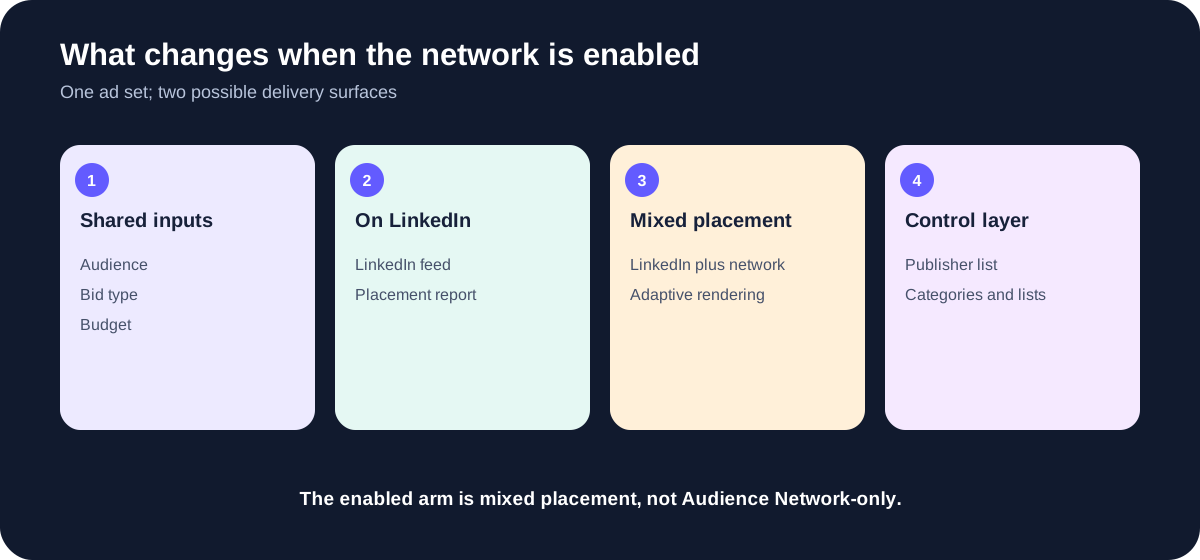
- Shared ad-set inputsAudience, bid type and budget.
- On LinkedInLinkedIn feed delivery.
- Mixed placementOn LinkedIn plus Audience Network.
- Changed layerPublisher context, rendering, controls and placement report.
The controls you can document
LinkedIn currently documents four control routes:
- IAB category exclusions. Exclude categories that do not fit the campaign. LinkedIn says these categories come from Pixalate and may change during the run.
- Block lists. Exclude named apps or sites.
- Allow lists. Limit delivery to named apps or sites.
- DoubleVerify profiles. LinkedIn says advertisers using DoubleVerify Pinnacle can apply profiles by request.
The control name is not proof that the control was applied. Keep these states separate:
- Proposed: someone intends to use the control.
- Prepared: the category choice or list exists and has an owner.
- Applied: a dated account receipt shows it was attached to the relevant ad set or account.
- Reviewed: someone checked it again on the agreed date.
For a first test, proposed controls can be part of a complete plan. Before you claim an existing campaign is running with those controls, you need the applied receipt.
Download the publisher list before you decide
LinkedIn’s current publisher-list instructions give this path:
- Open the ad account in Campaign Manager.
- Select Account settings, then Brand safety.
- Open LinkedIn suitability controls.
- In Block and allow lists, select Edit.
- Select Download publisher list and choose the Web and mobile app list.
The file downloads as CSV.
Save the file with the account, retrieval date, reviewer and intended campaign. LinkedIn warns that publishers can be added or removed before the downloaded list reflects the change. The CSV is a dated planning record. It is not a live guarantee of every placement.
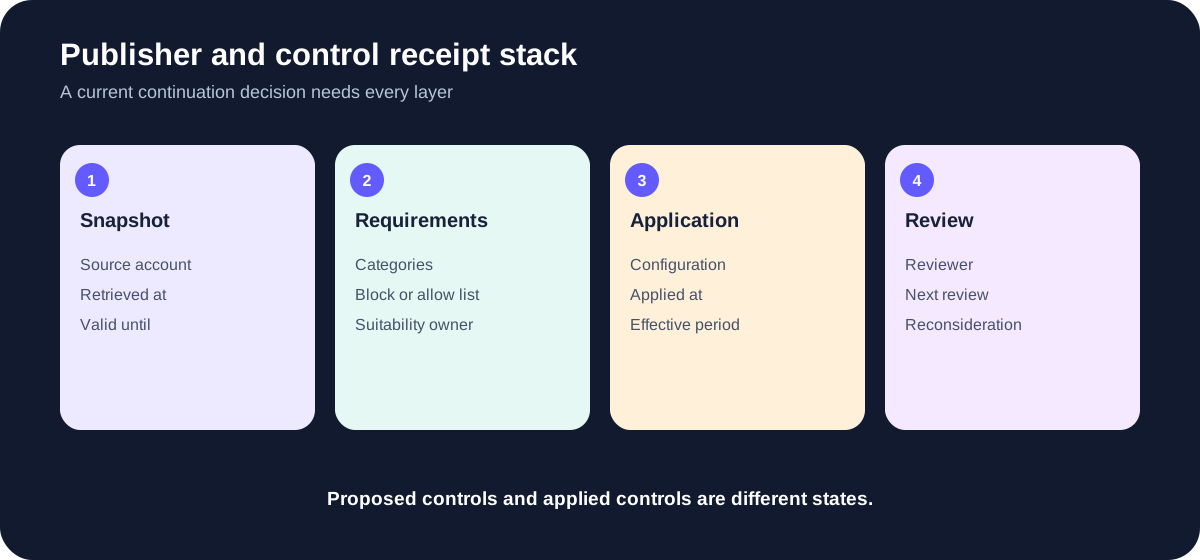
- SnapshotSource, retrieval time and validity cutoff.
- RequirementsCategories and lists tied to the buyer.
- OwnerOne person owns application and review.
- ReceiptApplied configuration covering delivery.
- Next reviewFixed date; do not claim permanent coverage.
Review publishers against a written suitability rule. “Looks fine” is hard to hand off and impossible to test later. A usable rule might name:
- prohibited content categories;
- prohibited app or site contexts;
- markets or languages that need separate review;
- whether an allow list is mandatory;
- who can approve an exception; and
- what change would stop the test.
If a mandatory rule cannot be met, keep the network disabled. You do not need weeks of CRM history to discover that the campaign cannot satisfy its own suitability requirement.
What the On/Off Network report can tell you
After an enabled ad set launches, LinkedIn says you can use Breakdown → On/Off Network in Campaign Manager and export the result as CSV. Video ad sets also have a Placements breakdown.
This report can compare platform delivery between On LinkedIn and Audience Network. Depending on the columns you export, that can include impressions, clicks, spend and other platform events.
It does not automatically tell you which placement produced a qualified lead, accepted account, opportunity or customer.
LinkedIn also states two reporting details that belong in the review:
- Audience Network requires a CTA button and destination URL. LinkedIn may add a CTA when the ad does not have one, which affects the Clicks to Landing Page metric.
- LinkedIn relies on third-party publisher signals for Audience Network impression and click measurement. LinkedIn says those signals have not been validated for MRC compliance, so those impressions and clicks are not MRC accredited.
Describe those limits precisely. They do not prove that every click is bad. They do mean a platform click should stay a platform click until another source establishes what happened next.
Keep platform delivery and CRM outcomes in separate lanes
The On/Off Network export gives you a placement split for platform delivery. Your CRM usually gives you campaign-level people, accounts and outcomes. Those two files do not become placement-level CRM evidence because their date ranges happen to match.
To claim a CRM outcome came from On LinkedIn or Audience Network, document all four parts of the join:
- Placement-to-lead source: the field, event or export that carries the placement identity beyond the platform report.
- Join method or key: how that record connects to the person, account or outcome in the CRM.
- Coverage: what share of the eligible records can be joined and what is missing.
- Deduplication: how repeated clicks, conversions, people and accounts are handled.
Without those parts, placement-level CRM acceptance remains Unknown. Campaign-level CRM data can still tell you how the campaign performed overall. It cannot be divided between placements by intuition.
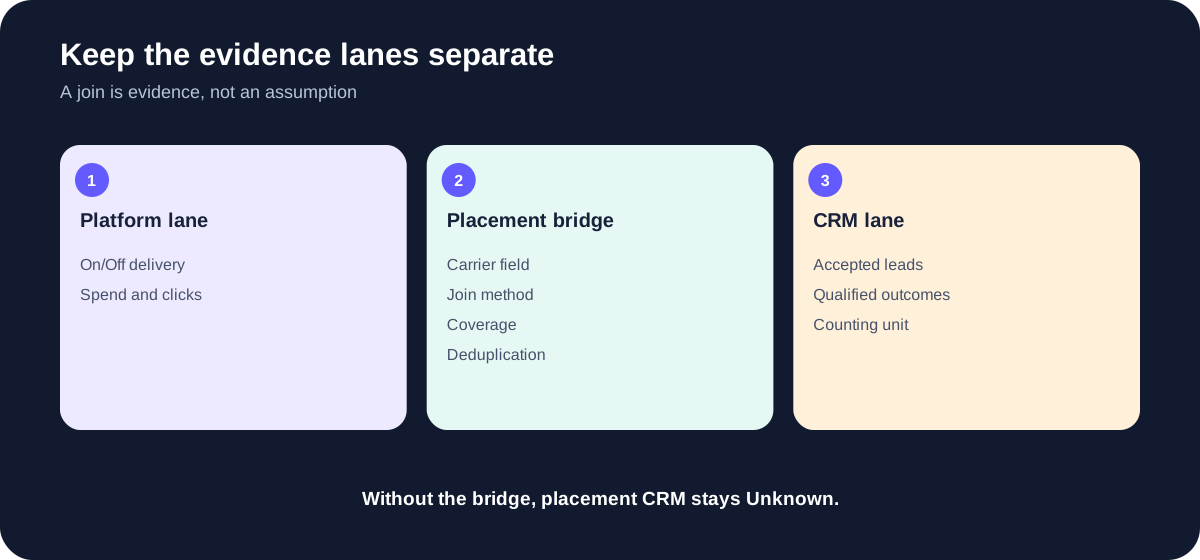
- Delivery laneOn/Off Network export proves platform delivery.
- CRM lanePeople or accounts and qualified outcomes.
- BridgePlacement carrier, key or method, coverage and deduplication.
- Missing bridgePlacement CRM stays Unknown; campaign CRM remains intact.
A common mistake
Suppose Audience Network shows cheaper clicks and the campaign produced ten qualified leads. You still cannot say the cheaper Audience Network clicks produced those leads unless the join proves it.
You can say:
- Audience Network clicks were cheaper in the platform export.
- The campaign produced ten qualified leads in the CRM.
- Placement-level CRM allocation is unavailable from the supplied evidence.
This answer tells you exactly what to collect or test next.
Prepare a first test
Choose Pre-test plan when the campaign has not produced usable placement evidence yet.
A complete plan needs more than “turn it on and see what happens.” Record:
- the campaign and eligible ad format;
- the offer, audience and destinations;
- a dated publisher-list snapshot;
- suitability requirements and owner;
- proposed categories, block list or allow list;
- how application will be checked after setup;
- the evidence sources you will collect;
- comparable dates and outcome cutoff;
- budget and time bounds;
- an early stop rule;
- the rule used at the review; and
- the review date.
The test arms must be labeled correctly:
- LinkedIn-only: Audience Network disabled.
- Mixed placement: Audience Network enabled, so delivery can occur On LinkedIn and across the network.
Do not call the second arm “Audience Network-only.” The documented setup shares targeting, bid and budget across the enabled ad set, and the arm can deliver on both surfaces.
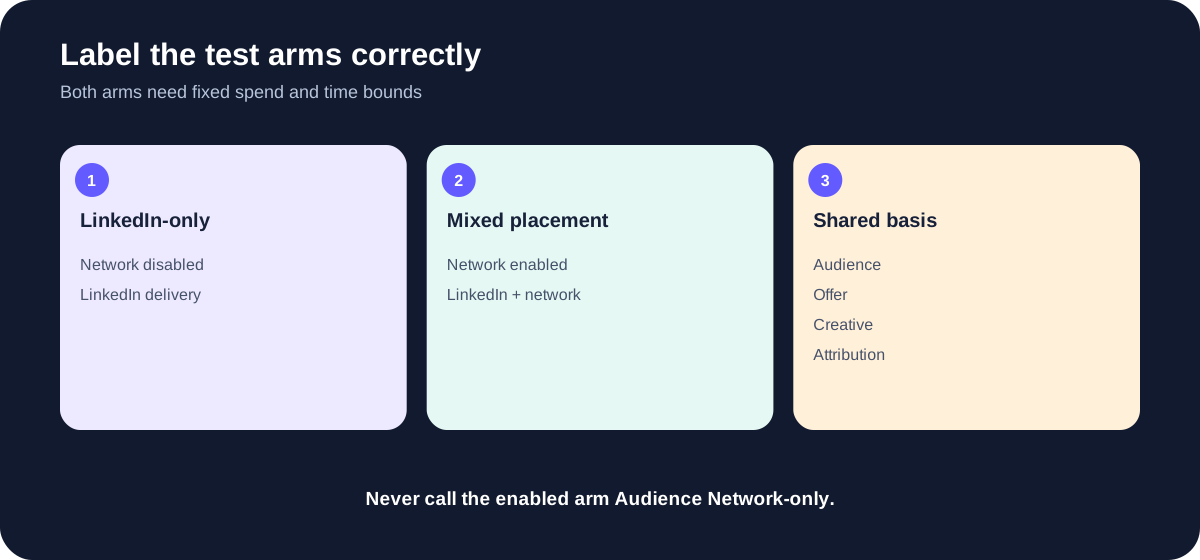
- LinkedIn-onlyAudience Network disabled.
- Mixed placementAudience Network enabled.
- Shared rulesComparable campaign inputs and fixed bounds.
- WarningMixed placement is never Audience Network-only.
Keep the comparison usable
Use the same audience definition, offer, creative, destination and conversion rules when the platform and test design allow it. Record any required difference. Match the date windows, attribution windows, denominators and outcome cutoffs.
A useful review rule names both branches. For example:
At the review cutoff, continue the mixed-placement test only if the placement evidence is mature, meaning the planned observation period has ended; required controls are applied; joined coverage meets our declared minimum; and the qualified-account rate satisfies our declared rule. If the rule fails, disable mixed placement. If the evidence is incomplete, collect the named missing evidence instead of choosing a winner.
The page does not supply a universal rate or coverage threshold. Set rules your team can defend before the numbers arrive.
Write a rule someone else can apply to the same data. Name the metric, the group you will review, whether you count people or accounts, and the minimum or maximum result you will accept. “Lead quality looks acceptable” is not a rule. A testable rule could say: divide qualified accounts by joined unique accounts, then require that rate to be at least the buyer-approved threshold, using the agreed CRM definition and outcome cutoff. Track joined coverage separately by dividing joined unique accounts by eligible unique accounts. At least one success condition should use an accepted or qualified CRM outcome. CTR, CPC and platform conversions can help diagnose the result; they cannot be the only reason to continue.
Worked example: a prepared first test
This is a fictional example. It is not a Maestro or client result.
A B2B software team has an eligible Single Image Ad, an approved landing page and a named analyst. It downloads the publisher list on 2 October, records prohibited categories, prepares a block list and assigns the media lead to confirm application. The team can collect the On/Off Network export and campaign-level CRM outcomes. It cannot join a person to a placement.
The team defines two arms: LinkedIn-only and mixed placement. It sets a 14-day or fixed-spend bound, whichever comes first, plus an early suitability stop. Its review rule compares platform delivery by placement and CRM outcomes by campaign arm. It does not promise placement-level CRM rates.
Decision: bounded test. The plan is complete enough to run. It preserves the attribution limit and names the next review date.
Review an existing campaign
Choose Existing campaign review when the ad set has already delivered.
Collect the evidence before judging the result:
- The On/Off Network export for the exact ad set and date range.
- The current publisher snapshot and applied-control receipts.
- The campaign scope, attribution window and outcome cutoff.
- The CRM source and qualification rule.
- The placement join proof when you want placement-specific CRM rates.
- The buyer-owned maturity, success and failure rules.
Then check comparability. Different date ranges, attribution windows, click definitions, lead denominators or outcome cutoffs can create a clean-looking comparison that answers the wrong question.
Comparable denominators do not need the same numeric count. They need the same definition, counting unit, eligibility rule and cutoff. One placement can have 40 eligible records and the other 120. The comparison becomes invalid when one side counts people and the other counts accounts, or when one side excludes records the other side includes.
Check control timing too. A block list applied today does not prove it governed delivery last month. The application receipt needs to match the control configuration, account or ad-set scope and effective period under review.
Before the maturity cutoff, future outcomes can still be pending observation. Current sources must still be complete through the collection cutoff. A partial CRM export is missing evidence now; it does not become a valid immature review merely because the final review date is in the future.
Existing campaign with no placement join
This is a fictional example.
An ad set has a complete On/Off Network export. The CRM contains every lead and accepted account for the campaign. There is no field or event that joins those records to On LinkedIn or Audience Network.
Decision: insufficient evidence for a placement-quality claim. The campaign-level CRM results remain valid for the campaign. Placement-level CRM rates remain Unknown. The next action is either to build a valid join or prepare a prospective LinkedIn-only versus mixed-placement test.
Cheaper Audience Network clicks do not change that answer.
Existing campaign with controls only proposed
Another fictional ad set has delivered for several weeks. The team now proposes a block list after seeing publisher concerns. It cannot produce a dated receipt showing that the list was applied during the reviewed period.
Decision: insufficient evidence for continuation with controls. Apply the control, capture the receipt and begin a new review period. Do not rewrite the old campaign as if the control had been there.
Mature evidence that fails the buyer’s rule
Suppose the dates, denominators, join, coverage, deduplication, maturity and controls all pass. The record conclusively fails a rule written before review.
The rule’s failed branch decides what happens next:
- If it says disable, the decision is keep disabled and the record names the failed criterion and reconsideration condition.
- If it says redesign, the record stays insufficient evidence until a complete replacement plan exists.
- Once that replacement plan is complete, the next state is bounded test. Preserve the failed review; do not edit it into a success story.
Mature evidence that passes
Continue with controls is available only when the existing record has comparable mature evidence, current publisher evidence, dated applied-control receipts, any required placement join proof and a satisfied buyer-owned rule.
The decision still needs a review cutoff. “Continue forever” is not a control.
Four outcomes, in order
The worksheet applies the first matching rule.
- Keep disabled. A clear suitability veto applies, a mandatory control cannot be operated, or mature evidence fails a buyer rule whose failed branch says disable.
- Insufficient evidence. The mode is unclear, a required field is missing, evidence conflicts, an existing review lacks a delivery or join record, controls are only proposed, cohorts are incomparable, or the buyer rule cannot be executed.
- Bounded test. A first-test plan is complete, a complete redesign plan follows a failed review, or a complete existing record is still inside its declared observation window.
- Continue with controls. Mature comparable evidence passes the buyer’s rule and every required control and receipt is current.
This order prevents a polished test plan from overriding a suitability veto. It also prevents attractive clicks from overriding a failed qualified-outcome rule.
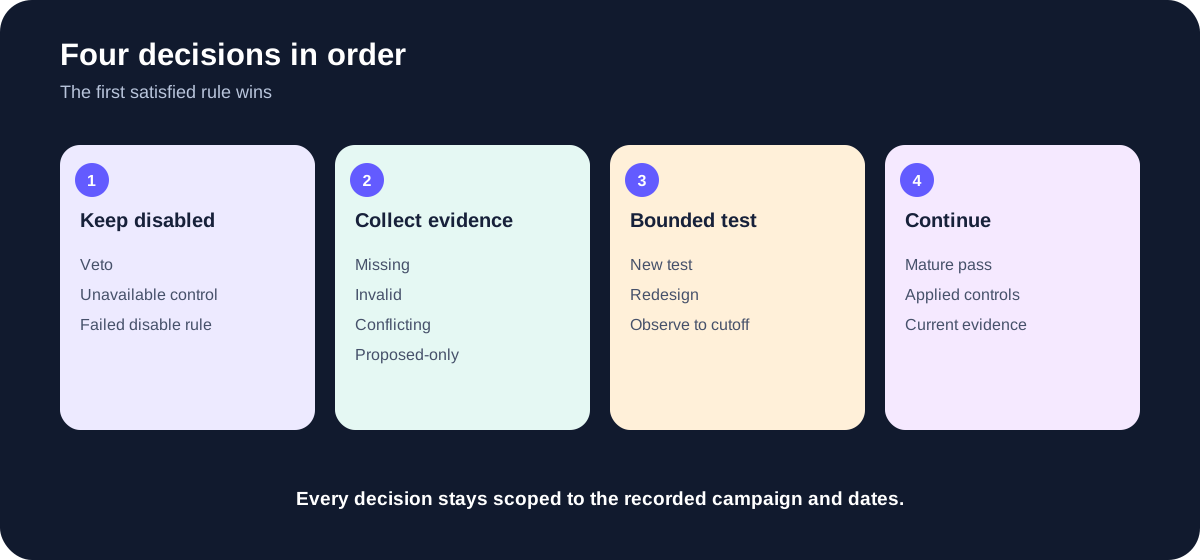
- 1. Keep disabledSuitability veto, unavailable mandatory control or mature failed disable rule.
- 2. Collect evidenceMissing, invalid, conflicting or proposed-only evidence.
- 3. Bounded testComplete plan, redesign or immature observation.
- 4. ContinueMature passing evidence with current applied controls.
Make the decision reviewable
Interactive decision record
Inspect the decision before you touch delivery
Load one of nine synthetic states or import your own supplied record. The same evaluator powers the browser, Node CLI and prompt downloads.
Exact next action
Load or import a record.
Open requests
Placement CRM metrics
Edit the canonical supplied record
Use the worksheet to create one saved record of your campaign decision. The browser view, JSON, CSV, Markdown and prompts should all use the same facts and decision.
At minimum, export:
- campaign and mode;
- current decision and exact reason;
- publisher snapshot date and source;
- suitability rule and owner;
- proposed and applied controls as separate fields;
- On/Off Network evidence source;
- CRM source and qualification rule;
- placement join source, method, coverage and deduplication;
- test arms and comparison windows;
- success, failure, maturity and stop rules;
- every Unknown and its owner;
- next action and review cutoff; and
- source dates and limitations.
Use JSON when another system or later browser session needs the record. Use CSV for the exclusions and evidence ledger. Use Markdown for the person reviewing the decision.
Use the build prompt to identify missing fields, and leave unknown information blank. Use the review prompt to check that the groups can be compared, controls have dated application records, CRM outcomes can be connected to placements and the four decision rules are applied in order. Keep Unknown values separate from zero.
Portable decision kit
Take the record, prompts and recording brief
Every machine-readable file uses the same evaluator. The fixtures are synthetic and prove behavior only.
Blank canonical JSONStart with every unknown preserved as null.Complete field worksheetMap every schema field, unit and confirmation boundary.Evidence ledger CSVCarry source facts and evaluator handoff fields.Standalone build promptCreate a supplied-fact record with the embedded engine.Standalone review promptRecompute a record instead of trusting its claimed verdict.75-second walkthrough briefRecord one decision without inventing evidence.
A practitioner view worth hearing
B2Linked’s AJ Wilcox discusses Audience Network from 1:15 to 2:24 in this January 2025 video. The useful part is the contrast: platform metrics can look attractive while meaningful site outcomes remain absent, and a test needs publisher controls.
Treat the video as practitioner opinion. Do not turn the speaker’s numeric examples, fraud claims, pacing claims or default recommendation into LinkedIn facts or Maestro benchmarks.
LinkedIn’s own 2017 introduction is useful as historical context, but it is too old to control today’s eligible formats, publisher counts, navigation or measurement limits. A 2024 short from Mitchell Gould shows the publisher-list task, but its navigation is also older than LinkedIn’s current Help path. Those two videos are supporting research, not the instructions on this page.
Common LinkedIn Audience Network questions
Is LinkedIn Audience Network good for B2B ads?
It can extend an eligible ad set beyond the LinkedIn feed. Whether it belongs in your campaign depends on publisher suitability, controls, measurement feasibility and a buyer-owned decision rule. Test or review that campaign. Do not import somebody else’s universal verdict.
Is LinkedIn Audience Network on by default?
LinkedIn’s product marketing page says it is default enabled for image, carousel and video format campaigns, while the current Help page describes enabling it during setup and lists Document Ads as eligible too. Treat the live ad-set setting as the source of truth for your account. Record what you actually see instead of relying on a remembered default.
Can I run an Audience Network-only campaign?
The documented enabled setup uses the ad set’s shared targeting, bid and budget across placements. For a prospective comparison, label the enabled arm mixed placement. Do not call it Audience Network-only unless LinkedIn provides and you verify a separate native route for the exact account and setup.
Can the On/Off Network report show lead quality?
It shows platform delivery by placement. Placement-specific lead or CRM quality needs a documented placement-to-lead source, join method or key, coverage and deduplication. Without that bridge, placement CRM remains Unknown.
Should I turn it off when CPC is lower but qualified outcomes look worse?
Use the evidence and the rule written for the campaign. Lower CPC cannot override a valid qualified-outcome rule. If the placement join is missing, you do not yet have a placement-specific qualified-outcome result. The next action is to repair the evidence or run a correctly labeled arm test.
How often should I review the publisher list?
Set the cadence in the plan and review after a material change or at the fixed cutoff. LinkedIn warns that the downloaded list can lag publisher additions or removals, so a single old CSV should not support an indefinite continuation decision.
Does a complete worksheet mean the campaign is ready to launch?
It means the decision handoff is complete. Campaign Manager still needs to confirm eligibility, setup, applied controls, creative rendering and account-specific behavior. Capture those native receipts before reporting that the plan was implemented.
Continue the campaign build
Audience Network is one part of a LinkedIn campaign. Use the related guide that owns the next task:
- Define the audience in the LinkedIn ad targeting guide.
- Choose the creative in LinkedIn ad types.
- Check the whole account with the LinkedIn ads audit.
- Forecast the budget in the LinkedIn ads cost guide.
- Check finished files with LinkedIn ad specifications.
If the campaign needs an independent review of the offer, creative, targeting and measurement plan, use the Demand Gen Roast.