
LinkedIn Thought Leader Ads: 12 examples and a plan for your first campaign
LinkedIn Thought Leader Ads let a company pay to promote someone's public LinkedIn post. The post appears under the person's name, with the company identified as the sponsor. The author has to approve it.
You can promote a founder's explanation, an employee's demonstration, or a customer's experience. The first decision is which person and post will help your buyer understand something that matters to them.
Below are 12 real sponsored posts from Figma, Adobe, Salesforce, Shopify, ZoomInfo and other companies. Each breakdown explains the choice behind the post and includes an original example of how another business could adapt it. You'll also find the approval steps, a completed campaign worksheet and prompts you can copy into your agent.
The examples show creative approaches, not a ranking of campaign performance. Their public Ad Library records establish who sponsored the posts; they do not tell us which ads generated profitable customers.
What job should the post do?
Choose a job before choosing a person. Otherwise the team tends to sponsor whoever is most senior or whichever organic post got the most reactions. Neither is the same as buyer fit.
| Job | Good author and post | Watch for | Choose another post when |
|---|---|---|---|
| Teach a problem or method | Practitioner who can show a real step, mistake, or decision | Relevant comments, profile visits, qualified visits to a linked resource | The advice is generic or cannot be supported |
| Explain a product use case | Employee or hands-on customer who knows the workflow | Buyer questions, relevant site visits, demo or trial actions if there is a clear link | The post only lists features |
| Bring a customer's perspective | Customer who chooses their own words and can name the work | Engagement from similar accounts, follow-up conversations | The account cannot verify the claim or approve its use |
| Address a market objection | Executive or specialist with direct evidence | Reach among target buyers, substantive replies, later branded or direct interest | The post substitutes a slogan for proof |
| Invite the right people to an event | Speaker or participant with a specific reason to attend | Registrations and attendee quality | The post just repeats the event title |
LinkedIn supports eligible member document posts as Thought Leader Ads with the Document format and brand awareness or engagement objective. For document creative planning, use the LinkedIn document ads guide. If you need to decide how a video teaches a point, see the LinkedIn video ad examples.
LinkedIn Thought Leader Ad Examples
Choose an example that matches the job your ad needs to do. The adaptations are fictional examples written for this guide. Replace their details with facts from your own business before publishing.
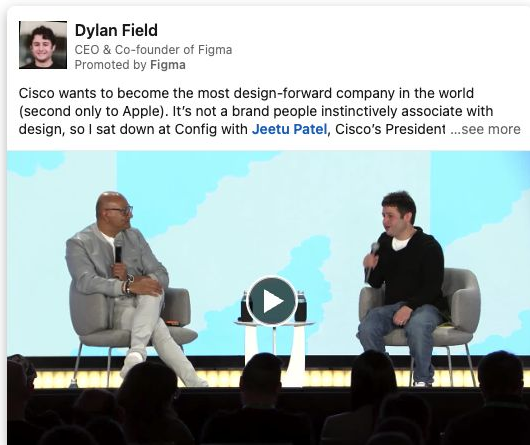
1. Figma and Dylan Field: teach a process through a customer conversation
Read the full source post text
Cisco wants to become the most design-forward company in the world (second only to Apple). It’s not a brand people instinctively associate with design, so I sat down at Config with Jeetu Patel, Cisco’s President and Chief Product Officer, to ask him a few questions about how he’s making that happen.
Three things that stood out from our conversation:
1. The people closest to the work should present it.
When Jeetu started design reviews at Cisco, teams were presenting to their VP, then their SVP, then their SVP’s boss. It took six weeks for a design review to show up on his calendar, so he reworked the process. ICs started presenting directly to execs.
That small change led to a shift in thinking that made great design the priority. People started obsessing over the details together. The result was a culture where everyone was expected to identify flaws and to make the product better.
2. Give people permission to care (and explore).
Most product builders want to build amazing products. The problem is that large organizations snuff out that instinct. Jeetu and his team helped shift culture at Cisco by getting into the details and giving people at every level permission to do the same.
That meant debating ideas openly and chasing the best answer instead of the fastest approval. They rewarded curiosity and craft over hierarchy and titles. People stopped optimizing for process and started focusing on building products customers love.
3. Enterprise should make people feel something, too.
Product builders often assume emotional design matters most in consumer products. Jeetu argued it's just as important in the enterprise. How a product makes you feel will make you choose it over another, and recommend it to others.
Cisco obsesses over everything from software interfaces to the fabric on a conference room speaker. The goal is to make products that are functional and elicit a feeling. "Products that appeal to people emotionally sell more than products that don't."
A huge thank you to Jeetu for joining me at Config last week. Link to the full talk in the comments!
See the sponsored post. Figma sells design and product-development software. CEO Dylan Field used a conversation with Cisco product leader Jeetu Patel at Config to address design leaders inside large companies.
How it opens: “Cisco wants to become the most design-forward company in the world (second only to Apple).” Field puts a surprising ambition beside two familiar names. The process lesson comes later; the opening first gives design leaders a reason to read the conversation.
The post describes a six-week chain of design reviews through successive managers. Field says Patel changed that process so individual contributors could present directly to executives.
Field's post puts the decision plainly:
“The people closest to the work should present it.”
The video shows a seated stage conversation. The post gives readers the process change; the clip discusses the broader commercial case for design. Together they offer more than a prominent guest's name. If you use an interview post, find one decision the buyer could try or challenge in their own organization.
A fictional operations-software company could draft this post:
“At our customer roundtable, a hospital operations lead described a scheduling change I wish we'd tried sooner. Shift swaps used to move through a manager, then staffing, then payroll. The team now checks policy and coverage in one shared queue before anyone approves. The point was to make the reason for each decision visible to the people taking the shift.”
That post needs the customer's account and permission. If the conversation produced no specific change, choose a different one.
2. OpenAI for Business and Amir Tavoli: show the work before the tool
Read the full source post text
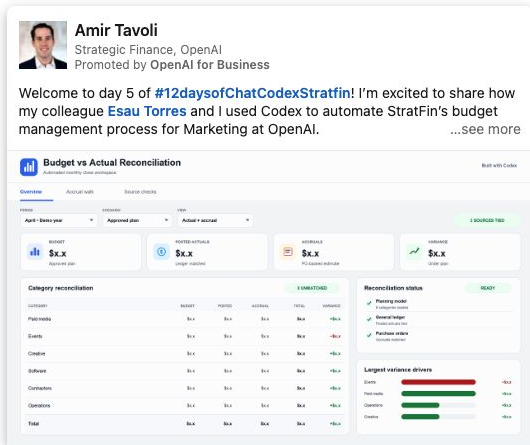
Welcome to day 5 of #12daysofChatCodexStratfin! I’m excited to share how my colleague Esau Torres and I used Codex to automate StratFin’s budget management process for Marketing at OpenAI.
Before Codex 🙁
Month-end BvA required significant manual spreadsheet work: pulling exports, copying data across tabs, updating formulas and pivots, and reconciling the plan, actuals, purchase-order schedules, accruals, and transaction detail.
The challenge was not only identifying a variance. It was tracing the variance to its source, confirming that every layer tied out, and packaging the analysis so our cross-functional partners could review the math without retracing the entire workflow.
Agentic dawn! 🙂
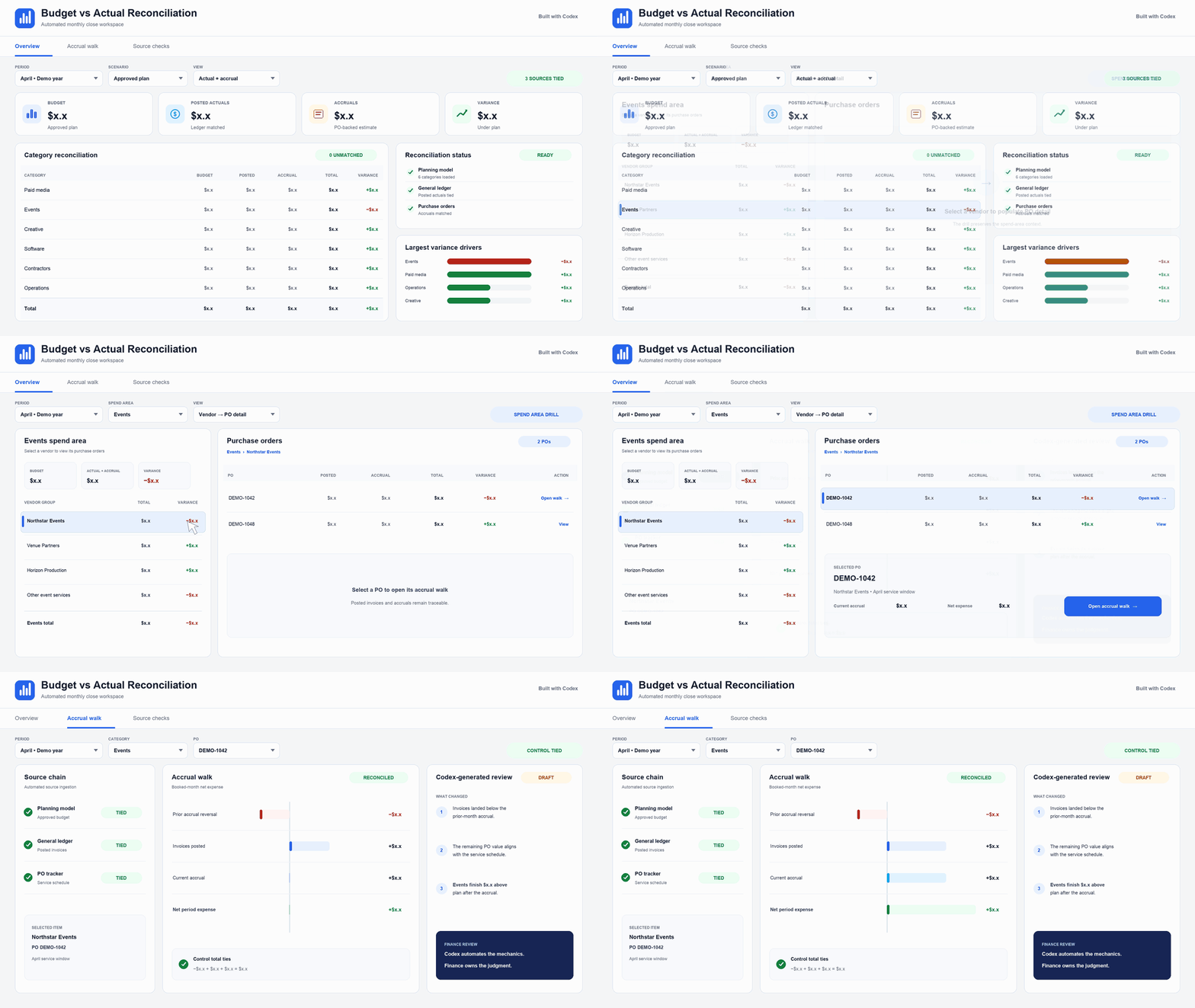
Codex now automates the workflow end to end. It ingests data from source systems, standardizes and reconciles the inputs, and produces an overview of the largest variance drivers.
Codex enables us to drill from the cost-center level into the underlying purchase orders, transactions, and accruals to understand what changed and trace each variance back to its source.
The result is less time maintaining spreadsheets and more time investigating what changed, determining why it changed, and deciding what to do next. Codex automates the mechanics, allowing us to focus on the strategic questions that matter most to the business.
As excited about Codex as we are? Try it yourself (https://openai.com/codex/), check out OpenAI Academy for tips (https://lnkd.in/gvSgP8ij), and register for our upcoming StratFin Codex event (https://lnkd.in/gz6bJ97W)!
Stacie Faggioli Sarah Friar Thibault Sottiaux Alexander Embiricos Nick Turley
See the sponsored post. OpenAI for Business sponsored strategic-finance employee Amir Tavoli's post about using Codex for month-end budget work.
How it opens: “Welcome to day 5 of #12daysofChatCodexStratfin!” Tavoli starts with a series announcement, then names the budget-management project. For buyers who do not know your series, lead with the task they recognize; a day number alone gives them little reason to continue.
He names the manual steps: exports, spreadsheet tabs, formulas, pivots, purchase orders, accruals and transaction detail. Finance readers can recognize where the work gets slow.
He identifies the harder problem in the post:
“The challenge was not only identifying a variance. It was tracing the variance to its source”
The animated creative starts with a “Budget vs Actual Reconciliation” overview and moves into purchase-order and accrual views. The post explains the work; the GIF shows where someone would inspect it.
For your own post, show one real record and the path back to its source, with sensitive data removed. Choose one next action for the buyer.
A fictional contract-management company could write:
“Our legal ops team used to compare renewal dates from three exports. The hard part was explaining which signed agreement controlled the date when the CRM and billing system disagreed. We now put the signed clause, account record and proposed renewal action in one review queue. A reviewer can open the clause before approving outreach.”
The employee author should be able to show that review queue and explain the old process from firsthand work.
3. Adobe for Business and Stephen Frieder: show how one campaign becomes thousands of assets
Read the full source post text
The National Football League (NFL) is working with Adobe to build an AI-powered content supply chain that helps turn the energy of the game into timely, relevant fan experiences around the world.
The scale is wild: a single Sunday tune-in campaign can grow from about 6,000 assets to more than 89,000 across 15 languages and more than 356,000 when adapted across experiences. Weeks of work has been reduced to hours and minutes.
The best part? This isn’t AI for AI’s sake. It’s people, workflows, data, governance, and creativity working together, resulting in teams spending less time on repetitive production and more time creating moments fans care about.
I can't wait to see what this season has in store. Fly Eagles Fly. https://lnkd.in/ezeYyHrY
See the sponsored post. Adobe for Business sells creative and experience software to enterprise teams. Adobe sponsored enterprise revenue leader Stephen Frieder's post about the NFL's content operation.
How it opens: Frieder names the NFL’s work with Adobe before introducing the asset counts. The familiar customer establishes the setting. If your customer is less recognizable, explain the work or scale that makes their story relevant before expecting the name to carry it.
He says a Sunday campaign grows from about 6,000 assets to more than 89,000 across 15 languages and more than 356,000 when adapted for different experiences.
The post names the scale:
“a single Sunday tune-in campaign can grow from about 6,000 assets to more than 89,000 across 15 languages”
The video moves from NFL branding to a fan-journey graphic, then to merchandise and app screens. Those scenes help a marketing-operations buyer picture where the assets go. The counts are Adobe's claims; the video does not independently verify them.
Borrow this structure when your own buyer also manages many versions, and define what each count includes.
A fictional industrial-training platform could write:
“One safety update starts as a policy memo. Each site then needs the right language, machine model and job role. Our review queue shows the policy source beside each local version, so a supervisor can approve what changed without rebuilding the whole document.”
Show a source document and one approved local version. A buyer with one site may have no reason to care about a versioning story.
4. Salesforce and Sundas Khalid: explain what buyers need to fix first
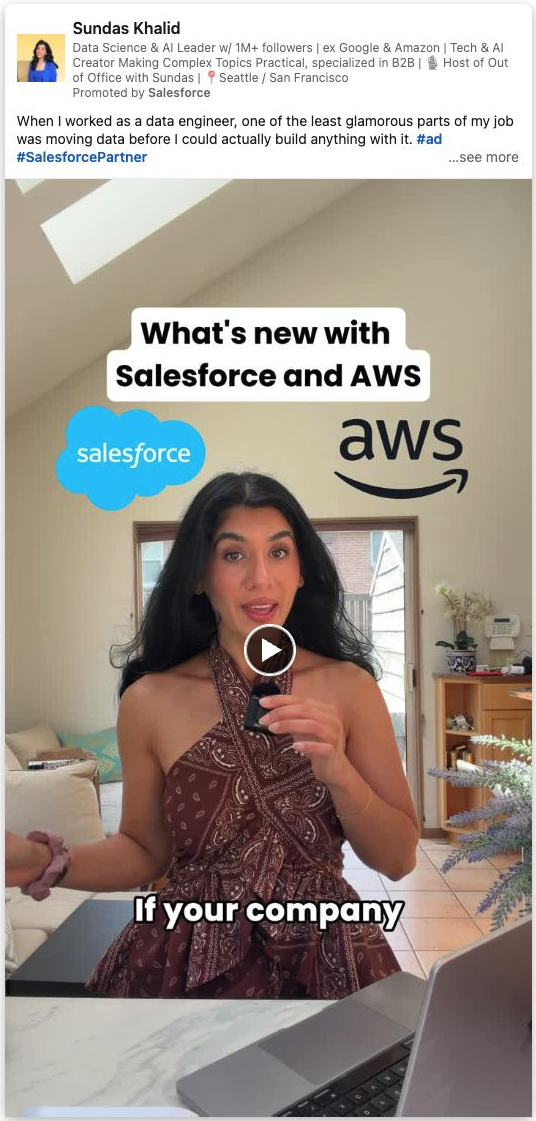
Read the full source post text
When I worked as a data engineer, one of the least glamorous parts of my job was moving data before I could actually build anything with it. #ad #SalesforcePartner
Before you could build a data pipeline or a fancy new dashboard, you had to figure out where the data lived, how to get it into the right systems, and whether copying it would create another security problem.
Years later, we are still running into the same problem, especially when building AI agents. An agent cannot do much if it doesn’t have access to the right data.
For example, imagine you’re building a customer service agent. How can it answer a customer’s question if their purchase history, previous support conversations, and account details all live in different systems?
Salesforce Data 360 Zero Copy removes the copying part. Agentforce can use customer data where it already lives instead of requiring companies to move or duplicate it first.
That may sound like a small infrastructure detail, but it could be the difference between an agent that answers questions and one that can actually get work done.
Salesforce and Amazon Web Services (AWS) will share more at Dreamforce 2026.
Register for Dreamforce using discount code DF26DAWS here: https://sforce.co/3UN7nzS
See the sponsored post. Salesforce sponsored a video post by data engineer and AI creator Sundas Khalid. It is marked “#ad #SalesforcePartner.”
How it opens: “When I worked as a data engineer, one of the least glamorous parts of my job was moving data before I could actually build anything with it.” The first sentence establishes firsthand experience and a recognizable frustration before introducing the partnership.
She starts with a task she says she did herself: moving data before building pipelines or dashboards. Then she asks how a service agent can answer a customer when purchase history, support conversations and account details live in different systems.
Her post states the prerequisite:
“An agent cannot do much if it doesn’t have access to the right data.”
The vertical video shows Khalid speaking to camera with interface inserts. Visible text names AWS S3, Zero Copy and Agentforce. The creative gives the data-access problem a technical setting before the Dreamforce invitation. This is a good pattern when buyers understand the promised application but have not solved the prerequisite.
The post also works as an event invitation. Khalid explains the data problem first, then says Salesforce and AWS will share more at Dreamforce and links to registration. That gives the buyer a reason to attend beyond the event’s name.
For your own event post, name the question the session will help answer, then give the date and registration link. Judge it on relevant registrations and attendance. A video that invites people to a conference is still a video post; the separate Event ad format has its own eligibility rules below.
A fictional manufacturing-analytics vendor could write:
“When I ran quality reviews, the dashboard was the easy part. The hard part was matching a failed inspection to the machine run, supplier lot and maintenance record. If those records disagree, another chart just makes the meeting longer. I check the lot ID, run timestamp and exception owner before building an alert.”
The author needs that experience, and the product needs a credible way to address the data match.
5. Shopify and Sandy Jeong: give a resource a clear structure
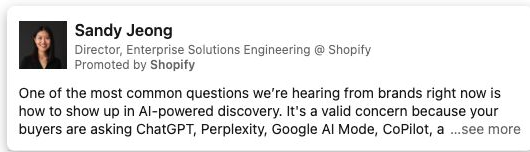
Actual LinkedIn Ad Library post preview. Open full-size screenshot.
Post text example · creative unavailable. No image or video file was available in the reviewed archive.
Read the full source post text
One of the most common questions we’re hearing from brands right now is how to show up in AI-powered discovery. It's a valid concern because your buyers are asking ChatGPT, Perplexity, Google AI Mode, CoPilot, and other AI agents what to buy. If you're not part of that conversation, you're already losing ground.
That's why we built The GEO Playbook. It's a practical framework for getting your products recommended by AI agents when it matters most.
It breaks down into three pillars:
1. SEO Fundamentals: AI agents rely on search engines to source their answers. Strong traditional rankings directly increase your chances of being cited in AI responses.
2. Brand Building: AI synthesizes reviews, press, community signals, and earned media to decide who gets recommended. The brand work you've already been investing in matters more than ever.
3. Data Quality: Clean, structured, real-time product data is what gives AI the confidence to recommend you. Fragmented or stale data means you're not in the conversation.
Here's the good news: if you're on Shopify, the infrastructure for AI discovery is already built-in. The question isn't whether AI discovery matters. It's whether you're ready to take advantage of it.
The playbook is live → https://lnkd.in/e-5yp_dp
See the sponsored post. Shopify sells commerce software to brands. It sponsored an enterprise solutions engineer's post answering a current buyer question: how should a retailer prepare its products for AI-powered discovery? Sandy Jeong previews Shopify's GEO Playbook with three sections: search fundamentals, brand signals and product-data quality.
The opening puts the buyer's question first:
“One of the most common questions we’re hearing from brands right now is how to show up in AI-powered discovery.”
The post lets the reader judge the playbook before clicking. For your resource post, name the buyer's question and enough of the contents to show what they will get. Link to the actual resource. No creative image was available in the archived capture, so this breakdown uses the post text.
A fictional procurement-platform employee could write:
“Suppliers keep asking what a buyer needs before the first review. We made a one-page intake checklist covering ownership, security documents and the person who signs the commercial terms. Use it to spot the missing item before a request reaches legal. I put the checklist on our site so you can work through it with your team.”
The promise works only if that checklist exists and the link in the member's post opens it.
6. ZoomInfo and Henry Schuck: pair a product claim with specific customer language
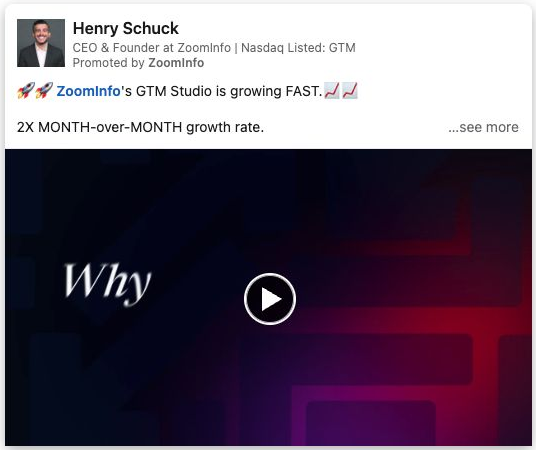
Read the full source post text
🚀🚀 ZoomInfo's GTM Studio is growing FAST.📈📈
2X MONTH-over-MONTH growth rate.
5X more customers creating their first audience QoQ.
7X growth in audiences being built QoQ.
Hear it directly from our customers.
"Dude, we could cancel 2 or 3 other technologies and just go with this."
"It's a lot easier than using ¢!@# which is a nightmare to get used to"
For years, GTM teams have been forced to stitch together one tool for intent, another for contact data, another for AI, and another to orchestrate.
GTM Studio brings it all together in one place - and it's flying.
The best data. AI that actually helps you build and execute. And the ability to go from idea to launch without jumping between platforms.
The growth tells us we're on the right track.
What our customers tell us matters even more.
Try it for free here: https://lnkd.in/gD7kFX7J
See the sponsored post. ZoomInfo sells sales data and go-to-market software. ZoomInfo sponsored founder Henry Schuck's post about GTM Studio for teams that currently connect several tools for intent, contacts, AI and campaign orchestration.
How it opens: “ZoomInfo's GTM Studio is growing FAST.” The original surrounds that line with rocket and chart emojis, then lists growth claims. This is a momentum opening; the later tool-consolidation problem gives a prospective buyer a more direct reason to care.
He pairs company-reported adoption figures with quotations presented as customer comments about consolidation and ease of use.
The post names the work it wants to combine:
“For years, GTM teams have been forced to stitch together one tool for intent, another for contact data, another for AI, and another to orchestrate.”
The video uses illustrated avatar heads and caption strips rather than filming a customer using the product. That is a customer-voice format, not a workflow demonstration. If your claim is that several tools can be replaced, list the jobs that move into one product and show the handoff separately. Quote customers only with their approval.
A fictional field-service platform could write:
“A technician closes the work order. Dispatch has the approved parts and labor, but billing often has to type them again. Our billing handoff carries those fields and the customer's sign-off into the invoice draft. The person preparing the invoice can check the original work order before sending it.”
This copy explains the job without inventing customer praise. A customer account would add a different kind of evidence if one is available.
7. monday.com and Leonard Rodman: name the gap between tools and work
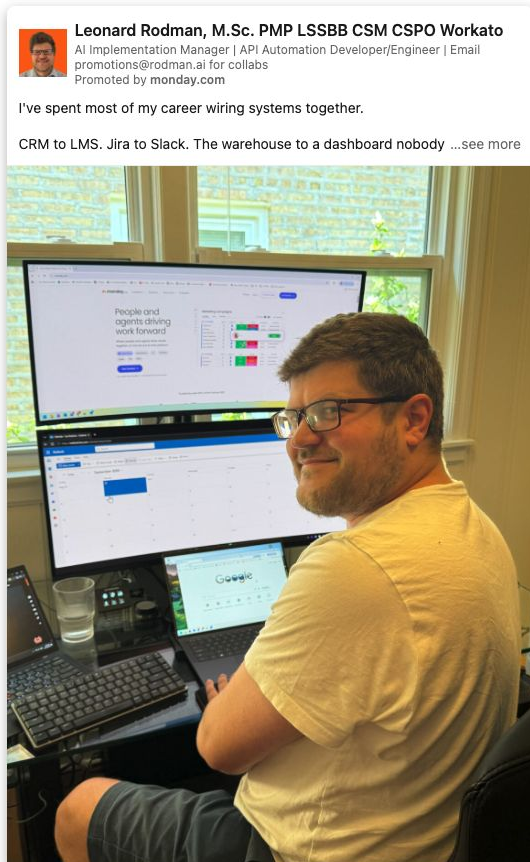

Read the full source post text
I've spent most of my career wiring systems together.
CRM to LMS. Jira to Slack. The warehouse to a dashboard nobody opened.
Real talk: half of those integrations were duct tape stretched over a coordination problem. Data moved. Work didn't.
Here's the stat that should embarrass all of us. 95% of organizations still can't point to real gains from AI.
The reflex is to blame the models. Or adoption. Or "change management," which is what we call it when we've run out of explanations.
It's none of that.
AI got very good at making one person faster inside their own lane. It never learned how an organization actually operates.
Your marketer has a copilot. Your PM has a copilot. Your ops lead has a copilot. None of them talk to each other, and none of them know what the company is trying to do this quarter.
That's not transformation. That's twelve people getting slightly better at their silo while the handoffs stay exactly as broken as they were in 2019.
The work was never stuck inside the task. It was stuck between them.
Which is why the monday.com shift matters more than another feature drop.
One workspace. People set direction, agents run the execution underneath it, and everything shares the same context, the same data, the same goals.
Sprint scope drafted from the actual backlog and actual capacity, in minutes instead of a two-hour meeting. Portfolio risks surfaced before the status call, not during it. Intake structured the moment it lands instead of three days later when someone remembers the inbox.
No consultants. No six-month implementation. No retraining your team on a new religion.
Bold take: the AI moment at work isn't going to feel cinematic.
It's going to feel like fewer things falling through the cracks. Like the handoff that used to cost a day costing nothing. Like your team spending Monday deciding instead of reporting.
People still make the calls. That part doesn't move. What moves is everything underneath the calls.
If you could hand off one recurring piece of work tomorrow, the one that eats your week and requires zero judgment, what would it be?
Curious what shows up in the comments. My guess is status reports win by a mile.
See the sponsored post. monday.com sells work-management software. It sponsored a post from integration practitioner Leonard Rodman for teams trying to coordinate work across functions. Rodman names systems he has connected, then says each employee may have a copilot while the handoffs between employees remain broken.
How it opens: “I've spent most of my career wiring systems together.” Rodman establishes his experience, then names familiar integrations. The short line below lands because the reader already knows the kind of work he means.
His sharpest line is short:
“Data moved. Work didn't.”
The creative shows Rodman at a multi-monitor workstation beside a screen reading “People and agents driving work forward.” The post supplies the substance: marketer, PM and operations lead have separate context. His closing question asks which recurring handoff readers would delegate.
Use that pattern when your product really connects a cross-team handoff; show where the work moves, not only where data appears.
A fictional revenue-operations platform could write:
“Sales marks an opportunity closed. Finance needs the signed order. Customer success needs the promised start date. We saw one handoff miss because all three teams had a different version of the agreement. Our fix was one launch record with the signature, start date and owner visible to all three teams. Which field does your handoff lose most often?”
The author should have observed the handoff and be able to show the shared record.
8. Intuit Accountants and Zane Stevens: let a customer discuss a difficult change
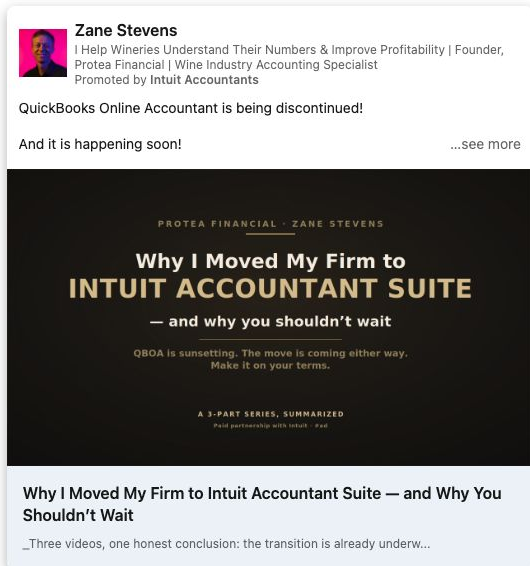
Read the full source post text
QuickBooks Online Accountant is being discontinued!
And it is happening soon!
New QBOA accounts are already gone. Every new signup is sent to the Intuit Accountant Suite.
So the question was never really "should I switch?"
It's "do I switch on my schedule, or on theirs?"
I moved my whole firm to IAS this year. It wasn't painless, and it isn't finished. But after three videos poking at its rough edges, I kept landing in the same place: it's a real step forward!
The move is coming either way, and doing it now, while there's margin before the fall, beats doing it in the middle of busy season.
I put the whole case in one article: the deadline, why the AI makes it a real platform and not a facelift, whether the paid tier is worth it (and who should stay on Core), and the honest part, where it's still being built.
#ad #sponsored
See the sponsored post. Intuit sells accounting software to firms and their clients. It sponsored an article post by Zane Stevens, who runs a specialist accounting firm and describes his move to Intuit Accountant Suite.
How it opens: “QuickBooks Online Accountant is being discontinued!” Stevens leads with a claimed deadline pressure, then explains his firm’s move. Treat that as the historical opening of this ad; check current Intuit notices before planning a migration.
His post promises an article covering timing, which tier is worth paying for and where the product is still rough. The copy carries “#ad #sponsored.”
His admission gives another accountant a reason to read:
“It wasn't painless, and it isn't finished.”
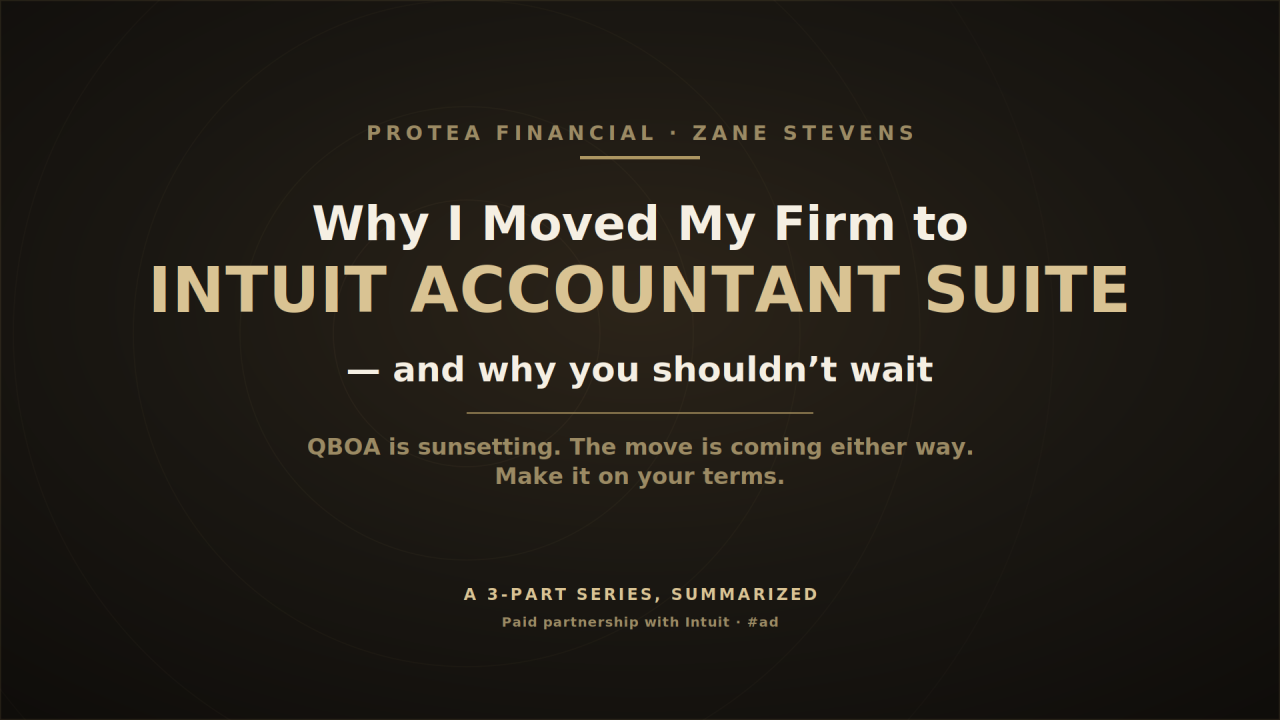
The article cover names the move and visibly says “Paid partnership with Intuit.” A customer-authored article fits a migration decision because the buyer needs more detail than a short testimonial can hold. The post's deadlines and availability statements are time-sensitive; check current product terms before using them to plan a move.
A fictional customer of an expense platform could write:
“We moved our team to a new approval flow. The policy mapping took longer than the data import. I wrote down the checks we made before switching off the old queue, including what we left for phase two. If you're planning a move during close, start with the policy owners.”
Ask the customer to write the full account in their own terms, including the parts of the move that still need work.
9. Numeral and Becca Millstein: have a customer explain relief from an unglamorous job
Read the full source post text
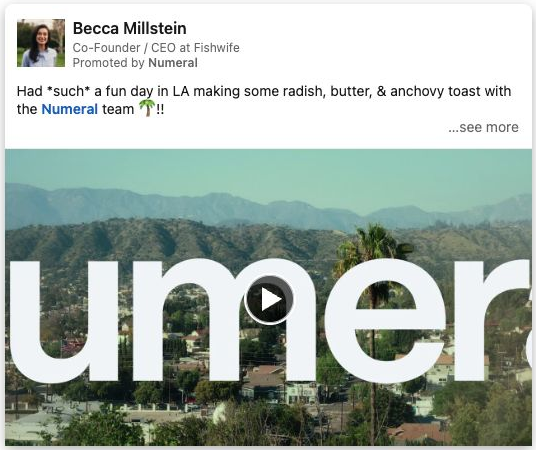
Had *such* a fun day in LA making some radish, butter, & anchovy toast with the Numeral team 🌴!!
I'm super stoked about Numeral, a platform that has been critical to Fishwife as we've scaled nationwide across all channels. Numeral covers Fishwife end-to-end, whether it's DTC or wholesale, and that gives me so much peace of mind. They’ve got sales tax covered 110%!!
That kind of innate trust means everything as a founder. Sales tax is incredibly complicated, and knowing I have access to experts backed by a guarantee lets me focus on what I'm actually good at in the business.
Sam Ross, Matt DuVall, and the entire team are incredibly buttoned-up and very responsive. It’s not just another piece of faceless software. Shout-out to Numeral, and thanks for the great hang 👏👏👏!!
See the sponsored post. Numeral provides sales-tax software and support for businesses selling across channels. It sponsored a post from Becca Millstein, co-founder and CEO of Fishwife. Millstein says Fishwife sells direct to consumers and through wholesale, and explains why she wants tax work handled while she focuses on the business.
How it opens: Millstein describes making radish, butter and anchovy toast with the Numeral team. It sounds like a founder sharing her day and fits Fishwife’s food business. The next paragraph must connect that scene to the sales-tax problem; the kitchen visit alone would not explain Numeral.
Her post makes the business context explicit:
“Numeral covers Fishwife end-to-end, whether it's DTC or wholesale, and that gives me so much peace of mind.”
The video shows food preparation and people working together in a kitchen; the inspected frames do not show a legible tax interface. That fits a founder's account of the business she wants to run. The post itself has to explain the tax problem and the support she says she receives. This is customer experience, not a measured result for every Numeral customer.
A fictional customer of a wholesale-inventory company could write:
“We used to spend Monday mornings reconciling what our store sold over the weekend with what the warehouse thought was available. Our inventory partner now flags the mismatched SKUs before the purchase-order call. I still check the exceptions, but I don't start the week rebuilding the count.”
The customer must approve that account. A generic “great partner” quote would leave the buyer's problem unexplained.
10. Pinterest Business and Stacy Wright Malone: challenge a buyer assumption with a concrete journey
Read the full source post text
I hear a lot of marketers say, “Pinterest is where people go for inspiration.” And that’s true. But that’s only half of the story.
Here's what the data actually tells us: the number one reason people come to Pinterest is to shop. Not to scroll. Not to pass the time. But to find something they want—and to buy it.
Pinterest is where people decide what to do, try and buy next.
I see it in my own life. I jumped on Pinterest to look for birthday ideas for my son, and walked away with a full party theme and all the decorations ordered. Plus a few gifts, too. All done in one sitting.
That's the experience Pinterest creates: you find something you love, and then you bring it home. It’s inspiration that turns into action.
And it’s why people on Pinterest are 70% more likely to make a purchase. They're not browsing. They're buying.
If your brand isn’t there yet, our suite of shopping tools can help. Learn how.
https://lnkd.in/g3U7Tjix
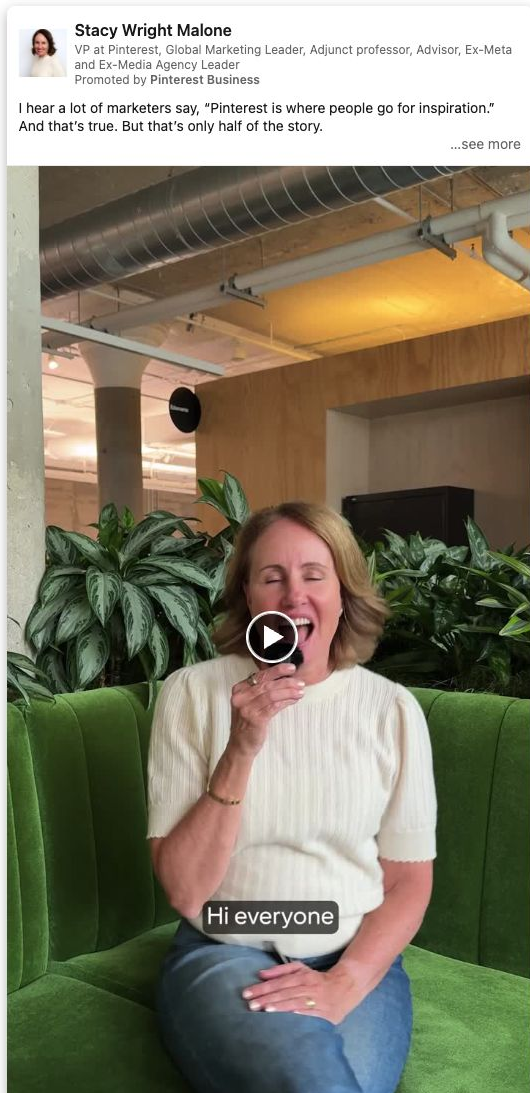
See the sponsored post. Pinterest Business sells advertising and shopping tools to brands. It sponsored marketing leader Stacy Wright Malone's post about a buyer journey from inspiration to purchase. Malone gives a personal example of searching for her son's birthday ideas and buying the decorations and gifts.
How it opens: Malone starts with the belief that people come to Pinterest for inspiration, then argues that shopping is part of the same visit. The birthday story below makes the alternative concrete.
The example is concrete in her post:
“I jumped on Pinterest to look for birthday ideas for my son, and walked away with a full party theme and all the decorations ordered.”
In the vertical video, Malone speaks directly to camera from a green couch. Captions move through the same planning-to-buying idea. A brand marketer can picture when a product might enter that journey. Borrow this sequence only when your buyer has a comparable path; Pinterest's shopping statistic is its own claim, not a figure for your market.
A fictional B2B travel-management company could write:
“Teams often tell us travel planning starts when someone books a flight. For an offsite, it starts earlier: deciding who needs to be in the room, which city works for them, and which dates avoid the sales kickoff. Those choices narrow the flight and hotel options before anyone opens a booking tool. We made a planning sheet that puts attendee, city and date choices together before the first fare search.”
The adaptation needs a real planning sheet and an author who knows the offsite workflow.
11. Kong and Augusto Marietti: turn product evaluation into buyer questions
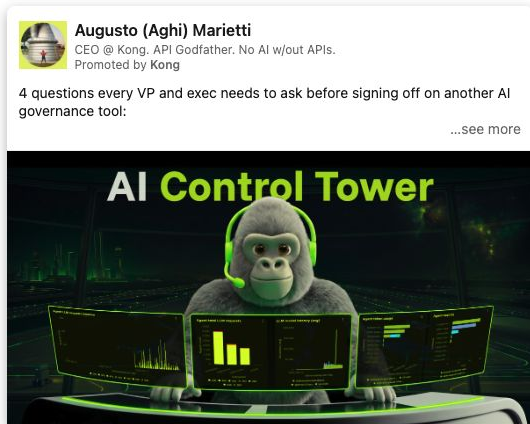

Read the full source post text
4 questions every VP and exec needs to ask before signing off on another AI governance tool:
1) Does this give me enforcement of AI traffic, or just observability?
2) Can I see token breakdowns by teams, APIs, agents, and model providers?
3) How will this secure and govern our growing list of MCP servers?
4) Will my AI policies be supported across EVERY model and cloud provider?
Your "AI control tower" should consolidate siloed functions (spend visibility, MCP security, policy enforcement, etc.) into one control plane that spans the full AI ecosystem: models, agents, MCP servers, and the data connecting them.
EVERY model. EVERY cloud. EVERY agent.
This is why hundreds of enterprises are scaling their AI traffic with Kong. There are many AI dashboards on the market, but who's in charge?
Start building yours: https://lnkd.in/erFwZ3HF
See the sponsored post. Kong provides API and AI infrastructure for organizations managing traffic between applications, agents and models. Kong sponsored CEO Augusto Marietti's single-image post for executives evaluating AI governance tools. He gives them four questions about enforcement, token-cost visibility, MCP-server governance and policies across models and clouds.
How it opens: “4 questions every VP and exec needs to ask before signing off on another AI governance tool:” Marietti names the reader, the buying decision and the format in one line. The questions must then help someone evaluate a tool, rather than disguise a feature list.
One of his questions asks:
“Does this give me enforcement of AI traffic, or just observability?”
The neon-green “AI Control Tower” image has panels for requests, latency, token use and agent cost. It sets the category; the questions do the selling because a technical team can test the answers. Write evaluation questions that matter to the buyer even when one exposes a limitation in your own product.
A fictional identity-security company could write:
“Before buying another access-review tool, ask four questions: Can an owner see why a person has access? Can they revoke it in the source system? Does the review cover contractors? Can an auditor replay the decision six months later? If your current tool only emails a spreadsheet, start with the source-system question.”
A security practitioner should check the questions and show buyers how to test each answer.
12. CodeRabbit and Raul Junco: start with the questions the user needs to answer
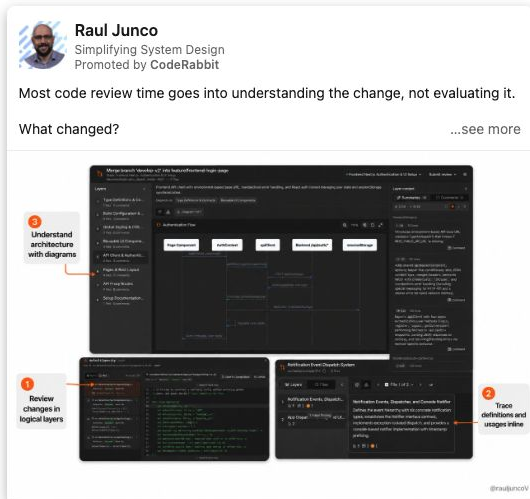
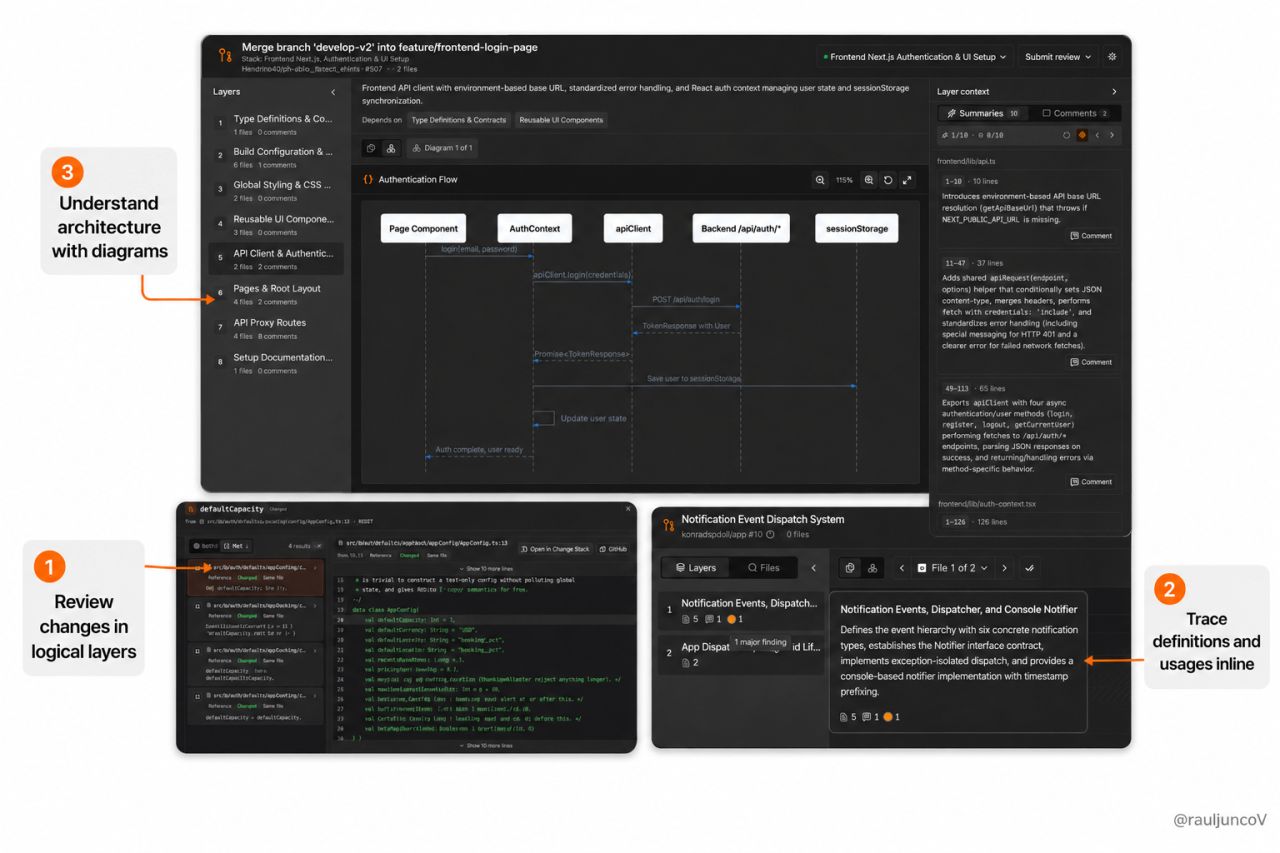
Read the full source post text
Most code review time goes into understanding the change, not evaluating it.
What changed?
Why did it change?
Which files belong together?
What depends on this function?
Before you can say whether the code is correct, you first have to reconstruct the story behind it.
It is crazy how coding has changed since ChatGPT and Claude showed up, yet code review still looks like it did in 2008.
I liked what CodeRabbit is doing to change that.
Instead of showing a pull request as a flat list of files, it organizes related changes into independent cohorts. Each cohort gets its own ordered layers.
Each cohort becomes a guided walkthrough with summaries and diagrams where they help.
It also includes:
• Code Peek to find definitions and usages without leaving the review
• A Chat Agent that understands the full PR context
• Severity labels to separate critical issues from minor improvements
• Native GitHub reviews, so the existing workflow stays intact
AI has made generating large pull requests much easier.
Now the review interface needs to catch up.
Code review should help you understand the change before asking you to approve it.
Check this out -> https://lnkd.in/eWbpcFEc
See the sponsored post. CodeRabbit sells AI-assisted code-review software. It sponsored software educator Raul Junco's post for developers reviewing large pull requests. He starts with the mental work: understanding what changed, why files belong together and what depends on a function. The product explanation follows that problem.
The post's opening is the lesson:
“Most code review time goes into understanding the change, not evaluating it.”
The screenshot points to three interface areas: logical layers, inline definitions and diagrams. A developer can connect the questions in the post to places in the product. A similar ad should show the screen where the buyer actually checks the answer, rather than only saying the interface is easier to use.
A fictional data-catalog company could write:
“Before approving a dashboard change, I need to know which metric definition changed, which reports use it, and who owns the source table. Opening five tabs to reconstruct that chain is the review. Our lineage view puts those answers beside the proposed change, so the analyst can check the definition before approving the chart.”
Show the lineage view with a real example. Measure review speed or quality before claiming either improved.
Choose one post: a worked example
Imagine Cedarfield, a fictional company that helps marketing teams route demo requests to the right sales representative. It wants revenue operations leaders to check their routing process using a one-page worksheet.
The team has three possible posts:
| Post | What the buyer gets | Decision |
|---|---|---|
| CEO announces a funding round | Company news, thanks and hiring plans | Skip it for this campaign. It doesn't help the buyer check demo routing. |
| Implementation lead shows a test request arriving without an owner | A problem the buyer can check in their own CRM, followed by a routing worksheet | Choose it after checking the demonstration and obtaining the author's approval. |
| Founder says customers doubled pipeline by replying faster | A dramatic outcome with no supporting evidence | Hold it. Ask for the evidence or choose a claim the team can demonstrate. |
The implementation lead's draft begins: “Your demo form can work perfectly while the request still goes nowhere. Submit one test request with a company name your sales team will recognize. Open its CRM record. Can you name the person who owns the next action?”
That gives the buyer something to do immediately. A short recording can then show the test record, the ownership rule and what changes when the request comes from a different territory. The worksheet continues the same task after the reader leaves LinkedIn.
In this passage at 09:52, practitioner Adam Holmgren describes one way to find candidate posts: review your own organic history for posts that drew more attention than usual, then inspect whether they teach something and connect to a next action. His shortcut starts with likes. Use those as a shortlist signal; choose the post that fits your buyer, has support for its claims and can lead to the campaign's stated action. This is practitioner advice, not a LinkedIn eligibility rule.
Load the selected 09:52–10:11 passage from Adam Holmgren.
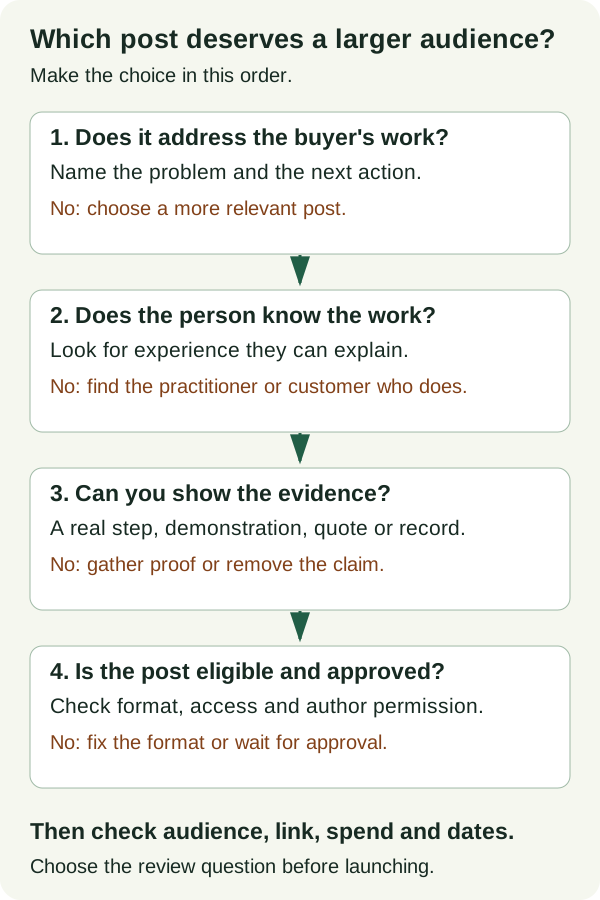
Read the completed Cedarfield plan to see the full candidate posts, recording brief, approval steps, fictional test budget and worked review. Open the editable blank plan to compare your own posts.
Launch the post in Campaign Manager
Start with the exact public post you want to sponsor and the person who can approve it. LinkedIn's current setup instructions and format rules are the sources for this walkthrough.
1. Check that the post is eligible
The author's profile must show their full name, and the post must be public.
You can promote text, a single image, video, documents, native articles or newsletters, and eligible LinkedIn Live Event posts. Polls, celebrations, multi-image posts, and reposts are excluded. For a repost, use the original author's post. LinkedIn's current Thought Leader Ads guidance, checked 29 October 2026, includes documents.
For LinkedIn Live Events, the author must be an attendee of an event created by the Page associated with your ad account. Their post must contain the event link, including its preview.
2. Check your Page and ad-account access
You need both:
- Super admin, content admin or Sponsored Content poster access on the company Page.
- Creative manager access or higher on the ad account.
For a Showcase Page, check your access on its parent company Page too.
3. Create or choose a compatible ad set
In Campaign Manager, open the correct ad account. Create a new ad set, or edit an existing Thought Leader Ad set whose objective and format match the post you want to sponsor.
An ad set holds your audience, placements, dates and budget. Choose the objective and format together:
| Your post | Format to select | Available objectives |
|---|---|---|
| Text or one image | Single image | Brand awareness or engagement |
| Video | Video | Brand awareness, engagement or video views |
| Document | Document | Brand awareness or engagement |
| Eligible LinkedIn Live Event | Event | Brand awareness or engagement |
| Native article or newsletter | Article and newsletter | Brand awareness or engagement |
For a text-only post, choose Single image too; that is LinkedIn's format label even when the post has no image.
Set the audience, placements, dates and spend limit for the test. Record whether LinkedIn Audience Network is enabled. Then continue to Ads in this ad set, where you can select the member’s existing post.
4. Find the member's post
Open Ads in this ad set, then:
- Choose Browse existing content.
- Select LinkedIn members, then Posts.
- Search by the member's name or the post URL.
- Check that you have the right author and exact post.
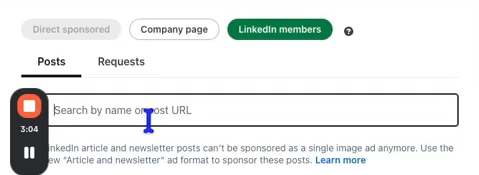
Campaign Manager can find employee posts and posts from first- or second-degree connections. For third-degree or more distant members, use Creator Marketplace to find the post and request sponsorship.
5. Request the author's approval
- Select the post you checked in the previous step.
- Click Request approval.
- In the confirmation dialog, click Send.
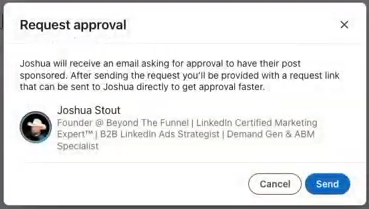
The author receives an email notification and can approve or reject the request.
If the request is declined, hold that post. Ask the author what needs to change, or choose another post whose author agrees to sponsorship. Record the decision in your worksheet. A different post needs its own eligibility check and approval; the declined request does not cover it.
If they need a direct reminder:
- Open View Request.
- Click Copy link (shown as Copy request link in the video below).
- Send that link to the author.
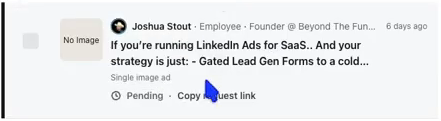
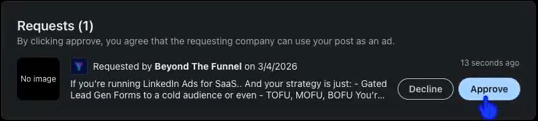
Check the Requests tab for the result: Pending, Approved or Declined. The author may also choose auto-approval for future requests.
In the Beyond The Funnel walkthrough at 03:11, the presenter explains how to request approval and share the request link. It was recorded in March 2026; use LinkedIn's current instructions if the interface labels have moved.
Load the selected 03:11–03:59 passage from Beyond The Funnel.
6. Check the approved ad before delivery
Check these together before launching:
- Correct author and post.
- Correct format and audience.
- Budget and dates for this test.
- Working destination link, if the post promises a resource.
Single-image, video, and document Thought Leader Ads have no CTA button. Put the destination URL in the member's post text. Event Thought Leader Ads can include a CTA button.
If the copy or link needs fixing, coordinate the correct post with the author before sponsoring it. Campaign Manager does not give you a free hand to rewrite someone else's post.
If the author revokes permission, LinkedIn stops the ad immediately. The ad set can continue delivering other approved ads, so check its remaining ads and spend settings too.
Measure the job you chose
Campaign Manager reports the paid ad. The author may see combined organic and paid impressions and reach on their post. Keep those totals separate when judging your test.
LinkedIn also reports member follows and clicks to the member profile for sponsored member posts. The official overview notes that the author's combined totals do not reflect LinkedIn Audience Network metrics.
For Cedarfield, the campaign's job is to get relevant revenue operations buyers to use the routing checklist. The completed worksheet keeps four sources separate:
- Campaign Manager for paid spend, impressions and landing-page clicks.
- The author's post analytics for combined organic and paid totals.
- Website analytics for tagged sessions and checklist downloads.
- CRM records for qualified conversations and later sales outcomes.
Define the action before launch. A download tells you someone collected the worksheet; it does not tell you they used it. For Cedarfield, worksheet use would mean completing a test form submission and checking who owns the resulting CRM record. The team could ask readers whether they completed that check and what they found. Record those replies separately from downloads, and call them self-reported use.
If you can only measure downloads, make downloads the measured action and keep actual use unknown. Do not rename a download “use” to make the report look better.
Suppose the fictional test spends $580 and records 120 paid landing-page clicks. Cost per landing-page click is $4.83. That calculation says nothing about lead quality until the team checks what those visitors did.
If website analytics shows fewer sessions than Campaign Manager shows clicks, check tracking, consent and load behavior before deciding the difference is wasted traffic.
The completed review shows these calculations alongside example download and conversation counts. Every number is hypothetical. Use your own economics to decide whether a second test is worth funding.
What should change after the test?
Use the problem you observed to choose the next change:
- Wrong people reached: repair the audience before rewriting the post.
- Right people, misunderstood message: revise the opening or demonstration.
- Clicks, but readers cannot get the resource: fix the destination.
- The same question from relevant buyers: answer it in the next post.
Decide which observation would cause you to continue, revise or stop before spending. A comment or site visit does not prove the ad caused a deal. Keep later CRM outcomes in the review, with the attribution method and its limits.
Get the worksheet and copyable prompts
Start with the completed Cedarfield plan to see the decisions, campaign settings and review in one place. Then open the blank worksheet and fill it in for your business.
You can edit the worksheet in your browser, print it, or download your edited copy as an HTML file. Neither version needs a signup.
Prefer plain text? Download the blank Markdown plan or completed Markdown example.
Choose the person and post
Copy this prompt into your agent and supply the facts it asks for. It includes the reference example, so you can use it without this article.
You are helping a B2B marketer select one person's LinkedIn post for a Thought Leader Ad. The company pays to distribute an eligible public member post under the member's name; the author must approve sponsorship. Choose for the stated buyer and campaign job, not for seniority, follower count, or organic reactions alone.

Business inputs (ask the user to paste them):
1. Company, product, and what the buyer can do next.
2. Specific buyer role, company type, buying situation, and problem.
3. Campaign job: teach a problem, explain a use case, bring a customer perspective, answer an objection, or invite the right people to an event. State the main decision the campaign should inform.
4. For each of at least two candidate posts: author and relationship to company; why the author knows the topic; exact public post URL or “not published”; full copy; media type and what is actually visible/audible; evidence for each factual claim or quote; intended next action and working destination; permission status.
5. Available targeting, total budget ceiling, test dates, measurement sources, and any legal/customer review needed.

Current LinkedIn rule summary, checked October 29, 2026: a sponsored member profile needs a full name and the post must be public. Eligible content includes text, single-image, video, document, article/newsletter, and certain LinkedIn Live Event posts. Celebrations, polls, multi-image posts, and reposts are excluded. The author must approve the sponsorship request. Campaign Manager can find employee and first- or second-degree connection posts; requests for third-degree or more distant members use Creator Marketplace. Brand awareness and engagement are available for supported formats; video also supports video views. For a document post, select the Document format with brand awareness or engagement. Single-image, video, and document Thought Leader Ads have no CTA button. Check the live official guidance before launch: https://www.linkedin.com/help/lms/answer/a1399568 and https://www.linkedin.com/help/lms/answer/a5965137.

Work through each candidate on the same six questions: Does it address the named buyer's actual work? Does this person have direct standing to say it? Is there a point more specific than a product announcement? Can the central claim or demonstration be checked? Can a viewer understand the creative? Does the next action continue the post's lesson? Treat post eligibility and author approval as separate launch gates. Do not make up a numeric score or universal performance threshold. A candidate can be strongest editorially but still on hold for proof or approval.

Return exactly these sections:
A. Input ledger: supplied facts, unresolved facts, and the owner or source needed for each unresolved fact.
B. Candidate comparison table: author/post URL, buyer fit, specific proof, weak point, eligibility, permission, next action, and choose/revise/hold/reject with one concrete reason per decision.
C. Selected post: the best eligible or conditionally eligible choice, why it beats the alternatives, and exact changes needed before requesting approval. If no post qualifies, say so and specify what post to create or verify.
D. Launch brief: author, exact post URL, compatible format/objective, audience, total spend cap and dates, tracked destination, permission owner/status, factual approval owner, comment owner, stop conditions, and review date. Put UNKNOWN where an input is missing.
E. Measurement decision: paid delivery, relevant engagement, site action if linked, and later account/CRM signals to inspect. State what result would lead to continue, revise, stop, or collect more evidence using the user's goals and economics, not a fabricated benchmark.

If buyer, campaign job, or the full candidate copy is missing, ask for it before selecting. You may still return a partial comparison marked provisional. Never invent a post, author experience, media scene, quote, result, approval, destination, audience size, or performance claim. Do not call a public organic post a verified Thought Leader Ad without separate paid evidence. Cite the supplied post URL for any source-specific observation.
Adapt a customer interview
Copy this prompt into your agent and supply the facts it asks for. It includes the reference example, so you can use it without this article.
Make an original author-led LinkedIn post brief from a real conversation with a customer or practitioner. Extract one teachable process change the buyer can examine. Do not turn a prestigious guest's name into the whole idea.

Reference mechanism: Figma sponsored a video post by CEO and co-founder Dylan Field (Ad Library: https://www.linkedin.com/ad-library/detail/1499184766). In the captured post text, Field recounts speaking at Config with Cisco President and Chief Product Officer Jeetu Patel. The post says Cisco design reviews previously took six weeks to pass through layers of management, then individual contributors began presenting directly to executives. Field uses that process change to discuss design culture. The transferable method is to lead with the guest's concrete decision, explain the old and new process, and draw a lesson the buyer can apply. The Ad Library record confirms sponsorship but not campaign outcomes; do not invent what the video shows or says.

Supply: sponsor company and product; buyer and why this process matters to them; author and their relationship to the interview; guest name, title, organization, and permission to identify them; interview recording, transcript, notes, or published source; exact approved facts and quotes; old process, change made, and observed result if substantiated; what the author learned; planned clip or image; one next action and working destination; review/approval owners and LinkedIn sponsorship status.

Return exactly:
A. Source map: each proposed process detail and quote matched to a supplied transcript timestamp, note, or public source. Label anything not supported. Do not infer a quote from a summary.
B. Lesson choice: one specific practice the buyer can examine, why it matters for their work, and why this author is the right person to relay it.
C. Original post brief: opening with the problem or surprising process detail, old way, decision to change it, new way, buyer takeaway, and one next action.
D. A full 150–230-word first-person draft. Use only approved facts. Attribute the guest's statements. Use [CONFIRM WITH GUEST] for any unapproved detail and no invented quotation marks.
E. Media plan: if a clip exists, identify the verified timestamp and what is actually shown or heard; otherwise suggest a still or text post without claiming a video exists. State what the image or clip adds beyond the text.
F. Publication/launch checks: guest and author factual review, media permission, public-post eligibility, compatible format, member sponsorship approval, and source/destination links.

If no interview source or guest permission is supplied, ask for those inputs and provide only an interview outline, not a publishable story. Never invent a customer conversation, speech, quote, time saving, result, endorsement, media scene, permission, or ad performance. Do not copy Field's prose or borrow Cisco's numbers for the user's company.


Before drafting, identify who will publish the post and whether that person is the interviewer or the guest. Write in that named author's voice. An interviewer must attribute the guest's experience; never turn the guest's first-person transcript into the interviewer's own experience. If the author or relationship is missing or ambiguous, ask for it and return only a provisional brief until clarified. If the guest is explicitly the author, their own account may use first person.
Adapt an employee workflow
Copy this prompt into your agent and supply the facts it asks for. It includes the reference example, so you can use it without this article.
Create an original, author-led LinkedIn post brief from a real employee workflow. Use the source example as a structural reference, not text to copy.

Reference mechanism: OpenAI for Business sponsored a single-image post by strategic-finance employee Amir Tavoli (Ad Library: https://www.linkedin.com/ad-library/detail/1508308714). In the captured post text, he first describes month-end budget-versus-actual work: pulling exports, copying data across spreadsheet tabs, updating formulas and pivots, and reconciling purchase orders, accruals, and transaction detail. He says the hard part is tracing a variance to its source so partners can review the math. Only after that does he explain the Codex workflow that standardizes and reconciles inputs. The transferable method is “show the real work and its difficult step, then show what the tool changes.” This is the sponsor's account, not independent proof of performance. Do not reuse OpenAI's wording, product claims, or results.

Supply these business inputs: company and product; exact buyer and the job they do; employee author's name, role, and firsthand experience; one real before-workflow with sequence, tools, and failure point; one real after-workflow that the product can demonstrate; a screen, artifact, or process record that supports it; approved facts and prohibited claims; one reader action and working destination; planned format; author review and sponsorship approval status.

Return exactly:
1. Fit decision (good fit, revise, or hold) with the specific work detail that earns the author's voice. If the author did not do or closely observe the work, hold.
2. Evidence ledger with each material statement you intend to use, its supplied source, and what still needs verification.
3. Original post brief: target reader, one-sentence point, opening based on the work, three beats (before step, hard part, after step), media demonstration, and one next action.
4. Only when the supplied evidence supports the material workflow claims, a complete first-person draft of 130–220 words in natural language. Use only supplied facts. Put [VERIFY: exact fact] where necessary instead of filling a gap. The author should be able to edit it into their own voice.
5. Creative instructions: what a single image or video should actually show, how to avoid sensitive data, and which visible detail proves the workflow. Do not describe an unsupplied video scene as if filmed.
6. Author and launch checks: factual review, public-post eligibility, member consent, compatible ad format/objective, URL check, and the point at which the post can be requested for sponsorship.

If the buyer, author's firsthand connection, before/after workflow, or proof is missing, ask up to five targeted questions first and produce only a provisional outline. A plan to record a demonstration is not proof that the workflow works. In that case omit item 4 entirely; do not produce a first-person draft with verification placeholders. List the exact screen, record or demonstration needed before drafting. Verification markers may identify small details in an otherwise supported draft; they must not replace evidence for the central claim. Never invent speech, customer quotes, numerical improvements, measured results, permissions, post URLs, or product capabilities. The Ad Library link verifies that the reference was sponsored; it says nothing about the new author's approval or the reference campaign's outcome. Keep any hypothetical illustration clearly labeled and outside the publishable draft.
Adapt a customer account
Copy this prompt into your agent and supply the facts it asks for. It includes the reference example, so you can use it without this article.
Build an original LinkedIn Thought Leader Ad post brief for a customer author. Protect the customer's voice and distinguish their actual experience from a sponsor's wish list.

Reference mechanism: Numeral sponsored a video post by Becca Millstein, co-founder and CEO of Fishwife (Ad Library: https://www.linkedin.com/ad-library/detail/1457457374). In the captured post text, Millstein says Fishwife has scaled across direct-to-consumer and wholesale channels, describes sales tax as a complication she does not want to manage herself, and says Numeral and its team give her confidence to focus on the business. The transferable choice is a customer explaining a specific, unglamorous job and what changed in her own language. The record does not establish typical customer outcomes, a performance result for the ad, or the footage's spoken words. Do not borrow her phrasing or put new claims in her mouth.

Supply: sponsor company and product; buyer and buying situation; customer author's name, role, company, and actual relationship to sponsor; the specific work the customer faced; what the customer can personally verify changed; any remaining limitation; verbatim approved quote if one exists; evidence or contact who can verify each claim; media already captured or planned; disclosure/contract requirements; exact next action and destination; customer's editorial and LinkedIn sponsorship approval status. Mark any input unknown rather than guessing.

Return exactly:
A. Fit and independence: explain why this customer perspective helps this buyer, what belongs in the customer's voice, and what would turn it into a vendor testimonial with no substance.
B. Claim/permission table: proposed statement, customer-supplied source, approval owner, status, and whether it may appear in the draft now.
C. Post brief: buyer problem, one concrete customer moment, the customer's own reason for caring, what the sponsor does, one next action, and a media plan that shows the work rather than only a smiling customer.
D. An original first-person post draft of 120–200 words using only the customer's supplied facts and exact approved quotes. If a fact or quote is missing, use [CUSTOMER TO CONFIRM] or omit it. Keep the customer's normal tone; do not imitate Millstein.
E. Production and launch checks: customer editorial review, any required disclosure, public-post and format eligibility, member sponsorship request, destination test, and a plan if approval is declined or revoked.

If the customer has not described the experience in their own words, ask for that before writing a publishable first-person post. You may provide an interview question list and a non-publishable structure. Do not invent a customer anecdote, quote, speech, approval, numerical change, or campaign performance. Do not imply an Ad Library listing grants permission to use a different customer's name or media. If there is no customer author, recommend the employee-workflow mechanism instead of faking a customer account.
Adapt buyer evaluation questions
Copy this prompt into your agent and supply the facts it asks for. It includes the reference example, so you can use it without this article.
Turn a real buyer evaluation into an original member post built around questions buyers can check. The goal is to help a buyer make a better decision, not to disguise a feature list as advice.

Reference mechanism: Kong sponsored a single-image post by CEO Augusto Marietti (Ad Library: https://www.linkedin.com/ad-library/detail/1597958026). In the captured text, he asks executives evaluating AI governance tools whether a tool enforces AI traffic or only observes it, whether they can break down tokens by teams and providers, how MCP servers are governed, and whether policies work across models and clouds. He introduces Kong's product argument after the questions. The transferable method is a short set of discriminating, answerable buying questions tied to consequences. Kong's enterprise-customer claim in the post is its own claim, not independent evidence or a benchmark to reuse.

Supply: company, product and category; exact buyer and purchase decision; author's name, role, and direct basis for advising on the decision; two to five real evaluation questions buyers currently face; why each answer changes a purchase or implementation decision; how a buyer can verify each answer; where your product fits and where it does not; approved supporting proof; the next reader action and destination; author and sponsorship approval status.

Return exactly:
1. Buyer decision in one sentence, plus a fit verdict for a question-led post.
2. Question table with question, why it matters, how to test the answer, what a weak answer costs, and the supplied evidence behind your advice. Remove leading questions that only restate your product features.
3. An original first-person LinkedIn post draft of 120–200 words: a direct opening, three or four numbered questions, one brief reason to check the answers, and a single next action. Do not claim every competitor fails the test. Use [VERIFY] where an answer or capability lacks evidence.
4. Creative plan for a readable single image or text-only post; indicate which questions should remain in post text so the reader can inspect them without zooming.
5. Launch checks for factual review, public-post/format eligibility, member approval, linked destination, and the measure that would show whether relevant buyers engaged with the questions.

If the buyer decision or testable questions are missing, ask focused questions before drafting. If supplied material gives operational checks but no buyer-research evidence, label them proposed self-checks. Do not describe them as questions buyers commonly ask. Request buyer validation before presenting them as evidence of market demand. If fewer than three supported questions are available, return only those questions and ask for the missing evidence instead of inventing questions to meet the requested count. If the product cannot honestly answer a question, retain the question and state the limitation or choose another question that matters to buyers; never pretend the capability exists. Never invent author expertise, vendor comparisons, customer quotes, performance, permissions, speech, or data. The source Ad Library URL verifies the reference ad, not the effectiveness of this pattern for the user's market.
Review the campaign evidence
Copy this prompt into your agent and supply the facts it asks for. It includes the reference example, so you can use it without this article.
Review one LinkedIn Thought Leader Ad test and recommend a next decision. Keep paid Campaign Manager metrics, the author's combined organic-and-paid post totals, website data, and CRM evidence separate. Do not call attention or clicks revenue.

Supply: the campaign's original buyer, job, target audience, objective, post URL, author, exact next action, total budget cap, dates, placements (including LinkedIn Audience Network), success decision agreed before launch, and any comparison campaign with its audience/objective/date definitions. For each data source, include date range, attribution window if relevant, metric names and definitions, values, and export or screenshot reference. Provide Campaign Manager spend, paid impressions, paid landing-page clicks if available, member follows/profile clicks, and relevant engagement; author-view organic-plus-paid reach/impressions; web analytics tagged sessions and the chosen action; CRM/account records with dates and source notes; qualitative buyer comments. State what is missing.

Current LinkedIn guidance says Campaign Manager reports Thought Leader Ad performance. The member can see combined organic and paid impressions/reach on the post; that combined total excludes LinkedIn Audience Network metrics. Member follows and member-profile clicks are reported engagement measures for sponsored member posts. Source: https://www.linkedin.com/help/lms/answer/a1399568 (checked September 23, 2026). Never use the author's combined impressions as the denominator for paid CPM or merge paid clicks with website sessions as though they were the same event.

Choose the output branch before writing. This input check takes precedence over the numbered report below.

MISSING-INPUT BRANCH: If the original campaign job, paid spend, definition of paid impressions, or intended reader action is absent, return only:
A. Questions for the missing required inputs.
B. A provisional data ledger containing supplied facts and explicit unknowns.
Then stop. Do not add arithmetic, a buyer-quality analysis, a campaign decision, or a stakeholder report. Do not fill these sections with “not calculable” or other placeholders.

COMPLETE-INPUT BRANCH: Only when those four inputs are supplied, return:
1. Data ledger: source, time window, metric definition, value, and known coverage or attribution limit for each supplied row. Identify mismatched windows and missing denominators.
2. Arithmetic table: paid CPM = paid spend / paid impressions × 1,000; cost per paid landing-page click = paid spend / paid landing-page clicks. Calculate only when numerator and denominator refer to the same paid scope and the denominator is positive. Otherwise write “not calculable” and explain why. Do not substitute all clicks, post impressions, or author totals.
3. Buyer-quality read: what the roles, accounts, comments, site actions, and CRM conversations actually show. Distinguish observation from causal inference. Quote only supplied comments with their source; paraphrase otherwise.
4. Decision: continue, revise, stop, or collect more evidence. Connect it to the predeclared campaign job, budget, and evidence. Name one change for a next test, what would be held constant, and the required new approval or spend decision. If evidence is thin, choose collect more evidence instead of making a confident call.
5. One-paragraph report for a stakeholder in plain language, including what happened, what remains unknown, and the next action.

If original goal, paid spend, paid impression definition, or the relevant action is missing, ask for the missing item and provide a provisional ledger only. Do not invent data, speech, quotes, attribution, revenue, customer influence, approval, or performance. Do not impose a universal CTR, CPC, or conversion benchmark. A later opportunity at a target account is a follow-up signal; it is not proof this ad created the opportunity without additional evidence.
Questions that come up before launch
Does the author need a large following?
No minimum follower count is stated in the official eligibility guidance reviewed here. Choose someone who can speak credibly to the buyer's work. Paid distribution can reach people outside the author's current audience. Follower count cannot rescue a post without a reason to read it.
Can I sponsor a customer's or outside creator's post?
LinkedIn says member, creator, and employee posts can be promoted, subject to discovery, eligibility, and the author's approval. For a customer or partner, settle claim approval and any commercial disclosure with them before sending the sponsorship request. The Ad Library examples above include both outside creators and customers; their presence does not tell us the private contract terms.
Can I edit the post after the author approves?
Plan around the author's existing post. The setup flow asks you to select that post and obtain permission for it. If the message or link is wrong, coordinate a corrected post with the author and request sponsorship for the correct version. Do not assume Campaign Manager can turn someone else's post into new company copy.
Are document and multi-image posts eligible?
Documents are eligible; multi-image posts are not. For a member document post, choose the Document ad format with brand awareness or engagement. The original public post still needs the author's sponsorship approval, and document Thought Leader Ads have no CTA button. See LinkedIn's format and objective table, checked 29 October 2026.
How do I know whether an example really ran as an ad?
An ordinary LinkedIn post proves the content exists, but not that a company paid to distribute it. For the examples here, the linked Ad Library record identifies the company sponsor and the person posting. That establishes the format; it does not establish campaign results. Check both the source post and the sponsor evidence whenever you make your own swipe file.
You can run a first test once you have the author, exact post, buyer, next action, and approval owner in the same worksheet. If those choices are still unclear, get a free Demand Gen Roast. Maestro will review your ad accounts and demand gen strategy, show what it would fix first, and ask about your market, deal size and current paid setup before booking.