
LinkedIn A/B testing: set up a paid ad test and read the result
LinkedIn's native A/B test compares two ad sets that differ by one selected variable. You can test an ad, an audience, a placement, or an optimization setting. Choose the metric before launch. At the end, read the Campaign Manager result and then check whether the variant produced the leads your sales team can actually use.
If you meant A/B testing organic LinkedIn posts, this is a different job. Comparing two posts at different times is a manual content experiment, not the paid Campaign Manager test described here.
Start with a question you can answer
Write: “For [audience], will changing [one variable] reduce cost per [chosen test metric] while preserving [qualified business outcome]?” The bracketed fields are the test. If you change the audience, headline, and landing page together, you will not know which change caused a difference.
Choose one primary platform metric and one CRM outcome. The metric available in Campaign Manager depends on your objective. For example, a cost-per-click test can answer which variant bought clicks more cheaply. It cannot answer which variant created more qualified opportunities unless you connect and assess those later outcomes.
LinkedIn offers four variable routes:
Swipe to read all columns, or focus the table and use the arrow keys.
| Route | Change | Keep fixed | Example question |
|---|---|---|---|
| Ad | Format or content, such as copy or media | Audience, placement, optimization, offer, dates | Does headline B lower CPC for the same single-image ad? |
| Audience | Targeting | Ad, offer, placement, objective, bidding | Do skills plus seniority reach better leads than job-title targeting? |
| Placement | Placement, including LinkedIn Audience Network selection | Ad, audience, offer, optimization | Does adding Audience Network improve the selected metric? |
| Optimization | Optimization goal or bidding strategy | Ad, audience, offer, placement | Does Leads versus Qualified leads optimization produce better qualified outcomes? |
The Optimization route has a specific “Qualified leads vs Leads” option that prepopulates its variants. If you are comparing optimization goals, keep the bidding strategy the same when possible; LinkedIn recommends this for a cleaner comparison. If you are comparing bidding strategies, that difference is the question. See LinkedIn's Ad, Audience, Placement, and Optimization guides.
Anna Sonnenberg's Social Media Examiner walkthrough makes the shared-settings/variant distinction concrete and warns that a CPC winner can lose on conversions. Philip Ilic at B2B Hero suggests job titles versus skills plus seniority as an audience question. His duplicate-campaign workflow is a manual comparison; for a native test, use LinkedIn's Test flow below. Anastasiya Khvin at Aimers puts the CRM question plainly: cheaper clicks or leads can still mean worse sales quality. These are practitioner examples, not LinkedIn requirements or performance promises.
Complete the test brief before setup
Record the control and challenger, exactly what changes, and what stays fixed. Include objective, selected test metric, ad/offer, audience, placement, optimization goal, bidding strategy, conversion event, tracking parameters, dates, budget, and CRM qualification rule. Put a review date after the conversion window has had time to mature. If you need sales opportunity data, define how ad set and variant IDs will reach the CRM record before spending money. The LinkedIn ads reporting guide covers the broader reporting handoff; keep this brief focused on one test.
Set a decision rule you will still believe if the result disappoints you. For instance: “If LinkedIn finds a clear CPC winner, we will check distinct qualified people per ad set for the same cohort and mature window. If identity joins are missing, we will hold the CRM decision.” Avoid choosing a business threshold after seeing which variant won.
LinkedIn's best-practices guide recommends one ad per ad set where possible and a test metric that fits the objective. A native A/B test cannot run alongside a Brand Lift test in the same account. LinkedIn says some members can appear in both test and control groups, so the split is not perfect isolation. Its requirement table lists $700 lifetime and $20 daily budget options; the recommendation row lists the same amounts and a 21-day duration. Check the actual budget type, amount, currency, and warnings shown in your account. These table entries do not tell you to spend both amounts or establish a separate minimum for each ad set.
On a small screen, swipe the diagram or focus it and use the arrow keys.
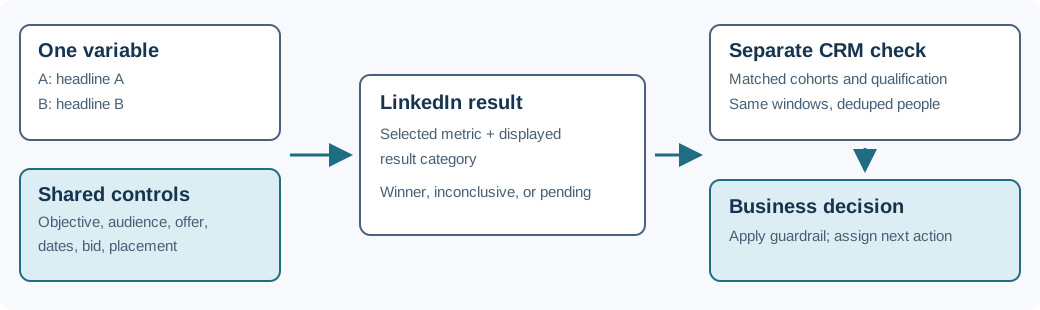
Create the native A/B test in Campaign Manager
LinkedIn's current creation guides describe this sequence:
- Open the ad account in Campaign Manager. Go to Measure → Test → Create test → A/B test.
- Give the test and both ad sets descriptive names. Choose Ad, Audience, Placement, or Optimization as the variable.
- Choose the test budget type and amount, then start and end dates. The guides say tests run at least two weeks and at most 90 days. The best-practices guide recommends 21 days. You cannot activate a test on the day you create it.
- Set the shared objective and selected test metric. Configure the settings that are not your variable once. Campaign Manager then lets you set the two versions of the selected variable. It creates the two ad sets needed for the test.
- Add the ads, review the summary and both ad-set budgets, resolve any red warnings, and launch. If the account or creative is not ready, save the test as a draft.
The order of shared settings and variant settings differs by route. On the Ad route, choose whether to compare formats or content. On Audience, define Audience A and B. On Placement, configure Placement A and B. On Optimization, configure each optimization variant. Read the specific LinkedIn guide for your chosen route as you work; Campaign Manager's displayed eligibility and budget requirements govern your account.
Before launch, check the conversion definition and ad-set identifiers. A platform test on CPC can run without a CRM join, but a later claim about qualified pipeline cannot. For EEA or Switzerland targeting, LinkedIn says its cost-per-paid-conversion and cost-per-qualified-lead metrics include only members who explicitly consented. Record that scope when you compare those metrics with CRM totals.
Leave the comparison intact while it runs
Monitor delivery and tracking without rewriting the challenger halfway through. LinkedIn's edit guidance advises minimal changes after launch; name, end-date extension, and budget increase are examples. A pause longer than a week may hurt result validity, and a canceled test cannot be restarted. Record any interruption before you interpret the readout.
To pause a running test, open Measure → Test, find its name, and choose Actions → Pause. Confirm Pause A/B test and check that the status becomes Paused. To restart it, choose Actions → Resume. If you need to end it permanently, choose Actions → Cancel, confirm Cancel A/B test, and check for Completed – User canceled. Cancellation cannot be undone by resuming the test.
At the scheduled end, both ad sets pause. That is the planned test lifecycle, so make the next campaign action a separate decision. If you need more time, use the result workflow rather than pretending the original window was longer.
Read two results, in order
First, open Measure → Test, find the test, and select View results. The LinkedIn result guide shows the selected metric, difference, winning ad set, and statistical strength. The category definitions include Winner found, Directional winner found/Inconclusive, Similar performance, and Pending. Results can begin appearing after two days, but an early result is not the completed test. LinkedIn says the P-value can fluctuate for seven days after the end. A conclusive result is not guaranteed.
If LinkedIn reports a clear winner, its test page offers Duplicate winner. If the result is directional or inconclusive, the page offers View results and a two-week Extend test duration action. Similar performance and pending are not a license to declare the lower number a winner. Save the actual report status and dates in your decision log.
Second, check the business outcome. Use the same ad-set IDs, defined cohort, attribution rule, and observation window for both variants. Reconcile clicks, form submissions, distinct people, qualified people, and opportunities as different units. One person can submit twice; two submissions are not two qualified people. A blank or broken identity join is unknown, not zero. If any source submissions are unresolved, or the CRM window has not matured, hold the downstream decision and name the missing evidence.
A fictional example: the click winner loses on qualified leads
A B2B analytics software company tests one headline in a single-image ad. The offer, landing page, audience, placement, objective, optimization, bid, dates, tracking, and qualification rule stay fixed. LinkedIn's selected metric is CPC. Assume the completed native report explicitly says Winner found: B. That report status is an assumption for this illustration; the click and spend figures alone cannot establish statistical strength.
Swipe to read all columns, or focus the table and use the arrow keys.
| Variant | Spend | Clicks | CPC | Form leads | Distinct CRM-qualified people | Cost per qualified person |
|---|---|---|---|---|---|---|
| A, existing headline | $1,200 | 100 | $12 | 12 | 6 | $200 |
| B, new headline | $1,200 | 150 | $8 | 15 | 3 | $400 |
The arithmetic is simple: $1,200 ÷ 100 = $12 per click for A; $1,200 ÷ 150 = $8 for B. On the selected CPC metric, B bought clicks more cheaply, and the assumed native report names B. In the fictional, fully reconciled CRM cohort, A produced six qualified people at $1,200 ÷ 6 = $200 each; B produced three at $1,200 ÷ 3 = $400 each. B's cheaper clicks did not translate into cheaper qualified demand. The business would investigate B's lead quality before duplicating it as the default.
That CRM conclusion requires complete joins, the same qualification definition, and a mature outcome window. If one B submission lacks a person match, “three qualified people” may be incomplete. Mark the CRM comparison pending and ask for the join. Do not turn a missing record into a zero, or claim A caused more sales from this small fictional table.
The example is deliberately one changed headline. A new headline plus a new lead magnet would test a package of changes. You might do that for a business decision, but you could not attribute the difference to the headline.
Record the decision before starting another test
Keep one line for the hypothesis, variable, fixed settings, selected metric, CRM outcome and qualification rule, dates, budget, native result status, CRM evidence status, and next action. A complete but unlaunched plan is ready for an operator to attempt native setup; account validation and launch still remain. A launched test whose outcome window is open is awaiting evidence. A platform winner with an unresolved CRM join is platform result known, business result pending.
Use the A/B test brief to set up the comparison, the worked example to check the arithmetic, and the review prompt to challenge a result before acting on it.
Copy the A/B test review prompt
Copy this prompt into your AI tool and paste your completed test brief. You can compare your work with the worked example. Open the plain-text prompt if you prefer to select it there.
Read or select the full prompt
If you want another set of eyes on the audience, ad, destination, and measurement path before choosing your first test, book a Maestro review. Bring the current campaign settings and the one question you want the test to answer.
Common questions
Can I A/B test organic LinkedIn posts in this workflow?
No. This native Campaign Manager workflow compares paid ad sets. Organic post comparisons need their own manual plan for distribution, timing, and outcomes; post engagement alone is not a native paid-ad winner.
Should I test creative or audience first?
Choose the question tied to the current constraint. If clicks are healthy but sales rejects most leads, audience or offer quality may deserve investigation. If the audience and offer are sound but nobody clicks, an Ad variable may be the more direct test. Do not claim a universal order from a broad benchmark.
How much budget guarantees a winner?
No fixed budget guarantees one. LinkedIn lists $700 lifetime and $20 daily minimum budget options; check the budget requirement shown for your test in Campaign Manager. Then decide whether the planned spend can produce enough observations on your chosen metric to inform a decision. LinkedIn explicitly says conclusive results are not guaranteed.
Can I use a LinkedIn winner as proof of better pipeline?
Only if the business outcome is measured and reconciled separately. LinkedIn's winner is about the selected platform metric. Keep qualified people, opportunities, and revenue tied to their own evidence.