
LinkedIn Brand Lift: plan the study and read the result
LinkedIn Brand Lift helps you measure how advertising changes survey responses about your brand. Use it when the decision concerns awareness, consideration, familiarity, or another supported brand metric. Start with the question the business needs answered, then check whether the account, budget, and study design can support it.
A positive consideration result does not tell you how many people bought. Keep the brand study alongside delivery and CRM reporting, with each answering its own question.
This guide covers standard account-level and selected-campaign Brand Lift studies. Connected TV has a separate workflow and reporting arrangements; use LinkedIn's CTV Brand Lift guidance for that route.
LinkedIn compares survey responses from a test group of members shown the ads with a control group of members not shown them. This is a comparison between groups, rather than the same people answering before and after a campaign. LinkedIn notes that some members can appear in both groups; preserve the native study method instead of assuming perfect separation. See the metric definitions.
Choose the decision before the survey question
Write the decision in a sentence. For example: “We need to know whether the campaign changes consideration of our workflow software before planning another campaign around the same message.” That gives the study a specific job.
Then choose a supported metric. LinkedIn documents ad recall, aided awareness, top-of-mind awareness, product consideration, recommendation, brand familiarity, and brand favorability, along with employer-related metrics. The question you select determines what the survey asks. See the current metric definitions.
These questions address different problems:
Swipe to read all columns, or focus the table and use the arrow keys.
| Business question | Metric to consider | What still needs separate evidence |
|---|---|---|
| Do people remember seeing the advertising? | Ad recall | Whether they remember the intended message or became buyers |
| Are people aware of the brand? | Aided awareness | Whether awareness produced demand or revenue |
| Would people consider the product? | Product consideration | Actual evaluation, purchase, or qualified pipeline |
| Has opinion of the brand changed? | Brand favorability | Which creative element caused the difference |
Record the exact native question and desired answers in the study brief. A loose label such as “awareness” makes later interpretation harder because different questions can produce different answers.
If the decision is which campaign variation performs better, start with the LinkedIn A/B testing guide. If the decision concerns recurring delivery and CRM reporting, use LinkedIn ads reporting. Neither task becomes a brand survey simply because the campaign runs on LinkedIn.
See what the member is asked
B2Linked’s Brand Lift walkthrough includes an actual published survey example: “Do you recall seeing an ad for B2Linked online or on a mobile device in the last 7 days?” Its three choices are Yes, No, and Not sure. That wording measures ad recall. A Yes answer does not establish product consideration or a purchase.
Use the example to check whether your proposed question answers the business decision. Record the actual question and answer mapping from your native setup. Do not assume the recall example’s answer choices apply to a consideration question.
The same walkthrough shows a historical Campaign Manager navigation screenshot with a separate Test item. Current LinkedIn instructions place the route under Measure. Use the current official steps below for setup; the screenshot demonstrates why an older navigation image should not be treated as today’s interface.
Check the budget and study requirements
LinkedIn's creation guidance, checked October 30, 2026, documents these budget minimums:
Swipe to read all columns, or focus the table and use the arrow keys.
| Number of brand questions | Minimum eligible budget in USD |
|---|---|
| One | $60,000 |
| Two | $90,000 |
| Each additional question | Add $45,000 |
A study requires one to six questions and runs for 14 to 90 days. Creating it requires campaign-manager access or higher. LinkedIn looks at the budgets of active campaigns and ad sets during the test period. For a non-USD account, use the native eligibility check because currency conversion can change the displayed requirement.
These are qualification requirements for the study. They do not guarantee enough responses or a conclusive result. Verify the actual account and included campaigns rather than treating the table as permission to launch.
For selected-campaign studies, the results aggregate across the selected campaigns. Selecting several campaigns does not give you a separate lift result for each one. Choose a scope you can explain to the person who will act on the report.
Record the budget owner, account operator, and results reviewer. The budget owner approves the plan and spending. The operator verifies the native setup and executes only an authorized launch. The reviewer checks the resulting evidence and its limits.
Prepare the setup in Campaign Manager
Start in the correct ad account. LinkedIn's current instructions use Measure → Test → Create test → Brand Lift test. Confirm the account identity before entering the study details.
- Name the test. Add a description that will help the team find it later.
- Choose the number of questions supported by the eligible budget.
- Select account-level scope or the specific campaigns to include.
- Set the start and end dates. Studies start at 00:00 UTC and end at 23:59 UTC. After the day's start has passed, the earliest available start is the next day.
- Enter the brand name, choose the survey language, and select the question types. Record the actual wording and answer choices shown in the account.
- Select the benchmark region and industry where applicable, then preview the survey.
- Review the study with its owner. Save as a draft if approval or evidence is missing. Launch only with explicit authority for that setup.
Top-of-mind awareness uses custom questions and does not have benchmarks. LinkedIn prohibits using it to solicit sensitive data. Confirm the current options and policies before preparing that question.
The test enters review after launch. For a live campaign-level study, campaigns cannot be added later. Check the scope before approving it.
Change or cancel a study
To find a study again, open Measure → Test, locate the exact test, and open its Actions menu. LinkedIn documents Edit for changing an eligible test and Cancel for ending a test. Confirm the account and study identity before choosing either action.
The current help pages give different descriptions of editing. The creation guide says an approved test cannot be edited. The editing guide lists all fields as editable in Draft and only the end date in Active, while also discussing hybrid CTV restrictions. Do not plan around changing an approved standard study: have the operator check the controls and rules for that exact test type and status first. In Review, Completed Results pending, Completed, and Rejected are listed as noneditable.
For cancellation, LinkedIn's documented path is Measure → Test → the study's Actions menu → Cancel. A canceled study cannot be reactivated. Record the cancellation time and resulting native status in the brief. This guide does not establish that canceling a study pauses the campaigns included in it; review campaign delivery separately if that is the intended outcome.
On a small screen, swipe the diagram or focus it and use the arrow keys.
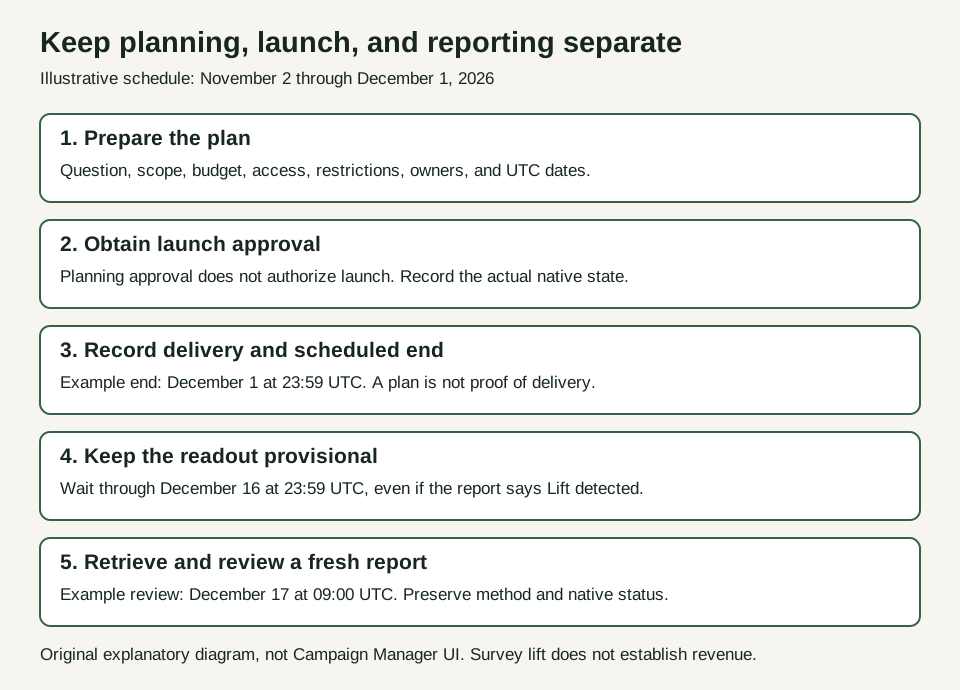
Original explanatory diagram based on LinkedIn’s creation and results guidance, not a Campaign Manager screenshot.
Separate visible results from final results
LinkedIn's results guidance says results become available after at least one desired response from each group and at least one undesired response from either group. Showing a result is different from establishing a detected lift status.
The same guidance says results and statistical strength can fluctuate for up to 15 days after the scheduled end date. It recommends waiting until that period has passed before accepting results as final. Put the final review date in the study brief before launch.
For example, a test ending December 1 at 23:59 UTC is still inside that window on December 6. The full 15-day period ends December 16 at 23:59 UTC; scheduling the review for December 17 avoids reading it early. A reviewer can record what the report currently shows and investigate missing data. They should not label the December 6 readout final because its displayed status looks encouraging.
Save the native report with its retrieval date, question, campaign scope, and reporting framework. Later changes should remain visible in the record rather than replacing the earlier observation without explanation.
Read percentage points and relative percent correctly
Absolute lift is the difference between the test and control groups' desired-response percentages, expressed in percentage points. Relative lift expresses that difference relative to the control percentage.
Consider a fictional arithmetic example: 24% of the test group gives the desired response, compared with 20% of the control group.
- Absolute difference: 24% minus 20% = 4 percentage points.
- Relative difference: (24% minus 20%) divided by 20%, multiplied by 100 = 20%.
Those are two descriptions of the same illustrative difference. Saying “20 percentage points” would be wrong. If the control percentage is zero, that relative calculation is undefined.
LinkedIn applies statistical methods to its reported results. The calculation above explains the units; it does not reproduce the native adjusted estimates or establish lift probability. Retain the native values and method in a real report instead of replacing them with a spreadsheet calculation.
Estimated total lift extrapolates the survey result across the reached population. It describes an estimated increase in members who would give the desired response. It is not a count of purchases, sales conversations, or qualified leads.
Keep current and legacy reports distinct
LinkedIn's methodology documentation describes a move from Frequentist to Bayesian reporting beginning in June 2026. Tests completed before that change retain the earlier framework.
Record which method the native report uses. Do not rename an older statistical-strength value as a probability of positive lift. When comparing studies, also compare the question, audience, campaign scope, timing, and response definitions. A change in the displayed number can reflect more than a change in advertising performance.
For current Brand Lift reporting, LinkedIn documents these status rules:
Swipe to read all columns, or focus the table and use the arrow keys.
| Native status | Documented strength | Response requirement |
|---|---|---|
| Lift detected | 90% or greater | Each group has at least 30 total responses, four positive responses, and four negative responses |
| Directional lift detected | 80% to below 90% | The same response requirements for each group |
| No lift detected | Below 80% | No minimum listed for this status |
| Not Enough Data | No strength conclusion available | Preserve the native label and inspect the question-level response evidence |
Response counts alone do not determine the native probability or status. If the supplied report is incomplete or inconsistent, ask for the actual native result. Do not manufacture a status from raw counts.
“Not Enough Data” means the report has not supplied enough evidence for a lift conclusion. Request the native report and response breakdown; missing counts remain Unknown. Do not relabel this state “No lift detected.”
“No lift detected” does not prove the true effect was zero. LinkedIn advises against making decisions based on that status. Preserve the result, identify the evidence limits, and use the platform's guidance to plan the next investigation.
Work through four B2B decisions
The following companies, dates, amounts, permissions, and report values are fictional. They illustrate decisions, not Maestro client results.
Alder: a complete plan awaiting launch approval
Alder has a fictional USD 65,000 eligible budget for one product-consideration question. Its operator has checked access, scope, and current restrictions in the simulated planning record. The plan runs from November 2 at 00:00 UTC through December 1 at 23:59 UTC, with final review on December 17 at 09:00 UTC.
Planning approval is recorded; launch approval is absent. The recommendation is to present the exact setup for approval. The study ID remains Unknown before creation, and all result fields remain Unknown before delivery. Neither gap prevents reviewing the plan. Neither authorizes the operator to launch it.
Open the completed prelaunch brief for the full question, answer options, scope, owners, and evidence boundaries.
Arbor: a positive report that is still provisional
Arbor Operations sells workflow software. Its one-question product-consideration study covers a selected campaign from November 2 through December 1, 2026. The fictional account has USD 65,000 of eligible budget and a simulated native eligibility confirmation. Planning and launch approvals are recorded separately.
On December 6, its analyst sees a simulated Bayesian report with 4 percentage points of absolute lift, 20% relative lift, a 92% lift probability, and the native status Lift detected. The 92% value is a fictional native output, not a probability calculated from the example response counts.
The analyst records the result as provisional. The study ended only five days earlier, and its final review is scheduled for December 17. The next action is to retrieve the report again after the post-end window, check its scope and status, and bring the interpretation to the budget owner. There is no automatic budget increase or revenue claim.
Open the worked Arbor brief to see the identifiers, question definition, roles, dates, and missing fields carried through the record.
Cobalt: a business question without an eligible budget
Cobalt wants to measure whether a product launch changes brand awareness. It has USD 25,000 planned for the relevant period. The question may be legitimate, but the supplied budget is below the current documented minimum for a one-question study.
The preparer records that gap and asks the budget owner whether the study belongs in a later plan. They do not raise the advertising budget merely to qualify. Any alternative research approach needs its own method and limitations; it should not be described as an equivalent LinkedIn Brand Lift result.
Harbor: a mature report with no detected lift
Harbor reviews a fictional final report more than 15 days after its scheduled end. The native report says No lift detected. Its reviewer records the question, method, scope, and result, then checks whether the evidence supports a performance decision.
The appropriate conclusion is that this report does not establish detected lift for the measured question. It does not prove advertising had no effect, identify a losing creative, or justify a revenue claim. A new test requires a specific change in the research plan and the owner's approval; repeating the same study without diagnosing the limitation is not a decision rule.
Open the completed Harbor readout for the question definition, response counts, exact timestamps, native status, and the next review action. The example separates a mature report from a conclusive result.
Use breakdowns and benchmarks within their limits
LinkedIn documents breakdowns by ad format, placement, company industry, company size, exposure frequency, job function, and seniority. These appear only when enough response data is available. Professional demographic figures are approximate, and the documentation limits breakdown significance to relative lift.
Treat an absent breakdown as unavailable. Do not write a company-size story from an empty chart. A pattern in a subgroup can support further investigation, but its reliability and scope belong beside the interpretation.
Benchmarks compare selected completed studies in a region and industry. LinkedIn describes them as directional and not tested for statistical significance. Its benchmark set includes completed tests with particular detected-lift statuses, so it should not be treated as a census of all advertisers. The results guidance advises against benchmark-based decisions when your status is No lift detected.
Complete one record before the review meeting
Open the blank study brief. Enter the business question, scope, question wording, budget evidence, owners, approvals, and dates. Keep unavailable fields as Unknown.
Compare it with the fictional worked example, then use the standalone review prompt with your completed brief. The prompt should return readiness, authorization, interpretation, missing evidence, and the next action. It cannot inspect your advertising account or supply missing results.
Reject a response that invents native eligibility, computes a lift probability from raw counts, treats a fictional receipt as live evidence, or turns estimated desired responses into revenue. Keep the original brief with the review so the next person can inspect the basis for the recommendation.
Bring one decision to the meeting: what the study can support now, what remains unresolved, and who owns the next evidence request. For help connecting LinkedIn campaign design and measurement to the wider paid-media plan, review Maestro's LinkedIn ads services.
Copy the brand-lift review prompt
Copy this prompt into your AI tool and paste your completed brand-lift brief. You can compare your work with the worked example. Open the plain-text prompt if you prefer to select it there.