
Facebook Messenger Ads guide and flow workspace
Facebook Messenger ads: decide the route, build the flow and prove it is ready
Start with the route
See the planning and launch decisions separately
Load a fictional Messenger plan, a website route or the blank record. The same evaluator used by the download checks every branch, owner, CRM field and native receipt.
Open the full record ↓Checking native evidence…
- Planning gaps
- —
- Evidence requests
- —
Facebook Messenger ads send someone from a Meta ad into a Messenger conversation with your business. They can work well when a short exchange helps a buyer take the next step. They are a poor fit when nobody owns the inbox, the offer needs a long private application, or the important action belongs on a website.
This guide helps you make that choice, then build the opening, qualification path, human handoff and CRM record. You will leave with one of three answers:
- Ready for native setup — the plan is complete, but Meta account checks still remain.
- Use another destination — Messenger does not fit the job this campaign needs to do.
- Hold for native evidence — the route might fit, but the plan or account evidence is incomplete.
None of those labels means an ad is live. Page linkage, destination availability, permissions, policy approval, publication, delivery, replies and CRM arrival stay Unknown until someone supplies a dated receipt from the real account.
On this page
What a click-to-Messenger ad actually does
Meta currently describes ads that click to message as ads that open a conversation in Messenger, Instagram or WhatsApp. A campaign may use more than one message destination. Meta's current Ads Manager help lists traffic, engagement, leads and sales as objectives that can work with click-to-Messenger ads, but it also warns that the setup experience is rolling out and can differ by account and objective.
That distinction matters. “Messenger ad” describes a destination and interaction. It does not tell you the right campaign objective, prove that the destination is available in your account or decide what happens after the first message.
For broad B2B Meta campaign planning, start with Facebook ads for B2B. Use this page when the unresolved job is the conversation itself.
Decide whether Messenger belongs in this campaign
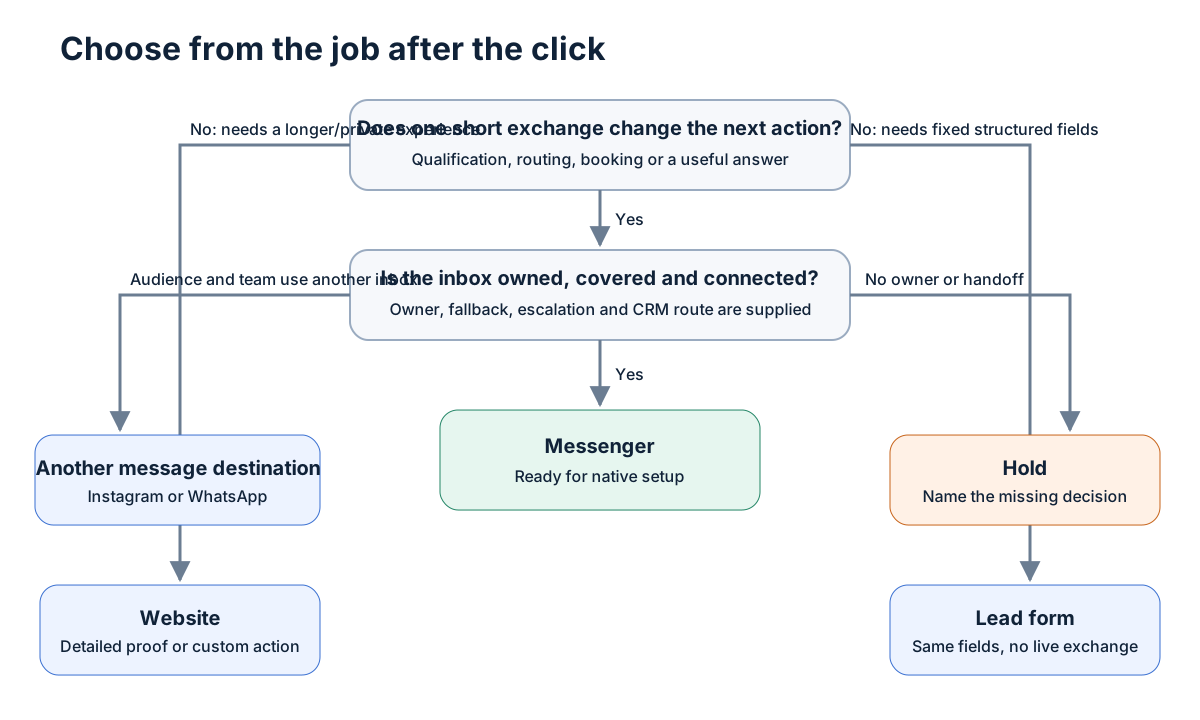
Choose the destination from the work the buyer needs to do after the click.
| Choose | When it fits | What must already be true |
|---|---|---|
| Messenger | One short exchange can clarify fit, route the buyer or book the next step | A named person or team owns replies, the opening is useful and the handoff is defined |
| Another message destination | The audience already uses Instagram Direct or WhatsApp and your team owns that inbox | The destination is available, staffed and connected to the same downstream process |
| Lead form | You need a small set of structured fields and do not need a live exchange | Required fields, consent language and lead delivery have been designed |
| Website | The buyer needs detailed proof, pricing, a private application, a custom calculator or self-serve purchase | The page is fast, coherent with the ad and instrumented for the next action |
| Hold | The offer, owner, escalation or account state is unclear | Resolve the named gap before choosing a route |
Messenger fits when the conversation changes the next step
A useful Messenger route does more than collect contact details in chat bubbles. Each question changes a business decision.
Examples:
- “Which CRM are you using?” sends HubSpot and Salesforce users to different integration instructions.
- “Are you trying to fix lead volume or lead quality?” routes the buyer to a different diagnostic.
- “Do you need this live this quarter?” decides whether a human should take over now or send a self-serve resource.
The answer should affect the response, owner, next action or CRM state. If it does none of those things, remove the question.
Use a form when structure matters more than conversation
A lead form is usually stronger when the campaign needs the same small set of fields from every person and a human reply would add little. A form also makes sense when coverage is thin and a delayed chat would create a worse experience than a clear confirmation screen.
The Facebook lead ads guide owns form fields, delivery and CRM verification. Do not rebuild that workflow in Messenger merely to make the campaign feel interactive.
Use a website when the buyer needs room or privacy
Send the click to a website when the next decision depends on a longer explanation, a detailed comparison, a private application, sensitive information or a tool the buyer should control. Messenger can still answer a question later. It does not need to carry the whole buying experience.
Use another message destination when the operating system already exists there
Meta says ads can open Messenger, Instagram or WhatsApp and can use multiple destinations. That is a product option, not a reason to turn every destination on. Choose the inbox your audience uses and your team can actually operate. If ownership or CRM handling differs by destination, split the plan until each route has one accountable owner.
Build the opening around one useful decision
The opening should continue the promise in the ad and ask one easy question. It should not introduce a second offer or make the buyer repeat the ad.
Use this structure:
You clicked to get [promised help]. Which is closer to what you need: [option A], [option B] or [not sure]?
That opening works because the options lead somewhere. The copy is less important than the operating contract behind it.
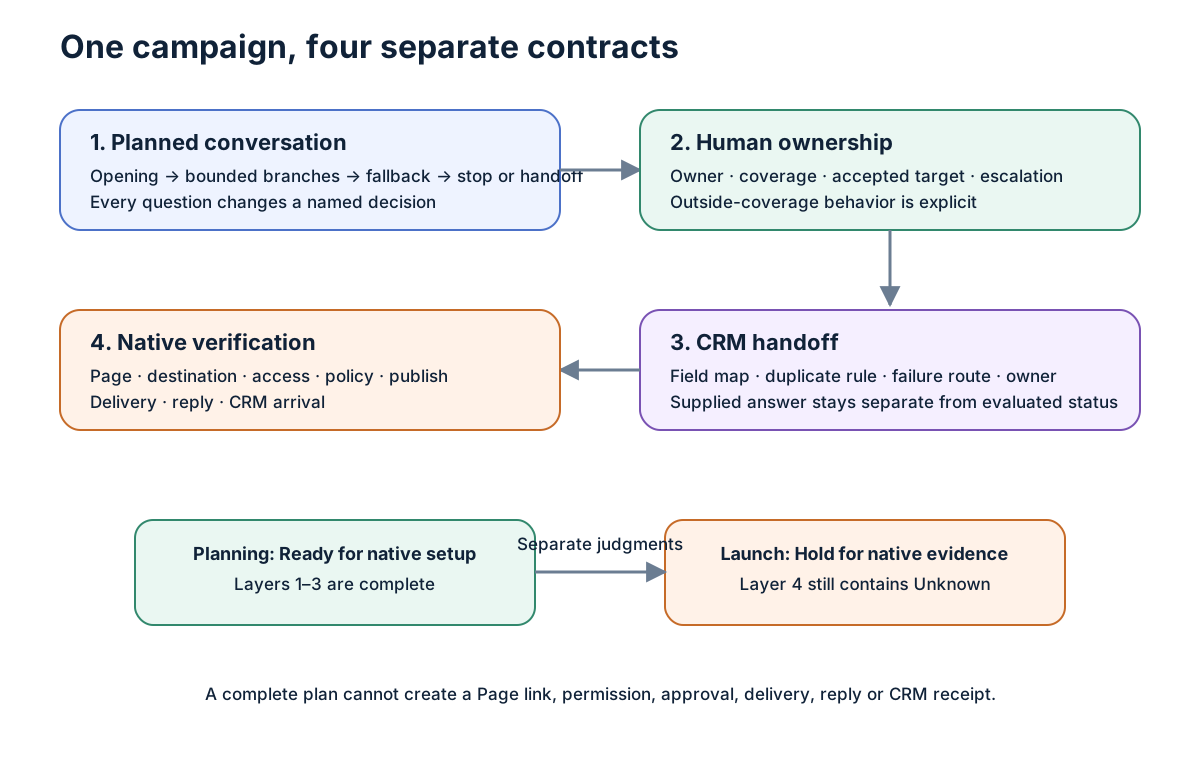
For every branch, define:
- Prompt — what the buyer sees.
- Purpose — the decision this answer supports.
- Expected response — the bounded answer or input.
- Next action — what the system or human does.
- Fallback — what happens when the answer does not match.
- Stop or handoff — where automation ends.
Keep the route short. Meta's current lead-messaging guidance says six questions or fewer is usually optimal. Treat that as Meta guidance, not a quota. A B2B route may need two good questions and a human handoff. It should not ask six merely because the interface allows it.
Worked example: a fictional demand-generation assessment
This example is fictional. It demonstrates the operating record and does not claim results, a live Meta setup or a Maestro client experience.
Ad promise: “See which part of your paid demand-generation system is holding back qualified pipeline.”
Opening: “Which problem are you trying to fix first: lead volume, lead quality or follow-up?”
| Buyer answer | Response | Next action | Stop or handoff |
|---|---|---|---|
| Lead volume | “Which channel is carrying most of the spend?” | Save the selected channel and offer the matching audit checklist | Hand off if the buyer asks for account-specific advice |
| Lead quality | “Where does a lead become qualified today?” | Save the qualification point and ask whether the CRM state is reliable | Hand off when the buyer reports a broken or disputed definition |
| Follow-up | “Who owns the first reply after a lead arrives?” | Save the owner or Unknown; show the response-coverage checklist | Stop and hold if no owner exists |
| Not sure | “Start with the five-minute system check.” | Send the self-serve diagnostic | Stop after the resource is delivered |
| Anything else | “A person should take this one.” | Route to the named human queue with the transcript | Hold if the queue or coverage is Unknown |
The plan can be Ready for native setup when every branch has a purpose, next action, fallback and owner. Launch still remains Hold for native evidence until the real account supplies the required receipts.
Assign a human before the ad creates work
Messenger shifts part of the landing-page job into an inbox. That only helps when someone owns the new work.
Write down:
- the response owner or team;
- the hours that person or team covers;
- the response target the owner has actually accepted;
- the escalation owner;
- what happens outside coverage;
- what the buyer receives when a handoff fails.
Do not invent a “five-minute SLA” because fast replies sound good. The target should come from real staffing and should be visible to the people expected to meet it.
Vendor walkthrough, used for one operating question
Watch 02:51–03:20: who owns the replies?
The Respond.io passage makes the response-capacity problem concrete. It uses a consumer example and moves into its own product; it is not a B2B result or an independent Meta test.
Video lesson: response capacity is part of the campaign
In Respond.io's click-to-Messenger walkthrough, watch 02:51–03:20. The passage describes the practical problem that appears after a campaign creates more conversations: the sales team must still notice and answer them.
Use the passage to ask one question: Who owns the conversation, and what happens when that person cannot respond?
Respond.io made the video and uses a consumer example before moving into its own product. It does not supply a B2B benchmark, an independent performance result or proof that Meta provides the later workflow features it promotes.
Map the conversation into the CRM
A chat transcript is not a usable sales record by itself. Map each collected answer to a named destination.
| Conversation value | CRM destination | Rule |
|---|---|---|
| Campaign and ad reference | Original source detail | Preserve the native identifier when it is available; do not replace it with a typed label |
| Selected problem | Primary need | Use the exact allowed value from the flow |
| Qualification answer | Qualification detail | Store the supplied answer separately from the evaluated status |
| Human owner | Record owner or task owner | Unknown holds the handoff rather than assigning a fictional person |
| Conversation state | Lifecycle or activity state | Keep opened, answered, handed off and qualified as separate events |
| Native receipt | Evidence reference | Store a dated link or receipt ID; a checked box without a reference does not pass |
Also define:
- the duplicate rule;
- the system that creates or updates the record;
- the failure queue;
- the person who reviews that queue;
- the evidence that proves one test conversation arrived correctly.
Meta says messaging leads can flow into a CRM that is already connected and that Ads Manager offers a spreadsheet download when a CRM is not connected. That statement does not prove your connection works. Run one authorized test and read the destination back.
Keep planning readiness separate from launch readiness
The operating record has two independent judgments.
Draft readiness
The plan is ready for native setup when it contains:
- a supplied offer and buyer;
- a reason Messenger fits this campaign;
- one useful opening;
- bounded branches with fallbacks and stop or handoff states;
- a response owner and escalation route;
- a CRM destination, duplicate rule and failure route.
Missing any of those produces Hold for native evidence with the exact missing fields. A route that clearly needs a website, form or different inbox produces Use another destination.
Launch readiness
Launch stays held until the record contains dated native evidence for every applicable item:
- Facebook Page linked to the intended business and ad account.
- Messenger destination visible for the selected campaign setup.
- Required people and system users have the necessary permissions.
- The ad and message flow pass the applicable policy review.
- The ad is published from the intended identity.
- A test click opens the intended Messenger thread.
- A test reply reaches the named owner or queue.
- The expected CRM record arrives with the mapped fields.
The page cannot generate those receipts for you. It can preserve the request, owner, reason and expected evidence so a reviewer knows exactly what to collect.
Measure the route without collapsing the funnel
Keep these events separate:
- ad delivered;
- ad clicked;
- Messenger thread opened;
- first answer supplied;
- qualification completed;
- human handoff requested;
- human response sent;
- CRM record arrived;
- sales accepted the lead;
- later qualified outcome recorded.
A thread opening is not a lead. A supplied answer is not a qualified opportunity. CRM arrival is not sales acceptance.
Compare Messenger with the route it replaces. If the real decision is Messenger versus an Instant Form, use a controlled test with the same offer and a clear qualification definition. If the decision is Messenger versus a website, measure both the completed action and the operational cost of handling replies. The Facebook ad funnel guide covers broader route sequencing, and the Facebook retargeting guide covers warm-audience follow-up.
Use the Messenger flow workspace
Messenger flow workspace
Inspect, edit, validate and export the operating record
Load the complete fictional plan, website route or blank record. Edit the JSON and evaluate it. Invalid imports keep the last accepted record.
Source record
Loading the worked example…
Decision
Planning findings
Native evidence requests
Record identity: None
Open the browser workspace and complete the record in this order:
- Enter the offer, buyer and reason the conversation helps.
- Choose the provisional destination.
- Write the opening and branches.
- Assign the response and escalation owners.
- Map the CRM fields, duplicate rule and failure route.
- Add native receipts only when they exist.
- Export the JSON and readable handoff.
Use the blank JSON record when you want to work in code, or inspect the worked fictional record before starting. The native-verification checklist is the handoff for the person with account access.
The build prompt turns supplied facts into the same operating record without inventing evidence. The review prompt checks the record, preserves every supplied fact and returns one of the three allowed outcomes.
Native setup sequence
Meta's interface changes and account availability differs. Use this sequence rather than relying on one frozen screenshot path:
- Verify the starting account. Confirm the business, ad account, Page and people involved. Record what you actually observed.
- Create the campaign from the current interface. Choose the objective that matches the business goal. Meta currently lists traffic, engagement, leads and sales for click-to-Messenger ads.
- Choose the message destination. Select Messenger only when it matches the accepted operating record. If the account offers different or multiple destinations, record the choice rather than assuming the artifact made it.
- Build the greeting and questions. Meta documents greetings and questions in message templates and automated Q&A for lead flows. Recreate the reviewed branch logic without adding unsupported promises.
- Preview every path. Test expected answers, fallback, stop and human handoff.
- Publish only after policy and ownership checks pass. Save the native receipt.
- Run one controlled test. Open the ad, answer the questions, trigger the handoff and read the CRM destination back.
- Compare the observed record with the plan. Any mismatch reopens review before spend scales.
If the controls differ, stop and capture the current screen. Meta explicitly says the setup experience is rolling out. A different screen is a verification event, not permission to guess.
Common failure modes
The opening repeats the ad
Repair it by asking the first question that changes the route.
The flow collects facts nobody uses
Delete any question without a named decision, owner or CRM destination.
Every answer ends with “talk to sales”
Give each branch a useful next action. Reserve human handoff for cases that need judgment.
Nobody owns replies outside business hours
State the real coverage window and provide a fallback. If no acceptable fallback exists, choose a form or website.
The CRM field says “qualified” but the transcript only shows interest
Store the supplied answer and evaluated state separately. Qualification needs a defined rule and an owner.
The plan looks complete, so the team assumes the campaign is ready
Keep the launch hold visible until every required native receipt has a date and reference.
Frequently asked questions
Are Facebook Messenger ads still available?
Meta's current documentation describes click-to-Messenger ads and lists traffic, engagement, leads and sales objectives. Availability and controls in a particular account must still be checked natively.
Can a Messenger ad qualify leads automatically?
Meta documents automated Q&A and qualifying questions for messaging lead flows. Design each question around a real routing decision and give uncertain or sensitive cases a human path.
Can I follow up with anyone who saw the ad?
No. Meta says a person must interact with the business or opt in before the business starts communicating with them in Messenger. Verify the current rules that apply to your account, market and use case.
Do I need a chatbot platform?
Meta says lead messaging flows can be built without a third-party integration. A separate platform may help with routing or reporting, but choose it from an operating requirement, not because the ad format automatically needs one.
How many questions should the flow ask?
Ask the fewest questions needed to decide the next action. Meta says six or fewer is usually optimal in its lead-messaging guidance. Many B2B routes should stop sooner.
How do I know whether Messenger beats a lead form?
Define the same qualified outcome, run a controlled test and include the cost of handling conversations. Do not compare thread opens with completed forms or qualified opportunities.
What is the final handoff?
Give the person with account access the JSON record, readable handoff and native-verification checklist. They should return dated receipts for the Page, destination, permissions, policy, publication, delivery, reply and CRM arrival. Until then, launch stays held.