
Facebook ad objectives: choose the result before the campaign
If you want demo requests, start with the demo request. Where does it happen? What event records it? Can you select that event in this ad account? Those answers will get you further than picking the objective whose name sounds closest to your quarterly target.
The six campaign objectives are Awareness, Traffic, Engagement, Leads, App promotion, and Sales, as listed in Mockingbird's October 2026 reading of Meta's guidance. The objective narrows the settings you can choose next. Your conversion location, performance goal, and event turn that broad intention into a delivery instruction. Meta's Blueprint course on selecting campaign objectives describes that relationship. Its public description does not publish a current option matrix, so check the actual options in your account before you build around a combination.
Scroll horizontally or use the arrow keys to read each step.
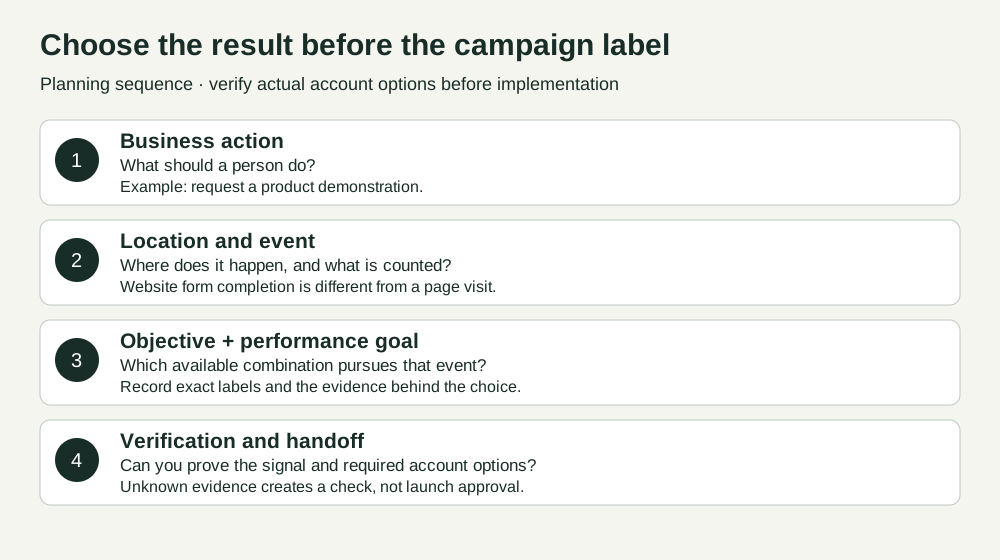
The planning order starts with the business action, where it happens, and the event that would count it. In Ads Manager, inspect the objective, conversion location, performance goal, and event selection, where an event is required. Record your intended action before opening Ads Manager, then verify which settings the account offers. A booked meeting, a form submission, and a landing page view are three different results, even when the same ad leads to all three.
What each objective is for
This is a planning overview, not a promise that every location or goal below is available to every account. The six names and general uses are described in Mockingbird's October 13, 2026 guide, which says it read Meta's undated Help pages that day. Jon Loomer's campaign objective analysis, updated March 1, 2025 also covers the six names and explains how later settings change the meaning of the choice.
Swipe to read all columns, or focus the table and use the arrow keys.
| Objective | Start here when the wanted action is… | B2B planning example | Watch the distinction |
|---|---|---|---|
| Awareness | Seeing or remembering the ad | Introduce a new category to a defined market | Reach or views are exposure measures, not evidence of sales interest. |
| Traffic | Visiting a destination | Send people to an original research report | A landing page view counts a visit, not report reading or a lead. |
| Engagement | Interacting with content or starting a conversation | Get views of a founder's explanation video | A video view, post interaction, and message are different actions. |
| Leads | Providing contact information or making an inquiry | Request a demo through a website form | A submitted form is not automatically a qualified opportunity. |
| App promotion | Installing or using an app | Bring users into a mobile B2B app | Confirm app setup and the event you can actually measure. |
| Sales | Buying or taking a purchase-related action | Buy a self-serve software plan | A purchase event needs a real purchase path and event check. |
Do not treat that table as a funnel ladder. A research report may be a Traffic task when report-page visits are the immediate goal. The same report could be a Leads task if the actual goal is a completed registration, subject to a viable lead path and available settings. Name the action and metric, then make the choice.
Objective, location, goal, and event are separate choices
The campaign objective is the broad outcome category. You select it when creating the campaign. The conversion location says where the action should happen, such as a website, an instant form, an app, or a messaging destination when those options appear. The performance goal says what Meta should seek within that setup. The event is the measurable action, where an event is required and selectable. Meta's Blueprint course explicitly pairs objective selection with conversion location and performance goal; the newer course description also names conversion events.
For example, “get meetings” is a business action. “Leads” is a provisional objective. “Website” is a proposed conversion location if the request form is on your site. “Conversions” and a lead-related event may be options to inspect at the ad set, but neither label should be copied from a guide into an account as a verified setting. The request form can fire a lead event and still produce unqualified submissions. Decide how the CRM will distinguish accepted meetings from raw leads.
Loomer explains how the objective shapes the menu of conversion locations and performance goals, while the chosen performance goal helps determine what delivery seeks. His dated article contains internally conflicting setting descriptions, so inspect today's account menu. In particular, do not infer that choosing Sales while optimizing for a click somehow makes the click a purchase.
Work through the action you want
Start with a single sentence: “We want [person] to [action] at [place], and we will count [event].” Add the business outcome you will check later. If you cannot fill in the event, you have a measurement question before you have a confident optimization recommendation.
- Name the action and unit. “Submitted demo request” counts submissions. “Sales accepted opportunity” counts a later CRM decision. Do not combine them in one field.
- Check the destination. Is the action on a website, in a Meta instant form, in an app, or in a message? This narrows the location you need to look for.
- Choose a provisional objective. Match the requested action to the six broad categories. Keep a second candidate only if it corresponds to a genuinely different immediate action.
- Inspect the live account. In Ads Manager, open a draft campaign with Create, inspect the available objective, and continue to the ad set to inspect conversion location, performance goal, and event selection where required. Record the exact labels and observation date. A public guide does not prove your account's eligibility or setup.
- Check the signal. Confirm that the intended action produces the measured result. Where the setup requires a conversion event, verify its receipt and selectability. A visible option is not proof of measurement accuracy or lead quality.
- Save the selection record for review. Keep unknowns visible and have the campaign owner approve the rationale before any separate launch process.
The blank selection record contains every field. The two completed examples show how to write a provisional decision while account availability remains unverified. Paste one completed record at a time into the standalone review prompt to catch missing or contradictory inputs. The prompt reviews a plan; it cannot inspect your ad account or authorize a launch. If you need to build the form itself, use our Facebook lead ads guide. For later campaign changes, see Facebook ads optimization; for reading reported results, see Facebook ads attribution.
Example 1: demo requests for a sales-led software product
Imagine a B2B software team with a website demo form. Its immediate action is a completed demo request. The form's submit confirmation is supposed to produce a lead-related event, and the CRM later decides whether that request becomes a sales accepted opportunity. The provisional path is Leads → Website → an available conversion goal → the verified demo-submit event. The exact goal and event labels remain Unknown until someone checks the ad set and event receipt. A Traffic campaign optimized for visits would answer a different question: who is likely to visit the page. It would not, by itself, tell Meta to seek completed requests.
This is a hypothetical planning case, not a Maestro client result. The complete record names the site event and the CRM outcome separately and asks for a live option and event check. If the form event is missing, the team should fix or verify measurement and reconsider the plan; a cheaper click is not automatic permission to change the business goal.
Example 2: readers for an original research report
Now imagine a B2B firm publishing an ungated industry report. The immediate task is getting people to its report page. No form is required. The provisional path is Traffic → Website → landing page views as the performance goal, if offered. Landing page views are the proposed measured result: one report-page load. Whether this setup requires a separately selectable conversion event is Unknown until inspected. Meaningful reading is a separate downstream measure that needs its own definition and instrumentation. The team can check report engagement outside the campaign metric, but should not label every visit a reader.
This is also hypothetical. If the brief changes to “collect report registrations,” the action, event, and objective need review again. The old Traffic rationale cannot be carried into a Leads plan by changing one dropdown. The worked records preserve both cases with the same field names as the blank.
Other situations that change the choice
For a thought-leadership video, decide whether the immediate action is a video view, a post interaction, or a message. Engagement is a plausible starting category, but inspect the available location and performance goal. View count does not establish that a buyer understood the argument. Loomer describes using Engagement with custom website events for quality traffic in his 2025 article. That is his practitioner approach, not a universal default for an unverified account.
For a message inquiry, write what the person is expected to ask and who will reply. Engagement or Leads may be candidates depending on the desired action and available messaging setup. A conversation count and a sales qualified inquiry have different units. For app adoption, App promotion is a starting point only when a real app and install or in-app event path exist. For an immediate self-serve purchase, Sales is the direct starting category; verify the purchase event and account choices before assuming any particular optimization.
Jon Loomer also describes using Awareness with Reach for a small, deeply engaged remarketing audience and a frequency cap in his 2025 analysis. That is a specific practitioner case, not a reason to choose Awareness for all B2B retargeting. His article illustrates why the intended action and performance goal need to be read together.
What happened to older Facebook objective names?
Older guides may show Conversions, Messages, Catalogue sales, or an 11-objective menu. KlientBoost's Facebook campaign objective guide is an example: it explains business-goal thinking, but its menu is historical. Do not map an old label to a new one by name alone. Ask what action the old campaign sought, where it happened, which goal was selected, and what event was measured. Then inspect the six-objective setup in the account. Jon Loomer's image below shows an early six-objective menu, already different from the older 11-objective instructions.
Scroll horizontally or use the arrow keys to read the original labels.
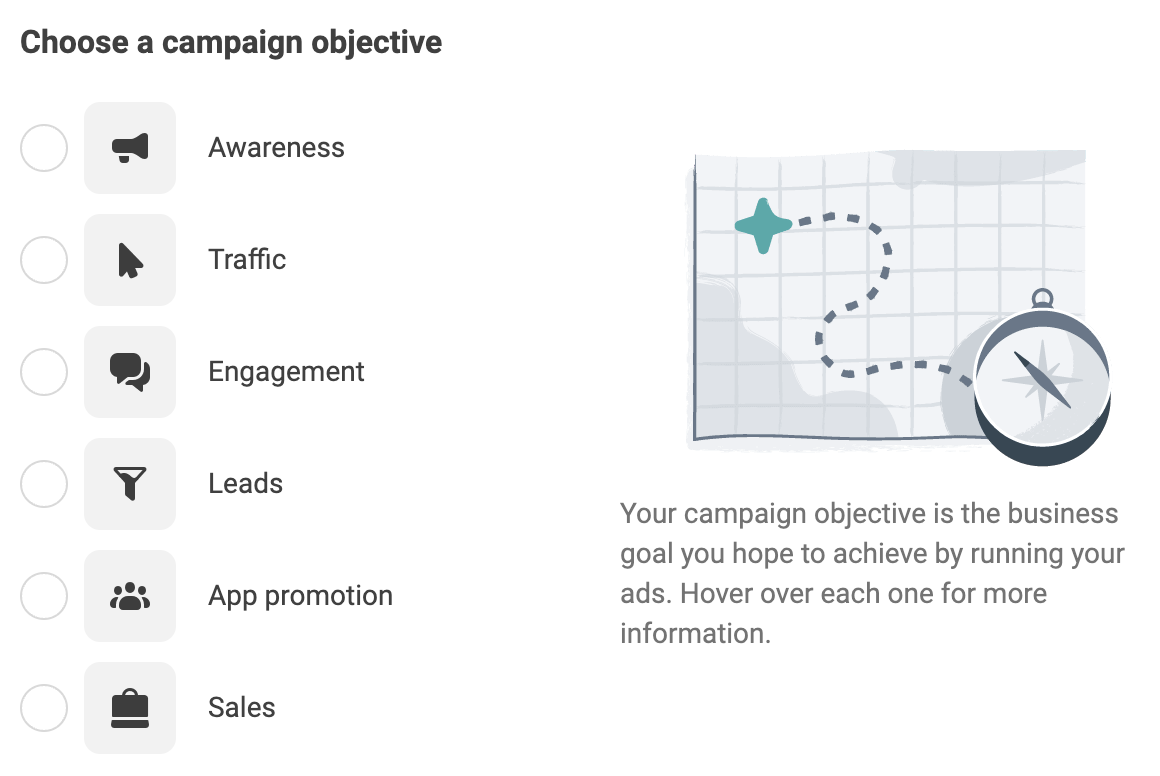
The image above is Jon Loomer's June 2023 six-objective menu. It shows the consolidated names at that time, not the older 11-objective menu, a current account screenshot, or an eligibility matrix.
Before anyone publishes
Read the saved record aloud: “We want this action, at this location, counted by this event; this is the objective and goal we observed in this account on this date.” If the sentence silently substitutes clicks for demo requests or form submissions for qualified opportunities, revise it. If the objective, location, goal, or event is Unknown, leave it Unknown and assign the exact account or measurement check.
This guide and its worksheet produce a reviewable selection. They do not prove event delivery, lead quality, attribution, causal lift, or campaign readiness. For a broader review of the campaign and measurement path, book a free Demand Gen Roast.
Sources and date boundaries
- Meta Blueprint: Selecting campaign objectives and conversion settings, public course description inspected October 31, 2026. The lesson body was not readable in the public response.
- Meta Blueprint: Selecting campaign objectives, public course description inspected October 31, 2026.
- Mockingbird: Meta ads campaign objectives, updated October 13, 2026. Its detailed objective table reports a reading of Meta Help pages on that date; those Help bodies were unavailable in our October 31 retrieval.
- Jon Loomer: Meta Campaign Objectives: Best Practices, updated March 1, 2025. Practitioner examples and historical setting discussion are attributed to Loomer.
- KlientBoost: Choosing a Facebook Campaign Objective, historical 11-objective framing, used here only to explain older terminology.
Review your objective selection
Copy this prompt into your AI tool. Paste your completed selection record after the prompt. Open the plain-text prompt to select it directly.