
Facebook ads vs Instagram ads: choose the placements your B2B campaign can support
Facebook and Instagram ads can run through the same Meta Ads Manager campaign. The choice is which eligible placements can show your offer clearly, which controls your account actually has, and what evidence would justify a later change. A cheaper click on one app does not settle whether it produces more qualified buyers.
For a new campaign with no owner-approved reason to exclude either platform, prepare creative for the eligible Facebook and Instagram placements and inspect the resulting delivery. That is a starting plan, not a claim that both will always win. If your offer, creative, destination, policy, or measured outcome calls for a narrower route, write down the constraint and check the current control before changing delivery.
What Facebook and Instagram ads share
Both use Meta's campaign, ad set, and ad workflow. You choose an objective and configure the audience, budget, ads, and eligible placements in that buying system. Meta's placement guide says available placements depend on objective, ad type, and settings. It explicitly says that not every ad can use every placement. Do not treat “Instagram ads” as a separate campaign manager with its own universal targeting rules.
The buyer sees different surfaces. Meta's current list includes Facebook Feed, Marketplace, Stories, Reels, search results, and other Facebook placements. It includes Instagram Feed, profile feed, Explore home, Stories, Reels, and search results. This is a placement inventory, not a promise that every item is available for your objective or account. Other Meta technologies may also be eligible. Our Facebook Audience Network guide handles partner-app inventory separately.
Swipe to read all columns, or focus the table and use the arrow keys.
| Question | Facebook side | Instagram side |
|---|---|---|
| Buying system | Meta Ads Manager | The same Meta Ads Manager |
| Places to prepare for | Feed, Stories, Reels, and other eligible Facebook placements | Feed, Stories, Reels, and other eligible Instagram placements |
| What changes in the ad | Crop, visible copy, video opening, on-screen UI, and destination preview can vary by placement | Check those same elements in the actual Instagram previews |
| How to choose | Current eligibility, a real business constraint, creative readiness, and measured outcomes | The same four checks; no app-wide B2B winner |
This table is a workflow comparison. It does not say Facebook has older buyers, Instagram has cheaper leads, or one app has better B2B targeting. Those claims need a defined population and current evidence for the business you are advertising.
Can you choose one platform in the current account?
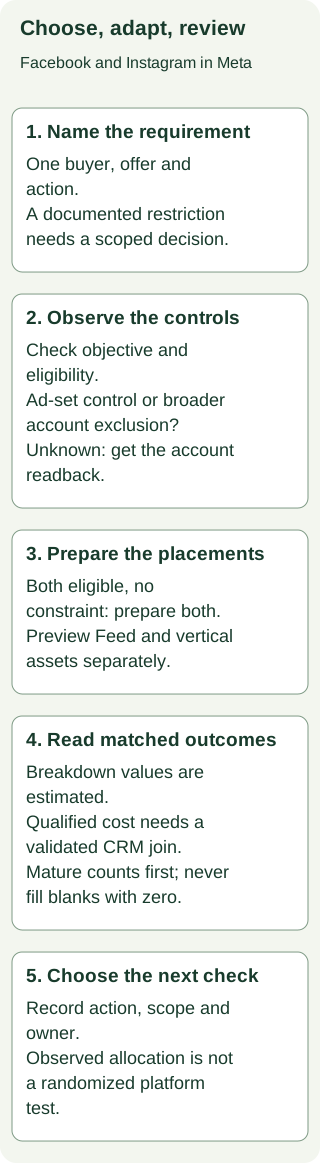
Check the objective and the control's scope before you plan a split. Meta's placement-setting change notice, reviewed October 31, 2026, says ad-set manual placement selection remains for Awareness, Traffic, and Engagement. It says that manual selection is being removed gradually for Leads, App promotion, and Sales, which default to Advantage+ placements in the affected accounts. Your account can be at a different point in the rollout.
Meta also documents account controls that can exclude specific placement groups by objective. Those controls affect the account's campaigns in that objective, rather than just the ad set you happened to open. They are not a promised single switch for excluding every Facebook or Instagram surface. If an owner asks for Instagram only on one Leads campaign, an account-level exclusion can be much broader than the request. Record every affected campaign and get the appropriate account-owner decision. Do not switch from Leads to Traffic just to regain a placement checkbox. That would change what the campaign is optimized to do.
Start in the intended ad account and campaign. Record the objective, ad set, selected placement setting, any account-level exclusion, the screen and observation time, and the campaigns affected by a proposed change. If you cannot inspect that account, write Control availability: Unknown. Meta's documentation establishes the possible routes; it cannot tell you what a specific account currently shows. The Meta objective guide helps you choose the business action before discussing placement control.
Swipe to read all columns, or focus the table and use the arrow keys.
| Situation | Decision now | What to verify next |
|---|---|---|
| Both platforms eligible; no supported constraint; creative and destination ready | Prepare both and review actual placement previews | Delivery by platform, then mature CRM outcomes where joined |
| Owner-approved restriction and a current control limited to the intended scope | Prepare the permitted platform | Native setting, affected campaigns, and destination |
| Restriction exists but the only visible control affects other campaigns | Hold the proposed exclusion | Account owner reviews the wider effect |
| Objective, control, identity, or destination is unknown | Hold the placement decision | Exact account observation and missing prerequisite |
A fictional example shows the difference. A B2B firm has an approved policy limiting one product launch to Facebook. In its fictional Awareness ad set, the operator can see a manual placement setting that allows the eligible Facebook Feed placement. The owner can choose a Facebook-only plan within that observed scope. In another fictional account, the owner wants Instagram only for a Leads campaign, but ad-set manual selection is absent and the visible account control would affect other Leads campaigns. That request stays on Hold until the account owner reviews the account-wide change. The second team should not quietly change objectives.
Adapt the offer for the surface
Use one approved offer and destination across the comparison so the buyer action stays clear. Then make the creative fit the places you intend to use. Meta's placement change notice describes placement asset customization for crop, text, and URL. It also warns that unsupported media can stop an ad from serving in a placement. Inspect the real previews before launch. Our Facebook ad mockup helps review image crops for Feed and vertical placements; the native preview is the final check.
Here is a fictional B2B SaaS offer. CedarOps sells a workflow tool to revenue operations teams. The approved resource is a handoff checklist. The intended action is a completed checklist request on the same landing page. We have invented the product, copy, and creative to teach the adaptation; no client result or source ad is implied.
Swipe to read all columns, or focus the table and use the arrow keys.
| Surface | Opening and scene | Text, action, and check |
|---|---|---|
| Facebook Feed, static | A legible product-style card shows an unassigned handoff with the owner field empty. Keep the empty state readable at phone width. | Intro: “Who owns the next step after a demo?” Headline: “Map the handoff before it stalls.” CTA: Download. Check crop, headline, CTA, and the checklist destination in the native preview. |
| Instagram Feed, static | Use the same approved empty-state card with a crop that keeps the owner field and checklist title visible. Do not shrink the whole desktop UI into a phone image. | Shorter first sentence: “Who owns the next step?” Retain the same claim, CTA, and destination. Check the actual Feed crop and text truncation. |
| Instagram Stories or Reels, vertical demo | 0–2 seconds: an owner field is empty. 2–5 seconds: the fictional team assigns an owner. 5–8 seconds: the checklist names the next handoff. Keep the important UI and words inside the current native safe-zone preview. | On-screen line: “Give every handoff an owner.” Add captions for spoken words; make the first frame understandable without sound. CTA: Download the handoff checklist. Check sound-off readability, safe areas, CTA, and destination. |
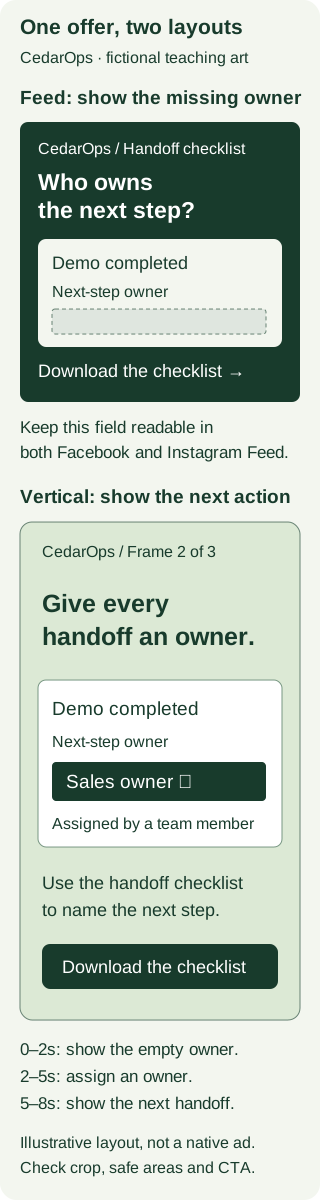
The vertical story demonstrates the same decision as the static Feed card. It does not promise that CedarOps automatically assigns owners, speeds up sales, or produces a measured lift. If those are real product claims, the team needs proof before putting them in an ad. A single horizontal image stretched into a vertical video would hide the very owner field the example is trying to show.
A Facebook Reel or Story may need its own vertical review too. The surface name alone is not a creative specification. Check the selected placement, actual crop, text area, captions, CTA, and landing experience. The Instagram Reels safe-zone guide handles a supplied asset's protected content in more detail. Meta says an advertiser can use a Facebook Page or a connected Instagram professional account as the ad identity for Instagram. If no Instagram account is connected, the Page can be the ad's voice. At ad creation, check the identity selected and inspect the Instagram ad preview before placing the order. The current account, objective, and available features still determine eligibility. Meta's Instagram ad setup and Page identity instructions were read October 31, 2026.
Compare what the campaign delivered with what the CRM knows
In Ads Manager, open the intended Campaigns, Ad sets, or Ads table. Meta places Breakdown between Columns and Reports; choose By delivery → Platform to see Facebook and Instagram rows, or Placement for individual surfaces. Save the report level, breakdown, objective, attribution setting, time zone, date basis, and extraction time. Meta says these platform and placement values are estimated. This is an observed delivery view, not a person-level CRM join or a randomized test. Meta's platform results instructions were read October 31, 2026. The exact current Insights API parameter names and allowed combinations were not verified, so this guide gives no copy-paste API request. If your report cannot separate the platforms at the required scope, hold the platform comparison.
Spend and raw form submissions may be visible by platform while CRM qualification is only known for the campaign total. The missing join matters. In a fictional mixed campaign, Facebook shows $2,500 spent and 50 raw submissions, while Instagram shows $1,600 and 40. Raw CPL is $50 and $40 respectively. The CRM has 15 qualified people for the whole campaign, but no validated platform key. Neither platform has a supported qualified count or qualified CPL. Dividing either platform's spend by all 15 would assign the same people to both sides.
For a mature comparison, use cohorts with the same offer, success action, geography, currency, attribution rule, date basis, qualification rule, and reporting length. Check how each submitted person is joined and deduplicated. A platform delivery breakdown by itself does not supply person-level CRM identity. A blank or pending qualification is not zero.
Here is a second fictional record with a separately validated CRM source key. Both platform cohorts ran September 1–30 for the same checklist request and the same US buyer group, using USD. The fictional export fixes America/New_York, impression-date reporting and a seven-day click attribution rule on both sides. Each CRM submission carries a validated platform source token and a unique submission ID. Duplicate submissions are removed by that ID. The delivery window closes September 30. The latest attributable request arrives October 7 after the seven-day attribution allowance. Qualification then has 14 days, through October 21; both cohorts were extracted October 22. This is the fictional team's explicit cutoff rule, not a universal Meta processing delay.
Swipe to read all columns, or focus the table and use the arrow keys.
| Matched cohort | Spend | Raw submissions | Qualified submissions | Raw CPL | Qualified CPL |
|---|---|---|---|---|---|
| $4,200 | 60 | 21 | $4,200 / 60 = $70 | $4,200 / 21 = $200 | |
| $2,400 | 80 | 8 | $2,400 / 80 = $30 | $2,400 / 8 = $300 |
Instagram's raw CPL is $40 lower, while Facebook's qualified CPL is $100 lower. The fictional owner supplied a $250 maximum cost per qualified request from the business's unit economics. Facebook's observed $200 meets that ceiling; Instagram's $300 does not. The threshold did not come from an industry benchmark. These are observed allocations, not a randomized test. Auction conditions, creative delivery, and who sees each placement can differ. Shifting spend to Facebook is a proposal to test, not a guaranteed $200 outcome at higher volume.
Zero and unknown still need separate answers. If a mature platform cohort spent $500 and has a verified zero qualified requests, its qualified CPL has no finite value. If another cohort spent $400 and its five submissions have not finished qualification, its qualified count and CPL are Unknown. The first needs diagnosis; the second needs a dated outcome check. Neither supports a tidy winner label.
Keep the decision with the next report
Download the blank platform decision record and worked Facebook–Instagram decisions. The worked records cover both eligible, a one-platform business constraint, unavailable control, missing CRM join, and mature versus zero or pending outcomes. Paste a completed record into the standalone decision prompt. It asks for missing evidence instead of filling it in and will not calculate a qualified cost from an unjoined campaign total.
Review your platform decision
Fill in the blank platform review, using the worked records as examples. Copy this prompt into your AI tool, then paste your completed record. Open the plain-text prompt to select it directly.
Read or select the full prompt
If you need a second set of eyes on the placement and CRM evidence, book a Demand Gen Roast. Bring the record, the observed account controls, the creative previews, and the qualified-outcome definition. That lets us review the actual decision without pretending a Facebook or Instagram average can answer it.
Frequently asked questions
Is Facebook or Instagram better for B2B ads?
Neither has a universal B2B advantage. Start with the campaign's objective, actual eligible placements, creative fit, destination, and account controls. Review delivery and mature qualified outcomes for a matched scope before proposing a change.
Can one Meta campaign show ads on both?
Meta's placement list covers both Facebook and Instagram in Ads Manager, but an ad's eligible placements depend on objective, ad type, and settings. Check the intended account and ad previews. An account-level exclusion can affect more campaigns than the one you are planning.
Should I split Facebook and Instagram into separate ad sets?
Only when the account supports the intended control and the split answers a specific business or measurement question. A split can change auction, budget distribution, and learning conditions. Save the scope before comparing results; an observed difference does not prove the split caused it.
Are Instagram ads cheaper than Facebook ads?
There is no general price that decides your B2B campaign. Compare spend against the same raw action first, then against mature CRM-qualified outcomes when a validated platform join exists. The fictional example above has cheaper Instagram raw submissions and more expensive Instagram qualified submissions.
Do I need an Instagram account to advertise there?
Meta says you can use a Facebook Page or a connected Instagram professional account for the ad identity. If there is no connected Instagram account, the Page can be the voice of the Instagram ad. Check the Identity section and Instagram preview in your own ad before placing an order. Meta's Page identity instructions explain that route; your objective and account still have to support the placement.