
Account-based marketing on LinkedIn: build your first campaign plan
Account-based marketing on LinkedIn starts with the companies you want to win. Sales and marketing agree on those accounts, decide which people need to understand the offer, and coordinate ads, content and follow-up around them.
The first campaign needs a few clear decisions: which accounts belong, how you can reach relevant people, what those people should see, and what sales will do when someone responds.
This guide walks through those decisions using six real ads and a complete fictional campaign. You can then put your own accounts, messages and owners into the blank LinkedIn ABM planner.
What your finished plan should contain
Our fictional example is FieldLedger, a software company that helps commercial mechanical contractors manage the documents needed to hand a finished project to the customer.
Its team wants to reach 50 US contractors with a project-closeout checklist about missing documents and handover responsibilities.
| Decision | FieldLedger's fictional first plan |
|---|---|
| Accounts | 50 US commercial mechanical contractors selected with sales |
| People | Operations leaders and project-controls managers |
| Problem | Missing closeout documents and unclear ownership delay handover |
| Audience route | Manual Company Names targeting, followed by a role and location check |
| Message | Show which documents are missing, who owns them and the next action |
| Offer | A project-closeout handoff checklist with a completed example |
| Sales action | Respond to explicit requests; review account engagement with the account owner |
| Review | Check delivery, responses, held meetings and sales feedback as separate evidence |
| Current state | Draft Ready; Launch Hold until audience, destination and tracking checks are complete |
All FieldLedger details and numbers on this page are fictional teaching inputs. They are not Maestro or client results.
You can read the full worked plan, compare the six ads, or start with your account list below.
Start with accounts sales actually wants
LinkedIn defines ABM around specific high-value accounts or companies. Start by choosing those accounts.
A company can match your industry and size filters and still be a poor prospect. It may have no reason to change, need a capability you don't provide, or already be working through an active sales process that needs different support.
Review the list with someone who knows your customers and opportunities. For each proposed segment, answer:
- What problem makes these companies a fit?
- Where did the accounts come from, and when was the information checked?
- Which customers or sales conversations support the selection criteria?
- Which suitable accounts are missing?
- Which accounts should be removed or treated separately?
- Who owns the next sales conversation?
Record the reason behind the list. “US contractors” describes a market. “US commercial mechanical contractors whose closeout work involves several project teams and document owners” gives FieldLedger a problem to investigate and a message to write.
Keep observed facts separate from assumptions. If sales has confirmed the problem at ten accounts, record those ten. Put Unknown beside the others until there is evidence.
You can research and draft around an explicit assumption. Do not turn it into a customer fact in an ad.
Watch: review the account list with sales
In this AdConversion discussion, 02:24–04:31, the speakers explain why sales and marketing still need to review a filtered data-provider export. They discuss missing accounts and what customer and pipeline records can reveal about fit.
After watching, write one sentence explaining why your first segment belongs on the list. Add the person who will check that explanation and the accounts they want to add or remove.
If the team cannot explain why these accounts should buy, mark Draft Hold: account selection needs review. Finish that review before making six versions of the same vague ad.
Choose an audience route that fits your list
There are four different counts to keep separate:
- The companies or contacts in your source list.
- The rows accepted in an uploaded file.
- The LinkedIn member accounts matched to that audience.
- The final audience after location, roles, exclusions and other criteria.
Delivery is another step. An eligible audience does not mean every account or person will see the ads.
Current LinkedIn documentation requires at least 300 rows for a company-list upload or contact-list upload.
The resulting list must also match at least 300 member accounts for use in an active ad set. The minimum ad-set audience is 300 member accounts.
Those are separate checks. Three hundred companies are not three hundred people. Three hundred uploaded contacts do not guarantee three hundred matches. Location is required, and your later selections can make an otherwise eligible segment too small.
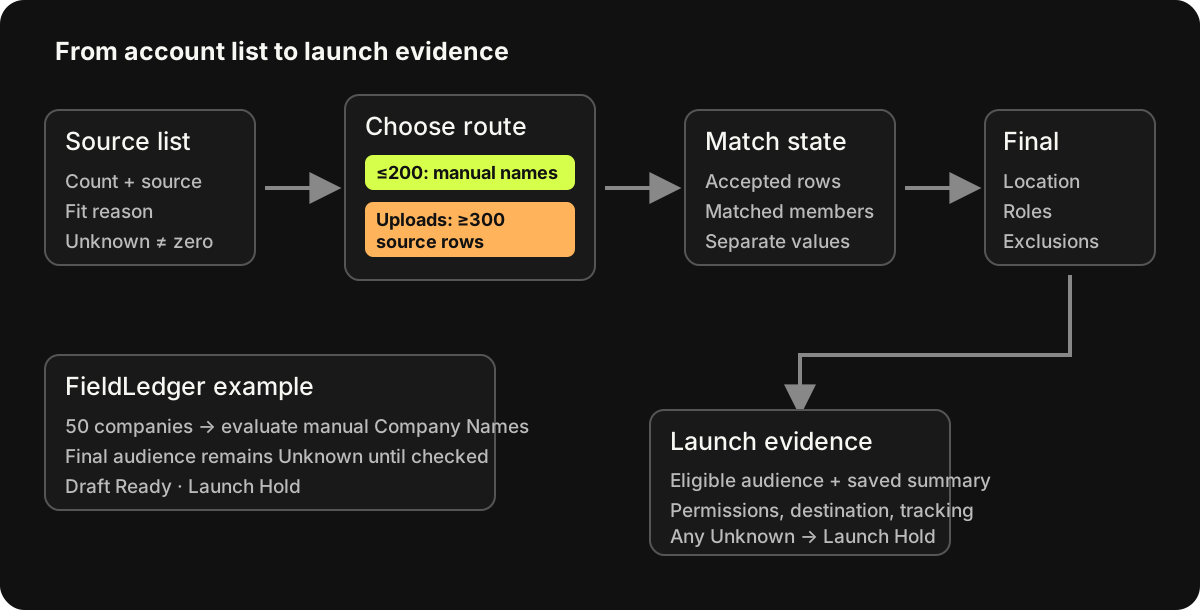
Situation 1: you have 50 named companies and little contact data
Start by evaluating manual Company Names targeting. LinkedIn documents up to 200 companies in that targeting option.
FieldLedger can therefore evaluate its 50 companies through manual targeting. It still needs to find the correct company entries, choose the relevant people and inspect the final audience.
The first checks are:
- Do the selected company entries correspond to the intended businesses?
- Which buying roles belong in the campaign, and which available attributes represent them?
- What happens to the audience after the location and role selections?
- Are the intended exclusions and expansion settings in place?
A small account list can contain many relevant people, or very few. Check the actual audience before deciding whether it is viable. Leave final audience size Unknown until that check is done, and keep Launch Hold while it remains unknown.
Situation 2: you have 600 companies, but the data is uneven
A company-list upload is a possible route. First resolve duplicate entities, subsidiaries and unclear names so the rows represent the businesses you intend to include.
Use LinkedIn's current company-list template and preserve its headers. LinkedIn requires at least one supported identifier and recommends adding a Company Page URL or website to improve matching.
The company-list requirements explain the accepted fields and file limits.
After upload, record the audience status and matched-member count. LinkedIn says generation can take up to 48 hours, occasionally longer. Then check the audience after the campaign's location and role criteria.
If 600 companies contain three unrelated buying problems, the next job is to choose a coherent first segment. If the companies share the same problem and offer, do not split them solely because the spreadsheet has several industry labels.
If the upload fails, repair the file. If matching or the final audience is too small, review the identifiers and legitimate targeting choices. Adding irrelevant companies to reach a threshold changes the campaign you intended to run.
Situation 3: some accounts already know you
Existing engagement can justify different treatment, but first identify what you actually know.
| Evidence | What it tells you | Next action |
|---|---|---|
| Company-level ad engagement | People associated with the company engaged, within the report's definitions | Ask the account owner whether the topic fits a current conversation |
| A named person requested a resource or meeting | That person made a specific request | Deliver it and follow up on the request |
| A CRM opportunity is open | Sales has recorded an opportunity | Agree which question or objection advertising can support |
A company showing clicks has not automatically asked for a demo. The account report does not establish which contact clicked.
If you combine a company audience with website retargeting, LinkedIn's documented example requires members to match both segments. That intersection can be much smaller than either starting audience.
Check whether the warm segment is eligible before designing a separate retargeting campaign. If it is too small, retain the agreed broader account campaign or support existing sales conversations directly. Keep the reason in the plan.
Keep the account boundary explicit
For a campaign intended to stay within selected accounts, start with LinkedIn's Build your own audience controls and review the saved audience summary.
Pay attention to three different options:
- Audience Expansion reaches members with similar attributes. LinkedIn says it is automatically enabled where available. Clear the checkbox when the plan requires the selected audience, and verify the saved setting.
- Auto-Targeting combines LinkedIn signals with your inputs. Company or contact lists can be audience signals; supplying a list does not establish a strict inclusion boundary. LinkedIn says an ad set saved with Auto-Targeting cannot switch back to manual targeting.
- Predictive audiences expand from source data to other members or companies. They can expand beyond a seed list even though the separate Audience Expansion setting is off.
Expansion can be appropriate for a different prospecting goal. Give that goal its own name and reporting definition so the team knows what is being tested.
For exclusions, record the source and owner. “Exclude customers” needs a current customer definition and a maintained list. “Exclude employees” needs the appropriate company or audience selection checked in the chosen mode.
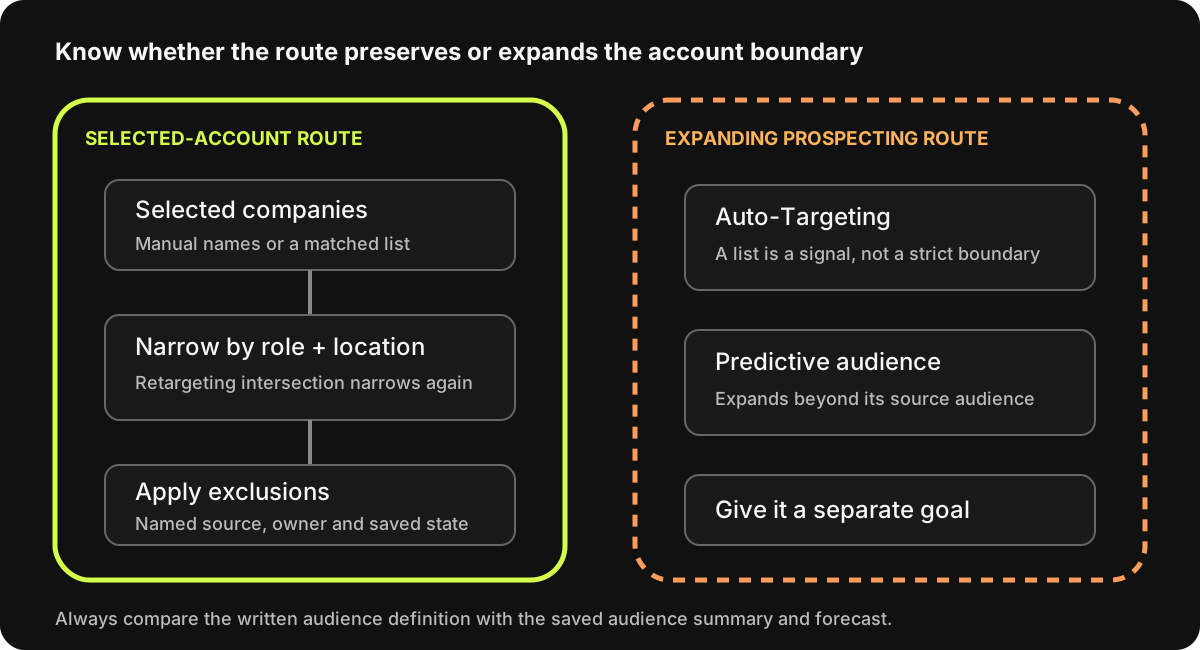
Use a written audience description before setting it up. For example: “People associated with these selected companies, in the United States, who match one of our relevant role selections, after the recorded exclusions.” Compare that sentence with the actual audience summary.
LinkedIn's audience-size guidance explains that alternatives within one targeting facet can broaden the audience, while adding required facets narrows it. Check the resulting combination rather than assuming that adding more filters makes the campaign better.
Segment when the message or sales action changes
A campaign split needs a reason. Two groups deserve separate treatment when they need a different offer, proof, buying-role message, geographic approach or sales action.
For example, FieldLedger could eventually distinguish a contractor dealing with missing project documents from one evaluating software access controls. The first needs to see the closeout workflow. The second needs evidence about access and administration. Those are different questions.
Two contractors in different states may still need the same checklist and demonstration. A geographic column in the source file is not enough reason to create another ad set.
For each proposed split, write:
- What changes for this group?
- Which ad, offer or sales action changes because of it?
- Who owns that extra work?
- Can the audience and budget support a separate test?
If the first two answers are the same across groups, start with fewer groups.
Check what the budget can support
Suppose FieldLedger has a fictional $10,000 media ceiling for 30 days. The allocation changes quickly as the team adds ad sets:
| Number of ad sets | Equal allocation per ad set for the period | Average allocation per day |
|---|---|---|
| 1 | $10,000 | $333.33 |
| 4 | $2,500 | $83.33 |
| 10 | $1,000 | $33.33 |
This is allocation arithmetic. It does not forecast clicks, promise that the money will spend, or define a daily billing cap. LinkedIn will not necessarily divide delivery evenly between the ads or accounts.
Before adding another segment, state what you expect to learn from it and which observed data will support that decision. If cost and response assumptions are missing, leave the forecast Unknown. Do not fill it with another advertiser's conversion rate.
The LinkedIn ads cost guide covers budget scenarios and the assumptions behind them. Use those calculations with your own inputs instead of copying a universal “correct ABM budget.”
Six real ads that help you choose the message and offer
These public LinkedIn ads show different ways to explain a problem, present proof and ask for a next step. Their public creative does not reveal their account lists, targeting or results. We are using them to make creative decisions for an account plan.
| Ad | Planning decision |
|---|---|
| Canva and F45 | Define the operating problem shared by a segment |
| Ramp construction | Make a broad product relevant to a specific industry |
| Figma and Jeetu Patel | Choose the person best placed to explain the idea |
| Intuit Accountants and CBIZ | Choose an offer with an appropriate commitment |
| Microsoft Advertising | Explain a change buyers need to prepare for |
| Fleetio | Give several buying roles questions they can use to evaluate a purchase |
Canva: build the segment around a shared operating problem
In this post by Rebecca Felicelli, promoted by Canva, the opening describes franchise locations with different neighborhoods, communities and local flavor. The creative says, “Local creativity, corporate brand control.”
Identity: Rebecca Felicelli
Sponsor: Promoted by Canva
Paid for by: CANVA PTY LTD
Read the complete source copy and fields
Every franchise is unique - different neighborhoods, different communities, different local flavor. But the brand? That doesn't need to change. That's what Canva Enterprise solves: Brand Kits, locked templates, and approval workflows keep every location on-brand, while franchisees design their own marketing in minutes - no design skills required. Take F45 Training. With Canva Enterprise's Brand Kit and locked templates, design turnaround for their 2,000+ franchise studios dropped from 10 days to under 24 hours. "Canva has proven to be a game-changer for F45. It provides our franchisees with a creative outlet to produce professional designs that align with our brand standards." - Global Director of Franchise Systems and Operations, F45 Training Read more here - https://lnkd.in/gqswYD7p
- Headline
- No separate headline in the verified record
- CTA
- View source record
Creative and copy are shown for inspection; the public record does not reveal targeting, spend or performance.
1 verified asset. Select an image to inspect the original-sized file.
Full Ad CardSource headline or label: Full Ad Card
The post connects that problem to Brand Kits, locked templates and approval workflows. It then introduces F45 Training as a customer example. Canva's post says design turnaround for F45's 2,000+ studios fell from ten days to under 24 hours; those are the advertiser's customer-story claims.
The sequence gives a franchise operator something specific to assess. Local teams need to make marketing quickly. The central team needs to protect the brand. The named product mechanisms explain how Canva proposes to handle both needs.
The next action is to read more through the link in the post. The captured version has no separate card CTA button. The reader can inspect the customer example before considering a larger commitment.
For your own campaign, identify the recurring decision shared by the accounts. A label such as “multi-location businesses” is broad. A problem such as “local teams need to make changes without sending every design back to headquarters” tells you what the ad needs to show.
FieldLedger's fictional adaptation is: “Keep each project team's closeout work in one view, with an owner beside every missing document.” Its supporting visual would show those document and owner fields. It would need its own customer evidence before making a turnaround claim.
Add the shared problem, product mechanism and available proof to the plan. Use this approach when your selected accounts face the same operational tension, even if their brands look different.
Ramp: use the industry's work to explain the product
Ramp's construction ad opens with its claim that “5,500+ construction companies run expenses through Ramp.” The headline is “Six job sites. One dashboard.” The CTA is “Learn more.”
Identity: Ramp
Sponsor: Promoted by Ramp
Paid for by: Ramp
Read the complete source copy and fields
5,500+ construction companies run expenses through Ramp. See why contractors are replacing manual expense workflows with software built for construction.
- Headline
- Six job sites. One dashboard.
- CTA
- Learn more
Captured video-ad card and cover frame; this screenshot is not full playback.
1 verified asset. Select an image to inspect the original-sized file.
Full Ad Card Cover FrameSource headline or label: Six job sites. One dashboard.
The example shown here is the captured ad card and cover frame, rather than a full video playback. The opening copy and headline are enough to examine the message.
Ramp could describe a finance platform in general terms. Instead, the card names contractors, construction expenses and several job sites. “One dashboard” becomes a response to a situation the reader can picture.
Translate your product's broad capability into the unit of work your segment manages: job sites, client files, stores, assets or projects. Then show that work in the creative.
For fictional FieldLedger, compare these two directions:
- Broad: “Improve operational efficiency with project software.”
- Specific: “See the missing closeout documents across your active projects.”
The specific version tells the creative team what to capture: several projects, missing documents, assigned owners and next actions. It also tells the reader what they can expect to see after clicking.
Use this approach when one product serves several industries but the day-to-day work differs. Put the industry's situation, opening line and planned demonstration into the campaign record.
Ramp's customer count remains Ramp's claim. Your adaptation needs its own proof.
Figma: let a person explain a decision they understand
Dylan Field's post, promoted by Figma, begins with Cisco's ambition to become a more design-led company. Field introduces a conversation with Jeetu Patel, identified in the post as Cisco's President and Chief Product Officer.
Identity: Dylan Field
Sponsor: Promoted by Figma
Paid for by: Not established in the verified record
Read the complete source copy and fields
Cisco wants to become the most design-forward company in the world (second only to Apple). It’s not a brand people instinctively associate with design, so I sat down at Config with Jeetu Patel, Cisco’s President and Chief Product Officer, to ask him a few questions about how he’s making that happen. Three things that stood out from our conversation: 1. The people closest to the work should present it. When Jeetu started design reviews at Cisco, teams were presenting to their VP, then their SVP, then their SVP’s boss. It took six weeks for a design review to show up on his calendar, so he reworked the process. ICs started presenting directly to execs. That small change led to a shift in thinking that made great design the priority. People started obsessing over the details together. The result was a culture where everyone was expected to identify flaws and to make the product better. 2. Give people permission to care (and explore). Most product builders want to build amazing products. The problem is that large organizations snuff out that instinct. Jeetu and his team helped shift culture at Cisco by getting into the details and giving people at every level permission to do the same. That meant debating ideas openly and chasing the best answer instead of the fastest approval. They rewarded curiosity and craft over hierarchy and titles. People stopped optimizing for process and started focusing on building products customers love. 3. Enterprise should make people feel something, too. Product builders often assume emotional design matters most in consumer products. Jeetu argued it's just as important in the enterprise. How a product makes you feel will make you choose it over another, and recommend it to others. Cisco obsesses over everything from software interfaces to the fabric on a conference room speaker. The goal is to make products that are functional and elicit a feeling. "Products that appeal to people emotionally sell more than products that don't." A huge thank you to Jeetu for joining me at Config last week. Link to the full talk in the comments!
- Headline
- No separate headline in the verified record
- CTA
- View source record
Creative and copy are shown for inspection; the public record does not reveal targeting, spend or performance.
2 verified assets. Select an image to inspect the original-sized file.
Full Sponsored Person PostSource headline or label: Full Sponsored Person Post Original ad videoPlayable archived video from the public ad record. Dylan Field frames the conversation; Jeetu Patel is the interview subject.
The post develops three lessons: let the people closest to the work present it, give people permission to care about the details, and consider how enterprise products make people feel.
One passage describes design reviews passing through several management layers before reaching Patel. Field's post says the process changed so individual contributors could present directly to executives. That gives a reader a specific management decision to consider.
The post explains how another leader approached a familiar problem. That makes it relevant to a product or design leader.
The sponsor, author and interview subject have different roles: Figma promotes the post, Field frames the conversation, and Patel supplies the experience described.
For FieldLedger, a comparable interview brief would ask an operations leader to describe one closeout handoff:
- Where did the missing-document problem become visible?
- Who was responsible for resolving it?
- What changed in the process?
- What could another contractor check on its next project?
Use answers the speaker can support. If you only have a product demonstration, explain the demonstration in the product team's voice. Do not write a customer's experience for them.
Add the messenger, their relationship to the evidence and the question they will answer to the plan.
Our Thought Leader Ads guide covers choosing and sponsoring a person's post. The video examples guide helps turn the idea into a recording brief.
Intuit Accountants: make the offer answer a specific buying question
This Intuit Accountants ad promotes a session about the roadmap CBIZ used to move clients to the cloud. The creative names the speakers, Sarah Sieman and Amanda Kuiken, and displays the session time. The recorded payer is BrandGlue Inc.
Identity: Intuit Accountants
Sponsor: Promoted by Intuit Accountants
Paid for by: BrandGlue Inc.
Read the complete source copy and fields
On September 28, we're sharing the exact roadmap that CBIZ used to migrate over 2,500 clients to the cloud. See how they were able to achieve a 58% reduction in unique Desktop file touches compared to the prior year, resulting in reduced licensing and support costs with Sarah Sieman and Amanda Kuiken. Save your spot today!
- Headline
- Delivering more value
- CTA
- Learn more
Creative and copy are shown for inspection; the public record does not reveal targeting, spend or performance.
1 verified asset. Select an image to inspect the original-sized file.
Full Ad CardSource headline or label: Delivering more value
The copy claims that CBIZ migrated more than 2,500 clients and reduced unique Desktop file touches by 58% compared with the prior year. Those figures explain why someone might want to hear the roadmap.
They remain advertiser-provided claims.
The offer also asks for time. A person must be interested enough in the migration problem to attend a session. That commitment makes sense when the buyer needs a detailed explanation or wants to hear how another team handled the work.
The captured event date has no year, so treat this as an ad example, not an invitation to a currently available event.
Choose your own offer by the question the account needs to answer:
| Buyer question | Possible offer |
|---|---|
| What should we check before changing our process? | A checklist with a filled example |
| How did another team carry out this change? | A customer session or detailed case discussion |
| Can this product handle our workflow? | A demonstration using the relevant workflow |
FieldLedger's fictional first offer is a checklist because the team has a product workflow to explain but no permitted customer result to present. A webinar would need a speaker and evidence that justify asking for attendance.
Record the buyer question, what the person receives, how long the action takes and what happens afterward. The ad, destination and follow-up should make the same promise.
Microsoft Advertising: explain a change before asking buyers to act
Microsoft Advertising's six-card carousel promotes “Prepare for the Age of AI Shopping.” Its introduction describes AI assistants and agents changing product discovery and comparison. The payer is Microsoft Corporation.
Identity: Microsoft Advertising
Sponsor: Promoted by Microsoft Advertising
Paid for by: Microsoft Corporation
Read the complete source copy and fields
AI assistants and agents are already reshaping how shoppers discover, compare and choose products. Automated traffic is growing 8x faster than human traffic, while AI-referred shoppers convert 42% better. Download our latest playbook, 'Prepare for the Age of AI Shopping' to see what these shifts mean for marketers and how to act now.
- Headline
- AI assistants and agents are already reshaping how shoppers discover, compare and choose products. Automated traffic is …
- CTA
- View source record
Creative and copy are shown for inspection; the public record does not reveal targeting, spend or performance.
6 verified assets. Select an image to inspect the original-sized file.
Carousel Creative Card · card 1 of 6Source headline or label: Is Your Brand Ready for AI-Powered Shopping? Carousel Creative Card · card 2 of 6Source headline or label: Is Your Brand Ready for AI-Powered Shopping? Carousel Creative Card · card 3 of 6Source headline or label: Is Your Brand Ready for AI-Powered Shopping? Carousel Creative Card · card 4 of 6Source headline or label: Is Your Brand Ready for AI-Powered Shopping? Carousel Creative Card · card 5 of 6Source headline or label: Is Your Brand Ready for AI-Powered Shopping? Carousel Creative Card · card 6 of 6Source headline or label: Is Your Brand Ready for AI-Powered Shopping?
The sequence moves through three kinds of information:
- A change in traffic and discovery. The opening card claims automated traffic is growing eight times faster than human traffic and names HUMAN Security as its source.
- Evidence meant to make that change matter. Later cards claim AI-referred shoppers convert 42% better, with an Adobe Analytics source label, and use a 72% consumer-expectation figure with a Microsoft Advertising survey citation.
- An action for the reader. The later cards argue for preparation, and the last card shows the playbook.
These figures are claims in Microsoft's ad. The planning lesson is the connection between each claim and the preparation the resource promises.
This approach fits an account segment that needs to understand a change before it can evaluate a product. The change could involve regulation, customer requirements or a documented shift in how work gets done. Name the change precisely and use sources your team has checked.
FieldLedger has no established market-change evidence in our fictional brief, so it should not invent a trend report. It can borrow the sequence at a smaller scale: show the missing-document problem, explain the handoff decisions, then offer the completed checklist.
Write the change or problem, its evidence and the action the resource helps someone take into the plan. If the evidence is Unknown, hold the factual claim and choose an explanation you can support.
Fleetio: give the buying group questions to take into a demo
Fleetio's nine-card carousel opens with a government-fleet software purchase. Its introduction names maintenance, inspections, compliance, budgeting and security. It asks the reader to use the checklist before scheduling a demo. Fleetio is both advertiser and recorded payer.
Identity: Fleetio
Sponsor: Promoted by Fleetio
Paid for by: Fleetio
Read the complete source copy and fields
Choosing a government fleet management system in 2026 isn't a simple software purchase. It affects maintenance, inspections, compliance, budgeting, security, and how your agency proves that public assets are being used responsibly. Before you schedule a single demo, here's the checklist that should drive the conversation. Swipe through. 👇
- Headline
- Choosing a government fleet management system in 2026 isn't a simple software purchase. It affects maintenance, inspecti…
- CTA
- View source record
Creative and copy are shown for inspection; the public record does not reveal targeting, spend or performance.
9 verified assets. Select an image to inspect the original-sized file.
Carousel Creative Card · card 1 of 9Source headline or label: Government Fleet Software Checklist Carousel Creative Card · card 2 of 9Source headline or label: Government Fleet Software Checklist Carousel Creative Card · card 3 of 9Source headline or label: Government Fleet Software Checklist Carousel Creative Card · card 4 of 9Source headline or label: Government Fleet Software Checklist Carousel Creative Card · card 5 of 9Source headline or label: Government Fleet Software Checklist Carousel Creative Card · card 6 of 9Source headline or label: Government Fleet Software Checklist Carousel Creative Card · card 7 of 9Source headline or label: Government Fleet Software Checklist Carousel Creative Card · card 8 of 9Source headline or label: Government Fleet Software Checklist Carousel Creative Card · card 9 of 9Source headline or label: Government Fleet Software Checklist
The cover promises seven questions. The next seven cards deliver them, and the last card offers a longer checklist. The sequence covers:
- The operational problems the agency needs to solve.
- Different departments and asset types.
- Connections to GPS, telematics, fuel cards, finance and ERP.
- Compliance, audit and budget-cycle records.
- Replacement and spending decisions.
- Security documentation and access rules.
- Procurement and implementation.
Those questions give different people a reason to participate in the evaluation. An operational workflow, an integration requirement and a security review are distinct parts of the buying decision.
The adaptation for FieldLedger is a short evaluation sheet with three columns:
| Question | What to ask the vendor to show | Who reviews it |
|---|---|---|
| Can we find every missing closeout document? | A project with completed and missing items | Project-controls manager |
| Can we see who owns the next action? | Assigned owners and status changes | Operations leader |
| Can the right people access the information? | The access controls required by the buyer | The buyer's technical reviewer |
That third row is an evaluation requirement, not a claim that fictional FieldLedger has every control a buyer needs. The seller must supply evidence before marking it answered.
Use a checklist when several roles need to agree on a purchase and each has different questions. Add the criteria, proof needed and reviewing roles to your campaign plan.
The carousel guide explains how to turn those questions into a card sequence. The Document Ads guide covers a longer in-feed resource.
A complete fictional campaign for FieldLedger
FieldLedger and everyone in this example are fictional. The company, capabilities, budget, assets and later review figures are teaching inputs. Nothing in this section represents a campaign that ran.
For this example, FieldLedger can display closeout documents by project, show whether each item is complete or missing, assign an owner and record the next action. The team has a demonstration environment. It has no permitted customer result for this campaign.
The account and audience plan
| Field | Fictional plan |
|---|---|
| Account selection | 50 US commercial mechanical contractors, reviewed by sales for fit with the stated closeout problem |
| Selection reason | Their closeout process involves several project teams and document owners |
| Contact coverage | 18 named contacts are recorded across the list; other buying-role coverage is Unknown |
| First audience route | Build your own audience using manual Company Names targeting |
| Buying roles | Operations leaders and project-controls managers; Maya must verify the available role selections |
| Geography | United States; Maya records the selected location definition |
| Source exclusions | Luis confirms which accounts are current customers or active opportunities before the selected list is finalized |
| Other exclusions | Maya checks the supported employee and other exclusions in the chosen audience mode and records them |
| Expansion | Plan requires Audience Expansion off where available; saved setting not yet checked |
| Final audience | Unknown until Maya inspects the complete criteria and forecast |
| Matched-list count | Not applicable to this manual Company Names route |
| Draft state | Ready to prepare and review creative using the supplied fictional inputs |
| Launch state | Hold pending audience, exclusion, permission, destination and tracking evidence |
Maya is the fictional marketing owner. Luis owns sales fit and follow-up. Nia owns CRM definitions and measurement. Each unknown has an owner who can resolve it.
For the role check, Maya starts with the team's buyer language: VP of Operations, Director of Operations and Project Controls Manager. She compares it with the titles and other role selections available in Campaign Manager.
Luis then checks whether the resulting definition includes the people involved in a purchase. These are planning candidates, not a claim that every title is an available targeting option.
The 18 named contacts help the team understand coverage and existing relationships. They are not presented as a valid contact-list upload or as the people who will receive the ads.
The message, offer and creative plan
Start with one shared account audience. The two roles need related explanations. The first test does not assume it can fund and learn from a separate ad set for every role.
| Decision | Message A: visibility across projects | Message B: ownership of the handoff |
|---|---|---|
| Role question | Which closeout documents are still missing? | Who needs to do what next? |
| Proposed opening | “See the missing closeout documents across your active projects.” | “Give every closeout item an owner and a next action.” |
| Proof to show | Fictional product screen with project, document and status fields | Fictional product screen with document, owner and next-action fields |
| First format | A single-image ad with a legible workflow view | A second single-image ad emphasizing the ownership view |
| Offer | The same closeout-handoff checklist and completed example | The same closeout-handoff checklist and completed example |
| Destination | A page that shows the checklist, explains the fields and offers an optional product walkthrough | The same checklist page and optional walkthrough |
| CTA | View the checklist | View the checklist |
| Next sales action | Respond if a person explicitly asks for help or a walkthrough | Respond if a person explicitly asks for help or a walkthrough |
These messages are intended to address different questions. Their presence in one ad set does not prove each role sees only its corresponding message.
Define the checklist columns before designing the ad: project, document, required-by date, owner, status and next action.
The completed example should show a missing item with an owner and a specific next action. That gives the reader enough information to fill the blank version.
Maya's provisional objective is website visits because this first campaign asks people to inspect an ungated checklist. She will still measure explicit requests and downstream sales outcomes separately.
A different offer could justify a different objective. Website visits is not a universal ABM rule.
The fictional media ceiling is $10,000 over 30 days. The actual cost and volume forecast remains Unknown.
Before launch, Maya reviews whether the eligible audience and planned delivery support the test. She does not promise that the full ceiling will spend.
Maya, Luis and Nia schedule the first joint review for day 14. They will repair any broken response path as soon as they find it.
What the team defers
The first plan defers a separate campaign per account, additional industry versions and a retargeting ad set. Each would add production and measurement work before the team has checked basic delivery and response.
It also defers a customer-results webinar. FieldLedger has a workflow it can demonstrate, but the fictional brief supplies no customer outcome that would support such a claim.
This leaves a clear production job: two message executions, one checklist offer and one destination. The B2B landing-page examples can help Maya review whether the destination delivers the promise made by the ads.
What must happen before launch
| Owner | Evidence to record | If it is missing |
|---|---|---|
| Luis | Final account list, fit rationale and treatment of customers/open opportunities | Hold account selection |
| Maya | Correct company selections, role/location criteria, exclusions, audience mode and final audience check | Hold launch |
| Maya | Ad permission, accurate copy, legible creative and working destination | Hold the affected ad |
| Nia | Tested response capture, campaign/source fields and agreed CRM definitions | Hold launch |
| Maya and Luis | Review date, media ceiling and who handles responses | Hold launch |
When a required field is Unknown, name the person and next action needed to resolve it. “We should check tracking” becomes “Nia submits a test request, confirms the source and owner in the CRM, and records the result.”
Give sales a clear next action
Agree on follow-up before ads run. A weekly report that says an account is “engaged” leaves the salesperson to guess what happened and what to do.
For each account review, record the account, observed signal, source, time window, existing relationship, owner and proposed next action.
In FieldLedger's fictional plan, three signals lead to different actions:
- A person asks for the checklist or a walkthrough. Luis responds to that request and records the question they want answered.
- Companies Hub shows engagement from an account with an existing opportunity. Luis asks the opportunity owner whether the checklist supports the current conversation.
- Companies Hub shows engagement from an account with no known relationship. Luis reviews the account's fit and context before deciding whether any outreach is appropriate.
Company-level engagement does not identify the person who engaged. Do not send a message telling a named contact that they clicked an ad when the evidence only identifies their company.
When someone has explicitly requested the checklist, a direct response could be:
> Here is the closeout checklist you requested, including the filled example. Which part of the handoff is hardest for your team: finding missing documents, assigning owners, or getting the final package ready?
That question follows the requested resource and gives sales a concrete starting point. Record the person's answer rather than assigning a buying stage from the download alone.
Review delivery, response and pipeline separately
Start with whether the campaign reached an eligible audience and whether the response path worked. Then examine the account and sales evidence.
Companies Hub, available through Plan → Companies in Campaign Manager, helps review company engagement. LinkedIn requires an associated Company Page. Its revenue view requires CRM Sync through Business Manager.
The documented metrics include paid impressions, clicks, leads and qualified leads. Connected CRM data can add opportunity and revenue information. Use the definitions and configuration that apply to your account.
Keep three sources in the review
| Source | Record | Decision it supports |
|---|---|---|
| LinkedIn reporting | Delivery, reported company exposure, engagement and platform-attributed conversions for a stated period | Diagnose audience delivery and message response |
| CRM | Explicit responses, meeting status, qualification, opportunities, owners and recorded value | Decide what sales should do and whether the account progressed |
| Self-reported source | What the person says prompted them to act, in their own words | Add context that may be missing from tracked events |
Keep these records separate even when you display them together. Someone can mention a colleague's recommendation, appear in an ad-engagement report and have an existing sales relationship.
That combination helps you understand the account. It does not isolate the effect of advertising.
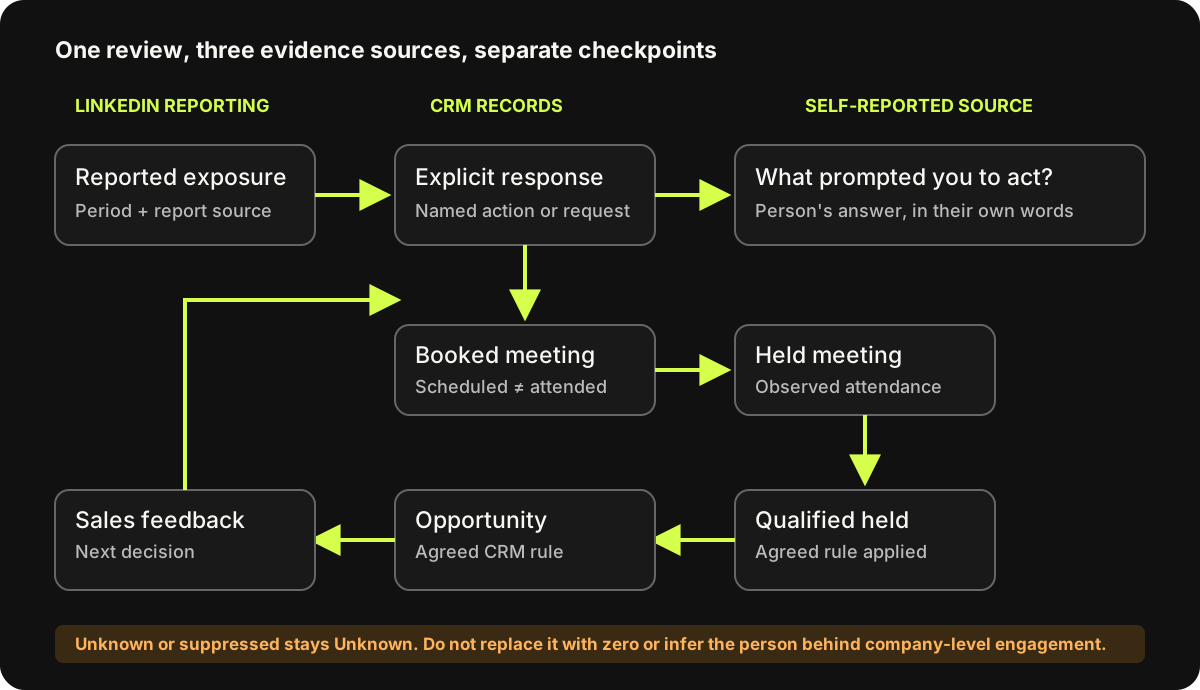
Watch: compare account engagement with CRM evidence
In this discussion with Marc Woodland from Winbox, 01:54–03:15, Woodland describes comparing CRM outcomes, company engagement and self-reported attribution.
Use the discussion to plan your own review. If a report identifies a company, keep that observation at company level. Only attach an action to a named person when the source supports that connection.
Define what counts before reading the numbers
For FieldLedger's fictional campaign, Nia uses these definitions:
| Measure | Definition and source |
|---|---|
| Account with reported paid exposure | A distinct account from the agreed target list with reported paid impressions in the chosen period |
| Explicit response | A recorded request or reply from an identifiable person, with its source and requested action |
| Booked meeting | A scheduled meeting recorded in the CRM |
| Held meeting | A meeting the owner confirms actually took place |
| Qualified held meeting | A held meeting where sales records account fit, a relevant closeout problem and an agreed next step |
| Opportunity | An opportunity accepted and recorded under the team's existing CRM rules |
| Won revenue | A closed-won opportunity value from the CRM, using the business's stated revenue definition |
These are example operating definitions. Your team should agree its own qualification and opportunity rules. A booking is not a held meeting, and a download does not establish qualification.
Handle missing and overlapping data correctly
LinkedIn suppresses some Companies Hub metrics below reporting thresholds. A dash means the value is not reported. Keep it Unknown, rather than entering zero.
Companies Hub can also differ from campaign totals. A member with two current employers can contribute to two company rows. A member without a current employer can appear in campaign reporting but not in company reporting.
An extra company row does not, by itself, prove that the campaign went outside its intended audience.
When calculating account coverage, count distinct target accounts with reported exposure and retain the reporting period. If 18 of 50 fictional target accounts have reported paid impressions, that is 36% with reported exposure.
Suppressed or missing observations prevent you from calling the remaining 32 accounts definitively unreached.
Conversion reporting has another boundary. LinkedIn supports Conversions API, website tags, CRM Sync and CSV uploads, and some conversions may be modeled.
Its attribution model can credit multiple eligible ad sets for the same conversion action. Do not add those credits and describe the result as unique customers.
A fictional review that changes the plan
Imagine FieldLedger reviews the first 14 days after its launch checks have been completed. These are invented observations to demonstrate a decision, not forecast results:
- Spend recorded for the period: $2,800.
- Target accounts with reported paid exposure: 18 of 50.
- Explicit requests: three; the CRM records all three sources and owners.
- Meetings: two booked, one confirmed held.
- Qualification: the held meeting meets the fictional definition above.
- Opportunity review: pending, so the campaign's opportunity conclusion is Unknown.
Luis's note from the held meeting says the prospect already assigns document owners. Its difficulty is agreeing what counts as an acceptable finished document, so items are returned after people thought they were complete.
Maya's next test adds an acceptance requirement and reviewing person to the checklist. The new creative would show a worked document row with the required version, the person who checks it and the next action after a rejection.
This tests an explanation the first two ads did not provide. It does not claim new FieldLedger product capabilities.
Nia and Maya also inspect delivery and company-reporting evidence before deciding whether the missing account observations call for an audience change. Luis records whether subsequent conversations repeat the acceptance problem. They schedule the next joint review for day 21.
One conversation gives the team a specific question to investigate. It does not establish that the new message is better or justify rewriting every ad.
Use the same reasoning in your review:
- If required tracking or the destination fails, repair it before interpreting response rates.
- If the audience cannot deliver, check the audience criteria and eligibility before rewriting every ad.
- If people respond but sales finds a different problem, revise the message or offer around that evidence.
- If the evidence is incomplete, record what is unknown and who will check it.
- If accounts fail the agreed fit criteria, remove or reassess them instead of spending more to force a result.
Build your own account-to-CRM plan
Open the blank planner beside the completed fictional FieldLedger plan. Work through one segment before adding another.
- Record the account-selection reason, source and owner.
- Separate source-list size, contact coverage, matched audience and final audience evidence.
- Choose the provisional audience route and document exclusions and expansion.
- Write the buying-role question, message, proof, offer and destination.
- Assign the creative, sales and measurement owners.
- Define the review period, CRM measures and next decisions.
- Give the draft and the launch separate statuses.
Use Draft Ready when the plan is coherent enough for the next preparation step and its unresolved items have owners. Use Draft Hold when missing account, problem or offer information prevents that work.
A ready draft can still have Launch Hold until the required live checks pass.
The standalone planning prompt helps review those same fields. Supply your business facts and evidence. Where a core input is missing, the next step is to answer a focused question, not accept an invented match rate or campaign result.
Interactive worksheet
Check whether your first segment is ready for drafting or launch
Enter observed values as values. Keep unavailable counts as Unknown; zero means you checked and found none. Draft and launch are judged separately.
Copy the complete planning prompt
Replace the bracketed answers with your business facts. The prompt keeps unknown live checks on Launch Hold.
Help me build and review a first LinkedIn account-based marketing campaign plan from my own facts. Treat this as a planning and evidence task. Do not invent companies, contacts, product capabilities, audience counts, match rates, delivery, results, permissions, live assets or CRM outcomes. A URL by itself does not prove that a page works. If I provide a hypothetical company, label every example decision and number fictional.

MY INPUTS
Business/product and first-test goal:
Named-account list or selection definition, source/date and count:
Why these accounts fit; evidence; sales reviewer:
Customers and open opportunities: include, exclude or handle differently; list source and owner:
Known contacts and buying-role coverage by account; gaps:
Shared buyer problem and its evidence:
Proposed first segment; what changes in message, offer, proof, geography or sales action; deferred segments:
Candidate audience route: manual Company Names, company upload, contact upload, retargeting intersection or other; reason:
Source companies/rows; accepted upload rows; matched member accounts; final audience after all criteria; source/date for each. Mark irrelevant upload/match fields Not applicable:
Location, role selections, exclusions and their source/owner:
Audience Expansion, Auto-Targeting mode and predictive-audience settings; saved checks:
Buying-role question, proposed message, claims and proof with source/date/permission:
Actual offer, CTA, post-click requirement, creative format and asset owner:
Destination URL or Not built; what was actually tested:
Marketing, sales-response, creative and CRM owners:
Ad-account authorization; required Page, identity and asset permissions; billing readiness; evidence/date/owner for each:
Media ceiling and period; any forecast with assumptions:
CRM definitions for reported account exposure, explicit response, booked meeting, held meeting, qualified held meeting, opportunity and won revenue if used:
Campaign/source capture and response-path test; sales-feedback process; first joint review date:
Other unknowns, each with owner and next check:

HOW TO WORK
1. First check for core planning facts: accounts or a selection rule, fit reason, shared problem, actual offer, a provisional audience route with a reason, buying roles and a responsible owner. If any of these are missing or contradictory, return Draft Hold and up to five focused questions. State which planning decision each answer enables. Do not produce a filled campaign by borrowing facts from this prompt or another company. You may list the known fields and a safe next step.
2. Separate source-list companies or contacts, accepted upload rows, matched member accounts, final audience after location/roles/exclusions, forecast and actual delivery. Never convert one into another. Zero means a measured zero with a source; blank means not supplied; Unknown means unresolved. Use Not applicable only where the chosen route genuinely skips a field.
3. Check route feasibility against current LinkedIn documentation when you have browsing or supplied source text. Manual Company Names supports up to 200 companies. Company-list and contact-list uploads each require at least 300 rows; an active list needs at least 300 matched member accounts; the final ad-set audience needs at least 300 member accounts. These are distinct requirements, not reach or performance guarantees. If current documentation differs, name the source and update the rule. If you cannot access the current source during this run, say you relied on the dated rule supplied in this prompt and do not claim that you rechecked it. Location is required. A company-plus-retargeting intersection can shrink the audience. Do not fix a threshold by adding accounts that do not fit.
4. For a selected-account boundary, distinguish manual Build your own audience, Audience Expansion, Auto-Targeting signals and predictive audiences. Record the intended exclusions and owner. A source list does not prove strict targeting when Auto-Targeting or expansion changes the boundary. Saved settings and final audience remain Unknown until checked.
5. Plan one coherent first segment. Split only when the message, offer, proof, geography or sales action changes and a separate test is feasible. For each role/message, state the buyer question, precise message, truthful proof, permission status, actual offer, format, CTA and destination behavior. If proof is unavailable, remove the unsupported claim or hold that creative; do not manufacture a customer result. Reject malformed or credential-bearing destination URLs. A valid public HTTPS URL still needs an observed destination test; do not mark it verified from syntax alone.
6. Define CRM checkpoints before interpreting results: reported account exposure with period, explicit person-level response, booked meeting, held meeting, qualified held meeting, opportunity and sales feedback. Keep company engagement separate from an identified person's action. A suppressed company-reporting value is Unknown, not zero. Define who will respond to a request and what they will record.
7. Return a compact account-to-CRM plan with these sections: account/segment; audience route and count ledger; boundaries; message/offer/creative/destination; owners/budget; CRM definitions and review; open checks with owner, evidence to obtain and decision enabled. Include a specific next action: repair data, validate audience feasibility, produce creative, run launch checks, launch after checks pass or stop.
8. Return two separate judgments. Draft Ready means the core plan is coherent and every remaining preparation item has an owner and next action. Otherwise Draft Hold. Launch Ready requires Draft Ready plus recorded passing evidence for the final account list and fit review; eligible saved audience and correct mode, role, location, exclusions and expansion settings; each required ad-account, Page/identity, asset and billing check; permitted accurate legible creative; working destination and exact offer delivery; tested response/source capture; agreed response owner, ceiling and review date. A denied, unavailable, pending, blank or literal Unknown permission/check blocks launch and must be named separately. A ready draft may still be Launch Hold. Never call an untested or hypothetical plan ready to launch.

Use plain language. Attribute platform rules to current LinkedIn help pages, such as https://www.linkedin.com/help/lms/answer/a417950/ , https://www.linkedin.com/help/lms/answer/a423102 , https://www.linkedin.com/help/lms/answer/a1489764 and https://www.linkedin.com/help/lms/answer/a423690 . State what was supplied, inferred as a proposal, and actually verified. Do not claim to have checked a live interface, file, permission or destination unless you did.

MY ANSWERS:
[Paste here]
If you want help reviewing your account list and first campaign, book a free Demand Gen Roast. Bring the current plan and its unresolved decisions so the review starts with the work you have already done.
Connect LinkedIn ads to the account plan
You may already call this “advertising to our sales list.” Account-based marketing gives that work a wider frame: the account list, the people involved in a decision, the ads and resources they see, and the sales conversations that follow.
Start with the account and buying problem. Then decide what LinkedIn should do. One segment may need a founder explaining a change in the market; another may need a product demonstration or a resource that answers an evaluation question. The six examples above help you choose that explanation. Their public ads do not reveal which accounts the advertisers targeted.
If Meta is also part of the plan, use the account-based advertising guide to assign each channel a job and record its audience boundary. Keep one shared account list and CRM definitions, while checking each platform’s matching, eligibility, and delivery separately. Do not add both platforms’ reported reach or attributed conversions together and call the result unique people or customers.
Get help running account-based campaigns
Maestro builds campaigns using company and contact audiences on LinkedIn and eligible contact or engagement audiences on Meta, with creative, destinations, and CRM reporting. Our account-based marketing agency page explains the advertising work we handle and the decisions your sales team still owns.
Bring the completed planner to a free Demand Gen Roast. Identify the part your team needs help with: preparing an audience, making the ads, fixing the response path, or connecting campaign responses to qualified meetings. That gives the scope discussion a concrete starting point.
Questions about LinkedIn ABM
How many accounts do you need?
There is no single account count that makes a campaign viable. Manual Company Names targeting supports up to 200 companies. Company and contact uploads each require at least 300 rows, and the relevant audience must meet the member threshold.
Check the final audience after the rest of your criteria. These platform requirements are eligibility checks, not performance guarantees.
If your list does not fit one route, evaluate a legitimate smaller segment or another supported route. Do not pad the file with irrelevant companies.
Do you need Sales Navigator?
It can help research accounts and people. The campaign plan can also start with an existing sales list, CRM records and customer evidence.
The audience-building options described in LinkedIn's Campaign Manager documentation do not require you to build the strategy around a Sales Navigator subscription.
Should you upload companies or contacts?
Choose based on the audience you need and the data you actually have. A company list can support reaching relevant people associated with selected companies, followed by role criteria. A contact list starts from known contact information.
Both need successful matching and a qualifying final audience. Neither guarantees that a particular person sees an ad. The company and contact requirements explain the supported fields.
Can you run one campaign per account?
Only consider it when the message and sales treatment justify the separation and the audience is eligible.
Starting with several accounts that share a problem usually creates a simpler first plan to produce and review. A strategic account can still receive individual sales attention while advertising covers an agreed group.
Which ad format should you start with?
Start with the explanation and evidence you can produce:
- A legible screenshot can demonstrate a workflow.
- A customer's documented process can support an interview.
- A series of buying questions can become a carousel or document.
The six examples above show those choices. None establishes one format as the winner for every account campaign.
Does account engagement prove that the ads created pipeline?
No. Keep the observed engagement, CRM opportunity and source information together, but preserve what each record says. Companies Hub revenue fields depend on shared CRM data. Their presence does not isolate advertising's effect from sales activity or other channels.
Do these audience rules work the same way everywhere?
Check the countries in your plan. LinkedIn says Matched Audience size can be limited in the EEA and Switzerland because matching depends on member opt-in. The fictional US example is not evidence of the same audience availability elsewhere.
Sources and example notes
LinkedIn product documentation was checked on 26 September 2026. The linked first-party pages support the audience and reporting requirements; the campaign recommendations are editorial guidance.
The six ad examples are attributed public LinkedIn Ad Library records. Their screenshots, copy and creative show what the advertisers presented. Advertiser numbers remain attributed claims. Public ad presence does not establish targeting, account reach, spend or performance.
The two practitioner passages provide account-review and measurement context. They do not replace current platform documentation. FieldLedger, its team, its campaign and all its numerical examples are fictional.