
Account-based advertising: plan LinkedIn and Meta around the same accounts
Account-based advertising is paid media built around a chosen group of companies and the people involved in their buying decisions. You choose the accounts, agree on the problem you can solve, and use ads to support the conversations sales wants to have.
LinkedIn and Meta can play different parts in that plan. LinkedIn supports company targeting. Meta can help you reach matched contacts and previous visitors, or find a wider audience. A target-account list gives each platform different inputs. Your plan needs to say which kind of reach each campaign can actually provide.
Start with the blank cross-channel plan and completed fictional example. They help you choose the first channel, define the audience boundary, assign the work, and decide what evidence would justify the next test.
Where advertising fits within ABM
Account-based marketing includes account selection, research, sales conversations, content, events, and customer relationships. Advertising is one part of that work. An ad campaign can put a relevant explanation in front of buyers; sales still needs a reason to contact the account and someone responsible for the next conversation.
Use account-based advertising when sales can name the companies it wants, explain why they fit, and follow through on responses. If the account list is just an unreviewed export, start with selection. If nobody owns the follow-up, resolve that before buying traffic.
For LinkedIn setup, use our LinkedIn account-based marketing guide. This page handles the cross-channel decision: what LinkedIn and Meta each do, which work they share, and how to read the results together. If you need a team to deliver the campaigns, see our account-based marketing agency scope.
Choose the audience before choosing the channel mix
LinkedIn Matched Audiences separates company targeting, contact targeting, and retargeting. Those routes answer different questions. Company targeting starts with employers. Contact targeting starts with known people. Retargeting starts with an observed action.
Meta's customer-list audiences match customer identifiers such as email addresses or phone numbers to profiles. Uploading company names is not an equivalent route. A company may be on your sales list while none of its buying team matches your contact audience.
| Audience route | What you start with | What you can plan around | What still needs checking |
|---|---|---|---|
| LinkedIn company targeting | Selected companies, then relevant roles and locations | Reaching eligible members associated with the selected companies | Correct company matches, final audience eligibility, exclusions, and actual delivery |
| LinkedIn contact targeting | Contact data you are permitted to use | A matched audience drawn from known contacts | Match status and final audience; an uploaded person is not guaranteed an impression |
| Meta customer-list audience | Permitted customer identifiers | Reaching matched profiles, subject to the chosen audience configuration | Data permissions, matching, audience mode, expansion, exclusions, and delivery |
| Website or engagement retargeting | Eligible visitors or interactions | Continuing an explanation for a prior audience | Source, lookback window, consent, eligibility, and expansion settings; visitors are not automatically target-account buyers |
| Expanded acquisition | Audience signals or suggestions | Finding additional potential buyers | Separate budget, reporting, and lead-fit checks; this is not proof of named-account coverage |
Keep source-list rows, matched people, eligible audience, and delivered reach as separate fields. Do not describe a list of 500 companies as 500 reached accounts. Do not describe 1,000 uploaded contacts as 1,000 matched people.
Check whether the list is a boundary or a suggestion
Meta's Advantage+ audience documentation says it can expand beyond audience selections, including customer lists. Some settings act as controls; others are suggestions. An audience named “Target accounts” can therefore produce a broader campaign than its name implies.
For a strict-list test, inspect the actual audience configuration available for the chosen campaign and record what can expand. If you cannot establish that the required boundary is enforced, hold that route or label it wider acquisition. Keep its results separate from named-account reporting.
LinkedIn Audience Expansion also broadens reach to people similar to the selected audience. Review the actual targeting mode and expansion setting before launch. Preserve a dated screenshot or export with the campaign record so the report describes what ran.
Start with the channel you can support
Running both platforms is a choice. It adds creative, audience checks, reporting, and follow-up work. The second channel earns a place when it has an eligible audience and a different job to do.
| Your starting situation | First move | Add the other channel when |
|---|---|---|
| Named companies and clear buyer roles; little permitted contact data | Evaluate LinkedIn company targeting and its final audience | You have a verified Meta audience route and a specific follow-up message |
| Existing permitted contact data or eligible visitors; account associations are known | Evaluate Meta matching or retargeting alongside the account record | LinkedIn can reach relevant roles missing from those known contacts |
| Very small list and no eligible paid audience | Improve account research, content, and direct sales work | A legitimate audience can deliver; do not pad the list to make an upload pass |
| Need a wider supply of buyers, not a fixed-account test | Run a separately labelled acquisition campaign | Leads meet the agreed account-fit criteria; do not retrospectively rename broad delivery ABM |
Check current platform eligibility in the account. A list can be large enough for upload and still become too small after matching, geography, role filters, and exclusions. Our LinkedIn targeting guide covers the file and audience checks.
Keep the first plan small enough to review. One account segment, one offer, and two creative explanations give you a clearer starting point than a separate campaign for every buying role. That is an editorial starting recommendation, not a platform minimum.
Give the channels different jobs and one consistent offer
Write the shared offer first. Then decide which question each ad answers. A person who clicks a LinkedIn workflow explanation should find the promised workflow on the destination. A later Meta ad can answer a different buying question without changing the offer.
The two ads do not create a guaranteed sequence. People can encounter them in either order, see only one, or never see either. Each ad must make sense by itself. Retargeting eligibility is not proof that someone read the first page.
Two public ads show different ways to explain the offer
These are examples of visible creative. They do not establish that either advertiser used ABM, targeted named companies, or achieved a particular result.
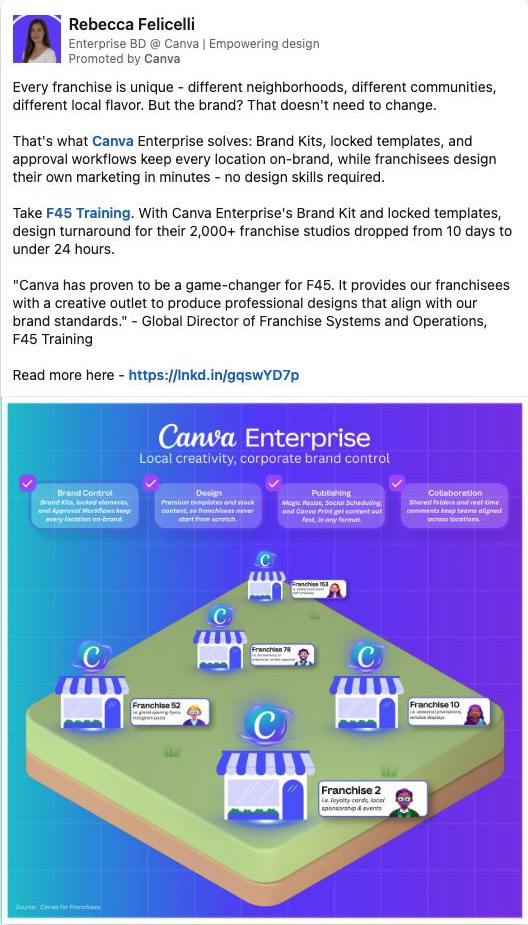
In Rebecca Felicelli's post promoted by Canva, the opening names a franchise problem: locations need different local marketing while the brand stays consistent. The post then describes Brand Kits, locked templates, and approval workflows. Its F45 story is an advertiser-presented claim.
Borrow the structure when several target accounts share an operating problem: name the situation, show the mechanism, and offer a next step. For example, a franchise software vendor could explain how a local manager submits a promotion for approval. It needs its own product evidence and permissions; Canva's customer story is not its proof.
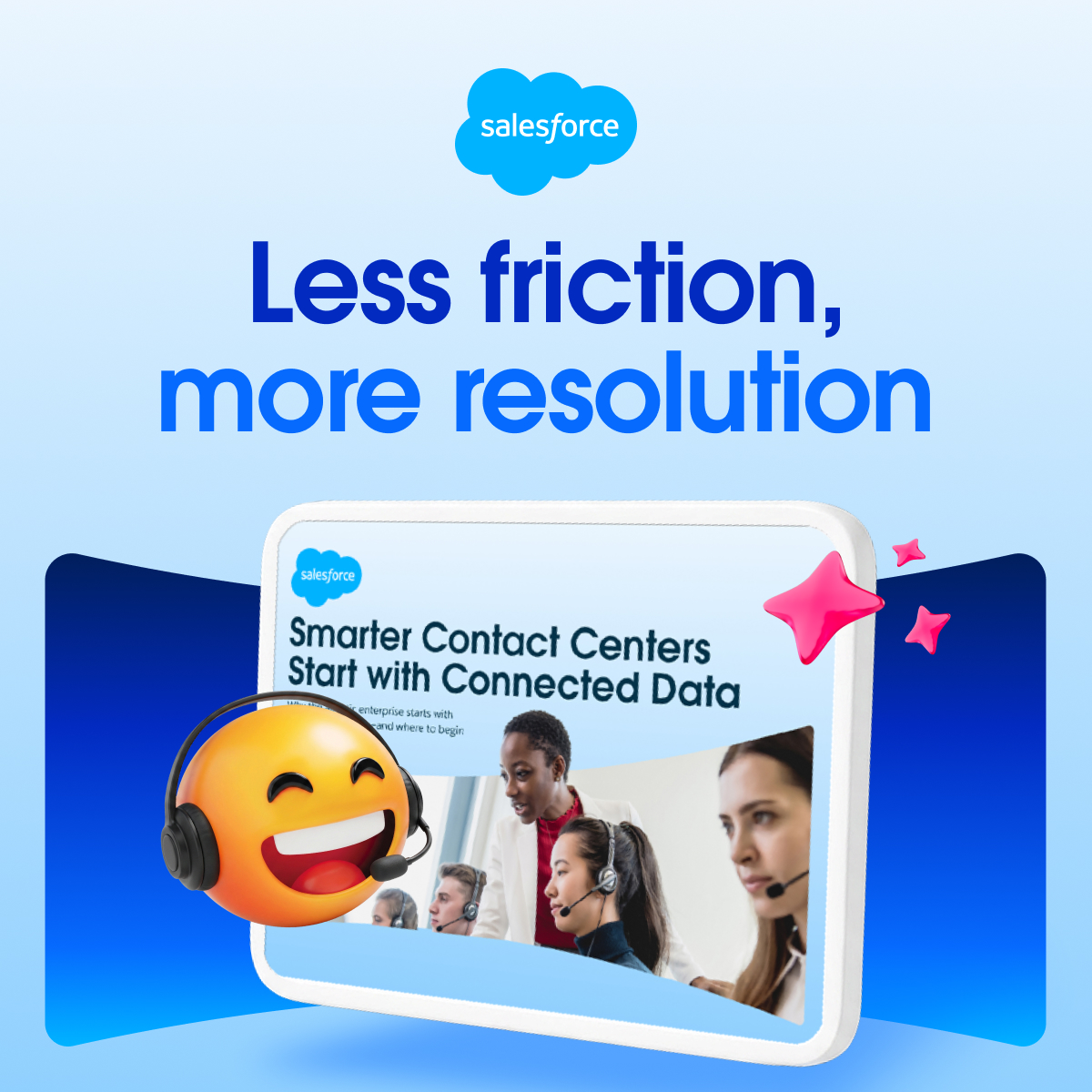
The Salesforce Meta ad shows a guide titled “Smarter Contact Centers Start with Connected Data.” The image gives the reader a concrete resource to expect after clicking. The captured creative alone does not tell us who received it or whether the guide converted.
Borrow this when the buyer needs to understand a problem before requesting a demo. Show the actual resource and name what it covers. For a second ad, choose a different question from the same buying process, such as how the data would reach the existing CRM. Do not invent a guide, integration, or customer result to make the sequence look complete.
For more creative choices, use the B2B ad examples and Facebook ads for B2B guide.
A complete fictional cross-channel plan
ServiceLedger is fictional. It sells software that helps commercial maintenance firms collect job-completion evidence. All names, counts, budgets, and decisions below are teaching inputs, not campaign results or forecasts.
Sales selects 80 US maintenance firms whose operations teams coordinate work across several locations. The offer is an ungated job-completion checklist with a filled example. A product walkthrough is optional. Marketing owns the ads and destination; sales owns account fit and requested conversations; operations owns CRM evidence.
| Decision | ServiceLedger's plan |
|---|---|
| Shared account record | 80 companies; sales records fit reason, website, account owner, and treatment of open opportunities |
| LinkedIn route | Evaluate manual company targeting plus operations-role and US criteria; matching and final audience remain Unknown until checked |
| LinkedIn message | “See which jobs still need completion evidence.” Show a fictional product screen with job, evidence, and status |
| Meta route | Evaluate eligible visitors to the checklist page after consent and audience checks; source size, eligibility, and delivery are Unknown |
| Meta message | “Give each missing job document an owner.” Show a filled checklist row; the ad explains the checklist without assuming a previous visit |
| Audience boundary | Record each platform's actual mode and expansion. Hold any strict route whose boundary cannot be confirmed |
| Media ceiling | $6,000 for a proposed 30-day pilot: up to $4,500 LinkedIn and a $1,500 Meta reserve; neither is a forecast or authority to spend |
| First launch decision | LinkedIn first if its checks pass; Meta stays held until its audience, configuration, and destination evidence pass |
| Sales action | Respond to explicit walkthrough requests; account engagement prompts an owner review, not a claim that a named person clicked |
| Review | Check faults immediately; review delivery and CRM observations weekly with a final pilot review after 30 days |
The reserve stays unspent if the Meta route is not viable. Do not force a 75/25 split by sending money to an audience that cannot answer the question. If both routes pass and sales feedback reveals a new buying concern, propose a new creative test with its own owner and budget decision.
The completed plan carries the account scope, owners, evidence requests, and separate Draft and Launch decisions. It is Draft Ready because the team can prepare the assets. Both channels remain Launch Hold until real checks and budget authorization exist.
Measure delivery, response, and account progress separately
Keep platform delivery in platform reports. Keep deduplicated people, meetings, and opportunities in the CRM. Add the person's own explanation of what prompted the enquiry when available.
LinkedIn Companies Hub metrics can help inspect company-level engagement. Some values are suppressed below reporting thresholds. A missing value is Unknown, not zero. A company-level signal does not identify the person who engaged.
Meta Conversions API for CRM can send CRM events back to Meta for lead-ad optimization. That feedback can support campaign decisions. It does not make Meta reporting a complete account-level view or prove that an ad caused a sale.
| Measure | Record it as | Decision it supports |
|---|---|---|
| Delivery | Spend, impressions, reach, audience mode, and dates by platform | Check whether the intended route delivered; avoid adding cross-platform reach as unique people |
| Account exposure | Distinct target accounts with reported exposure, source, and reporting window | Inspect reported coverage; keep unreported accounts Unknown |
| Explicit response | A deduplicated person and request with timestamp and source evidence | Assign the right reply and account owner |
| Qualified held meeting | A meeting confirmed held plus the team's documented fit and next-step criteria | Review message fit and sales progression |
| Opportunity and revenue | CRM opportunity ID, stage, value definition, and date | Track commercial progress without counting the same deal twice |
| Platform attribution | Each platform's credited conversions and attribution settings | Diagnose platform reporting; keep it separate from unique CRM outcomes |
Suppose the fictional pilot reports four LinkedIn-attributed conversions and three Meta-attributed conversions. The CRM contains five distinct requests; two people appear in both platforms' credited sets. Report seven platform credits and five distinct CRM requests. Do not call them seven leads.
If three of those five people belong to target accounts, report three target-account respondents. They might work at one, two, or three companies; count the distinct account IDs before reporting account response. If one of those accounts already had an opportunity, preserve that history rather than calling it new pipeline.
An exposed account that later buys is an observation, not a causal test. If you need incremental impact, plan a credible holdout or other experiment before the campaign, with enough accounts and a design that accounts for sales activity and overlapping channels. A small pilot may only support delivery and response decisions.
Use the review to change a specific part of the plan
If the campaign cannot deliver, inspect matching, final eligibility, exclusions, and the current audience mode. Increasing the budget does not fix an ineligible audience.
If delivery works but the wrong companies respond, inspect targeting and expansion, then review whether the offer attracts a broader audience than intended. Keep those enquiries in the CRM with their actual fit; do not remove them to make the campaign look better.
If the right accounts respond but meetings stall, read the sales notes. A recurring integration question may justify a workflow demonstration. A missing account owner needs an operational fix. Lowering the cost per click will not repair that handoff.
If evidence is incomplete, name the exact missing record and its owner. “Need better attribution” is too vague. “Operations will reconcile the five request IDs against the two platform exports for this review period” is work someone can finish.
Build your plan and assign the next action
Open the blank plan alongside the ServiceLedger example. Complete one segment. Record the reason for the account list, each platform's audience route, the shared offer, separate messages, budgets, owners, and measurement definitions.
Use the standalone review prompt with your completed record. It asks for missing business facts, keeps unverified audience evidence Unknown, and separates a draft you can work on from a campaign you can launch.
Need help producing the ads, landing page, and CRM handoff? Review our account-based marketing agency scope or book a Demand Gen Roast. Bring the account list and the decisions you have not resolved.
Sources and limits
LinkedIn and Meta product sources were checked on October 24, 2026. Public ad captures were first collected in September 2026 and visually reviewed again for this guide. They support the creative observations, not targeting or performance claims.
The channel sequence, budget split, and review schedule are editorial planning examples. Confirm current platform options in the account before launch. For software selection rather than campaign planning, use our ABM platforms comparison.