
LinkedIn predictive audiences: choose a seed and test quality
LinkedIn predictive audiences use a source audience, often called a seed, to find other people predicted to take similar actions. Use them when you have customer or lead data that represents the business you want more of and want to test reaching new prospects.
Start by choosing the behavior you want to repeat. A list of qualified buyers and an audience of people who watched a broad industry video tell you different things. Both can be eligible sources, but eligibility alone says little about whether the resulting leads will fit your business.
A company seed also allows modeled reach beyond those companies. If your campaign must reach only a selected account list, use LinkedIn account-based marketing with explicit company targeting. Predictive audiences suit a different task: expanding prospecting from a source you can explain and evaluate.
Use the seed brief to record that choice, then follow the setup and review steps below. The completed fictional example shows what a finished plan looks like.
What predictive audiences do
LinkedIn combines your source data with its AI to generate an audience predicted to perform similar actions. You choose the source type, target location, and audience size. The source can be a contact list, company list, conversion, Lead Gen Form, or retargeting audience. LinkedIn's requirements describe the supported sources and their limits.
The resulting audience can have a different mix of job functions, company sizes, and industries from your seed. Review those attributes and decide which targeting restrictions your business needs. A high forecast does not establish that the people in it can buy from you.
Audience Expansion is turned off for ad sets that use predictive audiences. That setting does not restrict the predictive audience to the seed. The predictive audience itself already models additional reach.
Choose a source that represents the outcome
Write a sentence describing who is in the seed and why. “Contacts at closed-won customers for our current product” gives you a clearer starting point than “everyone in the CRM.” The second list may contain customers, job applicants, partners, students, and people who downloaded something years ago.
Start with the closest available signal to your intended outcome, then inspect its quality. A customer list may include users who never influenced the purchase. A demo form can contain poor-fit requests. A conversion can fire for an action that sales does not consider a lead. The source name alone cannot make that distinction for you.
Swipe to read all columns, or focus the table and use the arrow keys.
| Possible seed | What the source tells you | What to check before choosing it |
|---|---|---|
| Customer contacts | These contacts are associated with existing customers | Whether the contacts and customers represent your current product, market, and buying roles |
| Company list | These companies share a reason for selection | Whether that reason reflects customer fit; modeled reach can extend beyond the companies |
| Demo or application forms | These members submitted a specific request | Which forms qualify, whether requests fit the offer, and how sales assessed them |
| Conversions | These members completed the tracked action | Whether the event fires correctly and represents the outcome you want |
| Retargeting audience | These members visited or engaged with a specified asset | Whether that behavior indicates buying interest or simply interest in the content |
LinkedIn recommends aligning the source with the ad set objective and suggests customer contacts, demo or application signups, and sales-selected or closed-won lists as starting points. Treat those as candidates to inspect, rather than assuming every customer or form record is equally relevant.
Record the source owner, selection rule, date range, and permission to use the data. Remove unrelated records according to that rule. If cleaning leaves too few records, keep the smaller, coherent group and decide how to collect more of the same signal. Adding unrelated people changes what you are asking the model to learn.
For a source based on repeat visits or content engagement, the LinkedIn retargeting guide helps you define the underlying audience before using it for predictive prospecting.
Check the requirement for your source type
The table below follows LinkedIn's detailed requirements, read October 31, 2026. The units matter: uploaded rows, matched member accounts, and modeled audience size describe different populations.
Swipe to read all columns, or focus the table and use the arrow keys.
| Source type | Documented source requirement | Additional check |
|---|---|---|
| Contact list | 300–300,000 rows | Source status must be Ready or Updating; inspect the matched audience separately |
| Company list | 300–300,000 rows | Source status must be Ready or Updating; rows do not establish a count of reachable people |
| Conversion | More than 300 member accounts | Confirm the conversion and its qualifying action |
| Lead Gen Form | More than 300 member accounts | Confirm the selected forms and member count |
| Retargeting audience | More than 300 member accounts | Confirm the engagement or visit definition and member count |
A file with 299 rows falls below the documented range; 300 rows meets its lower limit. It does not prove that LinkedIn matched 300 members, that the predictive audience has finished building, or that an ad set will deliver. Similarly, 300,000 rows is within the stated range; 300,001 is outside it. Use the source-specific requirement and then check its actual status in Campaign Manager.
There is a wording discrepancy at exactly 300 members. LinkedIn's creation guide says “300 member accounts or more,” while the detailed requirements say “more than 300” for conversions, forms, and retargeting. If one of those sources has exactly 300 members, confirm eligibility in Campaign Manager or with LinkedIn support. Do not treat the broader wording as a guarantee. A count of 301 clears the detailed page's numerical threshold, while the other source and account checks still apply.
You can select only one source type for a predictive audience. LinkedIn explicitly permits multiple sources within that type to meet the minimum, such as several Lead Gen Forms. That does not permit mixing a contact list with a conversion source. Record the selected source IDs and use the member count LinkedIn reports; adding form submission totals can double-count people who submitted more than one form.
Create the predictive audience
Have the selected source available in the correct ad account before starting. The following sequence comes from LinkedIn's current creation guide. Use it alongside the account you are building in.
- Open your ad account in Campaign Manager, then choose Plan → Audiences.
- Select Create audience → Predictive audience.
- Name the audience so you can identify the source and intended test later.
- Choose the source type, then select the source or supported sources within that type.
- Choose the target audience location.
- Use the slider to select the desired audience size. Record your selection so later comparisons refer to the same plan.
- Review the agreement and account details before choosing Agree & Create.
Next, use the predictive audience in the intended ad set. Apply the geography and other targeting restrictions your offer requires, then inspect the resulting forecast. Our LinkedIn ad targeting guide covers how to express those restrictions. A larger audience-size selection is a test choice, not a promise of more qualified leads.
If you want to avoid advertising to the contact or company seed, add that list as an exclusion on the ad set. LinkedIn specifically recommends this step when you do not want the seed included. Record both the exclusion you intend to use and the exclusion you actually observe in the ad set; an audience name such as “new prospects” does not apply it.
Keep the source version and build status together
A source can change while you are setting up the test. When a contact or company list shows Updating, LinkedIn uses the latest completed version to create the predictive audience. After the update finishes, a subsequent daily refresh uses the updated source.
For example, an operator may have uploaded a cleaned customer list this morning while yesterday's larger list is still the completed version. An audience created during that update starts from the completed list. Record both versions so nobody attributes the resulting audience to the cleaned list before it has processed.
On a small screen, swipe the diagram or focus it and use the arrow keys.
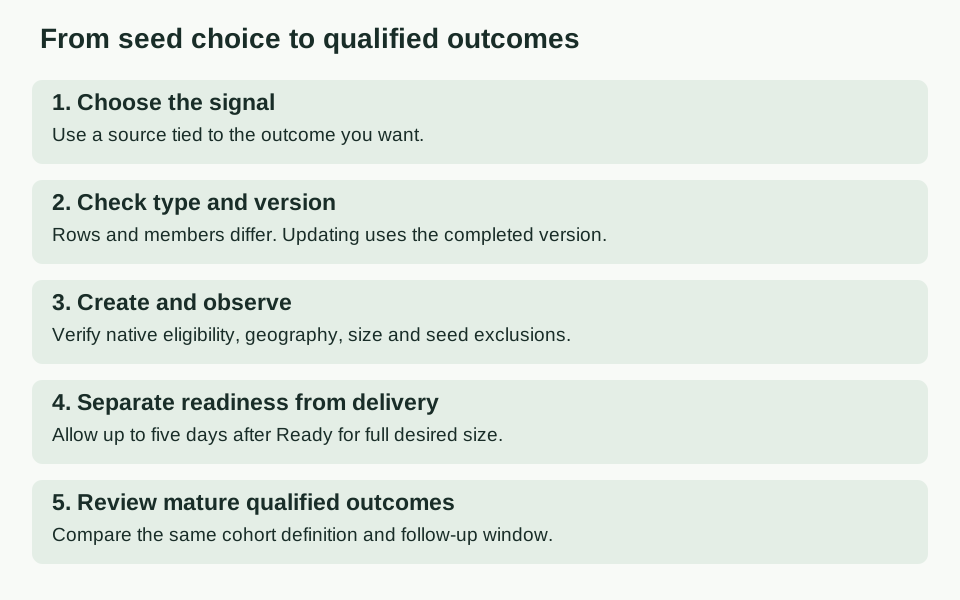
Predictive audiences refresh daily. LinkedIn says to allow up to five days after the audience becomes Ready for it to reach the full desired size. Those are separate observations: record when Ready appears and the audience size you see afterward. A completed plan, a Ready audience, and a delivering campaign each answer a different question.
You can inspect the audience's professional makeup through audience insights. LinkedIn says insights require an Active or Ready audience with 300 to 100 million member accounts. Its Audiences page guide also notes that source changes can take up to 48 hours to appear. Record when you viewed the insights so an older view is not mistaken for the new source's composition.
Four seed decisions in practice
The following examples are fictional operating decisions. Their counts and company details illustrate the choices; they are not Maestro results or platform recommendations.
1. A qualified customer contact list: prepare the test
Harborline Ops, a fictional workflow software company, wants more sales-accepted demos from operations leaders at midmarket businesses in the US. Its source owner prepares 1,240 contact rows associated with customers of the current product, removes records outside the agreed market, and records completed export v3 with a September 30, 2026 cutoff. Permission to use that source is documented in the fictional plan.
Choose Contact list as the source type. The row count is within the documented range, and the selection rule has a clear relationship to the desired outcome. Plan the target geography, choose a proposed size in Campaign Manager, and exclude the customer seed from the prospecting ad set. Use an existing offer and a comparable audience so the test has a clear point of comparison.
This is a coherent plan to take into Campaign Manager. The matched member count, native eligibility, resulting size, and applied exclusions still need to be observed there. Save those observations with the source version, then review sales-accepted demos from the test. The worked seed brief shows how to keep the planning decision separate from those later observations.
2. A broad video audience: change the signal
A cybersecurity company has 8,000 members in a retargeting audience built from views of a general “future of work” video. It wants qualified security demos, but has no evidence that the viewers work in security or are considering the product.
The audience clears the documented member-count threshold. The business case for using it as a demo-quality seed is weak. Keep it available for a content-engagement test if that is the goal, or choose a source closer to the demo outcome. A larger count does not repair the missing connection between the behavior and the buyer.
3. A cleaned list is Updating: identify the active version
An operator replaces a 2,400-row mixed lead list with 1,100 qualified contact rows. Campaign Manager shows Updating. The operator wants the predictive test to reflect the cleaned list.
Record the 2,400-row version as the latest completed source and the 1,100-row version as the pending update. Wait for the update to process, then check the predictive audience after its refresh before evaluating the cleaned-source test. Keep the earlier observations, but label them with the version that produced them.
4. A small demo audience: collect more of the same signal
A company has a demo-form source with 240 member accounts. Its general newsletter audience is much larger, and somebody suggests mixing the two to reach the minimum.
Keep the demo definition intact. The form source is below the documented requirement. If another Lead Gen Form represents the same qualifying demo action, select it within the same source type and check the resulting member count. Otherwise, continue collecting qualified demos or use another targeting approach while the source grows. Do not mix source types or treat unrelated newsletter engagement as equivalent to a demo request.
Check the audience composition, then the results
A modeled audience can differ substantially from its seed. In B2Linked's July 26, 2024 episode 141, AJ Wilcox described a customer seed in which 22% of members were in the HR job function. HR represented only 4% of the 200,000-person predictive audience he created from it.
That is one historical B2Linked client example. It is not a Maestro result or an expected distribution for your account. For the performance test, Wilcox added HR job-function and 11–1,000-employee company-size restrictions, reducing the 200,000-person audience to about 2% of its original size. He reported stronger click-through and conversion performance for that restricted test, not for the unrestricted modeled audience. The next question is whether the leads qualify for the business.
Wilcox recommended starting with a cleaner seed and said he expected that to produce a closer audience. His episode did not demonstrate a before-and-after clean-seed test. Treat the expected benefit as a hypothesis to test, while using his observed composition change as a reason to inspect your own audience.
Before spending, decide what would justify continuing the test. Use the same offer and creative where practical, and compare audiences with the same business outcome definition. Record meaningful differences in geography, targeting, bidding, attribution, or timing so they do not disappear behind one cost-per-lead number.
Swipe to read all columns, or focus the table and use the arrow keys.
| Review layer | What to record | What it helps you decide |
|---|---|---|
| Audience | Source version, target geography, chosen size, professional makeup, and exclusions | Whether the test represents the prospecting plan |
| Delivery | Spend, impressions, clicks, and actual delivery dates | Whether the campaign received enough exposure to evaluate |
| Lead quality | Leads, sales-accepted leads, disqualification reasons, and the qualification definition | Whether cheap leads are becoming plausible buyers |
| Commercial outcome | Opportunities or revenue from the same lead cohort, observed through a stated cutoff | Whether the test is contributing to the business outcome |
Keep the denominators with the metrics. Cost per sales-accepted lead is spend divided by sales-accepted leads. The acceptance rate is sales-accepted leads divided by all leads in the same cohort. If the qualification review is incomplete, say so; an unknown accepted-lead count is not zero.
Give both cohorts time to reach the outcome you are comparing. Comparing last week's predictive leads with three-month-old leads from another audience gives one cohort much longer to progress. Choose the budget, review date, and minimum evidence around your acquisition costs, sales cycle, and risk tolerance. There is no universal budget or duration that makes every predictive-audience test conclusive.
An ordinary campaign comparison describes what happened. It does not isolate the audience as the cause when other conditions differ. Continue, revise, or stop based on the qualified outcomes you can support, and keep immature outcomes open for later review.
Limits to know before handing off the build
LinkedIn allows up to 200 predictive audiences per ad account and a combined maximum of 1,000 Matched Audience and predictive audience segments. If the account is at a limit, review existing segments before creating another.
Predictive audiences cannot be shared across ad accounts or through Business Manager. You can share the underlying source data and create a separate predictive audience in the other account. Record the new account and source relationship; the first account's readiness and results do not establish the second account's state.
For programmatic builds, LinkedIn's requirements say access to the Predictive Audiences API requires access to the Matched Audiences API. They also state that the Predictive Audiences API does not currently support Lead Gen Forms or conversions as sources. Those sources are supported in the documented Campaign Manager workflow. Check the supported path before assigning an API build.
Download the seed brief and review prompt
Use the blank seed brief to capture the source selection rule, type, counts and units, version, intended geography, exclusions, and outcome review. Open the completed fictional brief alongside it when preparing your first plan.
The standalone review prompt helps you review a completed brief and identify the next missing input. Supply your own observations. The prompt cannot see Campaign Manager or verify account eligibility, permission, exclusions, or delivery for you.
If the account, source, source type, count unit, version, or reporting cutoff changes, revisit the affected checks and results. A new observation of the same export is a new observation time, not a new source version.
If you want help choosing the seed, setting up the test, and evaluating the leads it produces, see Maestro's LinkedIn ads services.
Sources and scope
Platform requirements and setup steps were checked against LinkedIn's predictive audience requirements, creation guide, and Audiences page guide on October 31, 2026. The exact 300-member discrepancy is preserved above because the two LinkedIn pages use different wording.
The historical audience-composition example comes from AJ Wilcox's B2Linked episode 141 transcript, published July 26, 2024. The four operating examples are fictional. Recommendations about source selection and test design are editorial guidance, not promised performance.
Copy the predictive review prompt
Copy this prompt into your AI tool and paste your completed predictive brief. You can compare your work with the worked example. Open the plain-text prompt if you prefer to select it there.