
LinkedIn Conversions API: plan the connection and review event evidence
LinkedIn Conversions API sends conversion events from your server or connected system to LinkedIn. It can carry website actions and later business events that a browser tag cannot observe on its own.
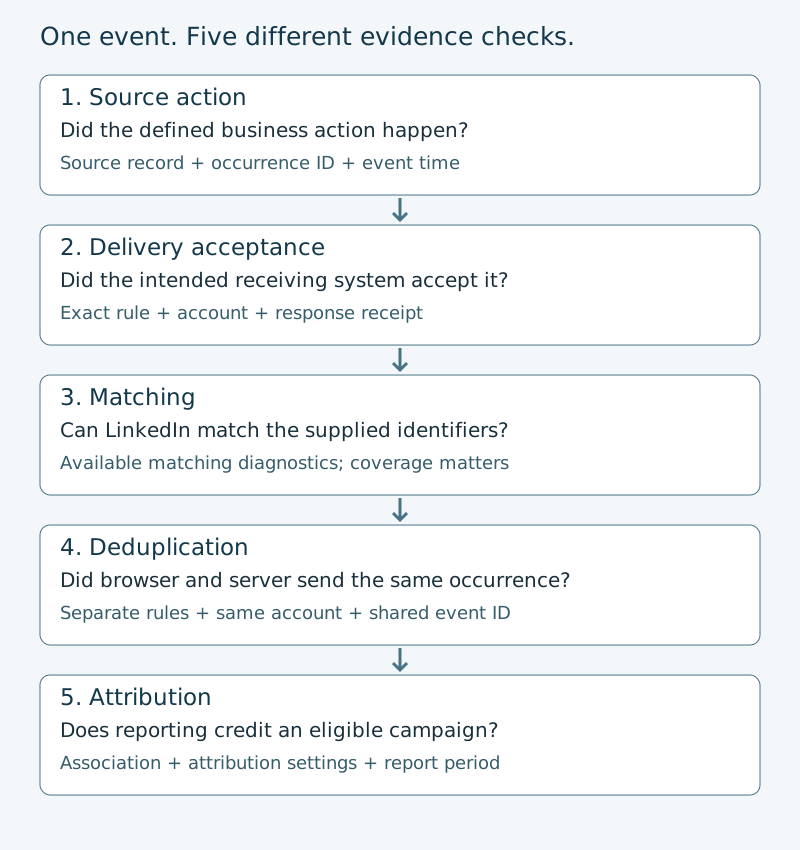
Start with one event you can prove happened. Connect that event to the correct conversion rule and ad account, send a controlled test, and preserve the response. Then check matching, duplicate handling, and campaign attribution separately. A successful API response answers only the delivery question.
This guide follows that sequence. Use the blank implementation worksheet, event ledger, and fictional completed example to hand the evidence to another operator. The examples explain the documented contract. No authenticated end-to-end test was performed for this guide.
Choose the connection route before writing a payload
Choose a route your team can operate after the first test. The important distinction is who owns the source event, credentials, mapping, delivery logs, and repairs.
| Route | A sensible starting situation | Evidence to request |
|---|---|---|
| Existing partner connection | Your CRM, customer-data platform, or measurement tool offers a supported LinkedIn connection | Exact supported event route, account selection, field mapping, delivery receipt, errors, and who can change it |
| Direct API integration | A developer can own event production, OAuth access, API version changes, and delivery monitoring | Application access, scopes, account role, conversion rule, request/response records, and retry policy |
| Browser tag only | The task is browser installation or a website signal and server delivery is not yet required | A browser request and LinkedIn source receipt; start with the Insight Tag guide |
A partner connection can reduce implementation work. It still needs an event definition and evidence that the intended event reached the intended account. A green connection badge does not prove that a qualification event was mapped correctly.
Direct access is also a commitment to maintain the integration. LinkedIn’s developer documentation uses versioned APIs. Record the supported API version you use and give someone ownership of migration dates. Do not paste a version from an old tutorial into production and leave it there.
If your problem is simply getting a Lead Gen Form response into a CRM, use the HubSpot–LinkedIn guide or Salesforce–LinkedIn guide. Receiving a lead and sending a later conversion are different directions of data flow.
Name the business event and its owner
“Lead” is too vague for an implementation handoff. Write the event as a condition someone can test: a demo request was saved successfully, a trial reached its first meaningful task, or a CRM record entered the agreed qualified stage.
For a demo request, the application’s confirmed save is a better source than a click on the Submit button. A validation error, abandoned form, or failed network request should not become the same conversion as a saved request.
Record these facts before opening the connection settings:
- Source system, event name, and exact condition that creates the event.
- Source record ID and event-occurrence ID. One person can perform more than one real action.
- Event time, source timezone, and how it becomes a timestamp in milliseconds.
- Ad account, conversion rule, and campaigns intended to receive the measurement.
- Approved identifiers and the team responsible for their permitted use.
- Browser signal, if the same action also uses the Insight Tag.
- Test owner, evidence location, and the condition for calling each stage complete.
Do not use an email address as the event identity. It identifies a person, while the event ID identifies an occurrence. Two demo requests from one person and two delivery attempts for one demo request need different treatment in your ledger.
Set up the rule and campaign association
LinkedIn’s direct API workflow has three parts: create a conversion rule, associate the intended campaigns, and stream conversion events.
Check access on the intended account
The documented direct workflow requires rw_conversions and r_ads scopes. The member granting access must have a supported ad-account role: account billing admin, account manager, campaign manager, or creative manager. A read-only account relationship is not proof that an integration can write conversion data.
Keep the access token in the approved secret store. The worksheet needs an access-check reference, not the token itself. Do not paste credentials or raw customer identifiers into the public review prompt.
Create or identify the server conversion rule
For direct creation, the documented endpoint is POST /rest/conversions. The rule uses conversionMethod set to CONVERSIONS_API, along with the name, account URN, and conversion type. Attribution settings belong to the rule; choose them deliberately instead of inheriting a sample’s values.
A successful creation response is 201 Created. Save the returned rule ID from the response body or x-restli-id header. The event request refers to that rule as urn:lla:llaPartnerConversion:ID.
If the rule already exists, read it back. Confirm its account, method, enabled state, event meaning, and attribution settings. A similar name is not enough. LinkedIn’s account finder returns owned conversions by default; the current documentation also describes an explicit option for owned and shared conversions. Record which object you actually selected.
Associate only the intended campaigns
LinkedIn documents manual associations through Campaign Manager or the Campaign Conversions API. The documented account path is Measurement → Conversion tracking: open the rule, review its details and selected ad sets, and verify the intended associations.
Direct rule creation can also request automatic association. The current API documentation says omitting autoAssociationType creates no automatic associations. ALL_CAMPAIGNS and OBJECTIVE_BASED have different behavior. Do not copy an “all campaigns” sample when the approved measurement scope is one campaign.
Only associated campaigns are eligible to attribute tracked conversions in reporting. A rule can exist and accept events while the campaign you care about remains unassociated. Save the selected campaign IDs or association readback beside the rule ID.
Map the event fields without guessing
The current event schema defines the payload. Use the field rules for the version your integration sends, especially when using recently added identifiers.
| Field | What it represents | Check before sending |
|---|---|---|
conversion | The exact server conversion rule URN | Account, rule ID, event meaning, and enabled state match the plan |
conversionHappenedAt | When the business event happened, in epoch milliseconds | Use the source event time, not the time of a retry; current validation requires a time within the past 90 days |
user | Supported identifiers for the person who performed the action | Include the documented structure and a valid identification route |
eventId | Advertiser-generated identity for the event occurrence | Preserve the same occurrence ID across browser and server when testing redundant delivery |
conversionValue | Optional monetary value with currency and decimal amount | Send only a value your business has defined; a lead value is not automatically realized revenue |
The API makes eventId optional in the general schema. That does not make it optional for the browser/server deduplication method in this guide. Its shared identity is what lets LinkedIn recognize the same action arriving through both sources.
For SHA256_EMAIL, LinkedIn specifies lowercase email with whitespace removed, then SHA-256 hashing. The result is a hexadecimal string. Do not hash an already hashed value again, and do not hash every field simply because email uses a hash. Different identifier fields have different rules.
The userIds list must be present. The current schema permits an empty list when another documented identification route is supplied, such as the appropriate userInfo, lead-response reference, or supported external ID flow. An empty list without a valid alternative is not a complete identification record.
For the first review, choose a supported identifier route whose source and transformation you can verify. More fields with uncertain provenance do not make a stronger test. Retain the transformation rule and a sanitized validation result; keep personal data out of general-purpose logs and review files.
Send one controlled event and inspect the response
For direct integrations, the event endpoint is POST https://api.linkedin.com/rest/conversionEvents. The documentation requires the authorization header, Linkedin-Version in YYYYMM form, and X-Restli-Protocol-Version: 2.0.0. The developer should check that version’s contract before transmitting data.
Use an authorized test approach that will not contaminate business reporting. Decide with the measurement owner how test records will be recognized and excluded from commercial conclusions. This guide does not establish a universal sandbox or promise a test-mode flag.
- Trigger the chosen business action and save its source receipt.
- Record the occurrence ID, source time, intended account, and rule before transmission.
- Send through the selected partner or direct route.
- Save a sanitized request reference, response status, response body where present, and transmission time.
- Inspect the receiving conversion source and any available diagnostics for that exact scope.
- Review matching and attribution later under their own evidence requirements.
For the documented direct single-event request, 201 Created is the success response. It does not certify that LinkedIn matched the person or attributed the event to an ad. A partner’s “sent” status may describe a different boundary; ask whether it means queued locally, handed to a connector, or accepted by LinkedIn.
Start with one event before introducing a batch. LinkedIn documents batch submission, but validation errors can fail the entire payload. Preserve the returned error and batch index, repair the actual field, and follow the integration’s documented resubmission policy. Do not treat the absence of an exception in your own script as a receiving-system receipt.
Deduplicate the browser and server versions of one action
If the same action arrives through the Insight Tag and Conversions API, follow LinkedIn’s deduplication instructions. They require a conversion rule for each data source: one browser rule and one server rule.
The two rule IDs are different. The event-occurrence ID must match, and both sources must belong to the same ad account. LinkedIn says that when it receives an Insight Tag event and a Conversions API event from the same account with the same eventId, it discards the CAPI duplicate and counts the Insight Tag event in campaign reporting.
Carry the occurrence ID across both paths
For an event-specific browser conversion, the documented JavaScript call carries conversion_id and event_id. The server payload uses conversion and eventId. The property spelling differs; the occurrence value must be the same.
For page-load conversions, the documented manual method sets window._linkedin_event_id before the Insight Tag base code runs. LinkedIn’s GTM method passes an event ID through the data layer into the template’s Event ID field. Follow the method matching your installation. Creating a new random ID independently in the browser and server defeats the shared identity.
The event should still represent the application’s confirmed action. Do not make a browser Submit-button click and a later successful CRM qualification share one occurrence ID merely because they belong to the same person. Those are different business events.
Check the conversion breakdown, not just a total
Associate both conversions with the appropriate campaign. LinkedIn says both source conversions can appear in the reporting breakdown; a detected redundant occurrence is counted under the Insight Tag conversion and deducted from the CAPI conversion count.
A higher browser count alone is not proof that your implementation deduplicated correctly. Keep the paired source event IDs and account references, then inspect the breakdown for the controlled scope. A missing server count could also reflect delivery, matching, association, or timing problems.
Browser/server deduplication is not a complete retry policy. Keep one occurrence ID when retransmitting the same action, record each delivery attempt separately, and confirm your connector’s behavior. Do not infer an unlimited idempotency guarantee or retry window from the browser/server rule.
Read a result at the right stage
| Stage | Evidence that advances the review | What it does not establish |
|---|---|---|
| Business action | Source-system receipt with defined event and occurrence ID | Transmission to LinkedIn |
| Delivery acceptance | Receiving response for the exact event or documented partner receipt | A matched member or an attributed conversion |
| Matching | Available source diagnostics for the identified population | Causal impact or campaign credit by itself |
| Deduplication | Paired source identities, same account, source rules, and reporting review | That all retries or unrelated events are deduplicated |
| Attribution | Campaign association, selected rule/window/model, and reporting evidence | Incremental customers or revenue |
Keep zero and Unknown separate. A complete report showing zero attributed conversions is an observed zero for that report. A missing report, an immature period, or incomplete diagnostic coverage is Unknown. Neither should be replaced with a reassuring success label.
For a recurring performance review, take the accepted event definitions into the LinkedIn reporting worksheet. Use the Revenue Attribution Report guide for the separate CRM revenue-influence product. Neither replaces event delivery testing.
Fix the first failing step
| Observation | First check | Next action |
|---|---|---|
| No source receipt | Whether the business action really completed | Repair the application or CRM trigger before changing LinkedIn settings |
| Authorization error | Token, scopes, and role on the intended account | Ask the access owner to repair the exact permission; do not switch accounts to make a call pass |
| Invalid conversion time | Event timestamp, units, and age | Correct the source-time mapping; preserve the real event time |
| Invalid or deleted conversion | Rule URN, account, method, and enabled state | Read back and repair the intended rule |
| Required identifier field missing | Identifier route and userIds structure | Follow the schema for that route; do not invent identity data |
| Accepted but no attributed result | Matching, campaign association, attribution settings, and reporting period | Investigate those stages separately before resending the event |
| Suspected duplicate | Browser/server occurrence IDs and account scope | Repair the shared identity and inspect the source breakdown |
If event meaning, account, source rule, or trigger changes, version the handoff and recheck dependent observations. The old successful test belongs to the old configuration.
Keep an explicit operating owner for credential renewal, API-version migration, connector errors, and unwanted event production. If a trigger is firing incorrectly, the implementation owner should stop that source’s automated transmission through its documented control while repairing it. Record what was stopped and when. Do not delete historical rules or reporting evidence as an automatic troubleshooting step.
Complete the handoff with the portable review kit
Download the worksheet and event ledger, then compare them with the fictional completed example. The worksheet separates the approved plan from observed receipts. The ledger makes duplicate attempts and separate business actions visible.
Copy the Conversions API review prompt
Copy this prompt into your AI tool, then supply your event worksheet and sanitized receipts. The complete text is also available as a TXT download.
Read or select the full prompt
Supply sanitized evidence references to the prompt, not tokens, email addresses, or customer payloads. The review should name the first unsupported stage, the owner who can resolve it, and the evidence needed. It cannot turn documentation into an observation of your account.
Common implementation questions
Does Conversions API replace the Insight Tag?
LinkedIn recommends sending through both sources for greater reliability. When the same event travels through both, implement the documented deduplication method. For browser installation and consent-aware signal testing, use the Insight Tag guide.
Can I send offline or CRM events?
The API streams conversion events regardless of where the action occurs. Your job is to define the business event, select a supported conversion type and identifier route, preserve its actual timestamp, and verify delivery. Do not call a lead import an attributed sale.
Why does a successful request show no conversion in my report?
Acceptance, matching, association, and attribution are different checks. A 201 response proves the documented request boundary succeeded. It does not prove a member match or an eligible ad interaction within the selected attribution settings.
Do I need a paid integration tool?
Not necessarily: LinkedIn documents a direct API workflow. A partner may suit a team that wants managed mapping and delivery. Compare the actual route, support, access, and evidence you can retrieve before choosing.
Can I copy the sample event IDs into production?
No. Create an occurrence identity for your actual event and preserve it across the corresponding paths. A repeated teaching ID cannot distinguish real actions. Keep customer identifiers and event-occurrence identifiers separate.
Sources and scope
Platform mechanics were checked on 29 October 2026 against LinkedIn’s Conversions API workflow, event schema, and deduplication guide. API contracts change; record and verify the version your integration uses.
The diagram and worked records are explanatory material. They are not native Campaign Manager screenshots or proof that a live integration was tested. A reader’s implementation is complete only when its own scoped receipts support the claimed stage.