
CPM calculator for multiple rows
Enter cost and impressions for an immediate CPM. If you have several campaign, ad, placement or period rows, use the full record to produce one result another person can reproduce.
Add compatible cost, add compatible impressions, then calculate cost per thousand from the totals. Do not average the CPM column in a report. That gives a small row the same weight as the row that delivered most of the impressions.
Calculate one CPM now
This result is arithmetic. Add rows and definitions below before combining or comparing groups.
Cost per thousand impressions
UnknownEnter cost and impressions.
Combine cost and impression rows
Load the fictional weighted example or start blank. Group B is optional.
Loading blank record…
What to resolve
Technical record details and optional import
No technical decision
Record fingerprint: None
On this page
What does CPM mean?
CPM means cost per mille: what you pay for 1,000 ad impressions.
Calculate CPM, cost or impressions
Cost per thousand impressions is:
CPM = cost / impressions × 1,000
If a campaign spent $1,200 and recorded 400,000 matching impressions, CPM is $3.00.
You can rearrange the same formula when two values are known:
Cost = CPM × impressions / 1,000Impressions = cost / CPM × 1,000
The word matching matters. Cost and impressions need the same currency, cost basis, date window and delivery definition. Media spend should not be mixed with a fully loaded cost. Dollars should not be added to euros. Served impressions should not be added to viewable impressions or unique reach.
The quick result gives you the arithmetic. It does not tell you whether the delivery was useful, the audience was right or the campaign created business value.
Calculate combined CPM without averaging row CPMs
For several compatible rows, use:
Combined CPM = sum of cost / sum of impressions × 1,000
Suppose one row spent $100 for 10,000 impressions. Its CPM is $10. Another spent $900 for 900,000 impressions. Its CPM is $1.
The simple mean of those row CPMs is $5.50. That is wrong for the combined result. The correct calculation is $1,000 / 910,000 × 1,000, or about $1.10 CPM.
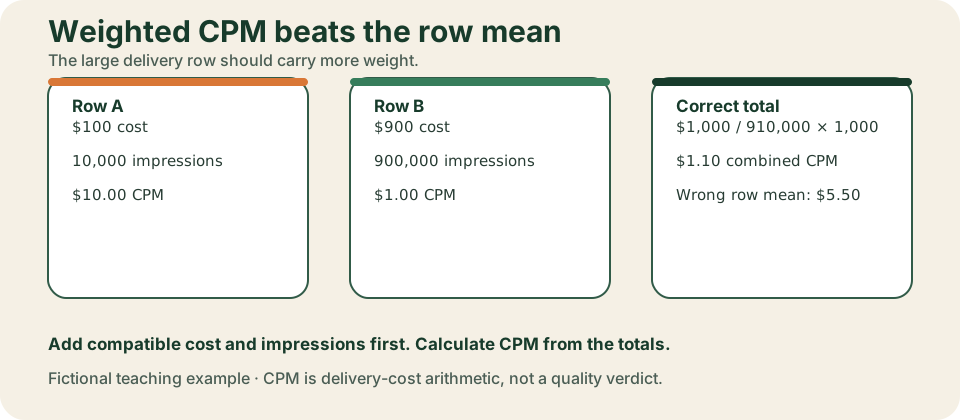
The full workspace keeps every row and shows the summed numerator and denominator beside the result. If a row does not belong in the group, hold it with a reason. Do not delete it just to make the total work.
Keep zero-impression cost visible
A row with positive cost and zero impressions is not empty. It contains measured cost and a measured zero denominator.
Its row CPM is Unknown because division by zero has no finite answer. The cost still matters. When that row is compatible with a $700 / 100,000 row, the group keeps both costs: ($300 + $700) / (0 + 100,000) × 1,000 = $10. The group is complete even though the zero-impression row has no finite row CPM.
A different rule applies when the $300 row has blank impressions. That row is held because its denominator is missing. The calculator labels the group Incomplete / on hold, displays $700 / 100,000 × 1,000 = $7 as Eligible-row subtotal (group incomplete) and keeps the held $300 outside that subtotal. A reviewer can see both the usable arithmetic and the evidence gap.
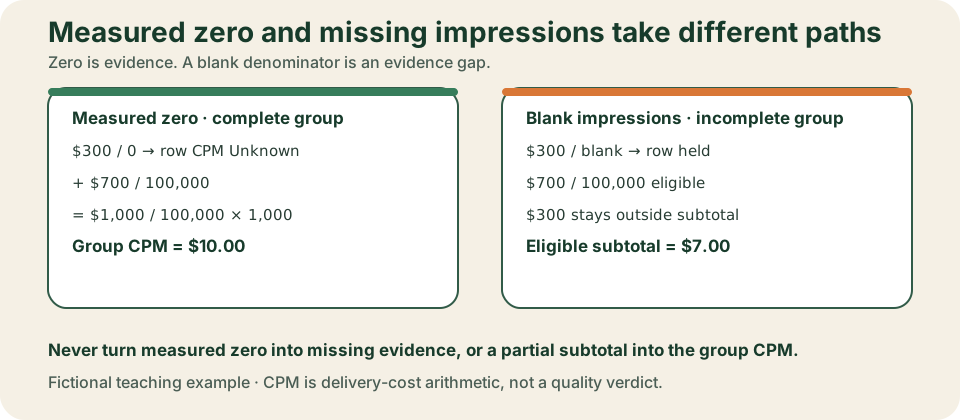
The calculator keeps these states separate:
| Input state | Meaning | Treatment |
|---|---|---|
| Blank | Missing | Ask for the value or bind an evidence-backed exclusion. |
Unknown | Someone checked, but the value is unresolved | Keep the uncertainty visible. |
0 | Measured zero | Preserve it as evidence. |
| Invalid | The value breaks the accepted format or rule | Hold the row and name the repair. |
Missing impressions are not zero impressions. A negative cost is not a refund unless the source record defines and supports that treatment. The calculator does not guess either one.
Keep impression definitions in separate lanes
An impression is not automatically the same thing in every export. LinkedIn's current Campaign Manager documentation, for example, defines impressions as ad displays and gives format-specific counting rules. The same documentation reports a separate brand-awareness cost per result using member accounts reached. This is why the denominator has to travel with the row.
Keep these lanes distinct:
- Served impressions
- Viewable impressions
- Unique reach or member accounts reached
- Any platform-specific impression definition from the source export
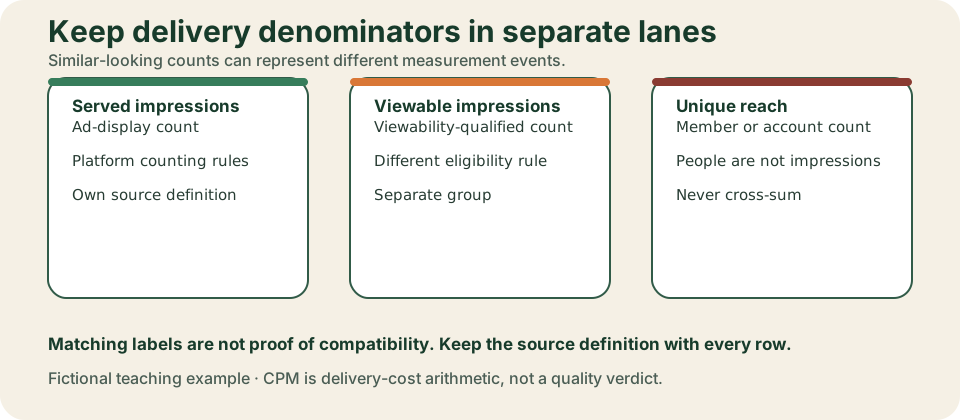
Matching labels are not enough when the definitions are unresolved. Two rows that both say Unknown do not become compatible. Record the source, owner and exact question needed to resolve the denominator.
Decide which rows can be combined
Rows belong in one total only when these declarations match:
- Currency and currency exponent
- Cost basis
- Denominator kind and impression definition
- Platform and placement scope
- Date window and time zone
- Population
- Source-row identity and coverage
Use separate groups when comparing two non-overlapping periods. Keep the period duration and population definition aligned. The comparison stays on hold when groups overlap, use different currencies or count different delivery events.
The calculator does not convert currencies. It groups held costs by their actual source currency and leaves an unresolved currency as Unknown. Same-currency values are added in integer minor units, so $0.10 + $0.20 does not turn into a floating-point artifact.
Compare CPM changes without claiming a cause
For two complete compatible groups, the calculator reports:
- Absolute change: current CPM minus baseline CPM.
- Relative change: current CPM divided by baseline CPM, minus one.
If CPM moved from $10 to $8, the absolute change is -$2 and the relative change is -20%. A zero baseline CPM can support an absolute change, but not a finite relative change.
These numbers describe what changed. They do not explain why.
CPM alone cannot establish auction pressure, creative quality, audience quality or lead quality. Use delivery diagnostics, auction evidence and controlled tests before naming a cause. Use the CTR calculator to inspect response with the same denominator definition. Use the CPC calculator when the next question is spend per click.
What is a good CPM?
There is no universal good CPM. A low CPM can buy cheap delivery to the wrong audience. A higher CPM can still be reasonable when the campaign reaches a constrained group of qualified buyers. CPM says nothing by itself about response, accepted leads, pipeline or contribution.
There is no single average CPM either. It changes with platform, audience, objective and period.
Start with compatible evidence:
- Compare the same platform, format, objective, denominator definition and audience over non-overlapping periods.
- Check whether delivery volume, placement mix or auction evidence changed before proposing a cause.
- Use the LinkedIn ads benchmarks only when the source, period, objective and definitions are genuinely comparable.
- Carry the same source rows into the CPC calculator when clicks are available.
- Move to the cost per lead calculator when the decision is about raw, accepted or qualified leads.
CPM helps reconcile delivery cost. It is not a verdict on campaign quality.
Export a reviewable CPM record
After checking the full record, download the format the next person can use:
- JSON preserves the complete source record and is a canonical reimport format.
- CSV preserves the same normalized source paths and can be reimported after strict header and path validation.
- Markdown gives a readable handoff and includes the exact source record in a fenced block.
The fingerprint binds a review to the current rows and definitions. Change a bound source field and the prior approval becomes stale. Import validation is atomic: malformed content does not replace the last accepted record.
Use the blank CPM record when preparing inputs elsewhere. Open the worked fictional record to see unequal rows, denominator labels and evidence requests. Download the build prompt to reproduce the calculation in another tool, and the review prompt to challenge the grouping without article context.
The portable CPM execution bundle runs the same evaluator without this article. Extract the ZIP, open a terminal in the extracted folder, and run node run-cpm.mjs downloads/cpm-record-worked-fictional.json --pretty. The command should return the fictional weighted CPM, keep incompatible denominators separate and list every evidence request.
The export authorizes calculation and review only. It does not authorize a budget or live campaign change.
Use the result in the next review
For recurring reconciliation, carry the source paths and definitions into the Facebook Ads reporting template. For response and lead-stage economics, move to CPC, CTR or CPL instead of trying to infer quality from CPM.
If you want another person to inspect the grouping, definitions and downstream handoff, book a free Demand Gen Roast. Bring the exported record. The conversation starts with the exact rows, not a screenshot of one blended number.