
Facebook Audience Network: should your B2B campaign use it?
Meta Audience Network extends eligible Meta campaigns into partner mobile apps. For a B2B advertiser, the decision is whether that extra delivery fits the campaign's business requirements and produces outcomes worth paying for. Start with the actual campaign objective and controls available in your account. Then compare placement delivery with qualified outcomes. A cheap click alone cannot answer the question.
This guide reflects Meta's advertiser help reviewed October 31, 2026. Meta says placement settings and some account and suitability controls are rolling out gradually. The controls described here are documented capabilities, not a claim that a particular account currently shows them.
Where do Audience Network ads run?
The current Meta Audience Network advertiser help describes partner mobile apps. It names native, banner, interstitial, and rewarded video placements and says Audience Network supports image, video, carousel, playable, and collection formats. Creative and placement eligibility varies by objective and placement. A publisher's list of monetization formats does not tell you which advertiser options your ad can use.
The same help article lists Awareness (video only), Traffic, Engagement (video only), App promotion, Leads, and Sales as supported objectives. Supported does not mean every ad under that objective will serve on every Audience Network placement. Check the campaign's actual eligibility and delivery. Meta's placement help says available placements depend on ad type and settings.
Can you turn Audience Network off?
First, write down the campaign objective, whether it is in a special ad category, and the placement settings you can actually see. Save the observation time. An old setup screenshot from another account is a poor substitute: Meta's current change notice says the placement interface is changing gradually.
For Awareness, Traffic, and Engagement, Meta says ad set placement selection remains available. If your ad set exposes it, inspect the eligible Audience Network choices before making a scoped change. A setting visible for one objective does not prove it is visible for another.
For Leads, App promotion, and Sales, Meta says a gradual rollout removes ad set manual placement selection and defaults those campaigns to Advantage+ placements. If you cannot find the old Audience Network checkbox in a Leads ad set, check whether this rollout explains it. Do not switch campaign objectives merely to recover a checkbox; that changes the business action the campaign optimizes for.
Meta also documents account controls for auction campaigns, including separate Audience Network native/banner/interstitial and rewarded video groups. Its change notice describes exclusions by objective for all six objectives. Inspect which version is present in your account and list every existing and new campaign the proposed setting would affect. The account control help says these settings apply to all existing campaigns in the account, may take up to 48 hours to affect existing campaigns, and cannot be changed from campaign creation. That makes an account control a business-wide decision within the account, even when your immediate question concerns one ad set.
There is a material exception. Meta says these account controls do not apply to ads about social issues, elections, or politics, or ads about financial products and services, employment, or housing. If your campaign is in one of those categories, record the exception and inspect the applicable controls before proposing a change. Do not assume an account exclusion will govern that campaign.
A control decision in four checks
Scroll horizontally or use the arrow keys to read each step.
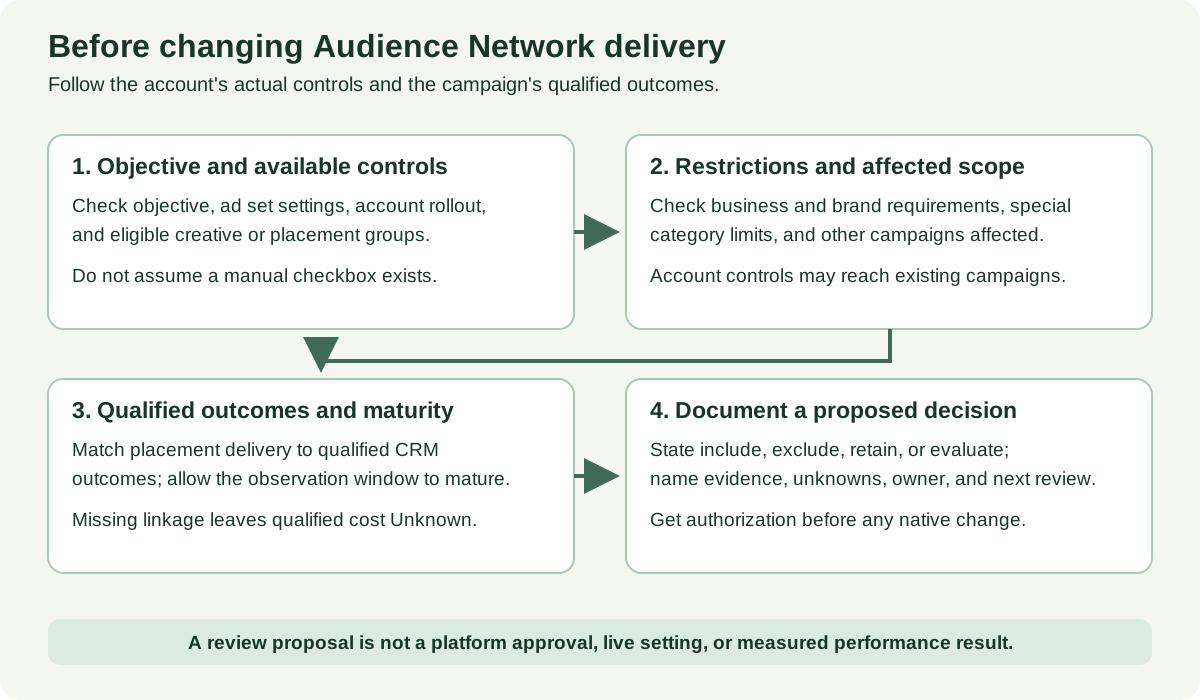
- Identify the campaign and objective, special category, and current placement state. Record what was observed, when, and where.
- Check creative eligibility and whether Audience Network actually received delivery in the reporting window. Eligibility and delivery are different facts.
- Name the proposed control and its complete affected scope. For an account control, enumerate other campaigns and the owner who can approve that impact.
- Decide whether the evidence supports retain, exclude, a scoped comparison, or a hold for missing data. Save the native setting and later delivery readback separately; a proposed change is not a change receipt.
What do publisher lists and reports tell you?
Meta's block-list help says a publisher block list can help prevent ads from appearing in specific Audience Network apps. A business portfolio is needed to view partner-publisher lists in the Brand Safety and Suitability Center, and some features are rolling out. This is a suitability control for identified publishers, not a general Audience Network on/off switch. The same help article describes content block lists for specified Facebook, Instagram, and Threads feeds and reels; it does not list Audience Network for that content-block-list feature. Check the actual available control rather than treating the two list types as interchangeable.
Meta's inventory-filter help names Expanded (the default), Moderate, and Limited sensitivity levels. On Audience Network, the filter excludes apps according to the chosen level. It is a broad suitability filter, while a publisher block list addresses identified apps. The filter is also rolling out, and Meta says no suitability setting guarantees that every publisher will match a business's own standards. Record the level you can actually see and the business rule it is meant to satisfy.
Meta's delivery-report help says publisher-level reports include impression information for Audience Network rewarded videos and native/banner/interstitial. Available scope can be a business portfolio, ad account, or campaign, depending on placement. The report is approximate and delayed about 3–5 days. It answers where impressions appeared at the report's available level; it does not join a particular publisher impression to a CRM qualified lead or establish the app's exact revenue contribution. Record the report's scope, window, date, and whether it is available before making a publisher-specific claim.
An inventory or partner-publisher list is another object again: it lists possible publishers, not necessarily places your campaign delivered. For a business requirement such as excluding a particular app, keep the requirement, list entry, selected control, and delivery readback distinct.
Four B2B decisions, with fictional numbers
The cases below are invented teaching examples. No account was inspected, and no setting was changed. The first three are also completed in the worked placement reviews.
1. The clicks cost less, but the CRM join is missing
Harbor Analytics runs a fictional Traffic campaign for a product demo. For October 1–14, an Ads Manager placement export dated October 18 shows Audience Network spend of $600 and 300 link clicks: $2.00 per click. Other placements show $900 and 180 clicks: $5.00 per click. Both denominators are link clicks in that export, not leads. A CRM export has eight qualified demo requests for the campaign overall, but it contains no placement identifier and cannot reconcile those requests to the two placement rows.
The Audience Network cost per qualified demo is Unknown. Dividing $600 by eight would falsely assign every campaign-qualified demo to Audience Network. The defensible next action is to repair or validate the placement-to-CRM linkage and hold the qualified-cost verdict. If a placement-specific business requirement exists, assess that separately. Cheap clicks are a reason to investigate, not a qualified pipeline result.
2. Qualified outcomes are linked and old enough to count
Morrow Systems runs a fictional Traffic campaign for an enterprise consultation. A qualified request must come from a company with at least 200 employees and result in a scheduled sales call. The team allows 14 days after each request for qualification.
Included clicks and requests are dated October 1–14. The last request is 17 days old at the October 31 review. In this teaching example, the Ads Manager and CRM exports use a placement ID on each request and deduplicate by request ID.
Swipe to read all columns, or focus the table and use the arrow keys.
| Measure | Audience Network | Other placements |
|---|---|---|
| Spend | $1,200 | $1,800 |
| Link clicks | 400 | 300 |
| Requests | 20 | 15 |
| Qualified requests | 4 | 9 |
| Cost per qualified request | $1,200 / 4 = $300 | $1,800 / 9 = $200 |
The totals reconcile to $3,000, 700 clicks, 35 requests, and 13 qualified requests. The hypothetical ceiling is $250 per qualified request. The actual Ads Manager attribution setting remains Unknown in this invented record and must be saved before a real action.
Audience Network misses that ceiling in this window. The proposed decision is to review an eligible, scoped exclusion or a preplanned comparison, subject to the actual control and other campaign effects. These are placement rows in an invented example, not a randomized experiment. Audience, auction, creative, and delivery can differ by placement; the $100 gap does not prove that turning Audience Network off will cause the other placements to produce the same nine qualified requests at the same cost.
3. The business rule is clear, but the control is broad
Northstar Clinical is a fictional health software vendor with a written rule that its product-demo creative must avoid game apps. Its October 31 preflight has a planned standard Traffic objective, with special category status still requiring a native check and no live delivery export yet. The team has a proposed list of two game apps, but has not verified whether they appear in a current partner-publisher list, whether a publisher block list is available, or whether the creative is eligible for Audience Network. The campaign owner asks about an account placement control. That control could affect five other running campaigns in the same account. The decision is hold the account-wide change while the owner checks a scoped publisher list or ad set control, verifies suitability coverage, and obtains authorization for any wider impact. The missing delivery metrics are Unknown, not zero. A business rule can justify a restriction, but it does not make an unobserved control or an unapproved account change real.
4. The Leads selector is absent
Pinebridge Security starts a fictional Leads campaign on October 31. The operator sees Advantage+ placements and no ad set manual placement selector. No campaign results exist yet. Meta's gradual rollout is a plausible explanation, not proof of this account's rollout status. The operator records the screen and objective, checks current account controls and the special category, then asks the account owner to review the affected scope before any exclusion. Switching to Traffic just to find a manual checkbox would change the campaign objective and make its lead-generation decision harder to interpret. With no delivery or qualified leads, performance is Unknown.
Make the decision from outcomes that match the business goal
Define the qualifying event before looking at the placement breakdown: for example, a demo request that meets company-size criteria and books a sales call. State how long that event can take to appear. Then record the reporting window, attribution settings, spend and delivery by placement, and the source of each qualified count. A publisher impression report cannot supply a placement-to-CRM join. If the join is missing, report qualified cost as Unknown even if campaign-wide CRM totals exist.
Where placement-linked qualified outcomes are available and mature, divide each placement's spend by its own positive qualified count. With positive spend and zero qualified outcomes, report the spend and zero outcomes: there is no finite cost per qualified outcome. Do not report $0. If both spend and outcomes are zero, the rate is undefined.
Keep zero distinct from missing: zero qualified outcomes after a complete, mature reconciliation is a real zero; a blank CRM field or an unlinked campaign total is Unknown. Decide against a stated business threshold or suitability requirement. If you change placement settings, document the other settings held fixed and compare a later mature window. Treat the result as a decision signal, with auction and audience differences still in view.
The blank placement review has 18 fields covering campaign scope, control blast radius, suitability, measurement, the proposed action, owner, and next readback. The three completed records show a preflight hold, a missing CRM join, and a mature comparison. Paste the standalone review prompt into another assistant with your own evidence; it asks for the same 18 fields and preserves Unknown values. Do not paste credentials or personal lead data into it.
Review your placement evidence
Fill in the blank placement review, using the worked records as examples. Copy this prompt into your AI tool, then paste your completed record. Open the plain-text prompt to select it directly.
Read or select the full prompt
If you want an outside review of the placement decision and the lead-quality path, book a Demand Gen Roast. For adjacent work, use the Facebook Ads audit to inspect the whole account, Facebook Ads attribution for conversion-window interpretation, and Facebook ad optimization for broader testing decisions.
Source review: October 31, 2026. Meta's placement and account-control interfaces are subject to gradual rollout. Account-specific eligibility, controls, delivery, and outcomes require a fresh account readback.