
Account-based marketing examples: four real campaigns to adapt
BioCatch changed ads as accounts moved toward a deal. Bonterra promoted additional services to existing customers and gave Sales a deadline to follow up. Snowflake warmed selected accounts before SDR outreach. Genesis connected a direct-mail package to an account-specific page and an assigned salesperson.
Each example shows a different job for account-based marketing. Choose the one that matches the problem in your campaign, then use the campaign brief to turn it into a plan.
| Your situation | Start with | What to adapt | What you need first |
|---|---|---|---|
| Cold accounts, engaged buyers, and open opportunities need different messages | BioCatch | Separate ad journeys by buying stage | Account states you can identify and keep current |
| Existing customers could buy an additional service | Bonterra | Expansion ads with a defined sales response | A relevant offer and a salesperson who owns each account |
| Sales has selected accounts, but marketing and outbound run separately | Snowflake | Account warming followed by coordinated SDR outreach | A reason to target each account and an agreed handoff |
| A small team needs personal outreach to a short account list | Genesis | A specific outreach touch, matching page, and sales follow-up | Account research, a clear next step, and time to follow through |
These examples come from published vendor customer stories. The campaign details and reported results are attributed below. The small-team adaptations are our recommendations, not additional actions taken by those companies.
Four account-based marketing campaigns
BioCatch: change the message as the account moves toward a deal
BioCatch sells behavioral biometrics and fraud prevention. Its agency, Marketbridge, needed to reach fraud, risk, and cybersecurity decision-makers at different stages of a purchase.
The Influ2 campaign spotlight describes three journeys. Contacts with no recent engagement received one-to-many campaigns selected using intent and firmographic data. Contacts who had interacted with BioCatch content, or shown mid-level intent, entered more focused campaigns segmented by role, region, and engagement. Known stakeholders attached to active Salesforce opportunities received one-to-one attention based on the opportunity stage.
Each journey has a different content job. Someone encountering BioCatch for the first time needs to understand the fraud problem and the product's relevance. Someone evaluating it needs evidence they can use in the decision. A contact in an open opportunity also needs a message that fits the conversation already underway with Sales.
What the audience saw
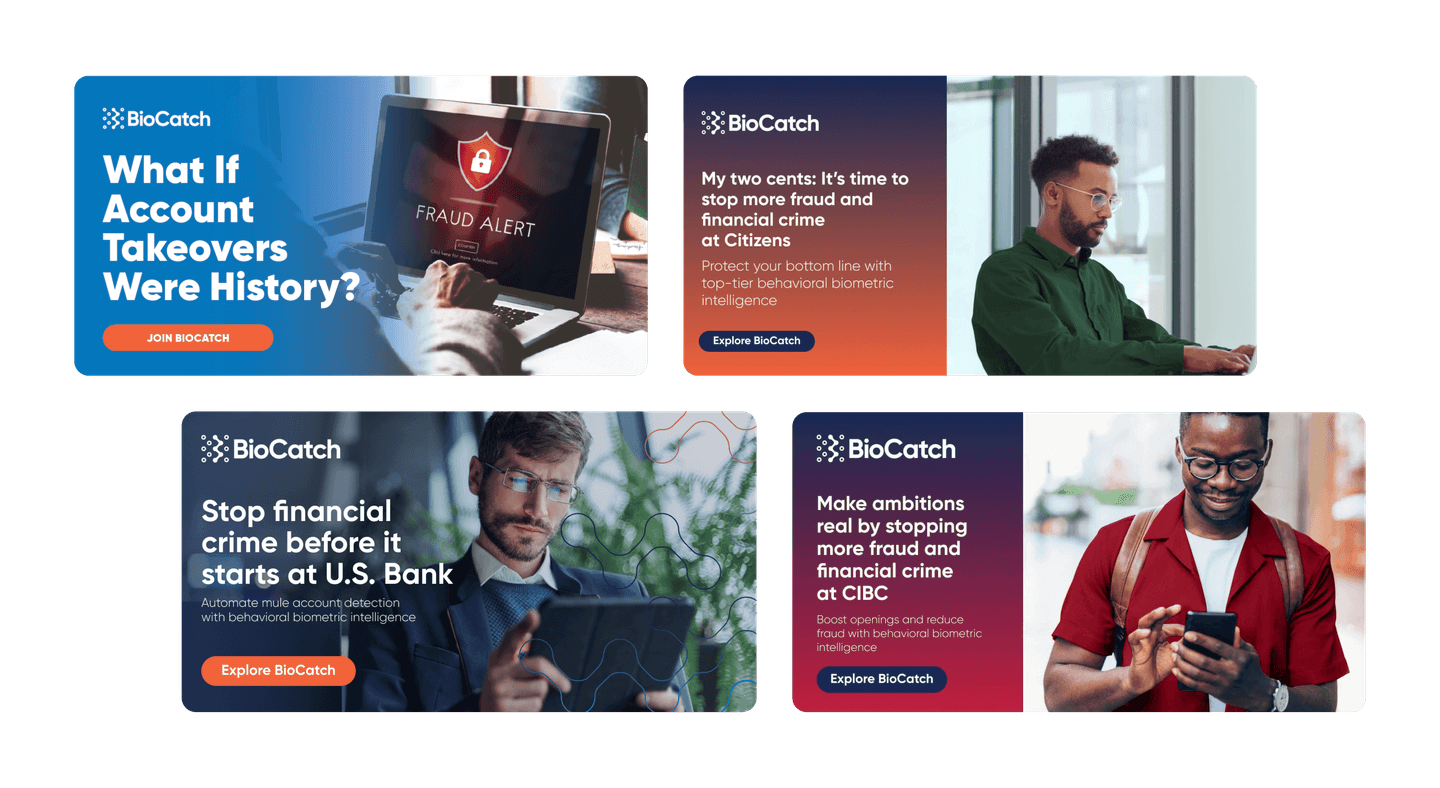
The general ad asks, “What If Account Takeovers Were History?” The named-account versions connect fraud prevention to a particular organization: “Stop financial crime before it starts at U.S. Bank,” for example. The company name sits inside a business problem the intended reader recognizes.
The creative panel shows how the messaging changed. It does not establish that the named organizations became customers.
How marketing connected to Sales
Marketbridge used 6sense for account segmentation and Influ2 for contact-level targeting. The reported campaign included LinkedIn and Google delivery, with HubSpot alerts, scoring, and sales workflows. Salesforce connected known stakeholders to opportunities.
Sales was involved early. Ad engagement and custom scoring helped Marketing surface accounts for follow-up. The source does not specify a universal click threshold, so there is no ready-made rule here that says three clicks make someone sales-ready.
Reported result: Influ2 says six times more accounts entered active pipeline. It does not provide the starting account count or measurement window. This is a claim about accounts entering pipeline, not six times the revenue or pipeline value.
Adaptation for a smaller team
Start with three account states you can maintain: selected but unengaged, engaged without an opportunity, and open opportunity. Write an entry rule for each state and name the person responsible for updating it.
Then choose one message and next action for each state. An unfamiliar account might see an explanation of the problem. An engaged account might get a relevant customer example. An open opportunity might need an implementation answer its buying committee is waiting for. Agree those messages with the salesperson before building the ads.
You do not need to copy BioCatch's 200-plus segments. You need enough separation to avoid showing every account the same pitch.
Bonterra: connect expansion ads to an accountable sales handoff
Bonterra provides social-good software for nonprofits, corporations, and public agencies. Its ABM team wanted to know whether its ads reached the actual decision-makers inside target accounts. According to Influ2's Bonterra case study, the team brought 6sense account lists into Influ2 and built segments with 5–15 stakeholders per account.
The team ran customer expansion, competitive knockout, and live-event campaigns. The expansion campaign is particularly clear: it gave existing customers a reason to discuss an additional service.
What the audience saw
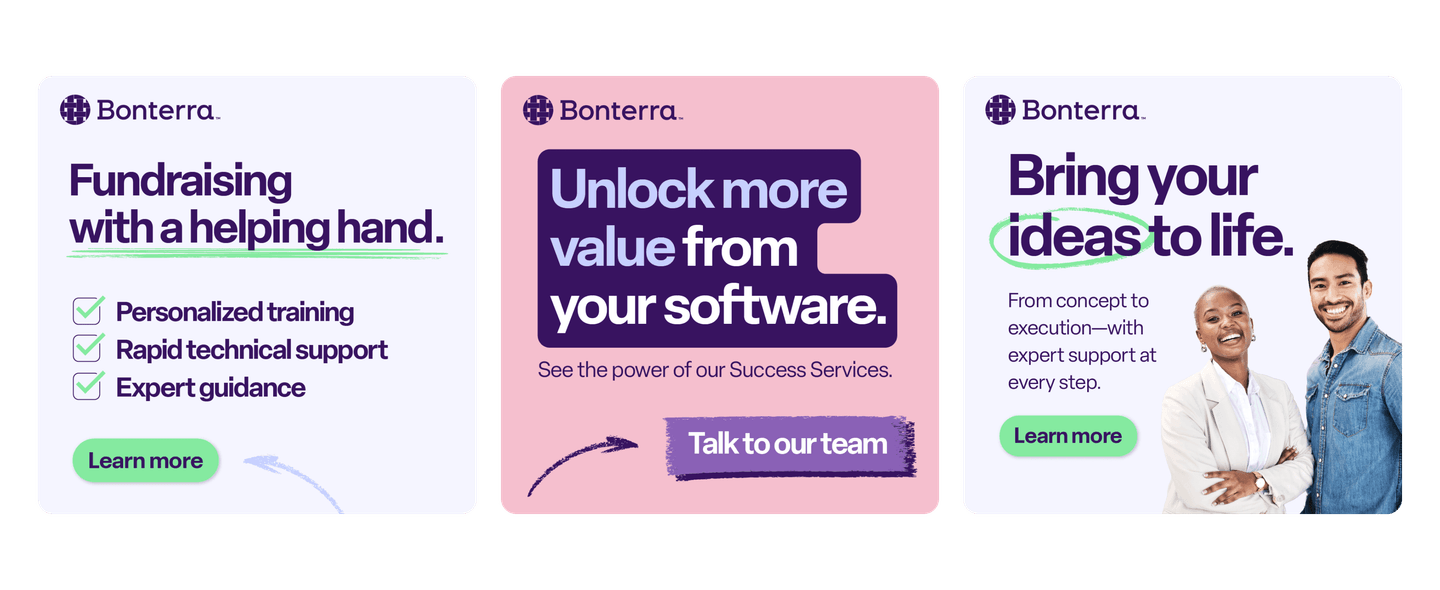
“Unlock more value from your software” leads into an offer for Success Services and a “Talk to our team” call to action. Another version offers personalized training, rapid technical support, and expert guidance.
The offer makes sense for an existing customer. They already have the software; the ad gives them a reason to discuss getting more from it. That is a different conversation from asking a new prospect to replace their current system.
What happened after engagement
Contact engagement flowed into a dedicated Slack channel monitored by Sales. If a rep did not follow up within 24 hours, Sales leadership intervened.
Bonterra defined meaningful engagement as an ad click or viewing all ads in the journey. Contacts who met that rule entered a Salesloft sequence with messaging matched to their interactions. Marketing then reviewed ad metrics alongside sales follow-up, handoffs, and meetings.
The salesperson receives the engagement context and a deadline to continue the conversation. Bonterra's engagement definition belongs to this case; your team needs a rule that fits your own data and sales process.
Reported result: Influ2 reports 19 influenced opportunities and four closed-won deals from the customer expansion campaign over four months. “Influenced” does not mean the ads independently created every opportunity.
Adaptation for a smaller team
Choose one additional product or service and identify customers with a credible reason to need it. Have the account owner check the list before launch. A customer dealing with an unresolved support issue may need that issue handled before an expansion message.
Build the ad around the additional outcome: training for a new team, help implementing a workflow, or support for a broader rollout. Give the salesperson the same offer and source context. Agree a response window they can meet, then track whether the handoff actually happened.
Snowflake: warm selected accounts before SDR outreach
Snowflake's example explains how paid media, personalized pages, and outbound can share a sequence. In the AdRoll customer story, a six-person ABM team supported more than 2,000 account campaigns.
The starting point was information about the account: previous conversations, known contacts, and product interest. For cold accounts, the team looked at non-branded topic intent. Sales operations helped model account fit; Marketing helped determine timing.
Make the destination match the ad
Snowflake used account advertising and LinkedIn formats, then directed people to Uberflip pages informed by intent and other signals. The ad and destination shared branding, persona-relevant messaging, and a call to action suited to the sales stage. Most destination pages included a note and photo from an actual sales rep.
That detail connects the page to the person who will continue the conversation. The visitor can find relevant content and contact the same rep who will follow up.
Maestro explanatory diagram of the published case description.
- Select accounts
Use sales knowledge or topic intent.
- Warm accounts
ABM activity for 2–4 weeks.
- SDR engages
A selected SDR begins direct engagement.
- AE takes opportunity
Pass it to an account executive when appropriate.
The ABM team begins warming another account while sales engagement continues.
Give the SDR a place in the plan
Snowflake described a “1–2 punch”: the ABM team warmed an account for 2–4 weeks before a selected SDR engaged directly. The opportunity passed to an account executive when appropriate. Marketing was already warming another account while this happened.
The team also held recurring alignment meetings between ABM, account executives, and SDRs. Reporting followed account engagement through sales touches, meetings, opportunities, and wins. That makes it possible to spot an account nominated for marketing support that nobody in Sales actually contacts.
Reported result: AdRoll reports a 75% quarter-over-quarter increase in SDR-booked meetings in ABM accounts. Absolute counts and quarter dates are not supplied. About half of Snowflake's target accounts were existing customers, so this is not a pure new-customer acquisition result.
Adaptation for a smaller team
Ask Sales to nominate a manageable group of accounts and write down why each belongs. For every account, name the salesperson, the problem to lead with, the destination, and the next action after engagement.
Choose a warming period that fits your campaign and review it with Sales. Snowflake's 2–4 weeks describes its process; it is not a required waiting period for every buyer. The transferable part is having marketing activity and SDR outreach planned together.
Genesis: connect a small direct-mail campaign to personal follow-up
Genesis Computing sells an enterprise platform for accelerating data pipelines. The Mutiny Genesis case study describes a two-person marketing team: Kevin Jong and Esther Katz. It offers a smaller-team example of account-specific execution.
For a direct-mail campaign, Genesis targeted 2–3 decision-makers across 20 accounts. The package contained a custom F1 remote-control car and a personalized F1 ID card with the prospect's name, Genesis's mission statement, and a direct contact.
Plan what happens after the package arrives
Kevin used a campaign brief, account research, and product information to create personalized landing pages in Mutiny. The source says he created 20 one-to-one pages in a day. Each link went to the assigned salesperson for follow-up after the package arrived.
The package created a reason to notice Genesis. The page and salesperson supplied the next step. A gift without that follow-up plan would leave the recipient to work out what to do with it.
Maestro explanatory diagram of the published case description.
- Select recipients
20 target accounts, with 2–3 decision-makers per account.
- Send personalized package
F1 remote-control car and personalized ID card.
- Equip the salesperson
Share the account-specific page link with the assigned salesperson.
- Follow up after delivery
The salesperson uses the page in follow-up after the package arrives.
This describes the published campaign sequence. Target accounts are not a verified delivery count.
Genesis also used sales-call transcripts to create recap pages with relevant use cases and next steps. Prospects could forward these pages to other departments. That extends the same account-specific approach beyond the first meeting: help the people inside the account explain the conversation to colleagues who missed it.
Reported result: Mutiny says 10% of cold accounts receiving the direct-mail campaign converted to a meeting. It does not give a measurement window or an explicit delivered-account count. The 20-account target list is not enough to infer an exact meeting count.
Adaptation for a smaller team
Start with a short list that Sales can research and follow up. Decide what the recipient should understand or do after the first touch, then build the page and handoff before distributing the campaign.
A physical item is optional in this adaptation. An account-specific problem analysis can also give a salesperson something concrete to discuss. Check each account fact before sending it, and make the next step clear. Personalization built on a wrong assumption gives the recipient a reason to stop reading.
Choose the mechanism your team can follow through on
If you have existing customers and an additional service to sell, start with Bonterra. The first decision is which customers have a reason to need that service. A customer-success owner can check the list and explain the offer. Buying more reach before that check can put an expansion pitch in front of customers who need support instead.
If two people are trying to reach new enterprise accounts, start with Genesis for ownership and follow-through, then borrow Snowflake's coordination with Sales. Prepare one account-specific destination and agree who follows up before adding more accounts. The physical gift is a choice; the ability to research each account and continue the conversation is a capacity constraint.
If your team cannot reliably distinguish engaged accounts from open opportunities, keep BioCatch's three journeys as a later step. First agree what each account state means and where it is recorded. Otherwise, automated message changes will reflect inconsistent records.
Turn one example into your campaign brief
Choose the example by the buying situation. Bonterra fits an expansion offer. Snowflake fits a team trying to coordinate account advertising with outbound. Genesis fits a short list that needs personal follow-through. BioCatch fits a program where accounts at different stages need different messages.
Write down the account group, the reason it qualifies, the people you need to reach, the offer, and what happens next. Name the salesperson who owns the handoff. If nobody owns that step, fix it before producing more creative.
Download the blank campaign brief and open it in your document editor. Fill in one account group and one next action. The completed fictional expansion brief shows how the decisions fit together. Use the standalone planning prompt to develop a first plan from your inputs and the documented examples. Review the account facts and proposed messages before using the output.
Copy the campaign planning prompt
Copy this prompt into your AI tool, then supply your campaign inputs. The complete text is also available as a TXT download.
Read or select the full prompt
Measure the account movement you intended
Choose the measurement window and account group before launch. Keep selected accounts, reached accounts, accounts with meetings, and accounts with opportunities separate. They answer different questions. For example, if your planned measure is the share of selected accounts that book a meeting, divide unique accounts with a qualifying meeting by the fixed selected-account list. Count each account once and keep nonresponders in that denominator. This is a proposed reporting definition, not a reconstruction of any vendor case above.
For an expansion campaign, record the relevant customers and expansion opportunities. For outbound support, record whether selected accounts received sales follow-up and booked meetings. For an open-opportunity campaign, record progression within that existing opportunity group.
Keep campaign exposure alongside the outcome rather than treating exposure as proof of causation. If an account already had an opportunity, its later close should not become a newly generated opportunity in the campaign report. A fixed account list and clear definitions make the report easier to trust.
Build the campaign around the accounts you can serve
Use our LinkedIn account-based marketing guide for platform execution, the account-based advertising guide for audience and channel planning, or the ABM platform comparison when you need to choose software.
If you want help finding the gap in your current campaign, book a free Demand Gen Roast.