
Facebook Lookalike Audiences: Build a Better Seed and a Test You Can Read
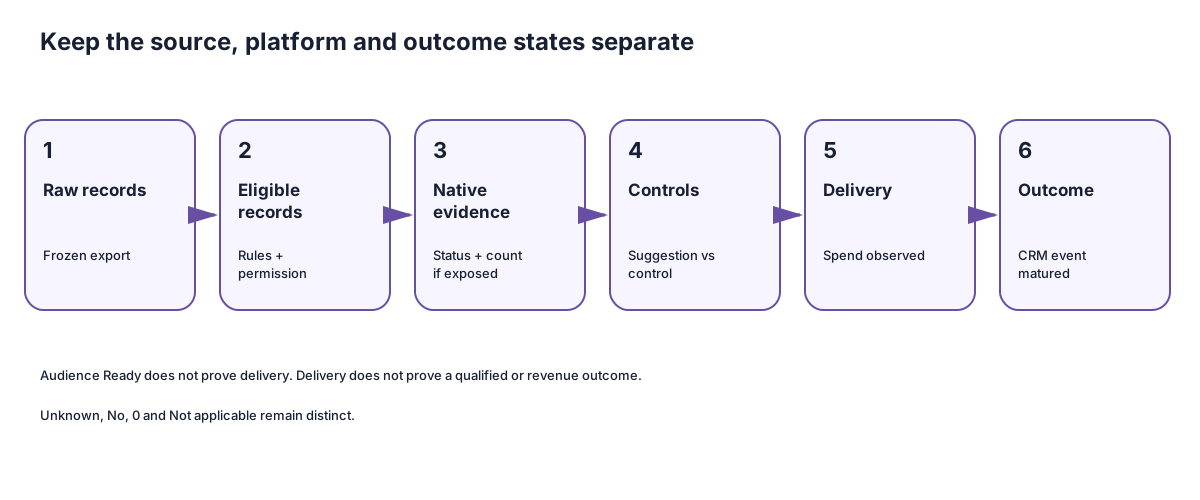
- Raw recordsFrozen export
- Eligible recordsRules and permission
- Native evidenceStatus and count if exposed
- ControlsSuggestion versus control
- DeliverySpend observed
- OutcomeCRM event matured
A Facebook lookalike audience helps you reach new people who resemble a source audience you already have.
The hard part is deciding what the source should represent.
A list of paying customers teaches Meta something different from a list of demo requests. A list that mixes customers, students, vendors and unqualified leads does not represent one useful outcome at all. The platform can still accept the file. That does not make the model useful.
Use this guide to make two decisions:
- Is the source population ready to use?
- What bounded prospecting test would tell you whether the audience helps reach the business outcome you care about?
Keep four states separate as you work:
- Plan ready: the source, rules, permission, owner and test are defined.
- Audience ready: Meta shows the native audience state you need.
- Delivery observed: the campaign actually spent and delivered.
- Business outcome observed: the chosen downstream event matured and was read back.
Creating an audience proves none of the later states by itself.
Open the seed-readiness planner →
Download the blank seed and test brief →
Start with the outcome you want Meta to model
Meta describes a source audience as the audience on which a lookalike is based. Its public guidance says source quality matters and gives “best customers” instead of all customers as an example.
That is a useful principle. It still leaves you with a decision.
Write one sentence before you export anything:
This source contains people who completed [named outcome] for [product, segment and geography] during [date range].
Examples:
- Customers who started a paid annual plan for the workflow product in the United States during the last 18 months.
- Sales-qualified opportunities accepted by the account executive for the enterprise product during the last 12 months.
- People who requested a demo, when a later qualification event is unavailable and the weaker proxy is stated plainly.
Do not describe a newsletter subscriber as a buyer because the subscriber opened an email. Do not describe every lead as qualified because the CRM happens to store them in the same object.
Use the strongest coherent event you can document. If a narrow, high-value population is too small for the current platform requirement, a broader source may be worth testing. It represents a different hypothesis and needs a different name.
| Source | What it may help model | What it does not prove |
|---|---|---|
| Paying customers | Similarity to people who reached a paid outcome | Future purchase intent or acceptable acquisition cost |
| Accepted opportunities | Similarity to people sales agreed were worth pursuing | Closed revenue or product fit across every segment |
| Qualified leads | Similarity to people who passed the stated qualification rule | Opportunity creation or revenue |
| Demo requests | Similarity to people who requested a conversation | Qualification, attendance or sales acceptance |
| Newsletter subscribers | Similarity to people who subscribed | Buying intent |
| Page fans or video viewers | Similarity to an on-platform engagement group | Product need, qualification or purchase intent |
If the source sentence needs “and” to join unrelated outcomes, split the populations and decide which hypothesis you actually want to test.
Build the source population before you count it
The raw CRM export is not the seed.
The seed is the set of records left after you apply a documented inclusion rule, exclusion rule and cutoff.
1. Freeze the scope
Name the product, market and outcome window.
“All customers” may hide three different products, different buyer types and a five-year change in positioning. If those groups would respond to different offers or land on different pages, they should not be treated as one obvious seed.
Record:
- product or offer;
- market or geography;
- outcome event;
- first and last eligible outcome date;
- CRM field or query that identifies the event;
- owner of the extract.
2. Write the inclusion rule
The rule should be specific enough for another operator to rerun it.
Weak:
Good customers.
Reviewable:
Accounts that began a paid annual plan for Product A between 1 January 2025 and 30 June 2026, with an active company domain and a billing country in the approved market.
The second version may still need business review. It gives the reviewer something concrete to accept or change.
3. Write the exclusions separately
Remove records that would teach the wrong lesson or violate the approved use.
Common B2B exclusions include:
- test and internal accounts;
- employees, contractors and vendors;
- students or job applicants captured through a shared form;
- duplicate contacts or accounts;
- refunded, fraudulent or cancelled records when the modeled outcome is a retained customer;
- people whose opt-out must be honored;
- records outside the approved product, market or date range.
An exclusion needs a reason. “Low quality” is not enough. Name the observed field or state that makes the record ineligible.
4. Define deduplication
Choose the unit you are modeling.
If one customer account has 14 contacts, uploading all 14 may overweight that account. If your sales motion is contact-led, collapsing everything to one company may remove useful variation. Record the unit, key and tie-break rule rather than letting a spreadsheet make the decision accidentally.
For example:
One primary buying contact per customer account. Prefer the contact tied to the accepted opportunity; otherwise use the current account owner’s nominated contact. Keep the original account ID only in the private source system.
The review record should contain safe aliases and counts, not raw customer identifiers.
5. Confirm the right to use the data
Meta's Customer List Custom Audiences Terms require the advertiser to have the necessary rights, permissions and lawful basis to use the customer-list data. The terms also require relevant opt-outs to be honored and later opt-outs to be removed.
Hashing contact data before upload is part of the matching process. It does not create permission.
Record:
- the approved use;
- the approving owner;
- the evidence reference;
- the opt-out source and removal process;
- the date the approval was checked;
- the date it must be reviewed again.
If permission is unknown, the plan is on Hold. The next action is to ask the named owner, not to upload the list and see whether Meta accepts it.
Keep the three counts separate
Most weak handoffs use one number called “audience size.” You need at least three.
| Count | Meaning | Example status |
|---|---|---|
| Raw records | Rows returned before inclusion, exclusion and deduplication | Observed in the source system |
| Eligible source records | Records left after the approved rules | Calculated from the frozen extract |
| Native audience evidence | The status, match evidence or estimate Meta currently exposes | Unknown until a dated account receipt exists |
Meta currently says a lookalike source needs at least 100 people and generally recommends 1,000–5,000. Treat those as dated platform statements, not a promise that 100 raw rows will match or that 1,000 people will produce good B2B delivery.
Write the counts like this:
1,284 raw contacts → 846 eligible records after exclusions and deduplication → native source recognition Unknown pending an Audiences receipt.
Do not turn Unknown into zero. Do not treat the eligible count as a matched count.
Check the current Meta state
Meta's current lookalike creation guidance describes this flow:
- Open Audiences.
- Choose Create audience and then Lookalike audience.
- Create or select the source.
- Choose the number and size of the lookalike audience.
- Create the audience.
Meta says saved audiences cannot be used as the source.
The current flow also changed an older instruction you may still see in screenshots. New lookalikes no longer choose the location during audience creation. The ad set's location settings are used, and the estimate appears when the lookalike is used in an ad set.
Record the current native state from the account:
- source type and safe alias;
- eligible source count from your own frozen extract;
- current source or match evidence Meta exposes;
- lookalike size or percentage selected;
- native state and observation time;
- ad set location and estimate, when the interface exposes them;
- objective or campaign type;
- owner of the receipt.
Meta describes three useful audience states:
- Populating: matching is still in progress.
- Audience not created: the source may have been too small or another creation problem occurred.
- Ready: the audience can be used.
Ready means the native audience can be selected. It does not mean the campaign delivered, reached the intended companies or produced qualified pipeline.
If the account view is missing, preserve the native state as Unknown and ask for a dated, redacted receipt. The article cannot tell you what your account currently exposes.
Treat the lookalike as a suggestion when Meta does
A selected percentage is not always a hard delivery fence.
Meta says Advantage+ lookalike can deliver beyond the selected lookalike percentage when its system predicts better performance. Meta also says this behavior is automatically enabled for certain lookalikes made from mobile, website or customer-list Custom Audiences in new, duplicated and draft campaigns or ad sets.
The exact interface can vary by objective and account. Check it rather than copying an older walkthrough.
Meta's audience controls and suggestions guidance draws a useful line:
- Controls limit who can see the ads. Meta lists location, minimum age, Custom Audience exclusions and languages.
- Suggestions guide delivery and may expand. Meta lists age, gender, detailed targeting and Custom Audiences to include among possible suggestions.
When reaching a defined audience matters more than expansion, Meta says the operator may need to choose a further-limit option and uncheck Use as a suggestion, where those controls are available.
Save an ad-set receipt that answers:
- Is the lookalike being used as a suggestion or a control?
- Can delivery expand beyond it?
- Which location and minimum-age controls apply?
- Which Custom Audiences are excluded?
- Are there account-level controls that must also apply?
- Which objective and campaign setup produced this screen?
The source members themselves are excluded from the resulting lookalike according to Meta's creation guidance. That does not prove every existing customer is excluded from acquisition delivery. The exact source may contain only one product, market or period. Use a current, approved customer exclusion when the plan requires broader customer suppression.
Three worked B2B seed decisions
These examples are fictional. The counts and outcomes are teaching data, not Maestro or client results.
Example 1: a coherent paying-customer source
Modeled outcome: Customers who started a paid annual plan for Northstar Workflow in the United States during the last 18 months.
Raw population: 1,320 contacts.
Rules:
- Include accounts with a paid annual-plan start in the date range.
- Exclude internal, test, refunded and fraud-marked accounts.
- Exclude contacts without the approved market and product scope.
- Deduplicate to one nominated buying contact per account.
- Keep later opt-outs in the removal feed.
The fictional cleanup is explicit:
| Step | Records left | Why |
|---|---|---|
| Raw export | 1,320 | All contacts returned by the frozen customer query |
| Remove 60 duplicate contacts | 1,260 | Keep the nominated buying contact for each duplicated account |
| Remove 35 contacts outside the product/market scope | 1,225 | They represent a different offer or geography |
| Remove 25 opt-outs | 1,200 | The approved use must honor the removal source |
Eligible source: 1,200 contacts.
Permission: Approved for this use by the fictional privacy owner; evidence reference supplied.
Native state: Unknown. The operator has not supplied a current Audiences receipt.
Decision: Plan ready; native state Unknown. Before upload, ask the paid-social owner to verify the current account setup, intended source type and ad-set control plan. An authorized operator can then decide whether to upload the approved source. After that action, capture the source, audience and ad-set receipts before launch. Keep launch on Hold until the native state, exclusions and Advantage+ behavior are visible.
The important part is the separation. A good source definition does not manufacture a platform state.
Example 2: a mixed CRM list that should stay on Hold
Proposed source: Everyone in the CRM with lead_status set to Contacted.
Raw population: 4,880 contacts.
The sample contains:
- customers;
- accepted opportunities;
- event attendees;
- students;
- vendors;
- job applicants;
- leads that sales marked unqualified.
Decision: Hold. “Contacted” is an operational activity, not one modeled business outcome.
The next request is not “upload the largest list.” Ask the CRM owner to separate the population into outcome groups and supply the rule behind each group. Then choose one hypothesis.
If the team chooses accepted opportunities, exclude records that never passed the acceptance rule. If it chooses customers, define the product, date window and account/contact unit. Do not merge the groups to clear a minimum without admitting that the model changed.
Example 3: a small high-value source and a broader alternative
Preferred source: 87 raw enterprise-customer contacts, leaving 62 eligible contacts after exclusions and deduplication.
Alternative source: 638 sales-accepted opportunities for the same enterprise product and market.
The preferred source represents the paid, high-value outcome in this fictional example, but its 62 eligible contacts fall below Meta's currently stated 100-person source requirement. The broader source is large enough on the eligible-record count, but it models sales acceptance rather than paid retention.
Decision:
- Do not pad the customer seed with unrelated leads.
- Keep the customer-source route on Hold pending a larger coherent population or a different supported source design.
- If the business wants to test the opportunity source, name it as a separate opportunity-similarity hypothesis.
- Use the same offer, creative, destination and downstream event in the comparison unless the test explicitly studies one of those variables.
Treat the broader source as a different hypothesis. Give it its own name, record and result.
Download the completed examples →
Define a bounded prospecting test
Audience creation is setup. The test begins when you state what should change and what you will hold constant.
Use one sentence:
People modeled from [source outcome] will produce a better [downstream business event] than [comparator] when the offer, creative, destination, optimization and measurement path stay fixed.
Then complete the test record:
| Field | What to record |
|---|---|
| Audience hypothesis | The source outcome and why it may predict the chosen event |
| Comparator | Broad/Advantage+ baseline, another coherent source or an existing approved benchmark |
| Fixed inputs | Offer, creative, destination, optimization event, placements and measurement path |
| Audience settings | Lookalike size, suggestion/control state, expansion, location and exclusions |
| Spend boundary | Approved cap and the owner who can change it |
| Delivery check | Spend, impressions and reach, kept separate from source and business outcomes |
| Primary business event | Qualified meeting, sales-accepted opportunity, paid start or another named event |
| Maturation rule | When an outcome is considered complete, pending or too early to judge |
| Join rule | The safe key name and deduplication rule that connect ad events to CRM outcomes |
| Review owner and date | Who reads the result and when |
Two campaigns are not automatically a clean experiment. Overlapping delivery, different budgets, different optimization histories or a creative change can make the result hard to interpret.
If you cannot isolate the audience variable, describe the work as an observed campaign comparison. That can still inform a decision. It should not be presented as a randomized audience test.
Write the decision rules before delivery
Do not wait for a cheap lead to decide what success meant.
Use four outcomes:
- Continue: the chosen business event meets the supplied economics and the evidence chain is complete.
- Revise: delivery occurred and the result exposed a specific source, message, destination or measurement problem worth changing.
- Stop: the supplied boundary is breached, permission/control fails, or the mature business result is unacceptable.
- Inconclusive: spend, delivery, maturation or data quality is insufficient for the promised decision.
The thresholds must come from the business. If the allowable cost per sales-accepted opportunity is missing, assign the question to the owner. Do not invent a universal benchmark.
Worked test readout with pending outcomes
This example is fictional. Every number is an input supplied by the example business, not a Meta recommendation or a B2B benchmark.
The plan compares the approved customer-source lookalike setup with a broader prospecting setup. Both use the same offer, creative, destination, optimization event and measurement path.
The example business supplies:
- a $1,500 spend cap per arm;
- a 14-day outcome-maturation window after each lead;
- “qualified attended meeting” as the primary business event;
- a $250 acceptable cost per qualified attended meeting;
- an instruction to pause either arm if tracking or the required customer exclusion fails.
At the interim review, one arm has spent $1,200. Four mature leads became qualified attended meetings. Two later leads are still inside the 14-day window.
The observed cost for the four mature outcomes is $300. The two pending outcomes remain pending. They cannot be counted as qualified or rejected to improve the result.
That arm has not met the supplied $250 boundary at this read. The record still does not name a winner because the other arm and the pending outcomes need the same readout. The next action is to keep the decision Inconclusive, stop at the approved cap, and review again when the named maturation condition is satisfied.
Read the result at the business event
A populated audience is not a campaign result. A lower cost per lead may still buy more unqualified leads.
Keep the result chain visible:
| Stage | Example measure | What it proves |
|---|---|---|
| Native audience | Ready/Populating/failed | Platform state at the observation time |
| Delivery | Spend, impressions, reach | The campaign entered the auction and delivered |
| Response | Click, form submit, demo request | The person completed the named response |
| Qualification | Accepted lead, held meeting, opportunity | The response passed the stated business rule |
| Revenue | Paid start, revenue, retained account | The downstream commercial event was observed |
Pending outcomes remain pending. Zero is a measured count. Unknown means the evidence is missing. Not applicable means the field does not belong to the selected route.
Use the same definitions in the planner, downloaded Markdown and review prompt. If the browser says Hold while the exported record says Ready, the record is broken.
Build the portable seed and test handoff
Use the complete lookalike kit
The planner, downloads and prompts use the same source-and-test contract. Every fictional example stays labeled. None of these files uploads data or authorizes launch.
The planner turns the decisions above into one record that another operator can inspect.
- Open the blank planner.
- Enter the modeled outcome and population scope.
- Add raw, eligible and native evidence separately.
- Record permission, opt-out handling and owner.
- Add the lookalike and delivery-control receipt.
- Define the comparator, fixed inputs, spend boundary and business event.
- Review the generated reasons and evidence requests.
- Copy or download JSON and readable Markdown.
- Reimport the record before handoff to prove that it survives transport.
The planner can mark a record ready for human review. It cannot authorize a customer-list upload, create an audience, approve spend or launch a campaign.
Use the prompts when an agent will help assemble or review the record:
Both prompts carry the full field and decision contract. A copied prompt should ask for missing evidence, preserve the supplied facts and refuse to invent permission, native status, delivery or results without needing this article.
Facebook lookalike audience checklist
Before an operator requests audience creation or launch, confirm:
- One modeled outcome is named.
- Product, market and date scope are explicit.
- Inclusion, exclusion and deduplication rules can be rerun.
- Raw, eligible and native counts are separate.
- Permission, opt-out process, evidence reference and owner are supplied.
- The current source and lookalike state is observed in the account.
- Location and percentage/size settings come from the current flow.
- Suggestion, expansion and further-limit behavior is recorded.
- Existing-customer and other required exclusions are verified as controls.
- The comparator and fixed test inputs are named.
- Spend, delivery, response, qualification and revenue remain separate.
- Continue, revise, stop and inconclusive rules use supplied business economics.
- Missing facts have an owner and a focused request.
Facebook lookalike audiences FAQ
What is a Facebook lookalike audience?
It is a Meta audience designed to help reach new people who share characteristics with a source audience. The source may be a customer list or another eligible audience type. Similarity does not prove that a person is a buyer or that the campaign will perform.
How many people do you need for a lookalike audience?
Meta's public creation guide currently says the source needs at least 100 people and generally recommends 1,000–5,000. Treat that as dated platform guidance. Raw CRM rows, eligible source records and native recognized people are different counts.
Should I use all customers or only the best customers?
Use a coherent source that represents the outcome you want to model. “Best” needs a reproducible definition. A high-value segment may be attractive but too small or unrepresentative. Do not pad it with unrelated records without changing the hypothesis.
Is a 1% lookalike always the best starting audience?
No universal percentage is best. Meta says smaller percentages more closely match the source and larger percentages are broader. Advantage+ behavior may also expand beyond the selected percentage. Record the hypothesis, current settings and business result instead of assuming the slider decides quality.
Are source-audience members excluded automatically?
Meta says people in the exact source are excluded from the resulting lookalike. That does not prove every current customer or other suppressed group is excluded from the acquisition ad set. Verify the separate Custom Audience exclusions you need.
Does Ready mean the audience is working?
Ready is a native audience state. It means the audience can be used. It does not prove spend, delivery, qualified pipeline or revenue.
Can I use a customer list without a separate permission check because Meta hashes it?
No. Meta's customer-list terms require the necessary rights, permissions/lawful basis and opt-out handling. Hashing is part of the matching process, not a replacement for those requirements.
Should I compare lookalikes in separate campaigns?
Campaign separation alone does not make the audiences mutually exclusive or the comparison randomized. State the comparator, overlap/control plan, fixed inputs and decision limits. Label an uncontrolled comparison honestly.
What should I do when the source is too small?
Do not add unrelated records just to clear a minimum. Wait for a larger coherent source, choose a different supported source, or test a broader outcome such as qualified opportunities. Name the new hypothesis because it answers a different question.
Continue the broader Meta plan
A lookalike audience is one part of the campaign plan.
- Use Facebook Retargeting Ads when the task is to choose the next message for a known action.
- Use Facebook Ads for B2B for the wider campaign strategy.
- Use the Facebook Ads Cost Calculator to model spend and raw versus qualified outcomes.
- Use Facebook Lead Ads when the response path uses an Instant Form.
- Use the B2B Meta Ads Agency guide when the decision is whether to hire an operating partner.
Sources and method
Platform claims were checked against public Meta Help and legal pages on 30 September 2026:
- About lookalike audiences
- Create a lookalike audience
- Source audience
- How to use custom or lookalike audiences
- About Advantage+ lookalike
- Audience controls and suggestions
- Customer List Custom Audiences Terms
Four strong relevant guides from Hootsuite, KlientBoost, LeadsBridge and Madgicx were inspected in rendered desktop and mobile views. They were used to understand reader coverage and writing choices, not as authority for current Meta controls. No current ranking order is claimed.
All worked companies, counts, receipts and outcomes on this page are fictional teaching examples unless the text explicitly links a source. No public ad was used to infer a private seed, targeting setting, delivery state or result.