
Build and audit a Facebook Custom Audience
A Facebook Custom Audience is a group Meta builds from one eligible source. Create it in Meta, then verify the source, permission, status, exclusions and planned use before another operator relies on it.
Choose one source and build its evidence record
Select the source that actually feeds the audience. The chooser starts a blank register with the right lifecycle defaults. You can also load a fictional case to see why the same Meta badge can lead to a different decision.
Selected source
Website
Pixel or dataset, event or URL rule, creation date and retention.
Current result
HoldComplete the source, permission, suppression and delivery evidence.
Fictional examples contain no client or person-level data.
Open the complete audience register
Blank website register loaded.
Result:
Fingerprint: Not available
- No record checked yet.
Technical JSON and atomic import
Advanced users can edit a complete record or import an exported JSON or Markdown handoff. A malformed import leaves the prior accepted record in place.
On this page
An evidence reference names a dated receipt. The fingerprint locks the exact register revision an operator approved.
Creating the audience is the easy part. The harder part is proving what the audience contains, whether you may use the source, when it last refreshed, who should be excluded and what the ad set will actually do with it.
Use the workspace below to choose one source. It will give you one of three results:
- Ready for operator review: the source, permission, audience state, exclusions and use are supported by current evidence.
- Repair: the intended use is possible, but the description, suppression or account setup conflicts with the evidence.
- Hold: a required fact is missing or failed. The result names the owner and the exact evidence to request.
The workspace does not upload a list, create an audience or change an ad set.
Choose the source first
The source changes the setup and the evidence you need.
| Source | What enters the audience | First evidence to check |
|---|---|---|
| Website | People associated with an eligible Pixel event or URL rule after the audience starts populating | Pixel, event or URL rule, reliable event history, creation date and retention window |
| App | People associated with an eligible app event | App, event configuration, event history and current account availability |
| Customer list | Customer or prospect records Meta attempts to match | Dataset owner, eligible-input rule, permission review, upload or sync receipt and removal process |
| Offline activity | Eligible offline events sent through the selected source | Event source, accepted event history, identity and data-use evidence |
| Meta engagement | People who took a selected action on a Page, Instagram account, video, lead form, event or another eligible Meta surface | Exact Page or account, content or form, action, available history and retention window |
Meta's Custom Audience overview separates advertiser sources from activity on Meta. The labels and available sources can vary. Check the source chooser in the account before writing the plan.
If the source is unclear, stop there. “Website visitors,” “CRM leads” and “engaged people” are not complete audience rules.
App activity path
- Verify the app, SDK or dataset and the intended event in Events Manager.
- Open Audiences, choose Create audience, choose Custom Audience, then choose the available app-activity source.
- Select the app and define the event, inclusion logic, retention and exclusions exposed in the current account.
- Name and create the audience.
- Save the source, rule, creation receipt, first reliable event observation and current status. If the app or event is absent from the chooser, Hold instead of substituting another source.
Offline activity path
- Verify the selected offline dataset and a current accepted-event receipt.
- Apply eligibility, data-use and suppression rules before events are sent.
- Open Audiences, choose Create audience, choose Custom Audience, then choose the available offline-activity source.
- Select the source, define the event rule and retention, add the required exclusions, then name and create the audience.
- Save submitted and processed counts separately with the current native status receipt. An accepted event count is not a matched-person count.
Meta changes source labels and may not expose every route in every account. If the named source is not present, capture that observation and Hold. Do not rewrite the plan around a source you did not verify.
What each status proves
Teams often treat these as one number. They are not.
- Source rows or events tell you what the source system observed.
- Eligible inputs apply your permission, quality, date and exclusion rules before anything is sent.
- Uploaded or submitted inputs tell you what the connector or operator attempted to send.
- Processed inputs tell you what the platform accepted for processing, when that receipt exists.
- Match evidence is the platform's account of recognized records. An upload count is not a match count.
- Estimated audience size is a planning estimate. A hidden estimate is Unknown, not zero.
- Ready is a platform status. It does not prove exclusive targeting, delivery or qualified reach.
- Delivered reach exists only after an eligible ad set delivers and the native report records it.
- Business outcomes belong to the later campaign and CRM cohort. They cannot be filled from audience status.
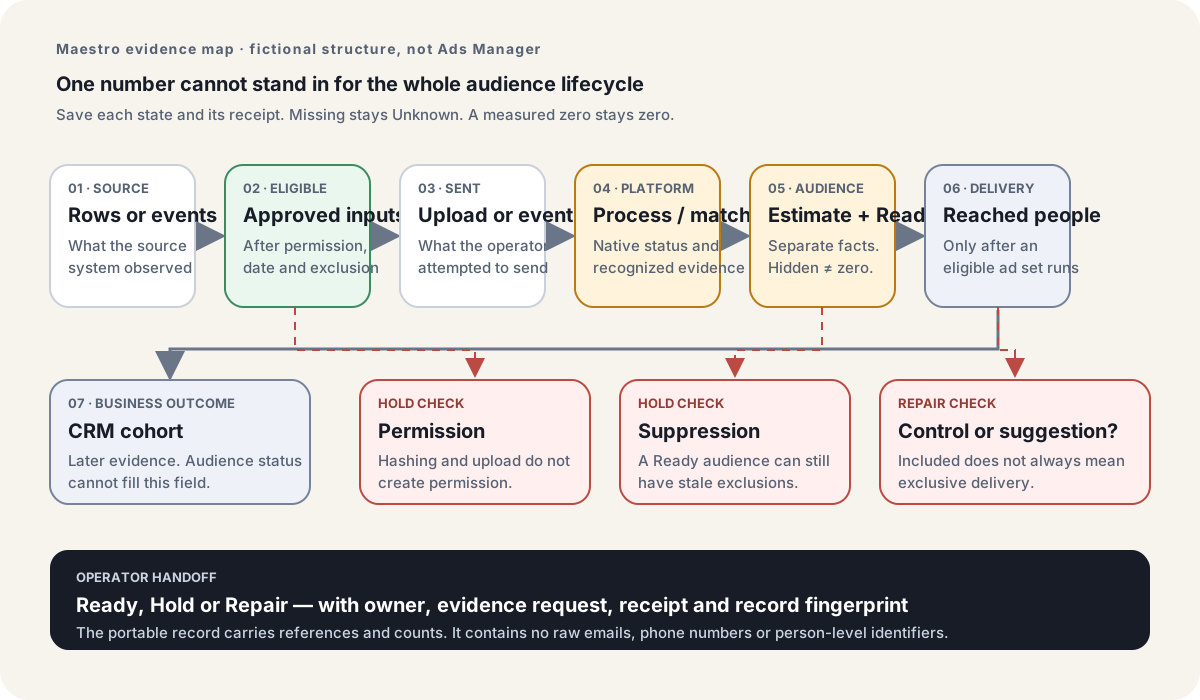
That separation prevents a common mistake: “We uploaded 1,000 contacts, so the audience has 1,000 people.” Meta still needs to process and attempt to match the eligible identifiers. The native audience estimate and eventual delivered reach are later facts.
Build a website Custom Audience
Meta's website-audience instructions describe a Pixel source, event or URL criteria, Any or All logic, retention and inclusion or exclusion rules. Its current guidance also says a website audience starts populating when it is created. It does not backfill earlier visitors.
Create the website audience in this order:
- Verify the correct Pixel or dataset and the event history in Events Manager.
- Open Audiences, choose Create audience, choose Custom Audience, then choose Website.
- Select the verified source.
- Set the Any or All logic, event or URL rule and retention window.
- Add the event-level exclusions required by the rule.
- Name and create the audience.
- Record the creation time, then wait for the current status instead of assuming earlier traffic will backfill.
- Save a dated source receipt and the first reliable event date with the account-only setup evidence.
Keep these fields in that account-only setup receipt before another operator relies on the audience:
- Pixel or dataset reference
- Exact event or URL rule
- Any or All logic
- Audience creation date
- First reliable event date
- Retention window
- Event-level exclusions
- Current status and observation date
- Source owner
- Receipt location
The portable register keeps the redacted source reference, combined inclusion rule, retention, owner and dated lifecycle evidence. It does not duplicate the organization, ad-account ID or account-only creation receipt.
The creation date matters. A team can have months of website traffic and still create an empty new audience if earlier activity is not eligible to backfill.
Watch the website setup controls
Use the video to locate the controls
Start at 00:06 for the Website source and Pixel path. The exclusion appears at 00:41 and the retention control at 01:12.
Open the caption-checked passage on YouTube
The account and ecommerce example are the creator's. Current Meta documentation and your own receipt govern your setup.
TJ Murray's February 2026 walkthrough shows the path through Audiences, Custom Audience, Website, Pixel and event selection at 00:06. At 00:41, he adds an exclusion. At 01:12, he uses the retention control.
The walkthrough shows his account and an ecommerce example. The 180-day value he selects is not a universal maximum or a recommendation for your B2B cycle. Use the video to locate the decisions. Use current Meta documentation and your account receipt to describe the actual setup.
Build a customer-list Custom Audience
A customer-list audience begins with the dataset, not the CSV.
Write the eligibility rule first. For example:
Include permission-reviewed evaluation contacts with a valid company email observed by 1 October 2026. Exclude current customers, open opportunities, opted-out contacts and records without an approved advertising-use basis.
Then save counts at each step:
| State | Fictional Harbor example |
|---|---|
| Source rows | 1,260 |
| Eligible inputs after rules | 1,040 |
| Uploaded inputs | 1,040 |
| Processed inputs | Pending |
| Matched people | Unknown |
| Estimated audience | Unknown |
| Ready status | Populating |
| Delivered reach | Unknown |
The Harbor example is fictional. It shows why 1,040 uploaded must not become 1,040 matched.
Meta's customer-list Help describes hashing and matching. Meta's Customer List Custom Audiences Terms put the responsibility for applicable rights, permissions or lawful basis on the advertiser and require later opt-outs to be removed where the terms apply.
Hashing changes how identifiers are transferred and compared. It does not give you permission to use a dataset.
Create the customer-list audience in this order:
- Apply the written eligibility and suppression rules before export.
- Prepare only Meta-supported identifiers for eligible records. Keep the raw file outside this portable register.
- Open Audiences, choose Create audience, choose Custom Audience, then choose Customer list.
- Select the available upload or partner-connection path and confirm that you have the required rights and permissions.
- Upload the file or connect the source, map the identifier columns and resolve reported mapping errors.
- Name and create the audience.
- Save the uploaded and processed counts separately. Wait for the current estimate and Ready status rather than treating the upload count as a match count.
- Save the native status receipt, suppression refresh receipt and later-removal process.
In the fictional Harbor build, Revenue Operations starts with 1,260 evaluation contacts. The written rule removes customers, open opportunities, opt-outs and records without an approved advertising-use basis, leaving 1,040 eligible inputs. The operator uploads those 1,040 records through Customer list, maps the supported identifier columns and names the audience “Harbor Grid: permission-reviewed evaluation contacts.” Meta shows the audience as Populating, so the register keeps processed, matched and estimate Unknown. It also returns Hold because the permission decision receipt is still missing. The upload completed; the audience is not ready for use.
Your register should name:
- dataset owner;
- eligibility rule and cutoff;
- permission reviewer and evidence reference;
- upload or sync method;
- later opt-out removal process;
- suppression owner;
- last successful refresh;
- failed-refresh handling; and
- a reference to the native audience receipt.
Do not place emails, phone numbers or other raw identifiers in the portable register.
Build a Meta engagement audience
An engagement audience needs an exact action. “People who engaged” is too broad.
Name the Page or Instagram account, video, form, event or other eligible surface. Then name the action: watched 50% of a selected video, opened a selected form, submitted that form, messaged the Page or another option shown in the account.
Create it in this order:
- Open Audiences, choose Create audience, choose Custom Audience, then choose the available Meta engagement source.
- Select the exact Page, Instagram account, video, form, event or other object.
- Select the exact action and retention window. Add exclusions for people who already took the later action when the sequence requires it.
- Name and create the audience.
- Save the selected object, action, retention, creation receipt and current status. Keep the later ad-set inclusion mode and exclusions as a separate receipt.
For a lead-form audience, “opened but did not submit” and “submitted” describe different groups. They may need different exclusions and a different next step.
Meta engagement happens on Meta's surfaces, but that does not remove the need to check source identity, available history, retention, status, exclusions and planned use.
Ready does not mean exclusive delivery
Check what the included audience does
Start at 08:35 for the audience in the suggestion area. The further-limit path begins at 12:15 in the creator's account.
Open the caption-checked passage on YouTube
A dated creator walkthrough cannot prove which control your account or campaign exposes.
A Custom Audience can be Ready and still be used as an Advantage+ suggestion.
Meta's current controls guidance separates audience controls from suggestions. It lists Custom Audience exclusions separately. An included Custom Audience may guide delivery without creating an exclusive boundary.
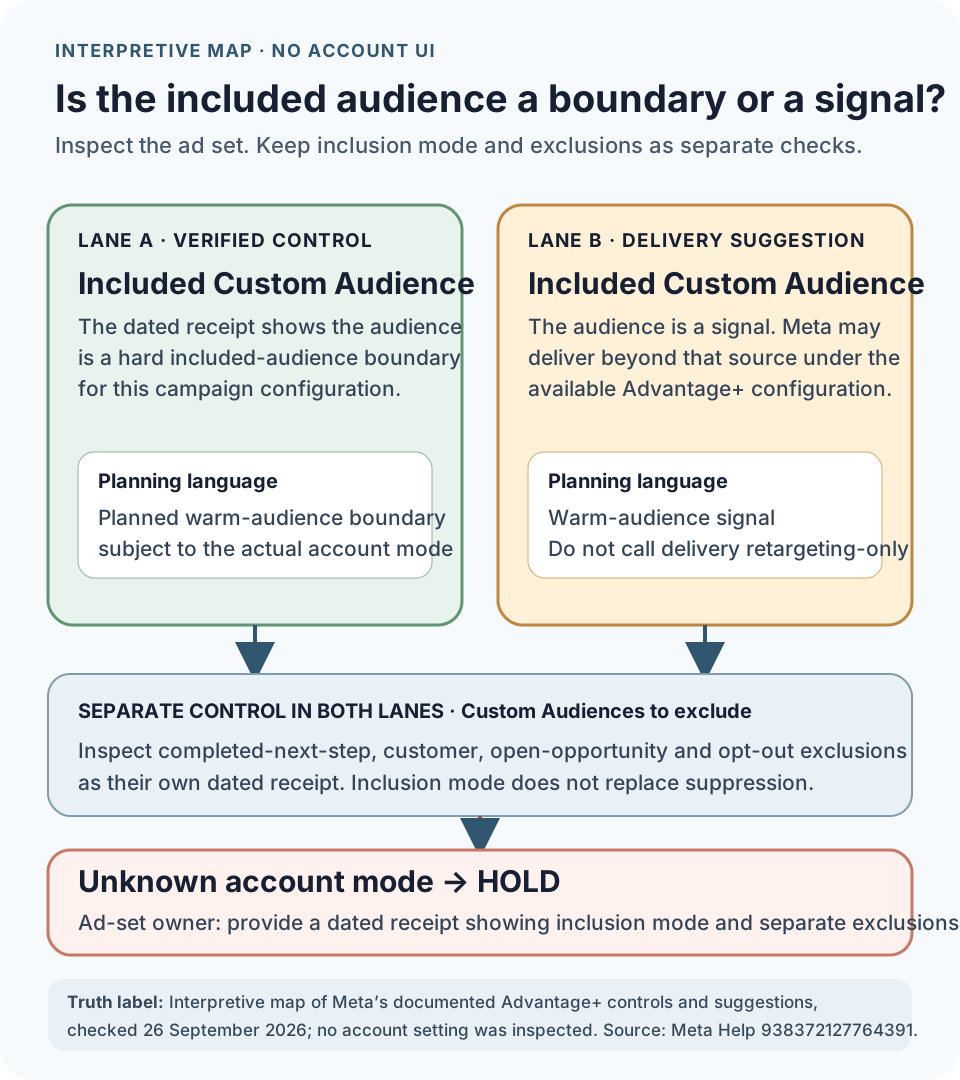
Save a dated ad-set receipt that answers:
- Is the included Custom Audience a hard control or a suggestion?
- Is a further-limit option available for this campaign?
- Is “Use as a suggestion” selected?
- Which Custom Audiences are excluded?
- Which campaign type, objective and account produced this screen?
If the included audience is a suggestion, say so. Do not call the delivery “retargeting only.”
Ben Heath's March 2026 walkthrough shows a Custom Audience inside the suggestion area at 08:35. At 12:15, he demonstrates a further-limit path and changes the suggestion setting in his account.
The video is a dated creator demonstration. It does not establish which controls your account or campaign exposes.
Exclusions only work when their sources are current
An exclusion name can look correct while its source is stale.
For each suppression audience, record:
- group being suppressed;
- source system and rule;
- last successful refresh;
- expected refresh method;
- owner;
- failure state;
- applicable later-removal process; and
- current native receipt.
Common B2B suppression candidates include customers, open opportunities, active sales conversations, completed next actions and opted-out contacts. These are planning examples. They are not universal Meta defaults.
Fictional Hold: Ready audience, stale suppression
Cedar Dispatch has a fictional customer-list audience marked Ready. Its customer and opt-out suppression sync failed six days before review.
The result is Hold. Ready proves the audience's platform status. It does not prove the exclusions include the six days of later changes.
The repair request is plain:
RevOps: repair the customer and opt-out suppression sync. Save the new successful-run receipt and the audience refresh receipt. Then ask the operator to review a new record revision.
Diagnose a small or unavailable audience
Do not jump from “small” to “the Pixel is broken.” Work through the states in order.
- Source identity: Is this the intended Pixel, app, Page, form, video or list?
- Source history: Did qualifying activity occur after the audience could start populating?
- Rule: Does the selected event, URL or action match the intended behavior?
- Retention: Is the window valid and compatible with the available history?
- Eligibility: Did permission, date, quality or suppression rules remove the inputs?
- Upload or sync: Did the source operation complete, fail or remain pending?
- Processing or match: What does the native receipt actually report?
- Estimate: Is it a number, hidden, unavailable or still populating?
- Status: Is the audience Ready, Populating, unavailable or in another current state?
Meta's size troubleshooting page notes that Ready status and audience estimates do not always appear together. Preserve the actual state. Do not convert a hidden estimate into zero.
Fictional known-zero case
Maple Ledger starts with 18 fictional renewal records. Its current permission, date and suppression rules leave zero eligible inputs.
That is a known zero, not missing data.
The correct result is Hold with a reason: no eligible records remain under the current source rule. The next action is to review the source definition or choose another supported source. Uploading an empty file would not solve the problem.
Keep one audience register
The audience register should be the object another operator reviews. It should contain references and counts, not person-level data.
Source and rule
- source family;
- source asset or dataset reference;
- inclusion rule;
- retention window;
- observation date;
- source owner; and
- dated lifecycle evidence references.
Keep the organization, ad-account reference, creation time and first reliable event date in the account-only setup receipt. The portable register uses redacted references and contains no account ID.
Permission and removals
- dataset provenance;
- permission reviewer;
- evidence reference;
- applicable notice or consent review;
- later opt-out removal process; and
- unresolved questions.
Population states
- source rows or events;
- eligible inputs;
- uploaded or submitted inputs;
- processed inputs;
- match evidence;
- estimate;
- platform status; and
- delivered reach, if a later eligible campaign exists.
Exclusions and refresh
- each suppression group;
- last successful refresh;
- owner;
- failure state; and
- suppression receipt;
- the same groups in the planned delivery exclusions; and
- current delivery-mode receipt.
Planned use
- control or suggestion;
- current ad-set receipt;
- separate exclusions;
- account and campaign context; and
- what remains Unknown.
Review
- Ready, Hold or Repair;
- reason codes;
- plain next action;
- exact evidence requests;
- assigned owners;
- reviewer and review time;
- evidence locations; and
- record fingerprint.
Any edit to source identity, permission, population evidence, suppression or inclusion mode should reopen review.
Use the portable readiness kit
The kit contains the evaluator, schema, five fictional records, blank JSON and Markdown, CSV summary and standalone build/review prompts. It runs locally and contains no raw identifiers.
Download the runnable ZIPDownload blank JSONDownload the worksheet
The workspace and downloads do not query Meta, grant permission, create an audience or change an ad set.
What the downloads do
- Blank audience register: collect one source without raw identifiers.
- Worked fictional registers: compare Ready, pending match, suggestion, stale suppression and known-zero states.
- Build prompt: turn supplied facts into a complete register. Missing facts remain requests.
- Review prompt: evaluate a completed register against the same predicates.
- Execution bundle: run the reference evaluator and verify JSON or Markdown exports in a clean directory.
The prompts cannot decide whether a dataset is lawful, query your ad account or invent native receipts. They preserve what you provide and tell you what is missing.
Common mistakes
Treating uploads as matches
Keep source, eligible, upload, processed and match states separate.
Calling a hidden estimate zero
Hidden, unavailable and still populating are Unknown states. A measured zero is different.
Treating Ready as delivered
Ready is not reach, frequency, qualified pipeline or performance.
Using hashing as permission
Hashing is part of processing. Permission needs its own evidence.
Forgetting later removals
A list can be permitted when first uploaded and become stale when later opt-outs are not removed.
Assuming included means exclusive
Check whether the included Custom Audience is a control or an Advantage+ suggestion. Check exclusions separately.
Saving raw identifiers in the handoff
Use secure source-system references, counts and receipts. Keep person-level data out of the portable register.
Related Maestro resources
- Use the Facebook retargeting guide after the audience evidence is ready and you need the source-to-message plan.
- Use the Facebook lookalike audience guide to decide whether a source population is fit for a prospecting seed.
- Use the Facebook lead ads guide to design a native form and prove CRM delivery.
- Use the Facebook Ads audit to diagnose an active campaign from delivery through CRM outcomes.
- Use the Facebook Ads for B2B guide for the broader campaign decision.