
Cost per lead calculator for B2B
Enter the total acquisition cost and lead count for a fast CPL. Choose the lead stage, then match the same group of leads and its sources before comparing results.
Calculate one CPL now
This first result is arithmetic. Add the cost details, the same group of leads and the source evidence below before comparing it.
Raw lead CPL
UnknownEnter the total cost and the count for one lead stage.
Match the same group of leads
A cohort means the same group of leads followed through each stage. Load the fictional example or start blank. The labeled fields below are enough to build a record; JSON import is optional.
Sources, definitions and owners
Complete these fields so another person can reproduce the calculation and resolve anything missing.
Quick input only. Complete or load the full record to see the cost and lead sources.
Loading blank record…
No full record checked
What to resolve
Technical record details and optional import
No technical decision
Record fingerprint: None
Exact source requests
Import a JSON record or an exported Markdown handoff. Advanced users can edit the complete source JSON below.
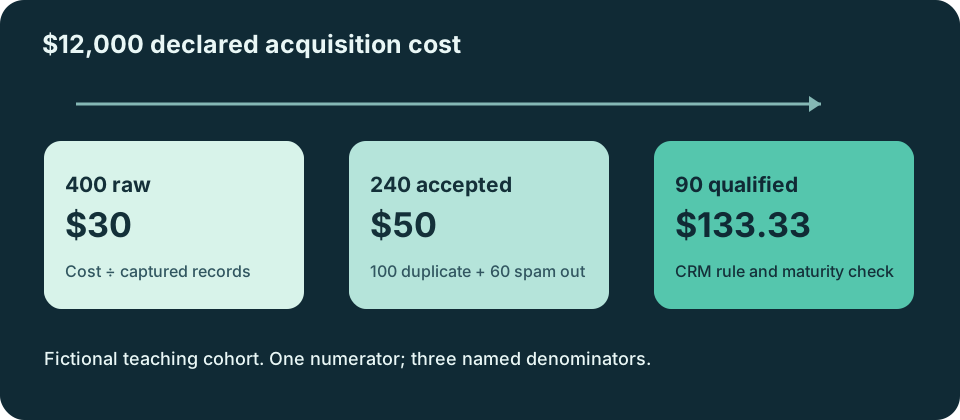
If you spent $12,000 and recorded 400 raw leads, raw CPL is $30. If 240 of those leads were accepted after duplicate and spam review, accepted-lead CPL is $50. If 90 met the team's qualified-lead rule, qualified-lead CPL is $133.33. These are three answers to three different questions from one fictional group of leads. None is a campaign result.
On this page
Choose the lead count you mean
A form submission may be a raw lead. Sales may reject a duplicate, an invalid contact or an inquiry outside the service area. A qualified lead must meet the rule your team actually uses. HubSpot describes Lead, Marketing Qualified Lead and Sales Qualified Lead as separate lifecycle stages, and allows custom stages. Your company still has to define when a record enters each one.
| Stage | Count in the fictional lead group | Cost per lead | What the count means here |
|---|---|---|---|
| Raw | 400 | $30.00 | Submitted records attributed to this acquisition group under the stated capture rule |
| Accepted | 240 | $50.00 | Raw records left after 100 duplicates and 60 spam or invalid records are removed |
| Qualified | 90 | $133.33 | Accepted records that met the fictional CRM qualification rule by the date chosen for the final check |
The rejected records do not disappear from the raw count. Keep them in the reconciliation: 400 raw − 100 duplicate − 60 spam/invalid = 240 accepted. Then record the qualified rule and its source separately. Do not infer the 90 from an ad-platform lead total.
Use the full form to name your cost basis, lead stages and sources. The blank CPL record and completed fictional record are optional portable copies of the same fields.
Match the cost ledger to the same group of leads
First choose what the $12,000 includes. A media-only CPL can be a sensible operating metric. A broader lead-acquisition cost may also include creative, agency, software or team expenses. Both can be calculated, but they answer different questions. Record included and excluded components so the next operator can reproduce the numerator. For fully loaded cost per new paying customer, use the customer acquisition cost calculator instead.
Next name the cost period and the lead group. A cohort is the same group of leads followed through each stage. If the cost period is 1–30 September and the lead period is also 1–30 September, the dates line up. If qualification is measured in October, state which September leads are followed, when their outcomes are considered final and how the CRM records join to the original group. Without that rule, an October qualified count may describe different people.
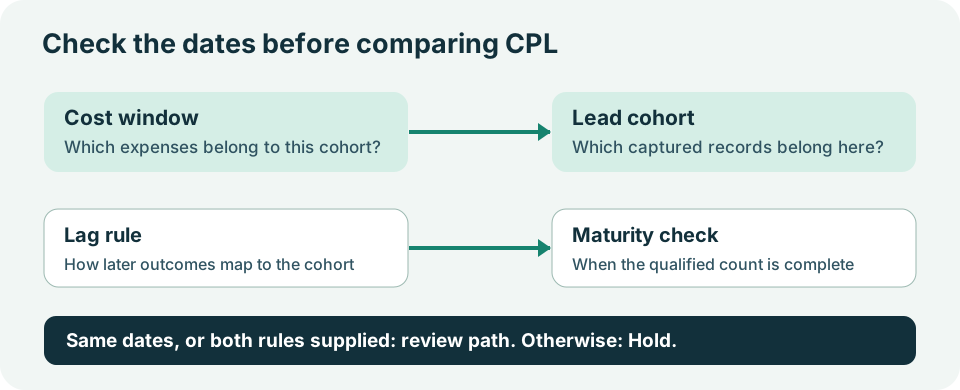
The full workspace holds a mismatched record rather than calling it ready. Correct the dates or explain how the later lead period maps to the cost period and when qualification is considered final. A future review date on its own does not prove that the stage count is final.
Reconcile raw, accepted and qualified
Move the quick numbers into the full record, then add the cost source, each count source and the person who can verify it. The workspace checks all three lead stages independently. If the qualified count is missing, raw and accepted CPL can still be calculated from their supplied counts, while qualified CPL stays Unknown. It asks the CRM owner for the qualified count for the named lead group.
A measured zero is different. If you spent $12,000 and observed zero qualified leads, the qualified count is 0 and qualified CPL has no finite value. Keep the zero; do not turn it into a blank or display $0.00. If the count field is blank, the count is Missing. If a source explicitly reports Unknown, keep that state. A negative or fractional lead count is Invalid and needs repair.
The same rule applies to exclusions. Enter zero duplicates when you have checked and observed zero duplicates. A blank duplicate field means that check has not been supplied. If the exclusion totals do not explain the accepted count, the workspace holds review even when it can still show arithmetic CPLs.
Compare channels after the definitions match
Two fictional channels can each spend $6,000 and each produce 200 raw leads. Both have a $30 raw CPL. Channel A has 150 accepted and 60 qualified leads, so its accepted and qualified CPLs are $40 and $100. Channel B has 90 accepted and 20 qualified leads, so those CPLs are $66.67 and $300.
| Fictional channel | Spend | Raw leads / CPL | Accepted leads / CPL | Qualified leads / CPL |
|---|---|---|---|---|
| A | $6,000 | 200 / $30.00 | 150 / $40.00 | 60 / $100.00 |
| B | $6,000 | 200 / $30.00 | 90 / $66.67 | 20 / $300.00 |
This comparison is meaningful only if the two channels use the same currency, cost basis, stage rules, lead-group treatment and final-check timing. It does not prove either channel produces more customers or profit. Compare like-for-like historical groups and inspect the sales feedback before changing a budget. The Facebook Ads reporting template can carry those definitions into recurring reports.
What counts as a good CPL?
There is no single good CPL for every B2B company. QRY's CPL guide makes the practical point that cheaper leads need not be better. For your own ceiling, start with a supplied customer contribution basis, a compatible lead-to-customer rate and the margin you want to keep. Label which lead stage the conversion rate starts from. A rate from accepted leads cannot set a maximum raw CPL without accounting for acceptance.
This calculator reports actual stage-specific CPL. It does not invent a maximum from missing contribution economics or turn a lead into revenue. For prospective Meta budget scenarios, use the Facebook ads cost calculator. For realized return after a lead group has had enough time to convert, use the ROAS calculator.
Export a record someone else can check
Use the labeled fields to enter the cost ledger, lead stages, dates, exclusions, sources and owners. Check the record. Download JSON for reimport, CSV for scanning and Markdown for an operator handoff. The Markdown includes the full source record, so another operator can recover every field. The technical details include a fingerprint that changes when a count, date or source changes, which tells the reviewer to check the current version again.
The standalone execution bundle contains the evaluator, examples and a command-line runner. The build prompt and review prompt work outside this article. They preserve Unknown and known zero, ask for missing evidence, and return each lead stage separately. A prompt response is a proposed record until its evidence is checked.
If the review holds, send the exact request to the named cost or CRM owner. If it passes, compare the record only with another lead group that uses compatible scope and stage rules. A reviewed CPL does not authorize a live campaign change.
If you want another person to inspect the lead definitions and source path, book a free Demand Gen Roast. Bring the exported record and the unresolved requests so the conversation starts with the actual numbers and rules.