
LinkedIn Ads Policy: How to Review a B2B Ad
An ad can be rejected for a claim, an offer mismatch, a restricted product, a rights issue, or a broken destination. Start with the exact creative and landing page that LinkedIn will see. Compare them with the Advertising Policies, last revised November 18, 2025. If the ad is already rejected, capture LinkedIn's stated reason before changing it.
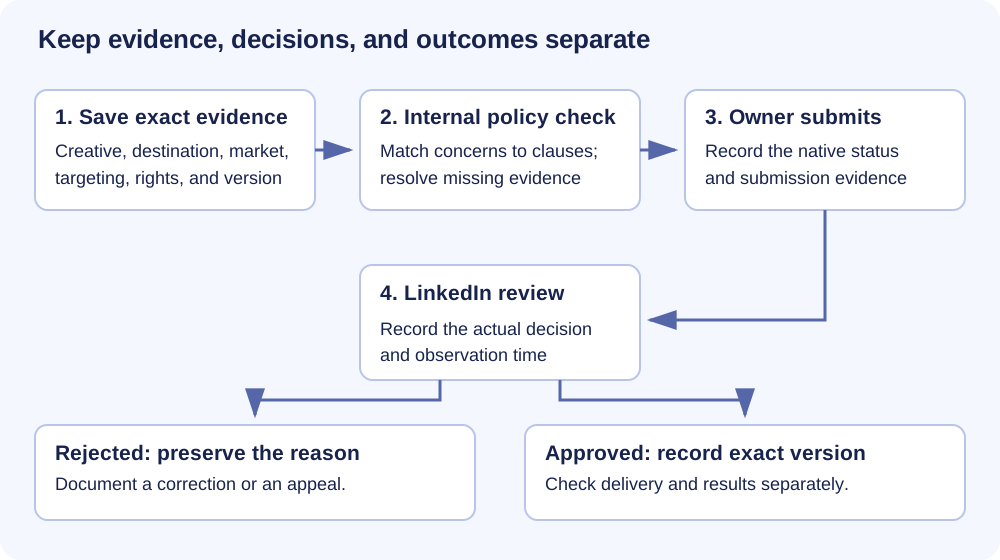
This guide gives you four fictional cases and a record you can hand to the person who owns the ad. An internal check helps find problems; LinkedIn makes the review decision. Its policy says ads do not run until approved, and its review help includes changes to existing ad sets and their ads or Lead Gen Forms. Approval does not establish delivery or campaign results.
Start with the ad and destination
Save the ad ID, version, complete copy, image or video, CTA, destination URL, page version, market, product category, targeting, and observation time. Open the destination as a new visitor and compare what it says with the ad. Then identify the relevant policy section. If the ad is rejected, save the exact Campaign Manager status and notice text. LinkedIn says the reason is available from the Rejected status, a notification, or email; the notice page includes the reason, edit link, and appeal option. (Advertising Policies §3; rejection help)
A copywriter can fix a copy mismatch. The account owner may need to check category eligibility, targeting, or the native notice. Write down who owns each action before anyone edits the ad.
Scroll horizontally or use the arrow keys to read each step.
Four B2B ad examples
These examples are fictional. “Before” describes an internal concern, not a LinkedIn rejection. Each repair still needs the final ad, page, and account checked together.
1. An outcome guarantee without evidence
Before: A CRM migration vendor writes, “Cut CRM cleanup time by 80% in 30 days,” with a “Download the migration plan” CTA. The linked page offers a six-page plan but says nothing about the 80% result. The team cannot name the study, cohort, or calculation behind the claim.
Repair: Remove the result promise. Write, “Plan your CRM migration with a six-page checklist for field mapping, deduplication, and owner review.” Use “Download the plan” only if the page and file actually provide those sections. Keep the original 80% claim only if the business can substantiate it and the page presents the advertised offer accurately. LinkedIn requires factual support for ad claims and an accurate match between the ad and product or service. (Advertising Policies §4, Fraud and Deception; review guidelines)
2. The advertised offer disappears after the click
Before: A procurement software ad says, “Get the 2026 supplier-risk scorecard free.” Its CTA opens a generic demo page. There is no scorecard or explanation of how to get it. A visitor can only request a sales call.
Repair: If the scorecard exists, link to its page and make the download easy to find. If the business only offers a demo, change the ad to “See how our supplier-risk workspace organizes vendor reviews,” and point to the relevant demo page. Check the final display and destination domains, redirects, landing page, Back button, and any pop-up. LinkedIn requires advertised offers to be discoverable from the ad link. Its link rule also requires matching display and destination domains, the same landing page for all clickers, no landing-page pop-up, and a way back. (Advertising Policies §§4, 6; review guidelines)
3. A customer mark suggests permission the team cannot show
Before: An analytics vendor puts a recognizable customer logo beside “Trusted by Acme’s data team.” The customer approved a private case study draft, but the ad team has no record that the company approved this logo or endorsement for paid advertising.
Repair: Remove the logo and attribution while permission is unresolved. The ad can describe the vendor’s own workflow: “Connect warehouse data to an account dashboard. See the sample report.” If the team obtains permission, verify exactly which name, mark, wording, and use it covers; disclose a pertinent partnership where one exists. LinkedIn bars unsupported affiliation or endorsement and restricts third-party trademark/copyright use. For a customer quote or logo, check the claim, permission to use the material, and whether the ad implies a relationship that does not exist. (Advertising Policies §4, Fraud and Deception, Trademark Infringement, Copyright Infringement)
4. A financial offer needs category and market review
Before: A commercial lender advertises, “See rates and eligibility for a working-capital line,” but the page only offers a consultation. The team has not checked the financial-services policy for the target market.
Repair: First, classify the actual offer. LinkedIn lists lending among restricted financial services; restricted does not mean every such ad is banned. Check the linked financial-services requirements, market, and advertiser eligibility before submission. Separately fix the offer mismatch: show rates and eligibility from the link if the claim is supportable, or say “Discuss working-capital options” and send the visitor to the consultation page. Do not assume ordinary B2B software becomes a restricted financial ad merely because it sells to finance teams. (Advertising Policies §5, Financial Services; §4, Fraud and Deception)
Check claims, targeting, and creative
For a performance claim, save the actual evidence and check that the wording says what the evidence supports. A customer story can contain both a factual claim and an implied endorsement; check both. The policy also prohibits deceptive competitive claims. Prices, discounts, and offers must be accurate and easy to find after the click. (Advertising Policies §4)
Check the category before calling an ad prohibited. LinkedIn lists political advertising, gambling and sweepstakes, affiliate advertising, tobacco, and several other categories under Prohibited Content. It lists financial services, cryptocurrency, medical devices or treatments, pharmacy and telehealth, and other categories under Restricted Content, with conditions that vary by category and market. Review the linked category rules for the actual product. (Advertising Policies §§4–5)
Targeting is a separate check. LinkedIn says ads must not target based on sensitive data or categories, including health, race, religion, political affiliation, sexual orientation, trade union membership, and income. Record the actual audience and data source rather than assuming the creative tells the whole story. (Advertising Policies §6, Sensitive Data)
Read the final creative aloud and inspect the image. LinkedIn requires professional language and standard spelling, grammar, and punctuation; it bars excessive emojis, capitalization, and unrelated hashtags. Its review guidelines also say to avoid contact information in creative, pop-ups, animated GIFs, and test ads. The ad and landing page language should match the selected audience language. (Advertising Policies §7; review guidelines)
Open the destination as a visitor
Open the exact URL in the final ad. Confirm the offer, price or discount if advertised; the working links; the display and destination domains; and a functioning browser Back path. Check billing practices and the privacy policy where applicable. If the page collects sensitive information, LinkedIn requires HTTPS. The policy also prohibits phishing and cross-site tracking cookies without full disclosure and consent. These checks need a real page and its actual behavior, not a screenshot of the ad editor. (Advertising Policies §6; review guidelines)
If the offer uses a Lead Gen Form, include that form and its version in the review. LinkedIn's review, rejection, and appeal help pages explicitly cover forms. For form setup and privacy requirements, use the Lead Gen Forms guide and check the current instructions for your form.
If LinkedIn rejects the ad
- Open the ad or form in Campaign Manager and click its Rejected status. You can also use an enabled Ad and Asset Status notification or the email notice. Copy the exact reason, ad/form ID, version, and observation time into the record. (Rejection help)
- Compare the reason with the current policy, creative, destination, category, and targeting evidence. If the reason is missing, retrieve the notice before attributing a cause. A plausible copy concern is still your hypothesis, not LinkedIn's stated reason.
- If the ad needs a change, prepare the corrected version and recheck the dependencies it touches. LinkedIn says editing an ad that does not meet policy automatically resubmits it for review; a new ad may also be an option. Save the resulting native receipt when an authorized owner acts. (Rejection help)
- If you believe the rejected version already meets policy, use the notice-page appeal route. LinkedIn says Ad and Asset Status notifications must be enabled. Its appeal instructions require reviewing the policy and ad/form, confirming the checkboxes, and submitting the appeal. Save the receipt and later decision. An appeal is a request for another review, not a reversal.
LinkedIn says it usually reviews ads and forms within 24 hours. For a time-sensitive ad or one still under review after 24 hours, its review help says to contact support. Its guidelines recommend setting up an ad set at least 48 hours before the start date to allow for corrections. Neither number is an approval deadline.
Use one record per ad and version
Download the blank policy review record, read two fictional worked records, or copy the self-contained review prompt. The record holds the exact copy and page version, policy section, status evidence, proposed correction, owner, and receipt. Write Unknown for missing evidence and None only when you checked and found no such item. An earlier approval or rejection belongs to its exact creative and destination version; changed copy, page, category, market, targeting, or rights needs a new check.
For setup details beyond policy, use our guides to LinkedIn ad specs, Text Ads, single-image ads, Lead Gen Forms, and ad targeting. If the problem is account performance rather than policy review, start with a LinkedIn ads audit.
If you want Maestro to review your demand generation setup and point out the gaps, request a Demand Gen Roast.
Sources and scope
Primary source: LinkedIn Advertising Policies, revised November 18, 2025, read October 31, 2026. Official help pages on review, guidelines, rejection, and appeal were read October 31, 2026. Policies may change without notice. This page explains published rules and a review method; it reports no native account test.
For editorial context, Stackmatix's September 2026 guide and SAPBW's approval guide show common practitioner checklists. B2Linked episode 73, published October 13, 2022, discusses advertiser experiences under older policy versions. Those sources informed the questions; current LinkedIn policy and help pages govern the rules above.
Review your ad policy evidence
Copy this prompt into your AI tool. Paste your completed policy review record after the prompt. Open the plain-text prompt to select it directly.