
CBO vs ABO: choose where your Meta budget is controlled
Choose a campaign budget when you can let Meta move spend between ad sets toward a shared result. Choose ad-set budgets when the business needs separate allocations. Then check ad-set budget sharing: Meta now documents a third option that allows some budget to move between ad sets even when each has its own budget.
CBO means Campaign Budget Optimization, now called Advantage+ campaign budget in Meta's documentation. ABO is the common shorthand for setting budgets at the ad-set level. Neither choice guarantees equal daily spend, a clean experiment, or better qualified leads.
The decision starts with one question: does the business value the opportunities in these ad sets similarly enough to let budget move between them? A demo request from a target account and a low-intent resource download can both appear as leads. That does not make them interchangeable.
On a small screen, swipe the diagram or focus it and use the arrow keys.
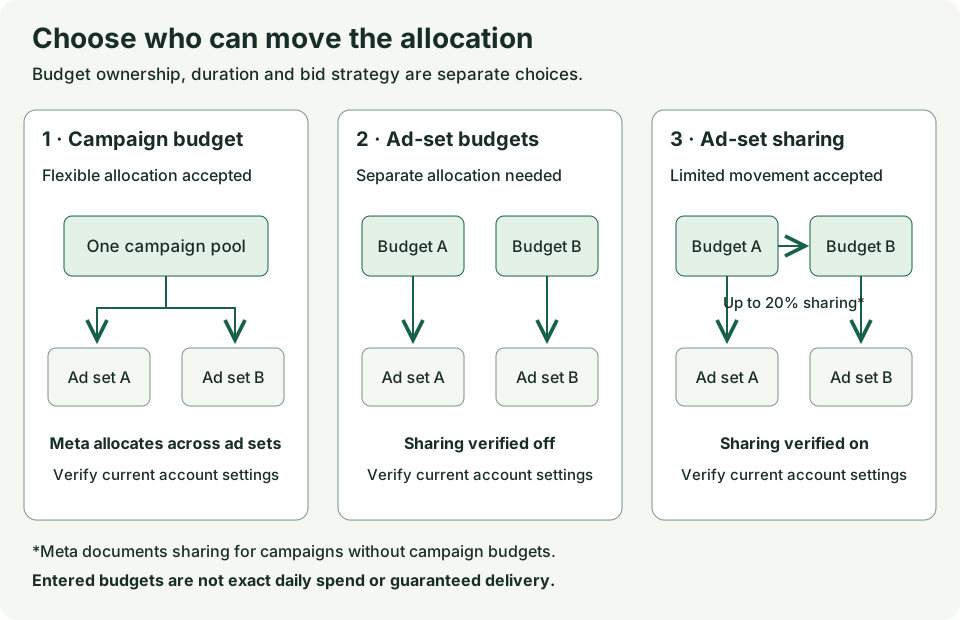
Compare all three budget options
Meta's budget-level guide describes campaign budgets, ad-set budgets, and ad-set budget sharing. Record which one is actually available and selected in your account before making a recommendation.
Swipe to read all columns, or focus the table and use the arrow keys.
| Option | Where you enter the budget | Allocation decision | Main reason to consider it |
|---|---|---|---|
| Advantage+ campaign budget, often called CBO | Campaign | Meta distributes the central budget across eligible ad sets | The business accepts flexible allocation and evaluates the campaign's combined result |
| Ad-set budgets with sharing off, often called ABO | Each ad set | You set each ad set's budget; delivery still follows budget and auction rules | The business has a reason to preserve separate allocations |
| Ad-set budgets with sharing on | Each ad set | Meta can share up to 20% of the daily budget across ad sets under its documented rules | The business wants separate budgets but accepts limited movement between them |
If sharing is unknown, write sharing unknown. Do not label the setup “fixed allocation” because the budget fields appear inside individual ad sets.
Budget level is separate from two other choices. Daily versus lifetime describes the budget's duration. A bid strategy describes how Meta approaches results, cost, or value in the auction. You can have a campaign budget with a daily duration, for example. “CBO” does not tell you the bid strategy or the schedule.
If the unresolved question is how much total spend a target requires, start with the Facebook ads cost calculator. Return here once you have a budget to allocate.
What campaign budget changes
A campaign budget gives Meta one amount to distribute across ad sets. Meta says it is best suited to campaigns with at least two ad sets and explains that it may spend most of the budget on one of them. An even split is not the objective. See Meta's campaign-budget explanation.
Consider Meta's own two-ad-set illustration. Both ad sets are active, but most spend goes to one. That allocation alone does not establish that the other ad set is defective. The system is choosing among delivery opportunities over time, so the campaign total matters.
Start the review with total optimization events and average cost per optimization event. Then investigate delivery and business quality. Meta warns that comparing individual ad-set costs alone can miss how opportunities and costs changed throughout the campaign. Its results guide explains this distinction.
For a B2B team, that still leaves a second question: did the reported results become qualified leads? Keep that review alongside the native result. Do not rename a raw submission a qualified lead because both sit in a reporting dashboard.
See how the controls differ
KlientBoost’s campaign-budget walkthrough includes a historical Ads Manager screenshot with three separate choices: the campaign-budget switch, the daily budget amount, and the campaign bid strategy. These controls answer different questions: who allocates the budget, how much is available, and how Meta bids for results.
Treat its screenshot as a historical example, not a map of today’s interface. The images are stored under a 2021 path. The walkthrough says campaign budget starts off; Meta’s current documentation says it starts enabled for Sales, Leads, and App promotion campaigns. Use the current account settings and Meta’s setup instructions before making a change.
The same walkthrough includes a theoretical $30 budget diagram. One side assigns $10 to each of three ad sets; the pooled side shows $7, $18, and $5 spent. Read those columns as an explanation of allocation. The illustrated conversion counts are not observed advertiser results and do not prove CBO improves performance. In your review, keep the amount entered and the amount actually spent in separate columns.
When separate ad-set budgets make sense
Write the business constraint before choosing ABO. “We want more control” is too vague to review. These are clearer reasons:
- A regional team has an approved allocation that cannot be transferred to another region.
- Two ad sets create leads with materially different business value, and the selected optimization signal does not express that difference.
- The ad sets need different optimization goals or bid strategies.
- Audience sizes differ substantially, and the business does not want the larger pool to absorb most of the allocation.
These situations align with the distinctions in Meta's budget-level guidance. They do not establish a guaranteed amount of daily delivery.
Campaign budgets also support ad-set minimum and maximum spend limits. Adding those constraints reduces the flexibility that motivated the campaign budget. Meta advises using them sparingly and suggests considering ad-set budgets when individual allocations are strict. Combining spend limits with cost or bid controls can constrain delivery further. Read the current best-practice guidance before treating a limit as a substitute for the right structure.
Where ad-set budget sharing fits
Sharing is a separate decision inside an ad-set budget setup. Meta describes it as a way to allow up to 20% of daily budget to move between ad sets when opportunities arise. Its documentation says sharing cannot be used with campaign budgets. Check the current daily-budget explanation for the detailed behavior.
A business that accepts limited movement may consider sharing. A business that prohibits transfers needs the actual sharing state verified before approving that setup. Turning sharing off does not turn a daily budget into an exact daily charge or guarantee that an ad set will deliver.
Record the setting with the account, campaign, ad-set IDs, capture date, and source. A screenshot or read-only settings export should show the relevant account state. A general Help article establishes that a feature is documented; it does not show that the feature is enabled in your campaign.
A $100 daily budget does not mean exactly $100 spent each day
Meta's daily-budget article includes a specific illustration: an unchanged $100 daily budget for a complete calendar week. Its example distinguishes sharing off from sharing on:
Swipe to read all columns, or focus the table and use the arrow keys.
| Meta's documented illustration | Sharing off | Sharing on |
|---|---|---|
| Daily budget entered | $100 | $100 |
| Amount the example allows on some days | Up to $175 | Up to $210 |
| Weekly limit in the example | $700 | $840 |
This is Meta's published illustration, not a Maestro campaign result or a forecast. Some days may spend less. The example assumes the budget does not change during the week. Midweek starts, edits, and end dates have separate rules in the source article.
That article also contains general daily and weekly limit language alongside its sharing-specific example. Use the detailed rule that applies to the actual schedule and sharing state; do not turn this table into a universal cap calculator.
For your decision record, keep four fields separate: the amount entered, budget duration, sharing state, and amount actually spent. An invoice is another record again. It should not replace delivery spend in a cost-per-lead calculation.
Make the decision in this order
- Name the result and its value. Write the exact optimization event and the business outcome you will review. Explain whether a result from each ad set has similar value.
- State the allocation constraint. Identify any region, offer, audience, or team that needs a separate allocation. Name the person who approved that constraint.
- Check the current settings. Record budget level, sharing state, duration, schedule, bid strategy, optimization event, and any spend limits. Leave unavailable settings unknown.
- Choose a candidate route. Consider campaign budget when allocation is flexible and the ad sets are compatible. Consider ad-set budgets when the constraint needs them. Consider sharing only if the business accepts the documented movement and the option is available.
- Separate the recommendation from execution. The record preparer explains the choice. The budget owner approves the spend decision. An authorized account operator makes any approved change. The analyst reviews actual delivery afterward.
If the business value or constraint is unknown, pause the recommendation at that decision. Missing postlaunch results do not prevent someone from preparing an otherwise complete prelaunch brief. They do prevent someone from claiming that the setup has already worked.
Three B2B decisions worked through
The companies, identifiers, amounts, dates, and permissions below are fictional. They demonstrate how to reason through the choice; they are not client results or benchmarks.
Cedarline: flexible allocation for the same demo offer
Cedarline sells operations software. It is preparing a campaign for two prospecting audiences that receive the same demo offer. The budget owner treats a qualified demo request from either audience as equally valuable and permits the full planned allocation to move between them.
The fictional brief names account CD-01, campaign CD-DEMO-NOV, ad sets CD-A and CD-B, offer OPS-DEMO, and landing page DEMO-US. It uses USD and America/New_York. The proposed acquisition period is November 2–15, 2026, with CRM review through December 15.
Both ad sets are planned for the Leads objective, highest-volume bidding, the same website lead optimization event, standard delivery, and daily budgets. The proposed campaign budget is $150 per day. There are no proposed ad-set spend limits. These are planning inputs, not observed account settings or actual spend.
Recommendation: prepare a campaign-budget setup. The business permits pooling, the lead value is comparable, and the planned settings are compatible with the published eligibility rules. Before execution, the account operator must verify the actual settings and available controls. The budget owner must approve the change. Sharing is not an additional campaign-budget setting in this proposal.
The December review will compare delivery spend and native leads with unique qualified demo requests from the November cohort. Actual spend, actual lead counts, and qualified cost remain unknown before delivery. Cedarline should reconsider pooling if later evidence shows a material difference in lead value that the optimization event does not capture.
Northstar: separate allocations for two language markets
Northstar Workflow sells operations software. Its fictional budget owner wants a separate French-language allocation during a Canadian market-entry pilot. Both language groups receive the same workflow-assessment consultation through language-specific native forms.
The record names simulated account NS-DEMO, campaign NS-NOV-DEMO, ad sets NS-EN and NS-FR, and forms FORM-EN and FORM-FR. It uses USD and America/New_York. The planned acquisition period is November 2–15, 2026, with qualification review through December 15 and a report on December 16.
A simulated October 30 settings receipt shows Leads, highest-volume bidding, the same instant-form lead optimization event, standard delivery, and daily ad-set budgets. English has a $100 daily target; French has $60. Campaign budget and sharing are off. The budget owner accepts daily flexibility; the requirement is separate planned allocations, not a hard $160 daily cap or guaranteed delivery.
Recommendation: retain ad-set budgets with sharing off for this pilot. The distinct language-market allocation supports that route. A real operator must supply their own current settings and approval evidence. The fictional receipt is an example, not evidence about their account.
The planning constraint is approved in the fictional record, but launch and live-change authorization are absent. Actual spend and outcomes remain unknown. That does not invalidate the recommendation; it prevents execution and any claim that the setup has worked.
If the requirement changes to exact daily expenditure or guaranteed French-language exposure, reopen the recommendation. Daily targets cannot establish either guarantee. If the budget owner later allows transfers, review sharing as a new proposal rather than quietly changing the original constraint.
Meridian: the recommendation stays open
Meridian has two ad sets labeled “Lead.” One promotes a report to a broad audience; the other offers a consultation to recent site visitors. The operator proposes moving to campaign budget because one ad set is getting fewer results.
The initial record has account MD-01 and campaign MD-GROWTH, but no verified sharing state, exact optimization-event record, or comparison of qualified lead value. The spend currency, reporting period, and CRM outcome cutoff are also missing.
Recommendation: hold the allocation decision. Ask the operator for current settings and the reporting period. Ask the budget owner whether the two lead types are interchangeable and whether either audience needs a reserved allocation. Ask the CRM reviewer for the qualification definition and source coverage.
Meridian can still investigate whether the low-delivery ad set is eligible to deliver. It cannot declare the ad set a loser or choose a new budget structure from the shared “Lead” label. A smaller budget or fewer conversions alone does not resolve those missing facts.
Check the documented setup before an approved change
Meta's campaign-budget setup instructions list the same budget type and bid strategy across ad sets, the same delivery optimization event when using highest volume, and standard delivery. The instructions also say Sales, Leads, and App promotion campaigns have campaign budget enabled by default.
Use the current account as the final setup check. From the relevant campaign's edit view, inspect the budget control and record its current state before changing it. For a new campaign, check the default instead of assuming it matches the last campaign you built.
For the campaign-budget route, Meta documents choosing daily or lifetime duration, entering the amount, selecting the campaign bid strategy, and then completing ad-set schedules and settings. A lifetime budget can use an ad schedule. Record those choices alongside the budget-owning entity so the next reviewer can reconstruct the proposal.
For the ad-set route, inspect each ad set's budget and schedule, then verify whether sharing is on, off, or unavailable. If you cannot establish the sharing state, keep that field unknown and stop any claim that transfers are disabled.
Meta documents a two-hour minimum interval when switching campaign budget on or off. Plan the approved change before touching the control. Repeated toggling is not a diagnostic method. Save the previous settings, intended change, approval, operator, and review date; after the change, read back what actually saved.
Do not use a guide as permission to publish campaign edits. A completed brief supports an account decision. It does not grant account access or budget authority.
Review actual spend and qualified leads together
Start with the campaign's native result totals. Then add the business outcome that Meta's chosen optimization event may not represent. The following fictional example shows why both views matter.
Suppose one campaign spent $1,500 across two ad sets. Its acquisition cohort covers November 2–15, 2026, in USD and America/New_York. The native result is a submitted website demo-request lead under a recorded seven-day click attribution setting, reported by impression date for both ad sets. For this illustration, every reported submission is reconciled to one captured submission ID and one CRM person. Retries and duplicate submissions are removed before the unique-lead comparison; a person who submitted through both ad sets is assigned once, to their earliest qualifying submission in the cohort. Both ad sets have complete source coverage.
The CRM reviewer counts a person as qualified only if the person works at a target-size B2B company, has a relevant operations role, and confirms an active evaluation. Qualification must be recorded by December 15 at 23:59 in the account timezone. The report is prepared on December 16. These definitions and dates are fictional assumptions shared by both rows.
Swipe to read all columns, or focus the table and use the arrow keys.
| Fictional result | Ad set A | Ad set B | Campaign total |
|---|---|---|---|
| Actual media spend | $900 | $600 | $1,500 |
| Reconciled raw leads | 90 | 30 | 120 |
| Cost per raw lead | $10 | $20 | $12.50 |
| Qualified people by the cutoff | 3 | 6 | 9 |
| Cost per qualified person | $300 | $100 | $166.67 |
The raw-lead calculation favors A: $900 divided by 90 leads is $10. The qualified calculation favors B: $600 divided by six qualified people is $100, compared with A's $300.
This is a reason to investigate the difference in lead quality. It does not prove that ABO would beat CBO, that all future budget should move to B, or that B could absorb more spend at the same cost. These are observations from unequal allocations, not a randomized comparison of budget strategies.
Before recommending a change, check whether the offer, audience, qualification process, and source coverage explain the difference. Keep the campaign total visible, and use the Facebook reporting template to carry delivery and CRM evidence into the same review.
If one CRM source is incomplete, do not report its missing qualified people as zero. Show the observed count as partial and leave the final qualified-cost comparison unknown. If the outcome cutoff has not arrived, label the review immature and schedule the next read. Review the cohort again when the missing records and qualification decisions are available.
Equal budgets do not make a controlled test
Giving two ad sets the same budget controls one input. It does not establish equal actual spend, equal audience opportunity, random assignment, or equal exposure. Differences in audiences, auctions, schedules, creative, and lead maturity can still affect the result.
Write the question before calling the campaign a test. “Which ad set produced cheaper leads during this period?” is an observational question. “Did changing budget structure cause a better outcome?” requires a design that can separate the budget change from other differences.
Use the optimization guide to define the variable, comparison, observation window, and decision rule. A fixed number of days alone does not establish statistical significance. Avoid declaring a winner because a week has passed or because each ad set received the same amount in its budget field.
Keep one allocation decision record
Download the blank allocation brief, then compare it with the completed fictional Northstar record. The worked file uses the same identifiers, budgets, and approval state as the Northstar example above.
- Fill the scope, business requirement, and current controls from your own evidence. Keep a proposed setting separate from a setting you have actually observed.
- Write the recommendation and the reason. Leave unavailable facts Unknown; a plausible answer is not a source.
- Copy the standalone review prompt into your assistant and attach your completed brief. The prompt includes its rules and source links, so it can be used without this article.
- Check the response against the brief. It should return a planning recommendation, setting gaps, separate change-authorization status, and post-delivery calculations only where the evidence supports them.
- Give the reviewed record to the budget owner and account operator. Keep the original brief alongside the response so they can inspect which facts support the recommendation.
For a prelaunch brief, actual spend and CRM outcomes should remain Unknown. If the assistant invents them, or treats planning approval as launch approval, reject that output and correct the specific unsupported claim.
Finish with the action and its status: proposed, approved, executed, or read back. An approval can authorize an action without proving it happened. A saved setting can prove the change without proving delivery. Each status needs its own evidence.
Copy the allocation review prompt
Copy this prompt into your AI tool and paste your completed allocation brief. You can compare your work with the worked example. Open the plain-text prompt if you prefer to select it there.
Read or select the full prompt
CBO vs ABO questions
Is CBO better than ABO?
It depends on the allocation problem. Campaign budget fits flexible allocation across similarly valued opportunities. Separate ad-set budgets can fit distinct business constraints or incompatible goals. Sharing adds another option. Judge the decision against the business outcome and actual account settings, not an account-wide rule.
Does ABO guarantee equal spend?
No. Equal configured budgets are equal inputs. Daily-budget flexibility, delivery conditions, and sharing state affect what actually happens. Verify spend from reporting after delivery.
Can I use campaign budget and ad-set budget sharing together?
Meta's current daily-budget documentation says sharing cannot be used with campaign budgets. For an ad-set budget campaign, check whether sharing is available and selected in that account.
Should I switch to ABO when an ad set barely spends?
Investigate delivery first. Meta's campaign-budget best practices caution against reflexively pausing low-delivery ad sets. Check eligibility, schedule, restrictions, audience differences, and the campaign's total result. Change the structure when the evidence supports a different allocation policy.
How much budget do I need for CBO?
There is no universal amount established by this guide. Model the total spend from your own assumptions, then assess whether the planned structure fragments that budget across too many separate tasks. A formula copied from another advertiser is not evidence that your campaign can deliver or produce qualified leads.
What should I do before changing the setting?
Prepare the allocation record, verify the current controls, obtain the required budget approval, and name the operator who will make the change. Preserve the prior settings and define the post-change review. If the business constraint or sharing state is still unknown, resolve it before promising a precise allocation.
Take a specific decision to the budget review
Bring the allocation record and the evidence that would change your recommendation. The team should be able to say which entity owns the budget, whether sharing is permitted, why the business accepts that allocation, and how delivery and qualified outcomes will be reviewed.
If the team needs help connecting those decisions to its offer, audiences, and CRM outcomes, review Maestro's B2B Meta ads services. Start with the campaign and the unresolved decision, so the conversation has something concrete to solve.