
Facebook dark posts: reuse the right post without losing the trail
Choose an existing Page post or a new unpublished post, preserve the source identity and export a handoff another operator can verify.
Complete the reader task
Choose the source-post route
Load a synthetic case. The result keeps local, creation, native and launch states separate.
Synthetic local evaluation only. No spend, launch or live-account edit is authorized.
A Facebook dark post is the common name for an unpublished Page post used in an ad. It does not appear as an ordinary post on the Page timeline. The name sounds mysterious. The operating choice is ordinary: reuse an existing source post or create a new one, then give the next person enough evidence to prove which post the ad uses.
If the creative is meant to stay identical, start with Use existing post and preserve the Page ID, post ID and creative fingerprint. If the message, media, destination or call to action changes, create a new unpublished source post and record the new identity. If the identifiers conflict, the preview has expired, or the account evidence is missing, stop at Hold for native evidence.
The workspace on this page turns that choice into a portable handoff. It does not publish an ad or prove a live account state.
The three routes
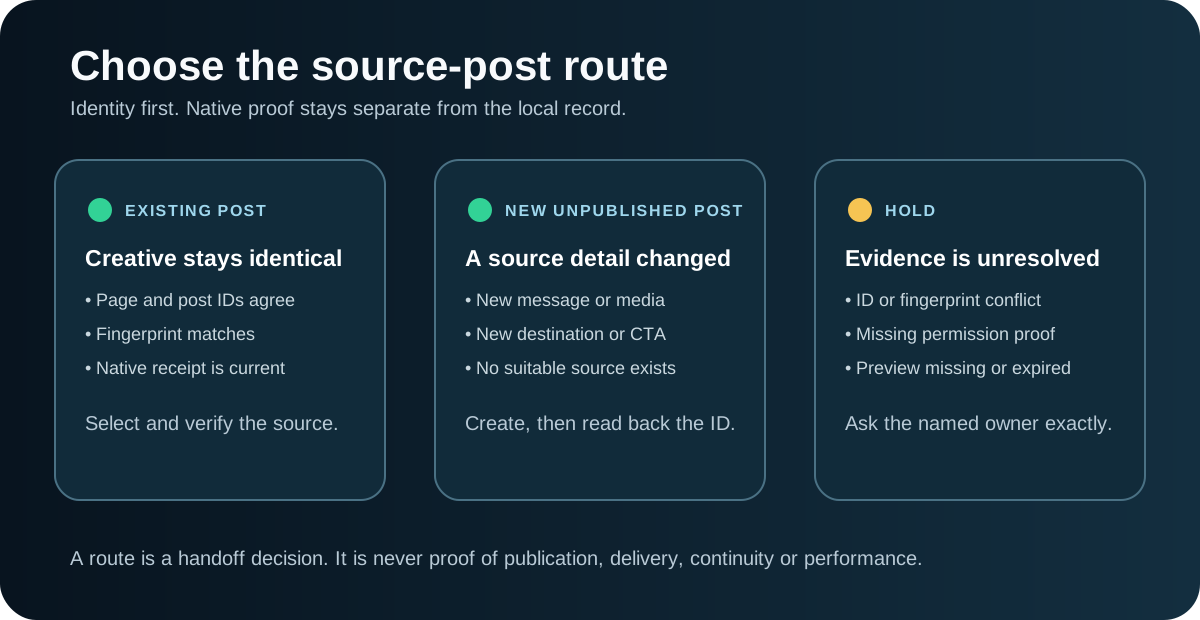
| Route | Use it when | What must be true next |
|---|---|---|
| Existing post handoff | The intended source post already exists and the creative fingerprint matches what you plan to run. | Find the post in Page posts, verify the ID in Meta, attach a current native preview or account receipt, then complete launch review separately. |
| New unpublished post handoff | The creative, destination, CTA or other source-level detail has changed, or there is no suitable existing post. | Create the unpublished Page post in the correct Page and account context, then capture the new post ID and native preview. |
| Hold for native evidence | The Page or post identity conflicts, required permission is unproved, the preview is missing or expired, or the creative fingerprint does not match. | Ask the named owner for the exact missing evidence. Do not fill the gap with a URL fragment, a remembered ID or a confident guess. |
These are handoff states. They are not delivery states. A locally complete record can still describe a post that has not been created. A created post can still lack native identity verification. A verified source post can still be waiting for creative or launch approval.
Use an existing post when the source should stay the same
Meta's current Ads Manager guidance puts Use existing post in the ad setup. Under Ad creative, Select post opens the post-selection window. Meta also warns against copying a post ID from a URL. It tells advertisers to find the post in Page posts and use the value shown in the ID column.
That distinction matters. A long number in a browser URL is not, by itself, evidence that you selected the intended Page post. No post-ID numerology required. It may be the wrong identifier, belong to another Page, or point to a source the current objective cannot use.
Use the existing-post route when all of these are true:
- The Page is the intended Page.
- The selected post is the intended source post.
- The message, media, destination, CTA and any source-level tracking choices match the approved creative.
- The person selecting the post has the required account and Page access.
- A current native check can confirm the Page/post pair and visible creative.
Record the intention to preserve existing engagement as an intention. Do not turn it into a result claim. A post ID and a local fingerprint do not prove that engagement carried over, the ad delivered, or performance improved.
Create a new unpublished post when the creative has changed
Create a new source post when a material source-level detail changes. Common examples include:
- a new image or video;
- revised primary text, headline or description;
- a different landing-page URL;
- a changed CTA;
- a correction that must exist in the source creative;
- a variant that needs its own clean identity.
The handoff should begin before the post exists. Mark post created as false, leave the post ID Unknown, and name the owner of the creation step. After creation, add the ID Meta shows for that Page post, a current native preview and the creation receipt. Only then can a second operator verify the identity.
A future creation date or planned preview does not make the record native-ready. The post has to exist and be read back.
Creative fingerprint: a small check that catches expensive mistakes
A post ID tells you which source object Meta loaded. A creative fingerprint tells you whether that source object matches the creative you intended to use.
The full-record editor builds a SHA-256 fingerprint from seven source fields in a fixed order:
- primary text;
- headline;
- description;
- media asset references or hashes;
- destination URL;
- CTA;
- the revision label.
Open the full-record editor, fill those fields and choose Build creative fingerprint. The editor serializes the seven strings in the documented order and hashes the UTF-8 JSON bytes. It updates the proposed fingerprint only. The approved fingerprint stays separate until the named approver records approval evidence for that exact payload.
The fingerprint is a local comparison tool. It catches a post that has a valid ID but points to the wrong variant. It does not prove what is currently stored in Meta until someone compares the native creative with the record and attaches a receipt.
Four worked examples
The examples below are synthetic. They demonstrate the decision without implying Maestro account results.
1. Reuse the same webinar post
Northstar Security has an unpublished Page post for a webinar campaign. The Page ID and post ID were found in Page posts. The primary text, video asset hash, landing-page URL and CTA match the approved revision. A current native preview shows the same creative.
Route: Existing post handoff. Still separate: Launch approval and delivery. Useful receipt: Page-posts ID-column capture plus the current native preview.
2. Create a new post for a new landing page
The team wants to keep the message and video but send traffic to a new diagnostic page. That changes the source-level destination.
Route: New unpublished post handoff. Why: The new destination should not be hidden inside a record for the old source post. Next evidence: Create the new post, capture its new post ID, and verify the new destination in a native preview.
3. Hold when the ID and creative disagree
The handoff names post 123_456, but the native preview shows a different headline and old product screenshot. The local fingerprint does not match.
Route: Hold for native evidence. Exact request: “In Page posts for Page 123, open post 456 and attach a current native preview that shows the primary text, headline, media and destination. If the preview is for a different creative, return the correct post ID instead.”
Do not choose whichever value looks newer. The owner has to reconcile the identity.
4. Hold when the preview expired
The Page/post pair is recorded and the creative fingerprint is complete. The only preview URL was created two months ago and no longer opens.
Route: Hold for native evidence. Why: Local completeness is not current native verification. Next evidence: Generate a current preview from the correct ad context or attach another dated native receipt.
Meta says a shared preview for an unpublished ad can be active for 30 or 60 days. It also says that the shared URL becomes inactive when the ad is published. An inactive preview is therefore a signal to request fresh evidence, not proof of why the link stopped working.
The handoff record
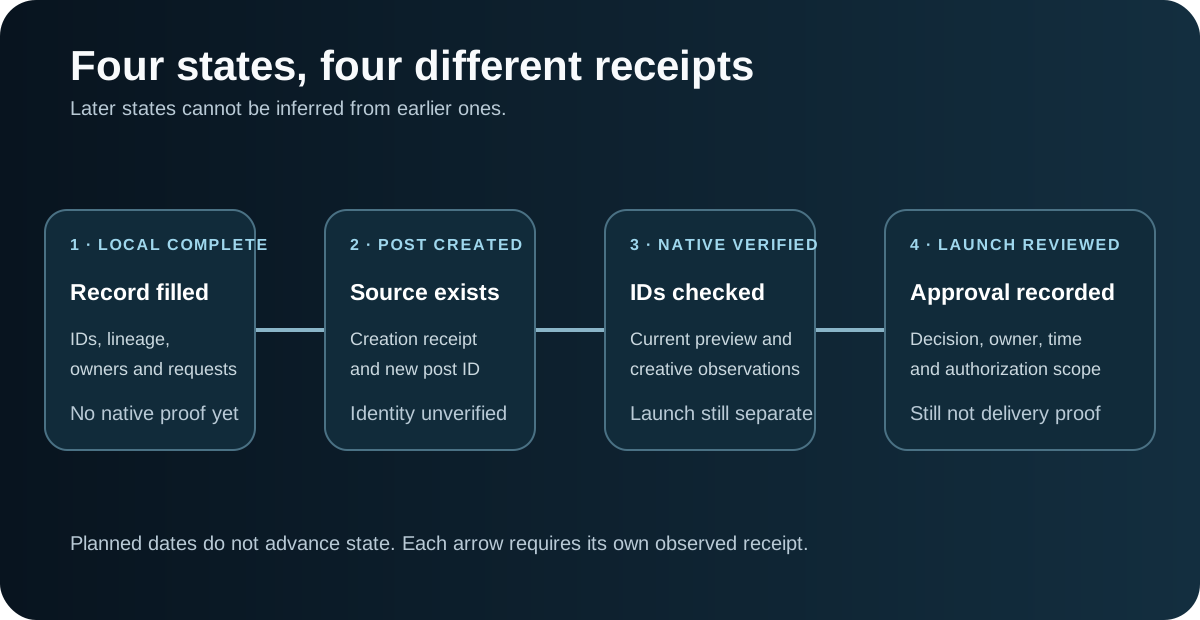
Complete these sections in order:
Page identity
Record the business, Page name, Page ID and the source that established the identity. A typed Page name is not enough when multiple Pages have similar names.
Post identity
Record whether the post is existing or planned, the post ID when it exists, the creation state, and the source of the ID. Use the Page-posts ID column rather than copying a number from a URL.
Ad-account context
Record the ad account and the campaign/ad context where the source will be selected. This does not prove permissions. Keep permission evidence as its own field.
Creative lineage
Record the seven creative fields and the revision. If any field changes, rebuild the fingerprint, obtain approval for the new value and reconsider whether this should be a new post.
Permission and approval
Keep access evidence, creative approval and launch review separate. Someone can have access to a Page without having approval to change the creative or launch spend.
Native verification
Attach the current preview or other native receipt, the time checked, the checker, and the observed Page/post/creative values. A result without the observations is hard to audit later.
Evidence requests
For every missing fact, keep the exact request, owner, reason and blocked decision. The downloads preserve supplied request text so the next operator receives the same question rather than a rewritten approximation.
Use the source-post handoff workspace
The case selector at the top of this page demonstrates the three routes with synthetic records. Its download is a decision summary. Open the full-record editor to import or edit a complete record, build the creative fingerprint and export the canonical JSON plus a readable Markdown handoff.
Test the awkward cases on purpose:
- leave a numeric field blank;
- enter an explicit zero;
- enter invalid text;
- supply a request in your own words;
- use a conflicting post ID and creative fingerprint;
- load a complete local record with an expired preview.
Blank, zero, invalid and Unknown should remain different. A blank value must never become zero. A supplied request must come back byte for byte.
Watch a current Ads Manager walkthrough
At about 5:36–6:25, Saenz Digital demonstrates selecting an existing post in Ads Manager. The walkthrough shows the branch in the current interface. The speaker also makes claims about preserving engagement and social proof. Treat those as practitioner claims, not proof that a particular account preserved engagement or improved performance.
What a native check should prove
A native check should answer specific questions:
- Does the Page ID match the intended Page?
- Does the post ID match the ID shown for the source post?
- Does the visible creative match the saved fingerprint inputs?
- Is the post compatible with the selected objective and CTA?
- Can the assigned operator select it in the intended account context?
- Is the preview current and readable?
Meta notes that some existing posts are incompatible with a selected objective or with an existing CTA that has a different goal. That is one more reason to record the native selection result instead of assuming any existing post can be reused.
What this record cannot prove
The local workspace cannot prove:
- that the post exists in Meta;
- that the current operator has permission;
- that creative or launch approval was granted;
- that the ad was published or delivered;
- that engagement carried across campaigns;
- that the ad performed better;
- that an expired preview became inactive for one specific reason.
Those facts require account-native receipts or performance evidence. The handoff makes the gap visible and assigns the next check.
Download the portable kit
Use the completed example to inspect the contract. Use the blank record for a real handoff. The build and review prompts work without this article and require the same route labels, evidence boundaries and export fields.
- Completed JSON and readable Markdown handoff
- Blank JSON and Markdown record
- Standalone evaluator
- Build prompt
- Review prompt
- Source-post verification checklist
A clean operating sequence
- Decide whether the source should remain identical.
- Choose existing post, new unpublished post or Hold.
- Record Page, post and ad-account identity.
- Freeze the creative fingerprint inputs.
- Record permission and approval evidence separately.
- Create the new post if required.
- Verify the Page/post/creative pair natively.
- Export the handoff.
- Complete launch review as a separate decision.
That sequence gives the next operator more than “use the old dark post.” It tells them exactly which source to select, what still needs proof, and when to stop.
Sources
- Meta: Create ads from existing posts
- Meta: Customize ad creative using an existing post
- Meta: Preview an ad during creation
- Meta: Share ad previews on desktop
- Meta: Troubleshoot publishing an ad
- Saenz Digital: Facebook Dark Post 2026
Need another pair of eyes on the handoff?
Maestro’s free Demand Gen Roast reviews the audience, message, creative, destination and measurement path that are visible today. Bring the source-post handoff, the creative and the account receipt. We can help find the first unsupported assumption before it reaches launch.